
Windows 11 Beta Adds New Touchpad and Start Menu Controls


 3 min. read
  Published on
Windows 11 Insider Beta Preview Build 26220.8925 introduces new touchpad controls, Start menu customization options, File Explorer improvements, accessibility upgrades, and several important fixes.
New Precision Touchpad Controls
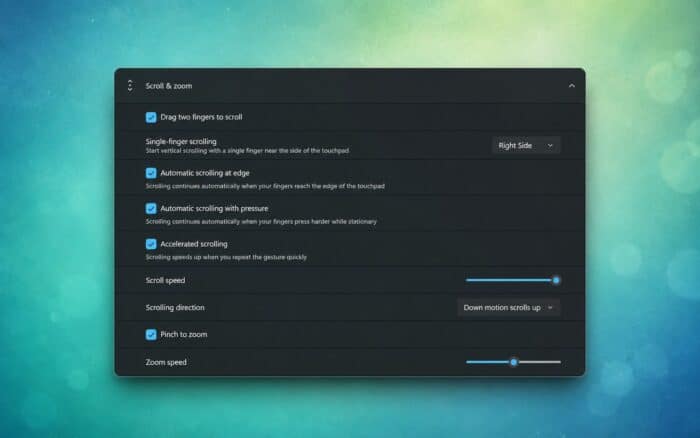
Microsoft has added more precision touchpad gesture controls to the Windows 11 Settings app, as previously spotted in Dev Build 26300.8376.
Users can now adjust scrolling and zoom speed based on their preferences. The build also introduces accelerated scrolling, which makes it easier to move through long documents and web pages.
Microsoft has expanded gesture support with automatic and optional single-finger scrolling controls.
Start Menu Gets More Customization Options
The Start menu now labels the Recommended section as Recent.
Microsoft has also introduced separate toggles for the Pinned, Recent, and All sections. Users can choose which areas appear in the Start menu without disabling the entire layout.
New Small and Large size options join the existing Automatic setting. Users can also hide their name and profile picture from the Start menu.
The company has redesigned the Start menu Settings page to organize these controls more clearly.
File Explorer Shows More Appropriate File Sizes
File Explorer now displays file sizes using appropriate KB, MB, or GB units instead of relying on a single measurement format.
Users can also middle-click folders in the address bar or Home page to open them in a new tab.
Microsoft has improved screen reader announcements during file copy and move conflicts, helping users understand which action Windows requires.
Narrator Adds Faster Braille Display Support
Braille displays can now connect instantly when users start Narrator.
The update adds support for HID-standard braille displays through USB and Bluetooth. Compatible HID displays can also work during the Windows setup experience.
Users can customize braille input and output options from the Accessibility section in Settings.
Account Control Flyout Gets a New Design
Microsoft has refreshed the Account Control flyout with a more modern interface.
A new subscription badge displays the user’s current account status. The flyout also provides faster access to plan benefits, storage details, and available upgrade options.
Windows Update and Mouse Cursor Fixes
Windows 11 Insider Beta Preview Build 26220.8925 fixes an issue that caused Windows Update installations to fail with error 0xc0000409.
Microsoft has also improved how Windows remembers custom mouse cursor size settings after users restart or sign out of their PCs.
More Windows 11 Changes
Windows 11 may reboot twice after installing the July 2026 updates when separate system components require additional restarts.
Microsoft is also working on faster File Explorer search results, with improvements initially focused on searches across This PC.

Read our disclosure page to find out how can you help Windows Report sustain the editorial team. Read more



Improve this guide


User forum
0 messages