
Winhance Open-Source Windows Optimization App Gets Major WinUI 3 Upgrade


 3 min. read
  Published on
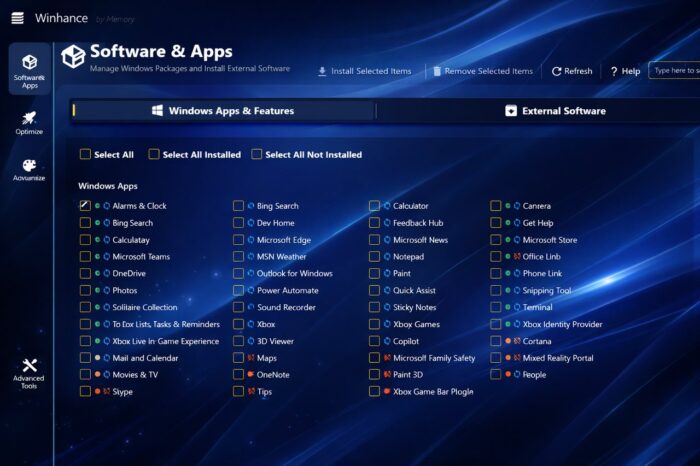
According to Windows Central, Winhance, an open-source Windows optimization app, has received a major update with a modernized interface and improved performance. The tool targets Windows 10 and Windows 11 users who want more control without complex scripts.
The app was created by Marco du Plessis, known online as memstechtips, and has been in development for just over a year. It is freely available through GitHub, where users can review the full source code.
Winhance Now Uses Modern UI, Built on WinUI 3
Version 26.02.13 marked a significant shift for Winhance. The developer migrated the interface from WPF to Microsoft’s WinUI 3 framework.
The change brings a design that visually aligns with the modern Windows Settings app. It now feels more native on Windows 11 systems while remaining compatible with Windows 10.
Alongside the visual refresh, the developer implemented backend optimizations focused on improving responsiveness and lowering RAM usage. The latest release, v26.02.17, resolves minor issues introduced during the UI transition.
Reduced memory usage benefits older desktops and laptops with limited RAM, making the tool more practical on low-spec machines.
Safe Tweaks with Built-In System Restore
Winhance automatically creates a System Restore point before applying system changes. This safeguard allows users to revert tweaks if something does not behave as expected.
As an open-source utility, Winhance also gives users full transparency. Anyone can inspect the code to verify what modifications the app performs.
The tool includes a batch uninstaller that removes default Microsoft apps in one go. Users can also batch install multiple applications, including legacy versions of Notepad and Paint, without Copilot integration.
Optimization Features and Advanced Tools
The “Optimize” section mirrors many options available in Windows Settings, but centralizes them in one interface. Users can apply additional tweaks, such as blocking OEM pre-installed bloatware.
Microsoft currently faces scrutiny over OEM practices, including forcing manufacturers to preinstall Edge. Tools like Winhance offer users an alternative way to manage what ships on their systems.
For advanced deployments, Winhance can generate an Autounattend XML file. This feature allows users to replicate selected settings and apps across multiple PCs, which can save time in lab or small office environments.
Users should download Winhance only from its official GitHub repository. Backing up files and settings remains a smart precaution before using any Windows optimization or debloat tool.
In related Windows news, Microsoft recently blocked some Windows 11 ISO downloads, impacting tools such as Rufus. At the same time, the company continues expanding Copilot features across multiple Microsoft 365 apps, signaling that AI integration across Windows and Office remains a priority.

Read our disclosure page to find out how can you help Windows Report sustain the editorial team. Read more



Improve this guide




User forum
0 messages