
You Can Avoid ChatGPT Ads on the Free Plan, but There’s a Catch


 2 min. read
  Published on
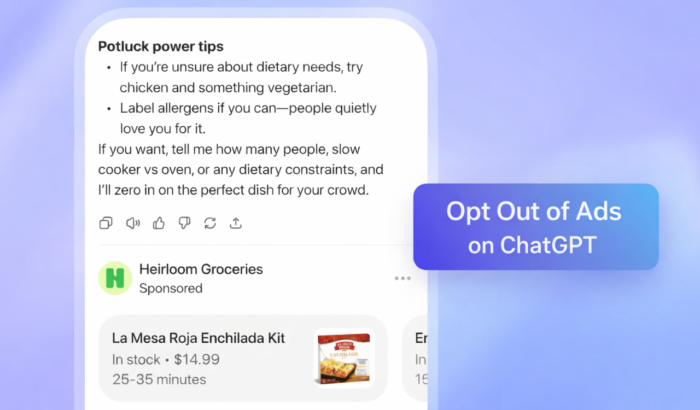
As reported yesterday, ChatGPT has officially started showing ads to users on its free tier. Fortunately, OpenAI has also quietly added a way to opt out without upgrading to a paid plan. The catch? You’ll have to accept reduced message limits.
Ads are currently rolling out to logged-in free users in the US. As mentioned by OpenAI, they appear as clearly labeled sponsored sections, just below responses, not inside the AI’s answers. OpenAI says the ads are visually separated and won’t influence how ChatGPT responds to questions.
If you don’t want to see ads and don’t want to pay, there is an alternative.
Here’s how to avoid ads on ChatGPT for free
OpenAI now lets free users switch to an ad-free experience by reducing how many messages they can send. Here’s how it works:
- Open ChatGPT and go to Profile
- Tap Settings
- Select Ad controls
- Choose Change plan to go ad-free
- Confirm Reduce message limits
Once enabled, ads disappear, but ChatGPT will cap how many back-and-forth messages you can send. OpenAI hasn’t disclosed the exact limits yet, and restrictions may vary as the rollout continues.
Paid plans remain fully ad-free
If you want unlimited access without ads, OpenAI wants you to choose paid subscriptions. ChatGPT Plus, Pro, and business or education plans remain completely ad-free, starting at $20 per month. The newer $8 ChatGPT Go plan, however, still includes ads.
One more workaround to avoid ChatGPT ads
You can also avoid ads by using ChatGPT without signing in. That said, OpenAI hasn’t confirmed how long this option will remain available, and it comes with trade-offs like losing personalization and memory-based improvements.
OpenAI says this ad rollout is still a test, and changes are likely. For now, free users have a choice: ads, fewer messages, or a paid subscription.

Read our disclosure page to find out how can you help Windows Report sustain the editorial team. Read more



Improve this guide

User forum
0 messages