
Pokemon TCG Not Working: How to Fix It Fast


 4 min. read
  Published on
If Pokémon TCG Live is not working on your device, you are not alone. Players often face issues such as the game not launching, freezing on the loading screen, or crashing after updates. Luckily, there are a few simple fixes you can try to get back into your matches.
Table of contents
How do I fix Pokemon TCG if it’s not working?
1. Check for Server Outages
Steps to check server status:
- Visit the official Pokémon TCG Live or Pokémon Support website.
- Check social media platforms like Twitter for outage announcements.
- Confirm if other players are reporting similar issues on community forums.
- If servers are confirmed down, wait until they are restored.
If you are curious about similar issues in other Pokémon apps, here is how to fix Pokémon Home error code 400.
2. Restart the Game and Device
- Close Pokémon TCG completely from Task Manager on Windows or force close it on mobile.

- Restart your PC, Mac, or mobile device.
- Reopen the game and see if it runs smoothly.
This clears temporary glitches that prevent the game from loading properly.
3. Clear Cache and Reserved Data
Corrupted cached files often cause Pokémon TCG Live errors. Clearing reserved data can refresh the game:
- On Windows, go to AppData and remove the cached files for the game.
- On mobile, clear the app’s storage and data in Settings.
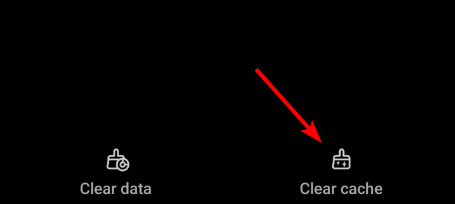
This is also a known fix for issues such as Pokémon TCG Live error 10099.
Clearing cache can also solve gameplay errors like the Pokémon TCG not enough energy issue, which often happens when corrupted files prevent energy cards from registering correctly.
If the game loads after clearing cache but QR codes still do not register, see Pokémon TCG not scanning for camera, lighting, and app settings fixes.
4. Update or Reinstall Pokémon TCG Live
- Check your app store or PC client for the latest updates.
- If updating does not work, uninstall the game and reinstall it from the official source.
Reinstallation ensures you have clean files and the newest features. Still seeing a stuck update or loop? Follow the steps in Pokémon TCG not updating to clear cache, fix time settings, and reinstall cleanly.
5. Switch Your Network or Use a VPN
Connectivity issues may block your login or prevent matches from loading. Try these steps:
- Restart your router and switch from Wi-Fi to Ethernet.
- Test another network such as mobile data.
- Use a VPN if you suspect region-based restrictions.
If you want to see how VPNs can also help in other Pokémon titles, check out this guide on how to play Pokémon Go on Windows PC.
If you cannot log in because the verification email never arrives, follow this dedicated guide: Pokemon TCG Not Sending Verification Code.
FAQs
It could be due to corrupted game files, outdated software, or server downtime. Restart your device, verify your files, or reinstall the game to fix it.
Switch networks, reset your router, or try a VPN to bypass region restrictions.
No. Your progress is tied to your account, not cached files. Only temporary files are removed.
Yes. If servers are under maintenance, you will not be able to log in until they are restored.
Yes, if updates and cache clearing do not work, reinstalling often fixes persistent crashes or loading errors.
Conclusion
Pokémon TCG Live may stop working due to server outages, corrupted files, or unstable networks. By following the steps in this guide, you can usually resolve crashes, login problems, or connection errors and get back to playing without major interruptions.

Read our disclosure page to find out how can you help Windows Report sustain the editorial team. Read more



Improve this guide


User forum
0 messages