
Chrome is testing a new startup option on Windows
The new setting lets users decide whether Chrome should open automatically after Windows login.


 2 min. read
  Published on

Google is testing a new startup option in Chrome Canary. The feature lets users decide whether Chrome should open automatically when Windows starts
Until now, users who wanted Chrome to open at startup had to depend on Windows Startup apps, Task Manager, or custom shortcuts in the Startup folder. These methods work, but they live outside the browser. Many users miss them or configure them incorrectly.
The new setting under On startup brings this control into Chrome’s own settings. That makes it easier to find and manage.
Users can find the option in Settings under On startup as “Open Chrome when my computer starts.” The toggle stays turned off by default.
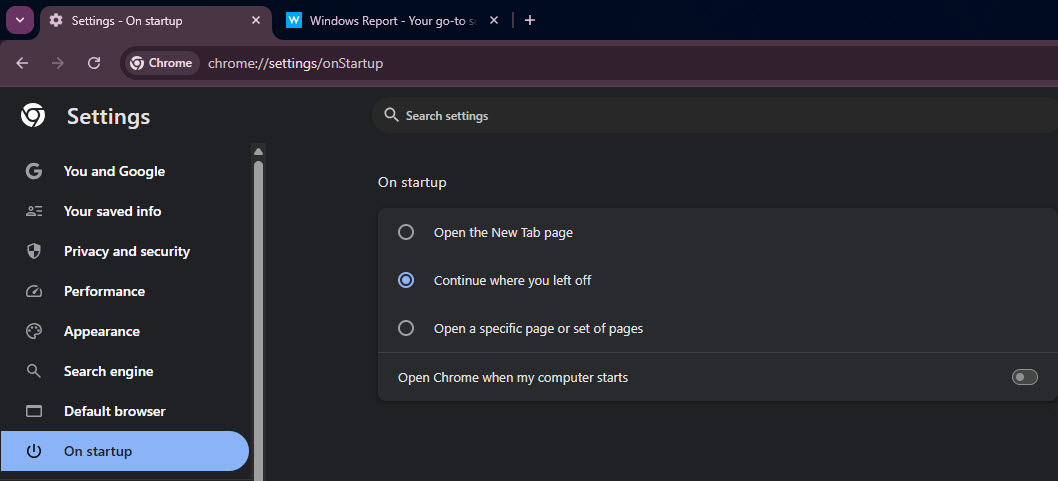
When enabled, Chrome launches shortly after Windows login. It opens like a normal browser window instead of running quietly in the background.
During testing on Windows 11, Chrome restored the previous session when “Continue where you left off” was selected. Tabs and windows reopened just as they do after a regular browser restart.
Firefox already offers an optional setting that lets the browser open automatically when the computer starts. Users can find it under Settings in the General section as an auto-start option.
Chrome is now testing a similar one, though the feature is still limited to Canary and is currently under development. This behavior benefits users who work mainly in the browser and want Chrome ready as soon as they sign in.
Google is also testing a feature in Chrome that notifies users when the default browser changes on Windows 11. The new startup setting is another change targeted toward Windows.


Read our disclosure page to find out how can you help Windows Report sustain the editorial team. Read more



Improve this guide



User forum
0 messages