
7 Best Driver Updater Tools for Windows 11/10


 6 min. read
  Updated on

Free driver updaters scan your system, find what’s old and corrupt, and fix it. They’re a headache-free alternative to doing it yourself or using Device Manager.
So if you don’t want your PC to act up and all hardware working fine, check our lowdown on 8 solid free driver updaters for Windows 11.
What are the best driver updaters for Windows 11?
Table of contents
- What are the best driver updaters for Windows 11?
- 1. Fortect Driver Updater – Comprehensive Driver Management with Automatic Backup
- 2. IObit Driver Booster – massive driver data base and offline updates
- 3. Driver Easy – Detailed hardware information
- 4. DriverPack Solution Online – Expert mode
- 5. DriverMax – Restore point creator
- 6. Snappy Driver Installer – No limitations
1. Fortect Driver Updater – Comprehensive Driver Management with Automatic Backup
| Feature | Details |
|---|---|
| Key Functions | Full driver scan, one-click updates, automatic backup before install |
| Standout Factor | Focus on safe updating with rollback options |
| Database | OEM-sourced drivers with WHQL certification |
| Safety | Strong backup & restore features |
| Ideal For | Users prioritizing stability and recovery options |
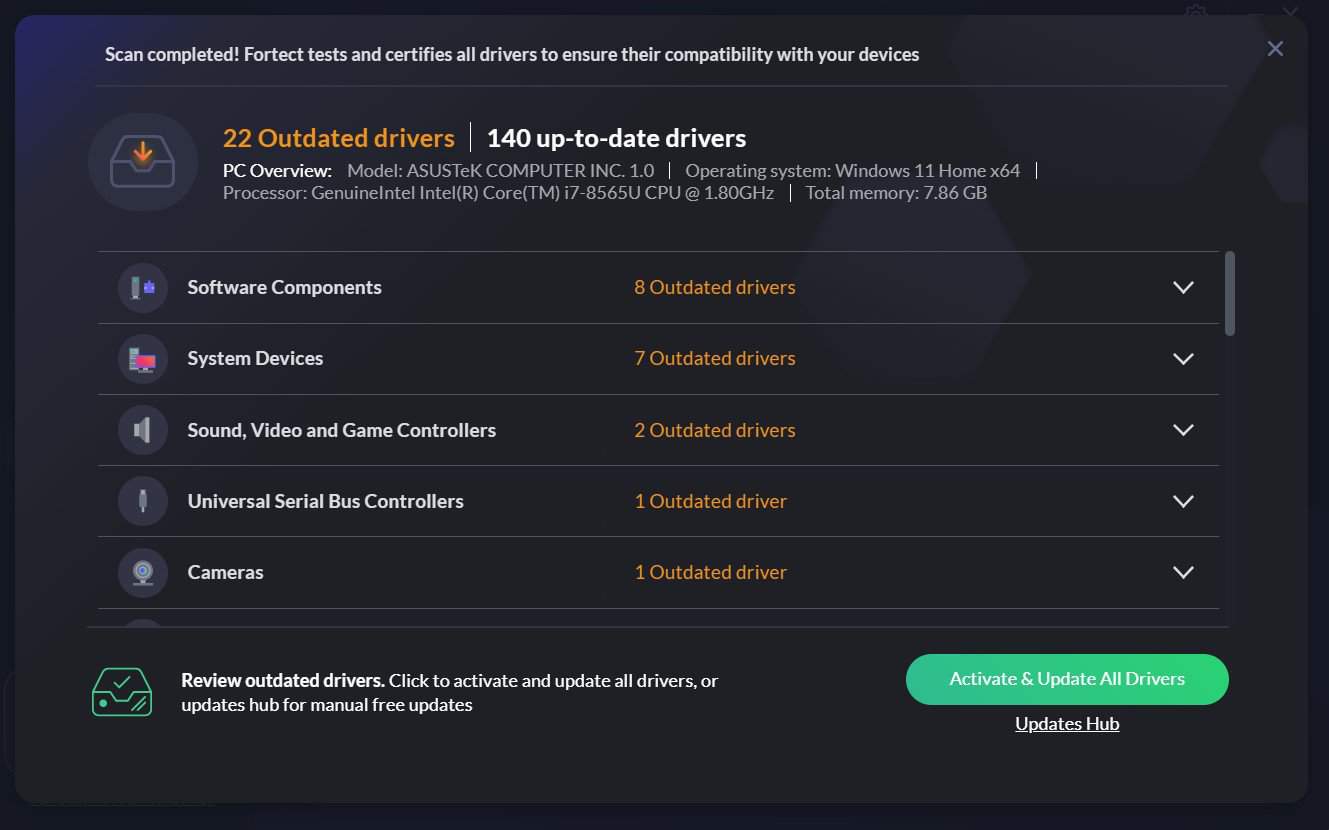
Fortect Driver Updater is a versatile tool that simplifies the process of keeping your drivers up-to-date. Upon installation, it immediately scans your system for outdated or missing drivers and offers one-click updates.
The software has a vast driver database, ensuring compatibility with a wide range of hardware.
One of its standout features is the ability to create backups before each update, allowing you to easily restore previous versions if necessary.
Key features of Fortect Driver Updater:
- Automatic driver scans and updates.
- Extensive driver database.
- Backup and restore functionality.
- Intuitive interface.

Fortect
With Fortect Driver Updater, you can keep your drivers up-to-date without any effort.2. IObit Driver Booster – massive driver data base and offline updates
| Feature | Details |
|---|---|
| Key Functions | Massive driver library, game-ready drivers, offline updates |
| Standout Factor | Optimized for gamers and offline use |
| Database | Over 8 million drivers, frequently updated |
| Safety | Backup & restore, WHQL drivers |
| Ideal For | Gamers and users with limited internet access |

Driver Booster is a top-notch driver updater with a database of over 6 million drivers curated from over a thousand brands.
It runs automatically in the background to find outdated drivers and the corresponding official update.
One of the standout features of the Driver Booster is that it shows a comparison of the update and the outdated one before installation. This allows you to make a choice on which is better for you.
What’s more, it creates a restoration point before updating drivers. This makes it possible to restore the original driver if there is a problem in the installation process.
Other notable features:
- Drivers rollback.
- Schedule manager for scanning for outdated drivers.
- Incorporates an offline updater.

IObit Driver Booster
Driver Booster can swiftly scan, download, and install device drivers for you in the most convenient manner, even while you are not connected to the internet.3. Driver Easy – Detailed hardware information
| Feature | Details |
|---|---|
| Key Functions | Detailed hardware info, scheduled scans, step-by-step update process |
| Standout Factor | Transparency with full hardware details |
| Database | Large, WHQL-certified drivers |
| Safety | Backup & restore features |
| Ideal For | Users who want detailed insight before updating |

Driver Easy scans your PC for outdated and broken drivers and recommends an update. It has a high-level schedule manager that allows you to schedule scans daily, weekly, or monthly.
With this, you can control how frequently you get updates and how much power it consumes running in the background.
It has a large database and directly downloads updates from within its software. Although you will still have to install the updates manually, it saves you the stress of navigating the manufacturer’s website to download them.
Extra features:
- Shows detailed hardware info.
- Offline scanning.

Driver Easy
DriverEasy The free version downloads all of the necessary drivers for you to manually install, and the pro version does it automatically.4. DriverPack Solution Online – Expert mode
| Feature | Details |
|---|---|
| Key Functions | Automatic driver installation, “Expert mode” for manual selection |
| Standout Factor | Gives power users full control over updates |
| Database | Extremely large, supports legacy drivers |
| Safety | Option to choose exactly which drivers to install |
| Ideal For | Power users and technicians |

The DriverPack Solution is a free and dynamic software. It lets you download an offline version with almost the entire database (25GB) and use it for offline driver updates from anywhere.
It is ideal for newbie users as it handles just about everything. You only need to click the Start installing button after it finishes downloading and scanning updates.
For an experienced user, you can switch to the expert mode and take control of the activities of the software. DriverPack solution just offers so much dynamism.
Extra feature:
- Installs some free application software on your PC if you don’t have any.
- Scans and installs updates in offline mode.
- Downloads official updates from within its software.
5. DriverMax – Restore point creator
| Feature | Details |
|---|---|
| Key Functions | Restore point creation, export/import drivers, daily updates |
| Standout Factor | Strong focus on safety with restore points |
| Database | Broad driver library |
| Safety | Automatic restore points before changes |
| Ideal For | Users wanting guaranteed fallback options |

Driver Max is one of the easiest-to-use free Windows 11 driver updaters available. Aside from scanning and updating outdated drivers, it also creates a backup of all installed drivers and can restore them after an update.
Like many other driver updaters in this guide, it allows you to create a schedule for auto-scanning.
One major downside of this software is that the free version only allows you to install one update at a time and a meager two updates per day. Bulk installation is only available in the paid version.
Extra features:
- Driver installation is done automatically without prompts.
- Downloads drivers from inside the program.
- Creates restore point before driver installation.
6. Snappy Driver Installer – No limitations
| Feature | Details |
|---|---|
| Key Functions | 100% free, portable, offline driver packs, no feature caps |
| Standout Factor | No limitations, completely open and portable |
| Database | Full driver archive, supports offline updates |
| Safety | User-controlled installation |
| Ideal For | IT pros and repair shops needing flexibility |

Snappy driver installer is a 100% free driver update software that lets you install downloaded updates without an internet connection.
Despite being free, it does not display any ads and just does its job effectively. The Snappy driver installer can install many drivers at a time without limitations.
It has a respectable download speed as it downloads the drivers directly from within the software. The major nadir of this software is that the app is hard to use for non-tech-savvy users to the extent that it warrants a forum for learning how it works.
Other features:
- It can work directly from an external device like a flash drive.
- Installs software with or without the internet after download.
The importance of updating your drivers cannot be stated enough. While all six drivers update software in this guide are effective in their rights, we recommend using the Outbyte Driver Updater software as it ticks all the right boxes.
Other important resources include open-source driver updaters and options specifically designed for Windows 7 users.
Feel free to name any effective free Windows 11 driver updater that you feel deserves mention in the comment section. You can also leave recommendations on any Windows 11 related software you’d want us to review in the future.

Read our disclosure page to find out how can you help Windows Report sustain the editorial team. Read more



Improve this guide

User forum
0 messages