
Amazon Business Login: How to Access Account on Desktop & Mobile


 4 min. read
  Published on

Logging into an Amazon Business account is useful for organizations and professional purchasing. You can manage business orders, payment methods, users, buying settings, and other workplace requirements.
The login process for an Amazon Business account is similar to that of a personal Amazon account. However, business accounts include several features that personal accounts do not. Amazon Business is designed for organizations and professional purchasing.
How to Log In to an Amazon Business Account
Amazon Business login on desktop
- Open the official Amazon Business login page.
- Select Sign in.

- Enter the email address connected to your Amazon Business account.
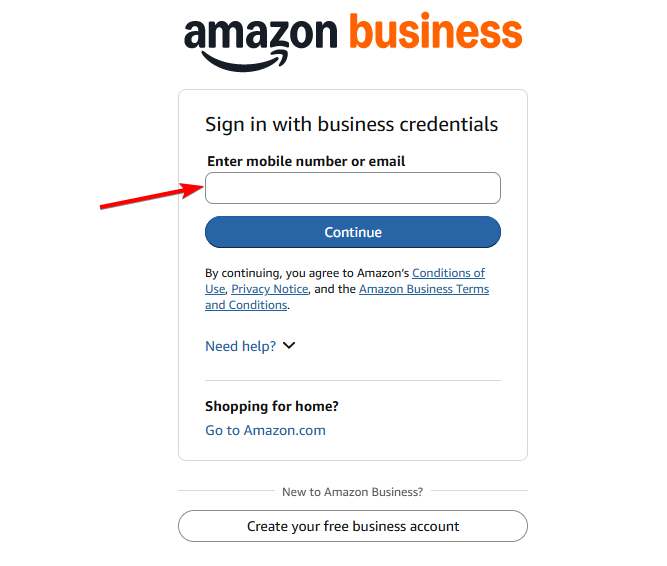
- Enter your password and complete any requested security verification.
- After authentication, Amazon should take you to your Business account.
If your company uses Single Sign-On, your process can look different. Amazon Business supports SSO, which lets organizations use existing workplace credentials.
Security tip: Use the official Amazon Business website rather than login links from unexpected emails.
What if you do not have an Amazon Business account?
You can create one through an Amazon Business account. Registration is free, with no long-term commitment or minimum spend. Amazon says new registrations require a work email and company information. Additional business documents may sometimes be requested during verification.
If your organization already has a Business account, an administrator may need to invite you. Amazon says administrators can add users through email, shareable links, or bulk uploads.
Amazon Business Login on Mobile
1. Amazon Business app
The dedicated Amazon Business app is built for business purchasing on mobile.
- Install the official Amazon Business app (Android) (iOS/iPadOS).
- Open the app.
- Choose the sign-in option.
- Enter your Business account credentials.
- Complete verification if requested.
- Continue to your Business shopping account.
The app also supports business account settings for eligible users. Administrators can manage areas such as users, payment methods, addresses, and buying settings.
2. Mobile browser
You can also use your phone’s browser. Open the Amazon Business login page and sign in normally. As a reminder, all the steps are the same as logging into your Amazon Business account on your desktop. This can help when you can’t install the app or are using another device.
Do note that Amazon Business also supports account switching through mobile browsers. Open the menu, select Switch Accounts, then choose an existing account or add another account.
Is Amazon Business Login Different From Personal Amazon Login?
Yes, but the basic sign-in process is very similar. A personal Amazon account is generally used for everyday consumer shopping. Amazon Business is designed around organizational purchasing and business account management.
Business accounts can support multiple buyers, administrative controls, buying groups, business settings, and organizational purchasing workflows. The important part is that your personal and Business accounts can remain separate. Amazon says account linking does not merge addresses, payment methods, orders, or subscriptions between them.
What to Do When Amazon Business Login Doesn’t Work
Below are some common issues that you might encounter during the Amazon Business login process. Make sure to go through them.
- Wrong password: Reset your password through Amazon if your credentials are rejected.
- Wrong account: Check whether you are trying to access your personal account instead.
- Company invitation: Ask your administrator whether your Business account invitation is still active.
- SSO issue: Contact your company’s IT team if your organization uses Single Sign-On.
- Browser problem: Try another browser or clear cached Amazon data before attempting another login.
Amazon also recommends avoiding account switching on shared devices. Someone else using that device could potentially access an account that remains available through the switcher.
All that said, Amazon Business login may look almost identical to regular Amazon sign-in. The difference appears after you enter the account, where business purchasing and organizational controls take over.
We hope this guide helped you with most queries regarding your Amazon Business account login. If you have any further questions, let us know in the comments below. Also, don’t forget to check our guide on logging into your personal Amazon shopping account.
We also have a guide on how to log in to a Best Buy account, so you might want to check it out.

Read our disclosure page to find out how can you help Windows Report sustain the editorial team. Read more



Improve this guide



User forum
0 messages