
Chrome Is Now Watching Your Clipboard Permissions — Here’s What That Means
Chrome Canary flags clipboard permissions in Safety Check, revoking them for unused sites and letting users restore access with a single click.


 3 min. read
  Published on
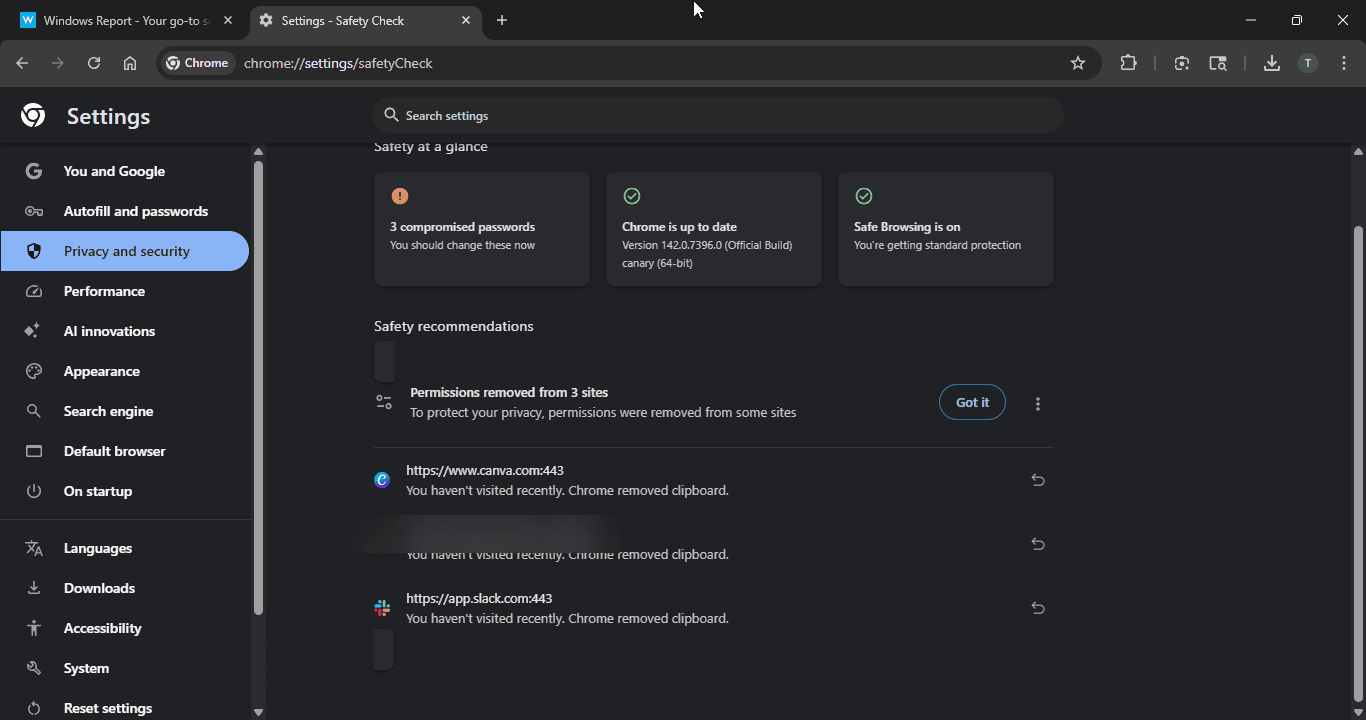
Your copy-paste data just got a new layer of protection. After working on resetting tampered search settings, Google is now testing a privacy-focused change in the latest Chrome Canary. The browser’s Safety Check automatically revokes clipboard permissions from idle sites and now shows a clear warning when it happens.
Safety Check has always handled permissions quietly in the background, but this is the first time clipboard access is singled out with a direct alert. Users may now see a message such as:
“You haven’t visited recently. Chrome removed clipboard.”
How Chrome Notifies You
When permissions are revoked, Chrome doesn’t keep it hidden. You’ll see a new menu notification that reads “Removed permissions for [x] sites” when you open the Chrome menu. Clicking it takes you straight to Safety Check, where the affected sites are listed.
Clipboard access is far more sensitive than many users realize. Unlike notifications or location, it can hold passwords, financial details, or even cryptocurrency wallet addresses. Security researchers have also warned that some websites can write to the clipboard without asking, potentially overwriting critical information before you paste it.
By revoking clipboard access automatically and flagging it in Safety Check, Chrome is treating copy-paste data as a high-risk permission.
Here’s the twist: Chrome doesn’t just take clipboard access away. If you click the back arrow in the Safety recommendations list, the browser shows the same sites again, this time with an “Allow again” button.
That means you can restore clipboard access with one click if you trust the site. But by making you pause before re-enabling it, Chrome is sending a clear privacy message: Are you sure you want to give this back?
Chrome may now revoke clipboard permissions from sites you don’t visit often, but it also provides clearer alerts and a one-click way to restore them. If needed, you can still manage clipboard permissions manually at chrome://settings/content/clipboard.
That’s not all. Chrome is getting touch drag-and-drop support on Windows 11 and will soon let you turn tab groups into bookmark folders.
Additionally, Chrome will soon allow users to set it as the default browser and pin it to the taskbar at the same time, as well as access tab groups directly from the New Tab Page.


Read our disclosure page to find out how can you help Windows Report sustain the editorial team. Read more



Improve this guide




User forum
0 messages