
Fubo TV Login: How to Sign In on Web, Mobile, and Smart TV


 5 min. read
  Published on

Fubo TV lets you access your account from a web browser, mobile device, Smart TV, or streaming device, and in this guide we’re going to show you how to properly log in to Fubo TV on your device.
How do I log in to Fubo TV?
1. Use a web browser
You can access your Fubo account directly from its website on a Windows PC, Mac, Chromebook, or another computer.
- Go to the Fubo sign-in page.
- Enter the email address associated with your Fubo account.
- Type your password.
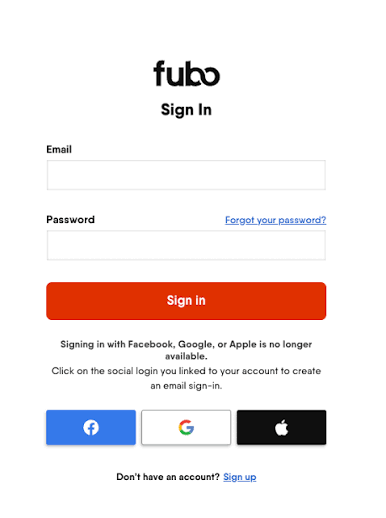
- Select Sign In.
- Enter the verification code sent to your email if Fubo asks you to verify the device.
You can also visit the main Fubo website and select Sign In in the upper-right corner.
2. Use phone or tablet
If you watch Fubo on Android, iPhone, or iPad, you can log in through the Fubo app.
- Open the Fubo app on your phone or tablet.
- Select Sign In.
- Enter your Fubo account email and password.
- Tap Sign In to access your account.
- Check your email and enter the six-digit verification code if Fubo requests one.
Fubo may require email verification when you sign in from a new device under certain circumstances.
3. Use an activation code
Using an activation code is usually the easiest way to complete the Fubo TV login on a Smart TV or streaming device because you do not need to type a long password with your remote.
- Open the Fubo app on your Smart TV or streaming device.
- Select Sign In.
- Choose Sign In With A Code.
- Leave the activation code visible on your TV.
- Open fubo.tv/connect on your phone, tablet, or computer.
- Sign in to your Fubo account if prompted.
- Enter the code displayed on your TV.
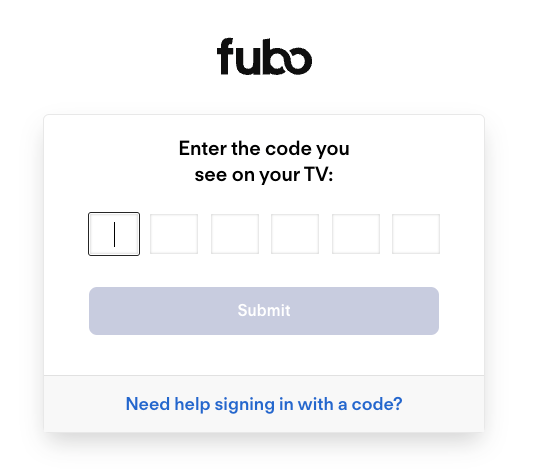
- Select Submit.
- Return to your TV. The Fubo app should automatically sign you in.
Fubo activation codes remain valid for five minutes. If the code expires, use the new code displayed on your TV and try again.
How to sign in to Fubo TV without a code
You can enter your login details manually if the activation method does not work.
- Launch the Fubo app on your TV.
- Select Sign In.
- Choose Sign In With Email.
- Enter your Fubo email address using your remote.
- Enter your password.
- Select Sign In.
Fubo supports this sign-in method on compatible Smart TVs and connected devices alongside code-based activation.
What to do if you forgot your Fubo password
You can reset your password if you cannot remember your Fubo TV login details.
- Open the Fubo sign-in page.
- Select Forgot your password?
- Enter the email address linked to your Fubo account.
- Check your inbox for the password reset message.
- Follow the instructions to create a new password.
- Return to Fubo and sign in with the new password.
Make sure you check your spam or junk folder if the reset email does not arrive.
What to do if the Fubo TV login is not working
Most Fubo sign-in problems come from incorrect credentials, an expired activation code, or problems verifying the account.
- Check your email address – Make sure you use the same email address you used when creating your Fubo account.
- Reset your password – Request a new password if Fubo keeps rejecting your credentials.
- Request a new TV code – Activation codes expire after five minutes, so use the newest code shown on your TV.
- Check your verification email – Look in your inbox, spam, promotions, and junk folders if Fubo asks for a verification code.
- Select Resend Code – Request another verification code if the first one does not arrive or has expired.
- Try signing in with email – On a Smart TV, switch from the activation-code method to Sign In With Email.
- Restart the Fubo app – Close the app completely and reopen it before trying again.
We hope this guide helped you log in to Fubo and get back to watching your channels, sports, movies, and shows. If you use the web version, check our guide on watching FuboTV in a browser. If playback becomes unstable after you sign in, we also have a guide that can help when Fubo keeps buffering.
FAQ
How do I log in to Fubo TV?
Go to the Fubo sign-in page, enter your account email and password, and select Sign In.
How do I activate Fubo TV on my Smart TV?
Open the Fubo app, choose Sign In With A Code, then visit fubo.tv/connect and enter the code shown on your TV.
How long is a Fubo activation code valid?
A Fubo activation code is valid for five minutes. If it expires, request a new code from the Fubo app on your TV.
What should I do if I forget my Fubo password?
Select Forgot your password? on the Fubo sign-in page and follow the instructions sent to your email to reset it.
Why is my Fubo TV login not working?
Check your email and password, request a new verification or activation code, and restart the Fubo app before trying again.

Read our disclosure page to find out how can you help Windows Report sustain the editorial team. Read more



Improve this guide



User forum
0 messages