
Ghost Recon Wildlands MSVCR110.dll Missing? Here’s The Fix


 4 min. read
  Published on

If you’re seeing the MSVCR110.dll error when trying to play Ghost Recon Wildlands, it simply means the required files are missing. Don’t worry, here’s how you can fix the error and get back into the game.
Table of contents
How can I fix Ghost Recon Wildlands error MSVCR110.dll?
1. Reinstall Visual C++ Redistributable 2012
The first step is to restore the missing components that include the MSVCR110.dll file.
- Go to Microsoft’s website and download the Visual C++ Redistributable for Visual Studio 2012.
- Pick the version that matches your system (x86 or x64).

- Install it and restart your PC.
Since this error is directly tied to the MSVCR110.dll file, reinstalling the right package usually resolves the problem. If the issue still shows up, you can also check out this detailed guide on what to do when the MSVCR110.dll file is missing in Windows 11.
If the launch failure appears as 0xc00007b, use the Ghost Recon Wildlands error 0xc00007b fix to address Visual C++ and DLL conflicts.
2. Repair the MSVCR110.dll File
If reinstalling doesn’t help, try repairing the file directly through Windows.
- Press Win + R, type cmd, then press Ctrl + Shift + Enter to open Command Prompt with admin rights.
- Enter:
sfc /scannow
- Wait for the scan to finish and let Windows automatically repair corrupted files.
If the scan doesn’t help, you can still manually restore or replace the DLL. This process is explained in WindowsReport’s step-by-step fix for MSVCR110.dll errors.
3. Verify Ghost Recon Wildlands Game Files
Another effective option is to let the game launcher fix missing or corrupted files automatically.
- Open Ubisoft Connect or Steam, depending on where you installed the game.
- Find Ghost Recon Wildlands in your library.
- Right-click the game and choose Verify files.
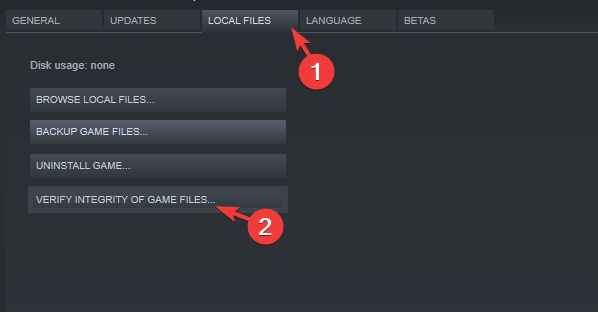
- Wait while the client checks and restores missing or corrupted files.
Verifying the installation is a quick way to make sure the game folder has everything it needs to run.
4. Reinstall Ghost Recon Wildlands
If none of the above works, a clean reinstall may be necessary.
- Uninstall the game from Ubisoft Connect or Steam.

- Restart your computer.
- Reinstall Ghost Recon Wildlands on a clean drive.
Reinstallation can be time-consuming, but it guarantees no corrupted files are left behind. For other issues with the game, such as error codes Tarija-00019 or 00014, you can follow this dedicated Ghost Recon Wildlands troubleshooting guide.
Conclusion
The MSVCR110.dll error in Ghost Recon Wildlands appears when required files aren’t available or get corrupted. Running a repair scan, verifying the game files, or reinstalling the game should solve it so you can jump back into action.
If the game still fails to start after fixing DLL issues, the problem may come from Easy Anti-Cheat. In that case, follow our guide on Ghost Recon Wildlands error code 30005 for additional solutions.
FAQs
It happens when the game can’t find or load the MSVCR110.dll file, usually because it’s missing, corrupted, or not properly installed.
It’s not recommended. Many sites offering DLL downloads are unsafe. Instead, use official Microsoft packages or system repair tools.
No. It’s a legitimate system file that comes with Visual C++ Redistributables. Errors occur when the file is missing, not because it’s malicious.
Not always, but it’s a reliable last step if repairing system files and verifying the game doesn’t work.

Read our disclosure page to find out how can you help Windows Report sustain the editorial team. Read more



Improve this guide


User forum
0 messages