
Ghost Recon Wildlands: Resolve Tarija 00019 and 00014 Errors


 4 min. read
  Published on

Ghost Recon Wildlands error Tarija 00019 and 00014 appear when players attempt to connect to Ubisoft servers. However, the steps in this guide can help you fix these issues and get back into the game without interruptions.
Table of contents
How can I fix Ghost Recon Wildlands error Tarija 00019 and 00014?
1. Restart your network equipment
A quick restart of your router and modem can clear temporary glitches.
- Turn off your router and modem.
- Wait at least 60 seconds before powering them back on.
- Reconnect to your network and try launching the game again.
This simple reset often clears temporary connection issues that trigger the errors.
2. Check Ubisoft server status
Sometimes the problem is not on your end but with Ubisoft servers.
- Visit the Ubisoft support page or check social channels for server updates.
- If servers are down, wait until Ubisoft resolves the issue before reconnecting.
Server outages are a frequent cause of lag, stuttering, or disconnecting issues in Ghost Recon Wildlands.
3. Disable firewall and antivirus temporarily
Security software can block Ubisoft connections if set too strictly.
- Open your firewall or antivirus software.
- Temporarily disable it and try launching the game.
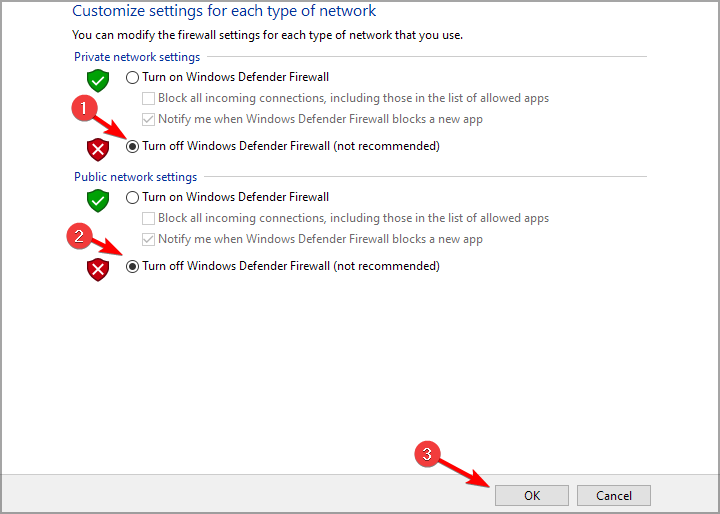
- If the error is gone, add Ghost Recon Wildlands to the exceptions list.
Overly strict security software can block Ubisoft connections, leading to Tarija errors.
4. Verify game files
Corrupted files can cause this issue, but you can verify them by following these steps:
- Open Ubisoft Connect or Steam.
- Navigate to Ghost Recon Wildlands in your library.
- Choose the option to verify or repair game files.

This process ensures that no corrupted files are preventing your game from starting properly. For more solutions, see our guide on fixing Ghost Recon Wildlands when it will not start.
If the verification shows a missing DLL file instead of general corruption, such as MSVCR110.dll, follow our dedicated guide to fix the Ghost Recon Wildlands MSVCR110.dll error with step-by-step solutions.
We also have a great step-by-step guide to fix Ghost Recon Wildlands 0xc00007b so don’t miss it.
5. Reset network settings
Resetting your network clears misconfigurations that might block Ubisoft services.
- Press Win + I to open Settings.
- Go to Network & Internet.
- Scroll down and select Network reset.

- Restart your PC and reconnect to your network.
A full network reset clears misconfigured settings that might block Ubisoft services.
6. Reinstall the game
If nothing works, reinstalling ensures a clean and updated installation.
- Uninstall Ghost Recon Wildlands.
- Download and reinstall the latest version.
- Launch the game and test if the error is resolved.
If other fixes fail, reinstalling ensures you have a clean and updated installation. You can also check our complete guide to fix common Ghost Recon Wildlands issues.
Conclusion
Ghost Recon Wildlands error Tarija 00019 and 00014 are usually connection related and can be fixed with simple troubleshooting. Restarting your router, verifying game files, and adjusting firewall settings are often enough to resolve the issue.
If your game still refuses to launch, the issue may be tied to Easy Anti-Cheat. In that case, see our guide on Ghost Recon Wildlands error code 30005 for additional solutions.
FAQs
It usually happens when your game cannot connect to Ubisoft servers due to unstable internet or blocked ports.
Yes, both errors are connection related and share similar fixes such as network restarts and verifying files.
Yes, firewalls and antivirus programs can block Ubisoft servers. Adding the game as an exception often fixes the issue.
Not always. Reinstalling is a last resort if verifying files, resetting your network, and checking servers do not help.
Sometimes. If your ISP is causing connection issues, using a VPN may help you connect to Ubisoft servers successfully.

Read our disclosure page to find out how can you help Windows Report sustain the editorial team. Read more



Improve this guide




User forum
0 messages