
Llama Windows App from Hugging Face Brings One-Click Local AI to Windows 11


 2 min. read
  Published on
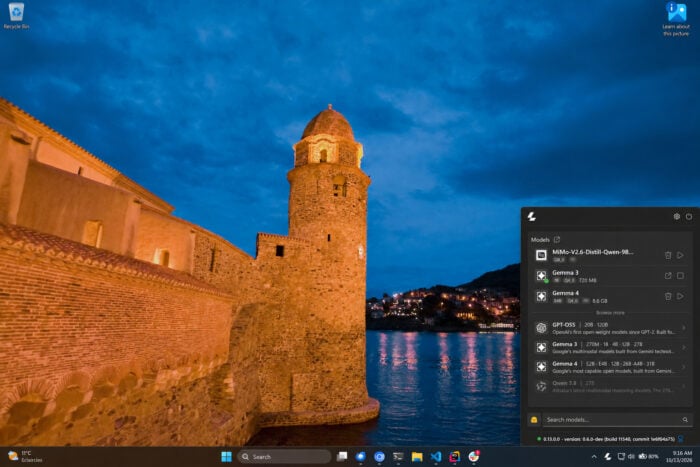
Running AI models locally on Windows 11 just got a whole lot easier. Hugging Face has introduced Llama Windows, a free, open-source app that brings the llama.cpp engine directly to your system tray. You can download models, launch them, and start chatting without touching the command line.
Llama Windows makes local AI accessible to everyone
Llama Windows removes several hurdles associated with running open AI models on a PC. Previously, users often needed to find compatible binaries, choose quantized models, and configure server commands manually. The new app turns that process into a few clicks. Its Recommended Models panel lists popular models from the Hugging Face Hub, showing their parameter counts, download sizes, and vision capabilities.
Once downloaded, models appear in the Available panel, where users can load or unload them. The app uses a native WinUI 3 interface and runs from the Windows notification area. Users can also press Alt + Space to open an overlay and start chatting with their agent.
Your AI models stay on your PC
Privacy is another major selling point. Llama Windows runs models locally, keeping prompts and data on the device rather than sending them to an external AI service. After downloading a model, users can run it without an internet connection.
The app also manages its llama.cpp runtime automatically. It connects to an existing server or installs the required runtime when necessary. No administrator rights are required. Developers get additional flexibility through a local server running at http://localhost:9931. Its OpenAI-compatible API allows other apps, scripts, and agents to use the same models.
Windows on Arm and NVIDIA RTX Spark support
Llama Windows launches with native Windows on Arm support and compatibility with NVIDIA RTX Spark. Hugging Face says it worked with NVIDIA to prepare support for the platform’s GPU capabilities. The app also shares models through the standard Hugging Face cache, avoiding duplicate downloads across compatible tools.
How to get Llama Windows
You can download Llama Windows for free from llama.app. Click its tray icon, select a recommended model, download it, and start chatting. The source code is available on GitHub, where developers can report issues and contribute improvements. For Windows 11 users curious about local AI, this offers a simpler starting point without complicated setup.

Read our disclosure page to find out how can you help Windows Report sustain the editorial team. Read more



Improve this guide




User forum
0 messages