
KB5079473 Breaks Sign-In for Teams, OneDrive, Edge, Excel, Word & Copilot on Windows 11


 3 min. read
  Published on

Every now and then, we come across reports of Patch Tuesday updates breaking some features or triggering new issues for Windows 11 users. To catch you up, last week, Microsoft released the March 2026 Patch Tuesday update, KB5079473, for Windows 11, and it already seems to be causing some issues. In our previous report, we talked about the same update triggering system crashes and installation errors. Unfortunately, the list of issues linked to KB5079473 is growing.
Microsoft confirms KB5079473 causes sign-in failures across free Windows 11 apps
Yesterday, Microsoft confirmed a new issue linked to the recent Patch Tuesday update. In the Windows 11 release health dashboard, the company confirmed that after installing KB5079473, Windows 11 users attempting to sign in with Microsoft accounts may find that apps like Microsoft Teams Free or OneDrive fail to authenticate properly (via Neowin).
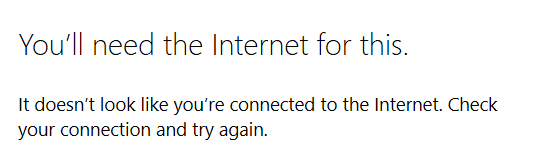
The company further adds that users may encounter error messages such as “You’ll need the Internet for this. It doesn’t look like you’re connected to the Internet” appear even when the device is online. According to Microsoft, the issue is limited to Microsoft account sign-ins, so business users who rely on Entra ID (formerly Azure Active Directory) remain unaffected.
Other apps impacted include Microsoft Edge, Excel, Word, and Microsoft 365 Copilot whenever a feature requires account authentication. While explaining the root cause, Microsoft notes that the error occurs due to a specific network connectivity state. In many cases, restarting the device while keeping it connected to the Internet resolves the problem. However, restarting without an active connection may return the device to the faulty state, triggering the issue again.
The company says a permanent fix is in the works, which we expect will roll out in the coming days. Until then, you can follow the recommended workaround to regain access to affected apps. Microsoft has further promised to update guidance once the resolution is available.
As of now, it’s unclear how widespread the problem is or if future updates might introduce additional sign-in issues. Moreover, you can continue to monitor official Microsoft channels for updates and avoid restarting devices offline to minimize the risk of encountering the error.
Other issues faced by users in the recent past
Earlier this week, Microsoft also confirmed a widespread outage affecting Office.com and Exchange Online. At the time, the outage left many users unable to access their mailboxes, calendars, and other essential productivity tools through various connection protocols. In a separate issue, confirmed by the company earlier this week, the Teams Meeting add-in prevents some users from accessing Outlook Classic.

Read our disclosure page to find out how can you help Windows Report sustain the editorial team. Read more



Improve this guide




User forum
0 messages