
How to Delete LinkedIn Account Permanently or Hibernate


 4 min. read
  Published on
Learn how to delete your LinkedIn account permanently or deactivate it temporarily with these simple steps.
Table of contents
How to Permanently Delete Your LinkedIn Account?
1. Log in and Open Settings
Start by accessing your LinkedIn account and opening the main settings page.
- Go to linkedin.com and sign in.
- Click your profile picture at the top right.
- Select Settings & Privacy from the dropdown.
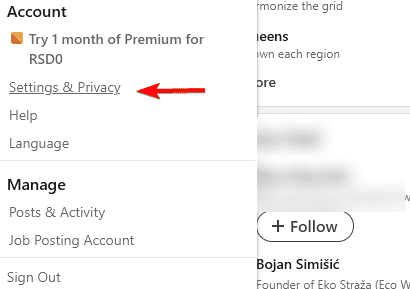
2. Navigate to Account Preferences
Next, head over to the section where account management options are located.
- In the left sidebar, click Account preferences.
- Scroll down to Account management.
3. Close Your LinkedIn Account
Here you confirm your decision to permanently close your account.
- Choose Close account.

- Select a reason for leaving and continue.
- Enter your password to confirm.
4. Verify and Finalize Deletion
Finally, LinkedIn schedules the deletion and hides your profile immediately.
- Your account is scheduled for permanent deletion within 14 days.
- During this time, your profile is hidden and no longer accessible.
How to Temporarily Deactivate Your LinkedIn Account
If you prefer a break instead of permanent deletion, use LinkedIn’s hibernation feature.
- Log in to LinkedIn.
- Go to Settings & Privacy > Account preferences.
- Under Account management, select Hibernate account.

- Enter your password to confirm.
- Reactivate anytime by signing back in.
When managing your account, you might also want to highlight career opportunities by adding your CV. Knowing how to upload your resume on LinkedIn makes your profile more appealing to recruiters.
You can also adjust your visibility without deleting your account. One option is to remove Open to Work on LinkedIn to keep your profile professional while still being discoverable by recruiters.
What Happens After Deletion
Here’s what you can expect once your account is closed.
- Your profile, connections, and messages are removed.
- Recommendations and endorsements disappear.
- Search engines may still show cached results for a short while.
Why Delete a LinkedIn Account?
Many users delete LinkedIn for privacy, fewer notifications, or because they no longer use the platform; consider hibernation if you may return later.
If you’re not ready to delete your account, you can still enjoy lighter features. For example, LinkedIn games let you connect casually with your network while taking quick mental breaks.
FAQs
No. After 14 days, all your data is permanently erased.
Not instantly. LinkedIn hides your profile, but cached search results may take time to clear.
Yes. Under Settings & Privacy > Data privacy, request a copy of your data before closing your account.
Some conversations may remain in recipients’ inboxes, but your profile will no longer be accessible.
Adjust preferences under Communications instead of deleting your account.
Conclusion
Deleting your LinkedIn account is straightforward whether you want a permanent exit or a temporary break; review options carefully and download your data first.
For users considering a fresh start instead of closing their profile, it helps to revisit the basics. Learning how to create a LinkedIn profile ensures you set up a professional presence from the ground up.
Deleting your LinkedIn account is straightforward whether you want a permanent exit or a temporary break; review options carefully and download your data first. Another alternative is refreshing your profile instead of leaving altogether, for example by following this guide on how to add promotion on LinkedIn.

Read our disclosure page to find out how can you help Windows Report sustain the editorial team. Read more



Improve this guide


User forum
0 messages