
What Is lsass.exe in Windows and How To Tell If It Is Safe


 4 min. read
  Published on

If you have opened Task Manager and spotted lsass.exe running, you might wonder what it is and whether it is safe. The Local Security Authority Subsystem Service (lsass.exe) is a vital part of Windows that manages authentication and enforces security policies for your computer.
However, cybercriminals sometimes disguise malware using the same name, so it is important to know how to confirm that it is legitimate and how to spot a fake version.
Table of contents
What Is lsass.exe in Windows And Is it Safe?
What Is lsass.exe?
The lsass.exe process is a core Windows security service that starts automatically during system boot. It works closely with other Windows components to protect user credentials and control access to system resources.
Key responsibilities include:
- Authenticating user logins to Windows or a domain
- Managing password changes and logoff procedures
- Enforcing system wide security rules
- Creating security tokens for applications and users
For a deeper look at how the Local Security Authority interacts with network and internet permissions, read this guide: Local Security Authority process trying to access the Internet.
Where lsass.exe Is Located
The legitimate lsass.exe file is always located in:
C:\Windows\System32\lsass.exe
If you find a file named lsass.exe in any other location, for example C:\Users, C:\Temp, or C:\Windows\SysWOW64, it may be a malicious copy attempting to imitate the real process.
If you are exploring system level security configurations, you can learn how to open and use the Local Security Policy tool here: How to open Local Security Policy in Windows.
How to Check If lsass.exe Is Authentic
Follow these steps to verify that your lsass.exe file is the genuine Windows version.
1. Check the File Location
- Press Ctrl + Shift + Esc to open Task Manager.
- Go to the Details tab.

- Locate lsass.exe, right click it, and select Open file location.

- Confirm that the path is
C:\Windows\System32
2. Verify the Digital Signature
- In File Explorer, right click the lsass.exe file and choose Properties.

- Select the Digital Signatures tab.
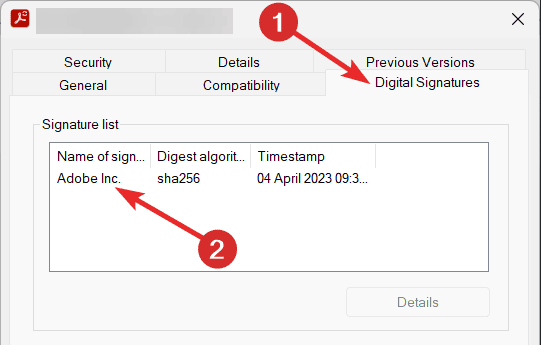
- Ensure the signer is Microsoft Windows or Microsoft Corporation.
- If the signature is missing or unverified, treat the file as suspicious.
3. Review the Process Description
- In Task Manager, right click lsass.exe and choose Properties.
- Go to the Details tab.
- Check the description field. It should read Local Security Authority Process.
- Any unfamiliar or altered name may indicate malware.
When lsass.exe Might Be Dangerous
You should be cautious if you notice any of the following warning signs:
- lsass.exe is running from a folder other than
C:\Windows\System32 - The process has no valid Microsoft digital signature
- The name or description looks unusual or slightly altered
- Your antivirus software flags lsass.exe as suspicious
If you want to understand how lsass.exe may impact system performance or CPU load, refer to: Local Security Authority Process high CPU usage in Windows 11.
FAQs
Yes, the genuine lsass.exe is a safe and critical Windows system process. It only becomes dangerous when malware pretends to be it.
No. Deleting or stopping lsass.exe will cause Windows to crash or trigger an automatic restart.
It should always be in C:\Windows\System32. Any copy outside that path is suspicious.
Because it manages authentication and security for all users, it must run continuously in the background for Windows to function correctly.
Conclusion
The lsass.exe process is a fundamental Windows component that handles user authentication and enforces security policies. As long as it resides in C:\Windows\System32 and is digitally signed by Microsoft, it is legitimate and safe.
Any version found in another folder, lacking a proper signature, or carrying an unusual description should be treated as a potential threat. By checking its location, verifying its digital signature, and watching for unusual behavior, you can quickly determine whether the lsass.exe running on your system is authentic and keep your PC secure.

Read our disclosure page to find out how can you help Windows Report sustain the editorial team. Read more



Improve this guide



User forum
0 messages