
Microsoft Brings Custom Skills and Finance Data Connectors to Excel Copilot


 3 min. read
  Published on

Microsoft has announced a major update for Copilot in Excel, introducing new AI capabilities designed to help finance professionals automate repetitive work while keeping greater control over spreadsheet changes.
The latest update adds reusable Skills, new financial data connectors, planning mode, and improved change tracking. Microsoft says the additions are part of its broader effort to evolve Copilot from a simple assistant into a more capable agent that can handle complex, multi-step workflows.
Copilot Skills automate recurring Excel tasks
One of the biggest additions is Skills, which let organizations create reusable instructions for common spreadsheet workflows.
A Skill can define workbook layouts, formulas, formatting rules, calculation steps, and other task-specific requirements. Instead of rewriting detailed prompts every time, users can invoke a saved Skill whenever they need to perform the same type of analysis.
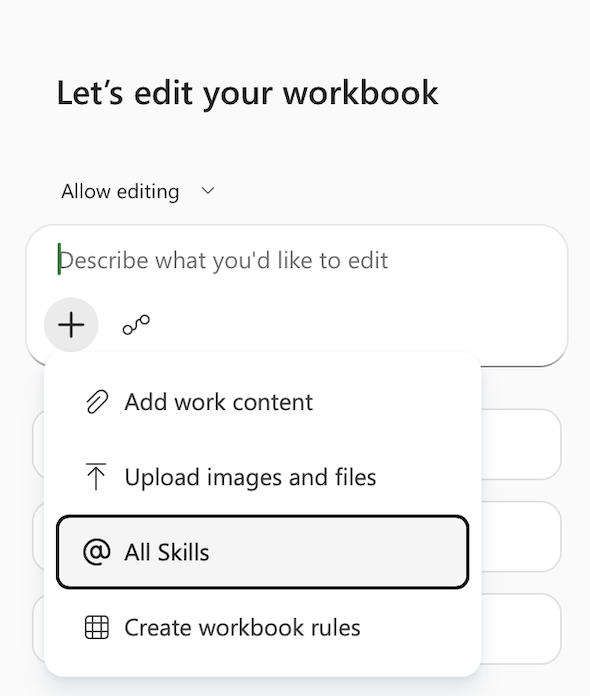
Companies can create custom Skills by saving a SKILL.md file in OneDrive. The Skill can then be selected from the Copilot pane or called directly with the @ symbol inside a prompt.
Microsoft is also introducing a library of prebuilt finance Skills, while software vendors will be able to distribute their own Skills through Microsoft Marketplace and the Microsoft 365 Admin Center later this year.
More financial data sources arrive
Excel Copilot is also expanding the number of external financial data providers it can connect to.
New connectors include CB Insights, Daloopa, FactSet, Morningstar, PitchBook, and S&P Global data through Kensho technology.
Some of these integrations require separate subscriptions with the respective data providers.
Microsoft says the FactSet connector is currently available in preview, with general availability expected in July.
Planning mode offers more transparency
Another new feature is planning mode, which gives users an opportunity to review Copilot’s intended actions before any workbook changes are made.
Instead of immediately modifying a spreadsheet, Copilot first displays which worksheets, cell ranges, formulas, and assumptions it plans to use. Users can inspect the plan before approving the operation.
Microsoft has also improved the Show Changes pane. It can now distinguish edits made by Copilot from those made by human collaborators, making it easier to review AI-generated modifications separately.
Availability
Most of the newly announced features are now generally available to Microsoft 365 Copilot customers using Excel on the web, Windows, and macOS.
Custom Skills are beginning to roll out to Microsoft 365 Insiders on Windows and Mac, with broader availability planned over the next month.
Partner-built Skills are expected to arrive during the third quarter, although availability will vary depending on licensing and region.
Microsoft has also rolled out several updates across its productivity suite, including the ability to test microphones and speakers in Teams Desktop before joining meetings, usability improvements to PowerPoint Live in Teams, and expanded Purview protections that prevent Copilot from analyzing confidential files.

Read our disclosure page to find out how can you help Windows Report sustain the editorial team. Read more



Improve this guide




User forum
0 messages