
Microsoft Finally Fixes Classic Outlook Bug That Won't Let You Send Emails


 2 min. read
  Published on

Last week, Microsoft confirmed user reports about receiving a non-delivery report (NDR) error message when sending or replying to emails. Users affected by this Classic Outlook bug usually come across an error message that reads, “This message could not be sent. Try sending the message again later or contact your network administrator. You do not have the permission to send the message on behalf of the specified user. Error is [0x80070005-0x0004dc-0x000524].”
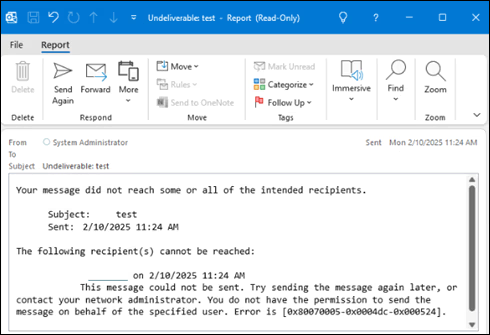
At the time, the company shared three workarounds as a temporary fix. Now, the issue has been officially fixed. In the updated documentation first spotted by Bleeping Computer, Microsoft has changed the status of the issue as “Fixed” and confirmed that “The Outlook Team implemented a service change to address this issue that is in production as of April 3, 2026.” That said, if you are still affected by Classic Outlook bug not letting you send emails, there are a few things Microsoft recommends doing.
First, you need to download the Outlook Address Book for any Outlook.com accounts that are having the issue. For that you can follow the steps given below:
- Open Outlook and select the Inbox of your Outlook.com account.
- On the ribbon select Send / Receive, select the Send/Receive Groups dropdown, then select Download Address Book.
- Uncheck Download changes since last Send/Receive.
- Select OK.
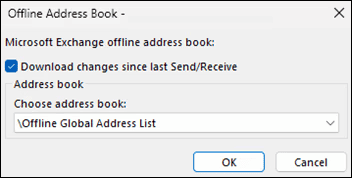
Microsoft adds that the goal of this step is to ensure the OAB folder is populated. Its folder is in path %LOCALAPPDATA%\Microsoft\Outlook\Offline Address Books. For Outlook.com accounts the OAB ends with “000000000000”, e.g. 00060000-ff01-d3b9-0000-000000000000. It should be noted that Outlook usually downloads the OAB files every 24 hours.
After that, make sure the Autodiscover.XML is downloaded and exists. To check the same, follow the steps given below:
- Restart Outlook (this will download the Autodiscover.XML)
- Open the folder at %LOCALAPPDATA%\Microsoft\Outlook
- Use Windows Search to search this folder for the Outlook.com email address and the results will show the Autodiscover file, [email protected].
- If this file exists with a current Date Modified, then you should be good to go.
Speaking of fixes, let’s not forget that Microsoft has also recently fixed the Teams meeting add-in issue affecting Classic Outlook users.

Read our disclosure page to find out how can you help Windows Report sustain the editorial team. Read more



Improve this guide




User forum
0 messages