
How to Make a Map in Minecraft Step by Step


 4 min. read
  Updated on

Learn how to make a map in Minecraft so you can explore, mark locations, and keep track of your world. This guide covers everything from gathering materials to using and expanding your map.
Table of contents
How to Craft a Map in Minecraft?
1. Gather Required Materials
To make a basic empty map, you need:
- 8 pieces of paper
- 1 compass
Paper is crafted from sugar cane, and the compass requires 4 iron ingots plus 1 redstone dust. If you are just starting out, our Minecraft how to play guide explains where to find these resources quickly.
2. Craft the Compass
Before you can craft the map itself, you need a working compass.
- Smelt iron ore into ingots using a furnace.
- Mine redstone dust from redstone ore blocks.
- Place 4 iron ingots in a cross shape.

- Put redstone dust in the center of the crafting grid.
This creates a compass.
3. Craft the Map
Once you have your compass, it is time to assemble the map.
- Open the crafting table.
- Place the compass in the center slot.
- Surround it with 8 pieces of paper.
- Collect the empty map.
If you enjoy crafting and designing structures, you might also like this tutorial on how to build in Minecraft.
4. Activate the Map
- Hold the empty map in your hand.
- Right-click or press the action button.
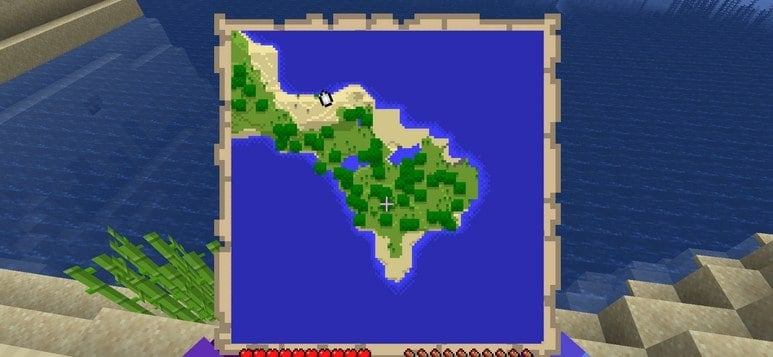
- The map will fill with your current surroundings.
Once your map is ready, you can also personalize your character for a complete experience. Check this guide on how to change your Minecraft skin and play with a style that suits you.
How to Expand and Upgrade Your Map
1. Enlarge the Map
You can zoom out to capture a wider view of your world.
- Place the filled map in the crafting table center.
- Surround it with 8 more pieces of paper.
- Repeat this process up to 4 times for maximum size.
2. Use a Cartography Table
The cartography table makes upgrading and managing maps easier.
- Craft a cartography table with 2 paper and 4 wood planks.
- Use paper to expand your map.
- Combine a filled map with an empty map to clone it.
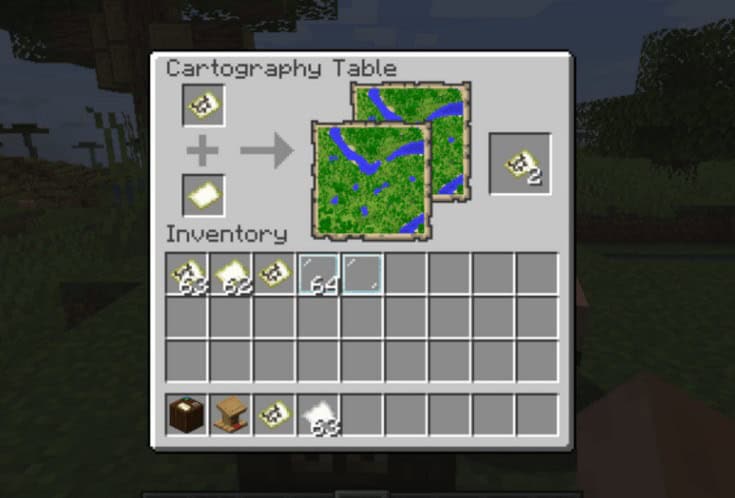
- Add a glass pane to lock the map and prevent further updates.
Trading with villagers can also provide access to maps and cartography tools. To set this up effectively, see how to breed villagers in Minecraft.
Why Maps Are Useful in Minecraft
- Track your exploration progress.
- Share maps with friends on servers.
- Mark bases, villages, or biomes.
- Combine multiple maps to create wall map displays.
Exploration becomes even smoother when you learn how to breed horses in Minecraft since they provide faster travel across large biomes.
Planning farms or base layouts is easier when you pair maps with chunk borders. Learn how to see chunks in Minecraft to align structures, avoid lag, and make smarter building decisions.
FAQs
You can craft an empty locator map on Bedrock Edition using just paper, but on Java you need a compass.
Yes. Place a filled map and an empty map together in a cartography table to create a duplicate.
Craft item frames with sticks and leather, place them on a wall, and insert maps side by side to form a large display.
Yes. In Bedrock Edition, banners placed in the world appear as markers on maps when interacted with.
Conclusion
Crafting a map in Minecraft is simple once you gather paper and a compass. You can expand it, duplicate it, and lock it using a cartography table. Maps are essential for navigation and make exploration more enjoyable, especially when shared or displayed on walls.
You can also upgrade your exploration skills by learning how to use the Heart of the Sea in Minecraft to support safer underwater travel.

Read our disclosure page to find out how can you help Windows Report sustain the editorial team. Read more



Improve this guide



User forum
0 messages