
How to Open a CRDOWNLOAD File in Windows 11 Step by Step


 4 min. read
  Published on

A CRDOWNLOAD file appears when you are downloading something via Google Chrome. It is a temporary file used to store incomplete downloads, and you can often recover or open a CRDOWNLOAD file safely with a few simple steps.
Table of contents
How to Open a CRDOWNLOAD File in Windows 11?
1. Check if the Download Is Still in Progress
Before you try to open the file, make sure the download is not still running in Chrome.
- Open Google Chrome.
- Press Ctrl + J to open the Downloads page.

- See if your file is still downloading and wait until it completes if needed.
When the download completes, Chrome will automatically rename and open it.
If Chrome says the download is stuck or will not finish, see how to fix it in this guide on Chrome showing “Download in progress”.
2. Resume or Re-download the File
If Chrome shows the download as incomplete or failed, try resuming it or downloading it again.
- If the download was interrupted, click Resume next to the file in Chrome’s Downloads list.
- If Resume is not available, right click the original link and select Save link as to re-download.

- Once the new download begins, check your Downloads folder for the updated file.
If Chrome reports “Download failed – system busy”, follow this fix for Chrome download errors .
3. Manually Open the Partial File
If you cannot resume the download, you can try opening the partial file manually.
- Navigate to your Downloads folder.
- Right click the .crdownload file and select Rename.

- Remove .crdownload from the file name and press Enter.
- Choose Yes when asked to confirm the file extension change.
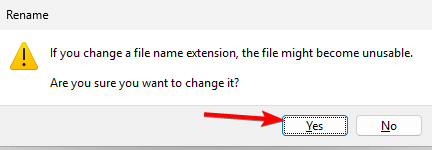
- Try opening the renamed file using a compatible program such as VLC for videos or WinRAR for archives.
Note: The file may not open fully if the download was not complete.
4. Use a File Recovery Tool (Optional)
If none of the above methods work, you can attempt recovery using dedicated tools.
- Install a recovery program such as Recuva or EaseUS Data Recovery.
- Scan your Downloads folder for lost or incomplete files.
- Look for files that match the name of your CRDOWNLOAD file.
- Attempt to recover or reconstruct the file and then try opening it again.
Why It Works
CRDOWNLOAD files hold partial data segments. By resuming the download or renaming the file, you allow Chrome or another tool to interpret the data that already exists and access any usable parts that were successfully downloaded.
What is a CRDOWNLOAD File?
A CRDOWNLOAD file is a partial download file automatically created by Chrome. It remains in your Downloads folder until the download is complete. Once finished, Chrome renames it to the final file format such as .mp4, .zip, or .exe.
If your download was interrupted, this file may stay behind. You can sometimes recover data from it manually.
For more on how Chrome handles downloads, check out this detailed guide on Chrome downloads.
FAQs
Yes. If the download failed or you no longer need it, deleting the CRDOWNLOAD file will not harm your system.
They appear when Chrome does not finish downloading because of network loss, a browser crash, or manual cancellation.
Sometimes. If most of the video was downloaded, VLC may be able to play it after you rename the file to its correct video extension.
Yes. They are temporary files created by Chrome and are not harmful on their own. You should still avoid opening renamed files with unknown or untrusted software.
You cannot truly convert it if the download is incomplete, but you can rename the file to the expected extension and then try opening it to see whether enough data was downloaded to be usable.
Conclusion
You cannot fully open a CRDOWNLOAD file until the original download is complete, but you can often recover parts of it by resuming the download, renaming the file, or using recovery tools. Understanding how CRDOWNLOAD files work helps you troubleshoot Chrome download problems faster and avoid losing important files when a download stops unexpectedly.

Read our disclosure page to find out how can you help Windows Report sustain the editorial team. Read more



Improve this guide

User forum
0 messages