Microsoft shows off the future of collaboration with Surface Hub at CeBIT 2016

Microsoft has brought its elusive enterprise-focused collaboration device, the Surface Hub, out of hiding at business IT expo CeBIT 2016, happening today in Hannover, Germany. The information was discovered by Reddit user u/chisk_.

According to the original source in German, the Surface Hub demonstrated features a 55-inch Full HD stylus-supported screen at 120Hz refresh rate, an Intel core i5 4th generation (Haswell), 8GB of RAM, and 128GB SSD. Up to three people can work on it simultaneously. There is one Full HD camera on each side of the Surface Hub that can dynamically track users depending on their position. Notably, there is no built-in hardware for Windows Hello which depending on use cases may be a missed opportunity for Microsoft, especially in the enterprise environment.

Courtesy of teltarif.de

On the software side, the Surface Hub runs a special version of Windows 10 with a customized lock screen that shows the scheduled meetings for the day, as well as three icons for calling, whiteboard, and connecting to other devices. Inside Windows, there’s a permanent button for Skype for Business group calls of up to 250 people. The Surface Hub can install and run Universal Windows Apps through the Windows Store; the file explorer, however, is stripped down for touch optimization, so those looking for a full desktop experience with the Hub will be disappointed.

Courtesy of teltarif.de

The performance of the Surface Hub reportedly improved greatly from its July 2015 debute, and now leaves little to be desired: navigation is quick, calls can be made with two steps, and the 120Hz screen looks smooth in motion. The fact that its functionality is based on Universal Windows Apps, despite not being as severe a problem in the enterprise, should still put more pressure than ever on Microsoft to make progress with developers in the times to come.

The device is going to retail in Germany for 10000€, with an as-yet undetermined release date. Stay tuned to WinBeta for updates.

Microsoft Innovative Educator Expert named Woman of the Year

The annual Woman of the Year ceremony has been celebrating California’s extraordinary women since 1987, and this year the assembly chose to honor education and technology advocate and Microsoft Innovative Educator Expert Tammy Dunbar as the 2016 California Woman of the Year for the 12th Assembly district.

Dunbar is a fifth grade teacher in the Manteca Unified School District and an instructor at the Teachers College of San Joaquin in Stockton, California. She believes in a “student-first, project-based learning model” and is a strong advocate for incorporating technology into the classroom. As one of 11 teachers nationwide to be named a Microsoft Innovative Educational Expert Regional Lead, she has also trained thousands of teachers on digital technology integration and her efforts have garnered her many awards, including being named Teacher of the Year at Manteca Unified School District. According to assembly member Kristin Olsen, “Tammy is a role model for teachers and students alike, she has contributed greatly to the advancement of technology in education, and her impact will be felt for years to come.”

According to assembly member Kristin Olsen, “Tammy is a role model for teachers and students alike, she has contributed greatly to the advancement of technology in education, and her impact will be felt for years to come”. Dunbar herself released the following statement:

“I am humbled and honored to be recognized by Assembly member Olsen who understands that teaching is not a job; it’s a vocation. We are called to help students discover their strengths, skills and gifts while helping them realize each one has a genius the world needs. I am proud to nurture life-long learners who realize life’s challenges must be embraced with enthusiasm and joy.”

This celebration is not only acknowledging Dunbar’s outstanding community service but also shining the light on Microsoft Innovative Educator Experts program that today counts 3,700 educator visionaries around the globe who work closely with Microsoft to lead innovation in education. Don’t hesitate to check Microsoft Education website and also Tammy Dunbar’s own website if you want to know more!

Last remnants of Entertainment for Xbox being swept away on March 22nd

If you own an Xbox One or an older Xbox 360, you may be aware that Microsoft’s popular video game consoles are not only used to play video games: a lot of entertainment services are indeed available on both consoles to enjoy movies, TV shows and listening to online music. However, we just spotted that official Twitter account @XboxEntertain that used to share content deals on the Xbox store will become inactive starting March 22:

With this last tweet, Microsoft is pushing its followers to follow the Windows Store Twitter account instead, making it clear that the new unified Windows 10 store is where Xbox users can now get all their media content from Microsoft. After the company removed Xbox branding from its new Groove Music and Films and TV services on its new Windows 10 operating system, tt’s another sign showing that Microsoft doesn’t want to focus its Xbox brand on entertainment anymore.

The @XboxEntertain account which has been created in July 2009 currently has 128K followers, that’s 41K more than the @WindowsStore account which has been created in January 2010, so we’ll see if the Windows Store account will gain more followers in the coming months. Please tell us in the comments if you think Microsoft is right to push its users towards its new Windows Store!

Find the perfect word with Microsoft Translator’s English Bilingual Dictionary

With words sometimes having multiple meanings depending on context, learning a new language can sometimes be hard. Thankfully though, if you’re trying to quickly find the best translation for a specific word, Microsoft has you covered with a new English Bilingual Dictionary feature on Translator for Bing, and is featured on a post on the Microsoft Translator blog.

Perfect for an English language learner or even English speakers learning a new language, the new feature gives you exactly what is needed to learn the language easier. It displays alternative translations from or to English, examples of words in context, and even an example of translated sentences using the selected word.  The new feature even displays a confidence meter next to each alternative to show how relevant the alternative might be.

The english bilingual dictionary feature
The English bilingual dictionary feature

The technology behind the new feature uses Microsoft Translator, an automatic translation service that uses statistical analysis to determine the best translation from one language to another. Microsoft claims that because of the way automatic translation works, translations are best when you provide some context to tell the computer how to translate a word.

The new feature is currently only available in translations to or from English. Regardless, Microsoft Translator still supports over 50+ languages through Bing Translate and the Microsoft Translate API.

Developers can make an extra 7% in Windows Store via Microsoft Affiliate Program

Microsoft’s Product Manager for developer monetization, advertising and Dev Center in the Windows Apps and Store team, Bernardo Zamora, has taken to the Windows blog to highlight a new way for app developers to get more revenue out of their products: through the Microsoft Affiliate Program.

In Zamora’s own words, the program is “a performance-based referral program that lets you earn commissions by referring customers to paid and freemium digital content in Windows Store and paid content in the Microsoft Store.” This is done by providing a special “Affiliate link” on your website to the app on the Windows Store; when a customer clicks on the link and go to the Windows Store, you earn money. The detailed commission rates are as follow (you can visit Microsoft’s complete list for more details):

  • For the first 24 hours, you earn 7% commission on Windows Store sales
  • For the first 14 days, you earn 7% commission on in-app purchases from apps and games purchased above; you’ll also earn $5 on every Groove Music Pass subscription, and a variety of commissions on other devices and software sales at microsoft.com/store

There are a number of ways for one to earn money throug the Affiliate program; provided examples include Shazam’s links to songs in Microsoft’s music catalog, and German Microsoft enthusiast Martin Geuss, who promotes his app Dr. Windows. As can be seen, Windows developers are at the best position to take advantage of the program, as they can continue promoting their apps while earning money for it.

Developer’s revenue has always been a debatable point for Microsoft’s Windows app store, as user numbers are reportedly usually not enough to generate revenue continued app support. The affiliate program, then, is hitting two birds with one stone, and will hopefully keep developers on the Windows board a bit longer for Windows to catch on with app users. Signing up is as easy as going to the Microsoft Private Affiliate Program and follow instructions. Microsoft also provides additional tools to make generating Affiliate links easier, which you can check out in the original link.

A crazy number of indie games announced for Xbox One and Windows 10 at GDC

At the Game Developers Conference, many amazing new games from independent developers in the ID@Xbox program were on show.  More famously though, the biggest story from this event was the announcement of Cross-Network play on Xbox One and Windows 10 through Xbox Live. While that may be huge, there is still some even bigger news for Indie gamers coming out of the event.

A long list of new Indie titles for Xbox One and Windows was released at the event, and some of these titles will soon be heading to Xbox fans across the world.  The new titles are from all kinds of genres, ranging from stealth, adventure, strategy, platformer, explorer, sci-fi, and even puzzle.

Here’s a list of just some of the titles:

Below are just some of the new Indie titles for both Xbox One and Windows 10.

  • EVERSPACE: 3D Shooter
  • Kingdom: 2D Pixel art sidescrolling strategy/resource management game.
  • Kyub: Action/Puzzle game.

The complete list of games features over 40 titles. If you’re a fan of Indie games, you can check out the complete list of games here. Once you have, let us know your thoughts in the comments below.

Point Break and The Hateful Eight now available digitally on Movies and TV app ahead of March 29 Blu-ray release

The recent remake of the classic Patrick Swayze and Keanu Reeves surfer movie, Point Break (which stars neither Patrick Swayze nor Keanu Reeves) is now available digitally on the Movies & TV (or Films & TV) app across Windows 10 PCs, Windows phones, and Xbox 360 and Xbox One.

Here’s the film’s description:

In “Point Break,” a young FBI agent, Johnny Utah (Luke Bracey), infiltrates a cunning team of thrill-seeking elite athletes–led by the charismatic Bodhi (Edgar Ramirez). The athletes are suspected of carrying out a spate of crimes in extremely unusual ways. Deep undercover, and with his life in imminent danger, Utah strives to prove they are the architects of this string of inconceivable crimes. The film is replete with the most daring athleticism ever seen in a motion picture. These action adventure feats are performed by elite athletes representing the world’s best in class in big-wave surfing, wingsuit flying, sheer-face snowboarding, free rock climbing, and high-speed motorcycling.

Point Break’s Blu-ray release is currently set for March 29 so this is a pretty good opportunity to see it before then. Quentin Tarantino’s latest movie, The Hateful Eight, is also available today digitally ahead of its own March 29 Blu-ray release. Like Point Break, it can now be purchased across all of Microsoft’s devices in the Movies & TV app.

All about The Hateful Eight:

In THE HATEFUL EIGHT, set six or eight or twelve years after the Civil War, a stagecoach hurtles through the wintry Wyoming landscape. The passengers, bounty hunter John Ruth (Kurt Russell) and his fugitive Daisy Domergue (Jennifer Jason Leigh), race towards the town of Red Rock where Ruth, known in these parts as “The Hangman,” will bring Domergue to justice. Along the road, they encounter two strangers: Major Marquis Warren (Samuel L. Jackson), a black former union soldier turned infamous bounty hunter, and Chris Mannix (Walton Goggins), a southern renegade who claims to be the town’s new Sheriff.

Do you like watching movies digitally or do you wait for their Blu-ray releases? Share your thoughts on the topic with the community in the comments below.

Surface Pro 3, Microsoft Band 2, Lumia 950, and Xbox One receive massive price cuts in Australia

The Australian Microsoft Store is discounting a wide variety of Microsoft stock for a special March Madness sale campaign that’s running until April 6.

Among the discounted items is the Microsoft Band 2, which has been reduced by AU$50 to AU$329.99. The Microsoft Band 2 is the latest version of Microsoft’s fitness tracker and features a redesigned form and several new features such as UV monitoring that set it apart from its competitors. You can read our hands-on impressions with it here.

The two new Windows 10 Mobile flagship phones, the Microsoft Lumia 950 and Microsoft Lumia 950 XL, have also had their prices slashed and are now selling for AU$100 cheaper than their usual cost. In addition to the AU$100 savings, both models are unlocked and a purchase of either device will come with a free one year subscription to Office 365 Personal.

Also being discounted as part of the Microsoft Store March Madness sale is the Xbox One 1TB Racing Bundle which usually sells for AU$708.90 but is now going for AU$599.

The Xbox One 1TB Racing Bundle comes with an Xbox One console with one TB of memory, one Xbox One wireless controller, one Xbox One Special Edition Forza Motorsport 6 Wireless Controller, a physical disk copy of Forza Horizon 2 Ten Year Anniversary Edition, and digital versions of Gears of War: Ultimate Edition, Rare Replay (itself featuring 30 games), and Ori and the Blind Forest. As an extra bonus, gamers who play Gears of War: Ultimate Edition online will also be given the entire Xbox 360 Gears of War collection to play on the console as well.

Probably the biggest discount in the sale is the Surface Pro 3 which has had its regular price reduced by over AU$400 and is also giving customers a free Surface Pro 3 Type Cover which usually sells for AU$199.95. Not bad value at all!

Are you tempted by any of these reduced items or do you think they should have had their prices reduced more? Let us know in the comments below.

Killer Instinct season 3 brings General RAAM to Windows 10 players

Killer Instinct season 3 is coming to Windows 10 soon sporting cross-platform functionality with the Xbox One. Now, according to a fresh report coming from Shoryuken, it seems that a new character will be available in the game.

General RAAM from the Gears of War universe will make an appearance after the Arbiter from the Halo franchise and Rash from Battletoads were confirmed. The publication said the following:

Shoryuken has learned the identities of two more characters joining the Killer Instinct cast in season three: Mira and General RAAM. Scratching your heads? We don’t blame you. Mira is a fairly new arrival to the Killer Instinct universe who was first introduced in the Xbox One reboot’s extended story as Maya’s late twin sister. While the circumstances surrounding her death are still a mystery, the scant details we have say that Mira sacrificed herself to save Maya.

General RAAM, on the other hand, is yet another guest character. He served as one of the primary antagonists in the opening installment of the Gears of War franchise, and will join Rash of Battletoads fame and Halo’s Arbiter as the third fighter pulled from outside the Killer Instinct universe.

What do you think about this upcoming Killer Instinct expansion? Go ahead and leave your comment below with your thoughts!

Watch Quantum Break’s full launch trailer for Windows 10

On April 5th, 2016, Remedy Entertainment’s highly-anticipated Quantum Break will launch globally on Xbox One and Windows 10.

To satiate some curiosity, the developer finally released the launch trailer of the game, featuring some impressive time-bending action courtesy of X-Men star Shawn Ashmore who plays Jack Joyce and Aidan Gillen of The Wire and Game of Thrones playing Paul Serene. Check it out below:

The game’s premise centers on Joyce’s ability to stop time temporarily, allowing him to escape from attacks or freeze enemies. He also has a few other tricks up his sleeve, such as”Time Blast”, “Time Rush”, “Time Shield,” and “Time Dodge.” Serene, on the other hand, can see into the future to better decided which choices to make in the present.

The game takes place in the fictional Riverport University after a time travel experiment goes wrong. The game’s cast is notable, with such reputed actors as Dominic Monaghan who played Meriadoc Brandybuck in Peter Jackson’s The Lord of the Rings epic film trilogy along with Lance Reddick who, best known for portraying Cedric Daniels in The Wire.

Are you excited for Quantum Break? Let us know in the comments below!

Evo Explores is a beautiful mix of impossible geometry and optical illusions

Editor’s Note We’re starting up a new series here at Windows Report! Every week, we’ll pick a new game from the Windows Store and review it for your gaming pleasure. Feel free to submit your own suggestions!

If you’re into optical illusions and platforming games (and really, who isn’t?), we have something for you. A new game titled Evo Explores recently appeared in the Windows Store, and we love it. Although the game isn’t entirely unique, it offers a lot of fun with a dose of mystery, good design, and a touch of imagination. It’s definitely worth trying.

In the game, you play as Evo, a tiny, adventurous robot who was sent to an unknown planet to discover its secrets by passing through levels full of geometrical objects. To discover the unknown world, Evo has to make his way through complex stages, stages that require a player’s full attention.

But this isn’t just a regular platform game where you complete puzzles to get through levels and finish the game: this is a platform game where the laws of physics don’t apply. So, in order to go to the next level, you need to trust your eyes — not your common sense.

evo explores windows 10 1

This game overwhelmingly reminds us at Windows Report of Monument Valley, so if you’re familiar with Ustwo’s title, we don’t need to tell you a lot about the concepts behind Evo Explores. However, if you’re not familiar with this type of game, you’re going to be delighted by how the developers of Evo Explores designed the gameplay. The creators of the game, Stampede Games, have mentioned that Evo Explorer was inspired by Monument Valley, so we should definitely give them credit for that.

When passing through the game, a player must arrange platforms and obstacles in order to make his way through to the end of the level. That wouldn’t be anything out of the ordinary if it weren’t for the game’s optical illusions. Pay no mind if a solution doesn’t immediately make sense — your only goal is to make sure different parts of the puzzle fit together.

evo explores windows 10 2

At the start the game, it’s easy to get the impression that the game is a simple walk exercise. As you progress, though, you’ll notice that you’ll need to combine careful observation and a bit of cleverness to pass the level. As we said, logical thinking doesn’t help much in this game, so you need to pay attention with your eyes.

The game is very well designed: a lot of beautiful architecture and complex shapes combine with atmospheric music to maintain a mysterious feeling while you play. You’re no doubt going to feel like you’re on another planet full of advanced technology and amazing buildings.

If you’re into games with totally unique experiences, then Evo Explores is the right game for. If you already finished Monument Valley, or you’re looking for a cheaper but still worthy alternative, you definitely want to check out this game. Evo Explores is already available in the Windows 10 Store and you can purchase it for $0.99.

Microsoft wants to teach developers the tips and tricks of designing apps for Windows 10

With Microsoft’s developer conference right around the corner starting March 30th, 2016, the company is trying to get out ahead of API and code talk with a new series dedicated to designing. In what the company is calling “the first in a multi-part series,” Microsoft is introducing tips, tricks and design principles for crafting unique and, more important, successful apps in the Windows Store.

The new series of blog posts can be found at Building Apps for Windows, and the first installment is a lengthy one that looks to cover the demystifying design, what content to focus on while designing an app, understanding customers, and much more.

Other useful tidbits from the blog also include advice on quickly iterating an app and its design.

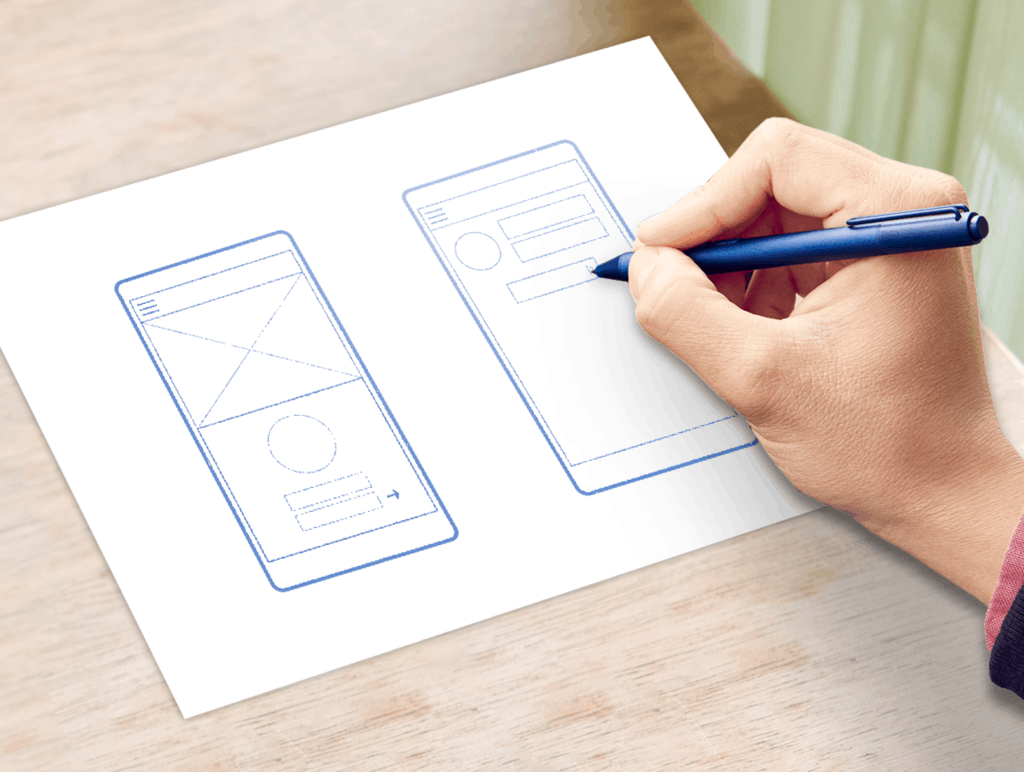
Mock up different screen designs based on your customer feedback, either as sketches or wireframes and imagine the workflow that customers will go through to accomplish their tasks. You can use whatever method works best for you to create these prototypes. If it’s faster for you to do rough interface designs in Visual Studio or Blend, use these tools. But note that you don’t need specialized software for this process, nor do you need to be able to draw. Notecards and sketchpads are just fine.

Even better, you can sketch your app design on sticky notes. This way you can easily move screen elements around to see how they look — and, more importantly, quickly put them back if things don’t work out the way you expect.

If you aren’t sure what to try first, take a look at apps that are similar to yours, then see how the workflow might look for your app.

Now try moving screen elements around. If you started with top navigation, you can try left navigation instead. If you have a large header with text, try moving it to the bottom. Buttons and content panels can go just about anywhere. Move them around. Switch out buttons with text; switch out text with links. Experiment. Iterate through this process for every screen until your gut tells you that you’ve gotten your layout to where it needs to be.”

Microsoft has its work cut out for itself this month as it tries to thread together a story around its UWP platform that can entice once-lost and current Windows developers to come along for the ride. Getting developers excited about the design of an app and explaining how user interface leads to user engagement seems like a solid beginning.

Interested in Microsoft’s UWP platform or creating for one of the company’s other platforms such as Xbox, Office, or Cloud? If so, head over to the Building Apps for Windows section of the Windows Blog to catch the first installment of app design walkthroughs.

GAME Reward updates its app with full support on Windows 10 devices

GAME is a British video game retail company specializing in the sale of game consoles, video games, accessories, and mobile phones. For those who want to keep up with everything that’s going on at GAME digitally, there’s now an official Reward app available on all major platforms.

Recently, the app was updated with full support for Windows 10 and Windows 10 Mobile, available for desktop, tablet and mobile users. The revamped GAME Reward app allows users to collect points from their purchases in-store and online, along with a few other things. Here are the main features of the app:

game reward windows 10 app

– Access the App using Cortana!
– Collect and redeem Reward points through the App.
– Change the design of the App by selecting one of the available backgrounds in settings.
– Scan games in store with Scan it, the new scanner, to find out all the product details, watch game trailers and find out your personalised price for the product.
– Move the tiles around to suit your needs, make your favourite features bigger on the App home screen.
– Complete exclusive accolades to earn bonus points, and view your progress against each one.
– Quick links to the online store plus links to Xbox credit, PSN credit, FIFA points and the Nintendo eShop.
– Change the font of the app.
– Get trade-in prices for your old games with our integrated Trade-in price checker.
– View our charts, and link straight to products on the web to buy or pre order.
– Looking for mobile games? Check out our recommendations.
– Add GAME Reward to your phone home screen and see the tile change.
– Find your nearest store with the built in store locator, even follow them on twitter!
– Keep your contact details up to date to make sure you don’t miss out on offers exclusive to Reward members as well as other great content & promotions that are relevant to you.
– Connect to the in store WiFi available through the app.

The app has also been updated with a new Augmented Reality (AR) scanner and additional security measures in order to keep users’ data and wallet secure by using a Facebook, Google, Microsoft, Twitter, or Steam login ID.

What do you think of the revamped app? Leave your comment below and let us know what you think about it!

Office 365 admin center offers up new reporting portal

After being previewed back in September, Microsoft finally introduced its new Office 365 admin center yesterday with the promise to give Office 365 admins more effective and easier management of Office 365. While the new dashboard will roll out to Office 365 users over the next few weeks, Microsoft is also explaining today in a blog post that a new reporting portal is also rolling out today.

While the Office 365 team gathered customer feedback during the development process of this new reporting portal, it became clear to the team that Office 365 admins could make good use of additional insights about how the Office 365 services are being used. That’s why the first version of the reporting portal includes a new activity dashboard featuring a highly improved user experience as well as a variety of reports providing insights on all services.

As you can see below, the cross-service portal uses graphs to give admins a key summary of the activity within each product (it’s also possible to switch between 7, 30, 60 and 90 days reporting periods to identify trends).

The new activity dashboard provides visibility into Office 365 usage

The new reporting portal can also provide detailed insights on individual services and tell administrators if users in an organizations are using them or not. That’s a key insight to effectively plan training and improve a user’s productivity, and the new portal will allow admins to quickly get data that they can also export in CSV format for further analysis.

The reports can tell you how individual users use the different services

As the Office 365 Team is just getting started, this new reporting portal is currently only available to customers in the U.S, Australia and Canada, while the rollout for Europe, APAC and Latin America will start in April. Moreover, Office 365 admins can only get three types of reports right now (Active Office 365 users, Email activity, Office activations), but the Office Team shared a roadmap of the upcoming features:

This is just the beginning. In April, we’ll make more reports available to U.S., Australian and Canadian organizations, providing insights on SharePoint and OneDrive site usage as well as on Yammer and Skype for Business activity—with organizations in Europe, APAC and Latin America following in May. More reports focusing on SharePoint and OneDrive for Business user activity and on user interaction with Office 365 (i.e. which browsers or operating systems do they use when they access the service) will be incrementally added.

We’ll also provide you with a Power BI Content Pack, which will combine your organization’s Office 365 usage data with your user’s information to provide richer insights into how your users are using Office 365. The content pack will allow advanced analytics scenarios, such as pivoting email usage by attributes like departments or regions and will make it easy for you to share insights within your organization. The Power BI Content Pack will be rolled out in June.

In the fall, we will provide new public APIs that will enable you to programmatically access the usage data and integrate it into custom applications like a company reporting portal.

While this new reporting portal is rolling out to customers, Microsoft also shared that the reports in the old admin center will be available until an equivalent report has been added to the new report portal. Last, customers can help the Office Team to improve this new reporting portal by using the feedback widget on the site. If you’re an Office 365 customer, please tell us in the comments what you think of this new reporting portal!

Microsoft disinvites sponsor and partner Okta from upcoming Ignite Conference over “broad competition” claims

The technology industry has proven to be very competitive at times, and Microsoft is no stranger to falling victim to or defeating the competition. Today, competition has risen to a high level, as Microsoft has “disinvited” sponsor Okta from its upcoming Ignite tech conference.

The situation was first reported on by Business Insider, with a statement from Okta CEO Todd McKinnon.  In emails obtained by Business Insider, Microsoft claims that the event’s leadership team refused an Okta sponsorship and removed the company as an exhibitor due to “Okta’s broad competition between our companies in the mobility solution space.”

The primary products from Okta help companies manage employee passwords for cloud services and also help employees manage mobile devices. Under CEO Satya Nadella, Microsoft has recently introduced several cloud products that are similar to Okta’s. The “cloud-first, mobile-first” strategy is likely why Okta was ejected from the event.

According to McKinnon, being kicked out of this conference is a big deal:

“…rarefied air. Amazon, Google, and Okta are the only ones not allowed,”

Microsoft notified Okta of the ban last week. Ignite will be held from September 26 to 30 in Atlanta. The event brings together all of Microsoft’s customers and partners that relate to the company’s cloud products.

Microsoft privately testing Visual Studio 15, the next major version

In a recent post, Microsoft is rumored to be working on the next big update to the next full version of Visual Studio, dubbed “Visual Studio 15.”, which will reportedly (and unsurprisingly) be called Visual Studio 2016. According to WalkingCat on Twitter, this might be a “lightweight installation experience of Visual Studio 2016.”

https://twitter.com/h0x0d/status/709684542877990912

According to Mary Jo Foley‘s Microsoft sources, they’re special features in Visual Studio 15 that will likely show up in Visual Studio 2016:

“There’s also a feature called “AnyCode” in the new VS release. AnyCode allows developers to use Visual Studio with source code that hasn’t been organized into projects and solutions. The private preview of VS’15 also includes TypeScript 1.8, and NuGet 3.4. NuGet 3.4 adds support for running NuGet in Linux and Apple environments, among other features. The preview also adds support for SQL Server 2016 and the most recent Azure SQL Database features in SQL Data Tools and Server Explorer.”

Microsoft made Visual Studio 2015 available in July 2015, and its received a several updates. The last Visual Studio 2015 update was in first week of March.

Microsoft announces trusted Azure cloud services for Canada, Germany, and the Department of Defense

The Microsoft Cloud has reached new levels in bringing the power of Microsoft Azure to customers in regions across the world.  Microsoft’s cloud services have been enhanced for customers in Canada, Germany, and the United States, thus marking a significant expansion of Microsoft cloud services.  The total amount of Azure regions is now up to 30, and this means more choices for Microsoft Cloud customers across the world.

As part of this, and here in the United States, Microsoft is establishing two new physically isolated Azure Government regions for Department of Defense and DISA Impact Level Impact 5. These regions are designed to meet the DoD security control and compliance requirements and will fit the requirements of the DoD workloads and data level 5.

In Canada and Germany, Azure Canada and Azure Deutschland (Microsoft cloud with German data trustees) have started the expansion of Microsoft’s cloud services. Here, an operational preview of Azure cloud services will be rolled out by these teams to selected customers. Combined with in-country data residency, the preview will give customers the benefits of Azure services and enterprise-grade reliability and performance.

In line with the other expansions, at the business IT event CeBIT Microsoft Germany also announced the availability of regional Azure IoT hub. This addresses the evolution of businesses and the growing digital transformation of the Internet of Things movement.

For more information on Microsoft Azure, you can click here. Then, for information Microsoft Cloud for Government you visit this web page from Microsoft. Information on Azure Deutschland and the IoT is also available by clicking here and here.


HERE is pulling Maps from Windows 10 Store, ceases new development

According to a new post on the official HERE blog, HERE 360 will be removing all HERE apps from the Windows Store. As of March 29, HERE Maps, HERE Drive+, and HERE Transit will no longer be available on Windows Phone 8.1 or Windows 10 Mobile. HERE apps for Windows Phone 8 will continue to be supported (you STILL use Windows Phone 8?).

“We’ve been developing mobile maps applications for about 10 years, since the first smartphones came with GPS. As the market evolves, we keep in step by introducing our apps for new operating systems while stopping support for others. Although the essence of the HERE apps lives on in the Windows Maps app, we are removing the HERE branded apps from the Windows 10 store on March 29, 2016 and will limit the development of the apps for Windows Phone 8 to critical bug fixes.”

For Windows Phone 8.1 and Windows 10 Mobile users, that means that HERE-branded apps will no longer be functional as of June 30, 2016. HERE 360 would have to invest money in building the apps from the “ground up,” which is a business scenario that they are not interested in pursuing.

So, HERE-branded apps will work until June 30, 2016, after that, Windows 10 Mobile will have to rely on the Windows Maps default application, but have hope, there should be some exciting features coming to Windows 10 Mobile Maps soon.

Do you rely on HERE Maps? Do you prefer HERE Drive+? Let us know in the comments below.

Windows Alarms & Clock app gets new UI changes in latest update

If you’re running the latest Windows 10 Mobile build 10586.164 on your Windows phone, we previously reported last week that this latest cumulative update included “Improvements for the reliability of app notifications, including text messages and alarms not ringing as scheduled”. Well, in the case your alarms are still not ringing as expected, Nokiapoweruser is reporting today that the Windows Alarms & Clocks has just received an update on both Windows 10 and Windows 10 Mobile, and the app has been bumped to version 10.1603.11020.0.

The new UI on the Edit Alarm page

While we have yet to receive the new app on our own devices, the update is reportedly bringing the usual bug fixes and performance improvements, as well as some UI changes on the Edit Alarm page. If you already got the update on your Windows 10 PC or phone, please tell in the comments if you find the app more reliable of if you spotted anything new!

Microsoft general counsel Horacio Gutierrez joins Spotify

Spotify made headlines this week when word a customer service rep let it be known that they would no longer support Windows Phone 8.1. Thankfully, they quickly retreated and announced that they would still support Windows Phone with an incoming app update. Now that the saga is over, there is more Spotify news to report on, this time dealing with a change in Microsoft’s internal team of employees.

The head of Microsoft’s general counsel, Horacio Gutierrez, is leaving Microsoft to take on the same role at music streaming company Spotify. Gutierrez previously led Microsoft’s intellectual property group and was responsible for the Redmond company’s efforts to license patents to other companies. After joining Microsoft in 1998, he was elevated to general counsel when longtime counsel Brad Smith was promoted to company president.

The acquisition of Gutierrez comes at a time when Spotify is in the middle of a battle over royalties and licensing in the music industry.

Gutirrez has even posted mixed emotions over the situation on Twitter:

According to the Seattle Times, Gutierrez will start at Spotify in April.  A Microsoft spokesman also told The Times that the company expects to announce plans for the management of Microsoft’s legal unit by the time Guiterrez departs.


Hearthstone expansion Whispers of the Old Gods comes to Windows PC this spring

This year’s Hearthstone announcement brought great joy to the community. Blizzard made revealed the new expansion, Whispers of the Old Gods, before the start of the America’s Winter Championship. The announcement included a cinematic trailer and a few card reveals, with more to come in the close future.

Unfortunately for most of us, only a small batch of cards have been showcased. However, they represent some new ideas that will no doubt change the current metagame and make the game more flexible.

The new Whispers of the Old Gods card designs feel completely different to what players are used to, adding more flavour to the current gameplay. Although we were expecting some new mechanics to be implemented and even a new class, most of the cards that were published by Blizzard were corrupted versions of current cards.

The most impactful card in the Whispers of the Old Gods a great margin is C’Thun, which has a Battlecry mechanic similar to Avenging Wrath and boasts synergy with some of the new cards that buff C’Thun throughout the match. Here are all the new cards which Blizzard revealed for now:

hearthstone whisper old gods windows

The developers hope to balance the meta as they are finally introducing a direct counter to Secret Paladin decks in the form of one card: Eater of Secrets. This card will be devastating to Secret Paladin decks and will probably render them obsolete. Not only destroys all the enemy secrets, but it also gains +1/+1 for each secret destroyed.

The best part is that this is a neutral card, and it will probably be used in all decks. There are also plenty of cards that favour a more control oriented metagame, so hopefully we will see some new cards that will also fit Zoo/Face decks in the near future, as Blizzard promised.

Overall, these are very welcome changes and everybody is looking forward to them, especially because players will all receive 3 Whispers of the Old Gods packs when the expansion goes live, with one of the packs guaranteed to contain C’Thun. In total, there will be 134 new cards but for now, all we can do is patiently wait for new releases in future Blizzard announcements on Twitter, Facebook and other social media sources.

Windows 10 Insider Hub’s latest “Made By You” highlights audio troubleshooting

Once again, the Windows team has taken to the Insider Hub to describe another feature that’s been implemented on behalf of the users. A few months back, the Windows team introduced the Made By You series of blog posts highlighted in the Insider Hub. The Insider Hub that is made available to those participating in the Windows 10 Insider Preview acts as an open forum for feedback and suggestions for the Windows team as they attempt to encourage a healthy discussion of when, how and why certain features get delivered to the Windows 10 platform.

Today’s highlighted feature involves Windows 10 and audio troubleshooting. A handful of Windows staff employees involved with the Answers Forums for Windows took out time to go over how audio improvements in Windows 10, as well as the process of collecting error reports and addressing audio issues, is done.

John Wink, Matt van Eerde or “maurits” and Ikemefuna Udeze a.k.a “Ike” begin the post with the a breakdown of the labor-intensive process of collecting user feedback as well as error reports to understand better the specific issues users were experiencing.

We began our journey by talking directly with a lot of you in the answer forums, and you us started with great information. We soon realized that we were dealing with more than one issue.

  • Audio services had a tendency to crash in certain situations
  • Some drivers from older OS’s didn’t play well with Windows 10
  • Some drivers were okay, but their add-on APOs (audio processing objects) weren’t
  • Sometimes changing the playback bitrate and depth broke (or conversely fixed) audio

With a starting point, the team then began collaborating their efforts with information gained from the Windows Feedback App aka UIF. UIF is an abbreviation the team uses to describe the engine the app runs on, User-Initiated Feedback. The UIF essentially auto-categorizes feedback based on how Insiders apply choose to identify their issues. Beyond categorizing issues, the UIF also helps prioritize issues based on Insiders upvoting and diagnostic data collected whenever an item is submitted.

Specifically, the team can gather information such as:

  • A DxDiag report from your machine
  • An export of the audio section of your registry showing audio endpoints, drivers, and APOs
  • Details on local audio stack failures

Once all the data is gathered, it’s solution time. Before most solutions are rolled out in a consumer-facing update or Patch Tuesday, the team begins distributing their solutions via the Answers Forums. Eventually, the information is trickled out amongst Insiders to one another and then makes its way out to media sources who pick up on it. Once Insiders can reliably count on the solutions, does the solution then get integrated into Windows 10 Audio Troubleshooter and posted online. The final step is to take that solution and roll it into a Windows 10 update.

Lastly, the Windows team used their blog post to encourage the continued use of the Insider Hub and Answers forums to help address issues with Windows 10. Part of their encouragement includes asking users to make use of keywords to narrow down overlapping situations.

The best piece of feedback is one that gives us useful keywords like “Realtek,” “glitch,” “no audio,” “static”, and such and such that provides detailed steps on how we can reproduce the issue and that uses the “Reproduce” option (available when you select “Problem” in the Windows Feedback Tool.”

As the Windows team continues to tool away at more Windows 10 features, it is becoming evident that the Insider Preview, along with the Answer Forums and other feedback tools are becoming more important than ever to the future of the operating system.

For Insiders interested in directly contributing to the development of Windows 10, visit the Insider Hub on your device and give as much feedback (positive or negative) as possible.

Latest Xbox One preview build adds feedback notification, fixes party chat bug

Microsoft has rolled out a new Xbox One preview build for those who are participating in the preview program. This new build is th2_xb_rel_1603.160311-1900 and is rolling out now. Here’s what’s been fixed:

  • Fixed an issue which caused navigating the party menu in the Guide to not correctly update the party state.
  • Additional fixes for graphics and DirectX.

Microsoft has also added a new feature called feedback notification. Basically, this feature will offer you notifications that allow you to rate certain experiences. Don’t worry, if they become annoying, you can adjust the settings and turn it off.

You’ll now periodically receive notifications asking you to rate certain experiences on Xbox One. These notifications, when acted upon, will launch a new lightweight app where you can supply a rating and optionally input text to further explain your score.

Too busy to give feedback when you get the notification? No problem! Just ignore the toast and you can access it under Notifications in the Guide when you’re ready. You’ll also find a new Setting for this feature under Preferences.

Grab the update and share your feedback in the comments below!

Retail copy of Hitman for Windows PC delayed until January 2017

Hitman fans are no doubt excited about the new Hitman game. Unfortunately, it seems that those looking for Agent 47 action will have to wait a bit longer before they get their hands on the physical copy of the game. According to reports, the physical release of Hitman has been delayed to January 2017.

Hitman retail release to come in January 2017

The latest Hitman game was released on Steam just a few days ago, but unlike previous Hitman games, this one is being released episodically. For now, only the prologue and the Paris mission are available to players, with additional missions to be added throughout the year.

According to developer Square Enix, there will be a total of seven episodes, with the first new episode planned for April followed by another in May. April’s episode will take players to the vistas of Sapienza, Italy while May’s episode will transport players to Marrakesh, Morocco. As for the remaining locations, they remain unknown for now.

Regarding price, each episode will be sold for $10. Currently, there’s an Intro Pack available on Steam for $15 that includes the aforementioned prologue and Paris mission. Of course, the option to pre-purchase the Complete Edition that includes all seven episodes for $59.99 is also available. 

When asked about the delay, a Square Enix representative said it was to give the developing team more time to work on the disc version in order to bring players the best Hitman experience possible. Although some fans might not be pleased by this decision, we’ll just have to wait until January 2017 before we get our hands on the retail copy of the game, but rest assured — it will certainly be worth the wait.

Microsoft Edge Extensions gets official info page ahead of release

One of the most-requested features in Microsoft’ Edge browser, by a long shot, are extensions, the snippets of add-on code that extend browser functionality. Microsoft has made extension support a priority in its efforts to make Edge more popular among Web users, and so far we expect Edge extensions to show up soon in an upcoming Windows 10 Redstone release.

Now, via MSPoweruser, we have the first real hint at what Edge extensions might look like in their initial preview mode, thanks to a dedicated page on Microsoft’s developer site. So far, it’s looking like we’ll have three extensions to try out when they’re enabled in the next Windows 10 build:

Microsoft Translator extension

Translate foreign language pages for 50+ languages by downloading the Microsoft Translator extension. The translation icon will appear in the address bar when visiting a foreign-language web page in Microsoft Edge. Click on the icon to instantly translate the web page to your current Windows language.

Reddit Enhancement Suite extension

A suite of modules that enhance your Reddit browsing experience.

Mouse Gestures extension

An extension for Microsoft Edge that allows customers to perform basic browsing tasks by right-clicking and then gesturing with the mouse. For example, right-click and hold, then move the mouse down and to the right to close the current tab, or move the mouse from right to left to go back to the previous page.

Each extension has its own download button and runs a text file that opens giving instructions on how to enable the extension, which initially will mean selecting an extension after extracting it via Edge’s More (…) functionality. In the future, extensions will be installed via the Windows Store.

Keep your eyes peeled to WinBeta for the requisite Windows Insider build of Windows 10. We’ll be sure to let you know just as soon as these extensions are working.

Update: We noted a similar page popping up back in December.

Update 2: As with the previous page, Microsoft has shut things down. The page is no longer responding, but we remain convinced that extensions are coming soon.

SharePoint 2016 hits Release to Manufacturing (RTM)

Today marks an auspicious milestone for Microsoft’s content management platform, SharePoint Server 2016. Specifically, the on-premise and cloud-based content management solution has hit Release to Manufacturing (RTM), meaning that customers will soon have access to its enhanced features.

Here’s a video providing an update on what’s new in SharePoint 2016, care of the Microsoft Office Blog:

Customers will be able to access SharePoint Service 2016 in early May from Microsoft’s Volume Licensing Service Center, and you can learn more about the solution by accessing a reviewer’s guide or downloading a trial version. Microsoft will also be hosting a live online event on May 4, where the company will provide information on their vision and future plans for the solution. You can register for this event here.

Here’s Microsoft’s take on the importance of SharePoint Server 2016 to the company cloud services line of business:

Billions of documents are stored on SharePoint sites—making it the center of content management and collaboration for over a decade. Whether enabling students to work together or helping a company transform its entire intranet, we have continually evolved SharePoint to meet the changing needs of the digital workplace.

As work teams become more dynamic and digital content growth continues to skyrocket, SharePoint will play an ever increasing role in enabling content collaboration for the new way of working. As a part of Microsoft’s broader ambition to reinvent productivity, we are on a mission to make SharePoint more simple, mobile, intelligent and secure to help customers unlock the value of having it as an integrated part of Office 365. This year, we will release significant new innovations spanning user experiences, document collaboration, mobile enhancements and platform improvements that will redefine modern content collaboration.

If your organization uses SharePoint to manage your content and communications, then today marks an important event. If you’re just now beginning to think about how to manage your content, then you’ll want to head over to Microsoft’s various resource and check out SharePoint Server 2016 as a viable option.

Warcraft III is patched to fix compatibility issues with Windows 10

Blizzard just announced a new patch for its classic RTS game, Warcraft III. The first Warcraft III update after nearly five years will fix potential compatibility issues with newer operating systems.

Blizzard announced the new update by posting a video featuring Robert Bridenbecker, the head of its Classic Games division, who said that the patch will be available to all Warcraft III players around the world at the same time. The update will change the game version to 1.27, but developers still haven;t reveal any details about other potentail features of the patch.

In the video posted by Blizzard, Robert Bridenbecker also said the company is just getting started with updates, as we’ll see more patches in the coming months.

As the latest update will fix Warcraft III’s compatibility issues with newer operating systems, all users who’ve had problems playing the game on Windows 10 should now be able to smoothly run the game.

Warcraft III still played by millions

Blizzard is still inclined to deliver updates to its older games being that its large portfolio of classics are still played by many players worldwide. Warcraft III isn’t the only game receiving an update either, as Diablo II also received a compatibility update a few days ago. Blizzard is on a roll with delivering fresh updates for its older games, so we wouldn’t be surprised if other games like Starcraft also receive a patch.

Warcraft III was released in 2002, and it became one of the most popular games ever. The game considerably helped Blizzard to become one of the biggest game publishers in the world. Players are still playing it 14 years later, so it isn’t a surprise that Blizzard wants to keep up with the latest software requirements, making the game playable on new platforms like Windows 10.

⇒ Get Warcraft Bundle edition from GOG.com

Blizzard brings Windows 10 support to Diablo 2 with latest patch

While Diablo III: Reaper of Souls is the newest Diablo game, Blizzard still pays attention to its older titles as well, with the legendary gaming company having recently released a new patch for Diablo 2.

Diablo II was released back in 2000 and its expansion pack, Diablo II: Lord of Destruction, was released in 2001. Both games achieved tremendous success when they were released, serving as the inspiration for many modern action role-playing games such as Path of Exile.

Diablo 2 gets Windows 10 support

Although Diablo III was released in 2012, Blizzard kept working on patches and updates for Diablo II. The last patch for Diablo II was the Lord of Destruction v1.13d update released in October 2011 and today, almost 5 years later, we have a new one. The company made the following comment about the patch:

There is still a large Diablo II community around the world, and we thank you for continuing to play and slay with us. This journey starts by making Diablo II run on modern platforms, but it does not end there. See you in Sanctuary, adventurers.

So what does this new patch have to offer? Unlike the 1.13d patch that brought several bug fixes, this patch brings Diablo 2 compatibility to modern operating systems such as Windows 7, Windows 8.1, and Windows 10. Before this patch, you had to run Diablo II in compatibility mode for Windows XP if you wanted to play it on a modern operating system, but now you can just run the game without using compatibility mode. Mac users aren’t left out of the fun — at least, not completely. Blizzard has also added support for Mac OS X 10.10 and 10.11, but no support for OS X 10.9 and earlier at the moment.

It’s great to see that Blizzard hasn’t forgotten about its older hits and according to a recent job listing posted by Blizzard, it seems like it isn’t stopping: other popular hits such as StarCraft and Warcraft 3: Reign of Chaos will get similar patches in near future that will improve compatibility with modern operating systems.


ExpressJet’s Windows 10 Electronic Flight Bag receives FAA approval

While consumer demand for tablets appears to be tapering off a bit, there are still healthy levels of curiosity and testing for alternate, lighter, and more portable forms of computing within the enterprise and industrial sectors.

Thanks in part to a combination of Windows 10 and Windows 10 enabled convertibles, detachables or 2-in-1 devices, industry segments such as airlines are seeing weighty relief from more traditional forms of computing.

With the FAA’s official approval, ExpressJet is changing the game for its pilots. With the Microsoft Surface 3 ‘Electronic Flight Bag’ (EFB) using Windows 10 we’re helping take that burden off of ExpressJet pilots. Nearly 4,000 ExpressJet pilots are now using the EFB solution on Windows 10 and can officially access up to 50 pounds’ worth of navigation charts at the tip of their fingers on their Surface 3 devices.”

The new FAA approval means that not only can pilots do away with additional heavy luggage, but through the Windows 10 EFB program, they can shave off hours of updating charts in between several flights a day. Other benefits of the combined Surface 3 and EFB pairing include real-time data about weather conditions before each flight as well as doubling as a single device for both preflight preparation tools and addressing work emails and other information.

The move to using tablets such as the Surface 3 as alternatives to the lumbering luggage full of charts is also being utilize by other airlines such as Delta, Emirates, SkyWest, Lufthansa, and Belgian Airlines. Microsoft’s ambitions regarding robust computing in more portable packages is already having a positive impact on the airline industry as Delta is reporting savings of 1.2 million gallons of fuel along with 7,500 sheets of paper being saved each year thanks to the combination of Windows 10 and Surface tablets.

Xbox One sales top 20 million units, according to VGChartz.com

Just a few days ago we reported to you on the PlayStation 4 once again surpassing Xbox One sales in the month of February. Despite efforts such as backward compatibility, bundles, cross-buy, and even the release of new titles to the Tomb Raider and Forza franchises, the NPD report made it apparent that Microsoft is still lagging behind Sony in console sales.  While Microsoft does not release official sale figures for consoles, VGChartz is a website which gives out fairly accurate estimates for console sales, and they too now are showing statistics that are not necessarily in Microsoft and Xbox’s favor.

While the statistical methods behind figure can be argued about, as of March 5th, the website is listing that Microsoft has sold about 20.4 million Xbox consoles. This is still a bit far behind their listing of Sony’s 38.8 million PS4 consoles sold.  The website, however, has proven to be fairly accurate with its listings and is close to Sony’s most recent official PS4 sales figure of over 36 million units sold.

VGChartz global totals.

Nonetheless, it has still been a good internal year for Microsoft and Xbox. The company has said that exclusive games sales for the Xbox One were up by 49 percent compared to February 2015. Microsoft even further mentioned that the number of hours spent by Xbox users has dramatically increased by a whopping 93 percent.

Compared to a few years ago with the Xbox 360, Microsoft has now shown a clearer understanding of the wants and needs of gamers. The company has listened to the feedback of fans in the Xbox Preview program by releasing a new Xbox One dashboard experience, and even released a new 1 TB systems for those storage hungry gamers.

Do you think Microsoft will ever catch up to Sony in console sales? The topic sure can be controversial, so be sure to let us know what you think in the comments below.

Windows 10 Cortana vs Siri: a Short Analysis

Cortana was first introduced as an answer to Siri and Google Now, initially only for Windows Phone 8.1. Eventually Microsoft expanded it to more platforms – including Windows 10 on desktop as well as mobile.

Just like Siri, Cortana acts as a personal digital assistant, however while Siri has a bit of experience and has been learning from people for a while now; Cortana is new and is still learning the tidbits.

In this article, we are going to compare the two amazing digital assistants. While Cortana, works on all the Windows and Android devices, Siri has only refrained to Apple devices like the iPhone and iPad. It will only be ridiculous to expect them to be perfect and each of them have their own flaws – but also their own distinctive personalities.

Information

Despite everyone calling these services “digital assistants” it is quite a stretch to do so – what they mostly do is provide you with some factual information. When asked questions like “How is the day, outside?”, Siri will reply back with the current conditions and show a brief forecast. Cortana, however, provides a detailed spoken report which can arguably be better. You can also ask these assistants simple questions such as “Barack Obama’s wife’s name”, “Length of China wall”, and they will answer with the correct facts – with variations in units where applicable.

Service

There are of course some advanced functions to these assistants that make your day to day life a little bit easier, such as finding the nearest grocery stores within a mile etc. Both Siri and Cortana are functional when it comes to performing local searches but Cortana provides more in-depth results.

For example, Siri displayed some three address within three different complexes, on the other hand, Cortana bothered to mention about the floor as well. Depending on where you live you can also use these assistants to do things for you such as making a reservation for lunch by mentioning the restaurant’s name.

If that doesn’t work, you can still ask for phone numbers of a specific restaurant and call them to make reservations. Both of them are capable of showing movie listings along with new releases in nearby theatres and link to apps that let you book tickets online.

Speed

While features and the accuracy of information matters, how fast these assistants reply to your queries also has a significant impact on how natural they can behave.

Afterall, an assistant that takes more than 10 seconds to give you an answer is not doing it’s job well. No matter how natural these two assistant sound, they are very digital at the end – and thus are limited by the laws of physics. Both Siri and Cortana depend on your internet connection to formulate the response for your queries, and thus highly depend on your latency times to Apple and Microsoft’s servers. This is where Microsoft can leverage its global CDN network – which Apple lacks.

No matter where you are in the world, Microsoft has a data center to serve your digital assistant to you – something Apple has not worked hard enough for. And thus, Cortana has better response times than Siri in most parts of the world – this completely depends on where you are and what kind of latencies you are getting to their respective servers but there is a higher chance of getting better latencies to Microsoft than Apple.

Humor

The last test of the three tests is the personality test. Though it is not important, it is relevant to know the wit of your digital assistant, just in case you want to show it off at some point. You can demand a joke from Cortana or Siri, and you will be presented with one – whether it’s a good one or not entirely depends on what their respective companies have taught it – though Siri seems to be better at it. Both of them perform well when challenged with a humorous question, but don’t expect them to be your girlfriend as they’ll just end up putting you into the friendzone!

Conclusion

Even though both of them are equally good, there are certain minute differences that made one of them better. In conclusion, both Cortana and Siri are at the same level of expertise regarding the facts they can provide, however both failed to be more descriptive about the complicated tasks when compared to Google Now but tried their best.

Compared to Cortana, Siri proved to have more wit and yet answer questions gracefully. In closing, while Siri might have better personality traits and higher a higher chance of making you smile with its witty responses, Cortana provides answers to your questions with more detail and is more on the serious side – unless you really ask it something stupid.


Use Bing Predicts to help you build a smarter March Madness bracket

College basketball fans are hard at work creating their NCAA basketball tournament brackets since the seeds were announced yesterday. And the team at Bing has also been going over the seeds and modeling the data to come out with their predictions and tools to help college basketball fans build their own brackets.

For this year’s NCAA tournament, Bing has rolled out their own bracket builder on the web which you can access by simply searching “march madness” in Bing or clicking here. From Bing’s bracket builder you can make your picks, view schedules, and view more information and stats about every team that made the tournament this year.

The Bing Predict team has also released their bracket. And they have integrated their predictions into the bracket builder to give you more information as you are making your own picks.

Bing bracket
Bing Predicts March Madness.

In a blog post yesterday, the Bing Predicts team spoke more about how they make their predictions and highlighted their success with last year’s tournament. They boasted that last year Bing’s smarter bracket picked “73 percent of the games correctly and finished in the top 30 percent of all brackets created nationwide—outpacing Google, Facebook and Sports Illustrated brackets.” The team makes their predictions using machine learning to pore over different types of data. The types include the usual statistical data from the NCAA but the team also analyzes social and search signals on the web.

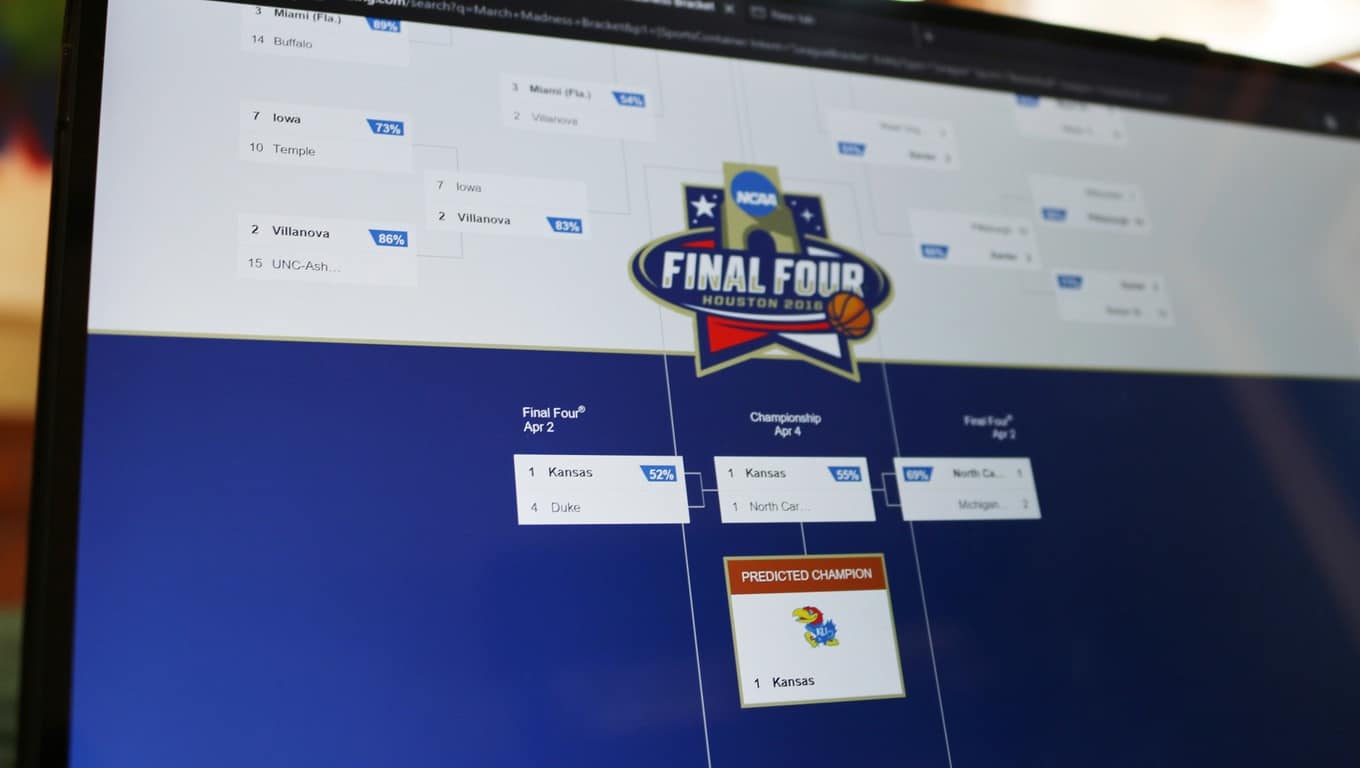
And when the Bing Predicts team announced their bracket this morning, they also released a blog post highlighting their picks for upsets and the final four for both the Men’s and Women’s brackets. The Bing team is expecting to see upsets from Arkansas-Little Rock, UT-Chattanooga, Gonzaga, Pittsburgh, VCU, and Butler. Bing predicts the final four will be made up of Duke, Michigan State, North Carolina, and Kansas, with Kansas beating North Carolina in the championship game on Monday, April 4th.

The Bing team also announced local Microsoft Stores near tournament games will be giving away tickets to local March Madness games. And the Microsoft Store in Woodlands, Texas will be having a special event with Basketball Hall of Famer Clyde Drexler and a chance to win tickets to the Final Four in Houston. To learn more about ticket giveaways you can head over to the Microsoft store Facebook page.

Dell launches XPS 12 and XPS 13 in India

As the one-year anniversary of Windows 10’s launch date approaches this summer, the list of Windows 10 devices just keeps on growing. Today, Dell has added to this growing list of Windows 10 devices by launching two new versions of its XPS laptops in India.

The Dell XPS 12 and XPS 13 laptops will go on sale in India for Rs 76,990 (about $1,146 US) and Rs 1,24,990 (about $1,861 US). As is the usual in devices these days, they both will also be powered by the Intel’s sixth generation processors, and will support Windows 10 features such as Cortana and Continuum.

In all its glory, the XPS 12 is a Surface Book like device. It is a 2-in-1 convertible laptop and features an IPS display with full 4k resolution.  The display supports 170-degree vieiwing angles, 400 nit brightness, and also Gorilla Glass protection. As for the body, it is made of magnesium alloy and has a 8 MP rear camera and a 5 MP selfie camera. In addition to a backlit keyboard and touchpad, support for Dell’s Active Stylus is also included.

Screen Shot 2016-03-14 at 12.14.50 PM
Dell XPS 12

Meanwhile, the XPS 13 is another top of the line device. It features an Infinity Edge Display with ultra-thin bezels, up to 1 TB SSF Storage, 16 GB of RAM, and a battery life of up to 18 hours. Dell also claims that this device is the smallest 13-inch laptop in the world.

Dell XPS 13
Dell XPS 13

The models will support a variety of Dell accessories, including the Dell Thunderbolt 2 USB Type 3 dock, and USB Type C to HDMI, VGA, Ethernet, and USB 3.0 adapters.


Microsoft highlights Skype for Web improvements

If you’ve used Skype for Web recently (either on the standalone website or via Outlook.com), you may have seen that the service has just received several new features. Fortunately, the Skype team is highlighting some of them in a blog post today, and we’re happy to see that the feature gap with desktop users seems to be closing.

First, you can now use the web app to call landlines and mobile phones using your Skype credit or a subscription: to use the feature, just click on the new “call phones” tab, select your destination then dial the number.

Call mobile phones and landlines directly from Skype

Next, YouTube videos shared in Skype for Web can now be watched directly in Skype, as they now appear like a video embed on the web. It’s a handy time-saving feature as you no longer have to open a new browser tab to watch the video, and you will also get the same volume and playback controls you have in YouTube.

Enjoy watching YouTube videos without leaving Skype

Skype for Web also gets a feature that was previously exclusive to desktop users: it’s now easier to invite other to Skype conversations as you can invite people by sharing them a unique conversation URL. Anyone who gets the link will be able to join your chat, and they don’t need even need to have a Skype account to join the fun.

Add new people to a conversation, even if they’re not on Skype

The Skype Team also improved notifications on Skype for web, as you’ll now receive notifications for your Skype chats even if you’re in another browser tab or another app. More than that, we spotted in the Settings tab a new “@mention notifications” feature that “always notify you when someone mentions you on Skype”. This interesting new feature only works in group conversations.

There is a new "@mention notifications" feature
There is a new “@mention notifications” feature

Last, we’re not sure if it’s new and Skype’s blog post doesn’t mention it, but we also spotted a “Translator preview” button in our Skype conversations on the web. It’s not clear if the feature works for voice conversations or written chats, but we couldn’t make it work anyway.

Skype web translator preview
The new “Translator preview” feature

While Skype for web is still labeled as a “beta”, we’re still happy to see that the Skype team keeps improving its web app, and that may well help Skype to stay one of the most ubiquitous messaging apps. We just hope that Skype for web will ditch the plugin requirement for phone calls in the future. Please tell us in the comments what you think about these new Skype for web features.

Microsoft partners with Team Gleason to bring technology to the battle with ALS

Microsoft has long been known for making contributions to help make the world a better place. In perhaps the best example of this, the company launched a #UpgradeYourWorld initiative  back in October of 2015 to help the world pick out the most prominent nonprofit organizations.  By virtue of the initiative, the winners have since received the honor of becoming Microsoft’s new local nonprofit partners. Team Gleason is one of these partners, and since winning, Windows and Microsoft have bettered Team Gleason’s cause.

As part of the partnership, Windows hosted an intimate fireside chat with former NFL athlete and ALS advocate Steve Gleason ahead of the debut of the film GLEASON at SXSW in Austin Texas. In the March 11th discussion (which was monitored by NBC’s Olivia Sterns) Gleason spoke about the integral role of technology in his life.

Fireside Chat (Photo by Sasha Haagensen/Getty Images for Microsoft)
The fireside chat (Photo by Sasha Haagensen/Getty Images for Microsoft)

With the help of his Microsoft Surface Pro 3 and Pro 4, Steve has been able to live his life to the fullest. Along with this, he has also worked with Microsoft to help develop life-changing technology, especially with eye gazing software.

He described his situation in the Windows Experience blog:

“Microsoft was the only company who stepped forward and was eager to deeply understand the needs of those who utilize technology as an extension of themselves. The company committed time, money, and talent to not only enhance the Surface Pro beyond its expectations, but went above and beyond to integrate controls for my power chair, allowing me to regain much more independence. The process has been as exciting as it has been liberating.”

The primary purpose of Team Gleason is to help provide individuals with neuromuscular diseases or injuries with top of the line technology and services. You can learn more about Team Gleason by visiting their website at teamgleason.org. You can also learn more about the technology developed with Team Gleason and Microsoft by clicking here and here.

Microsoft offers Grand Theft Auto V free with Xbox One console purchase

Ever since its inception, Microsoft’s Xbox One is lagging behind the PlayStation 4 in terms of hardware sales. The company has introduced a handful of bundles and promotions over the past few months in order to boost its sales.

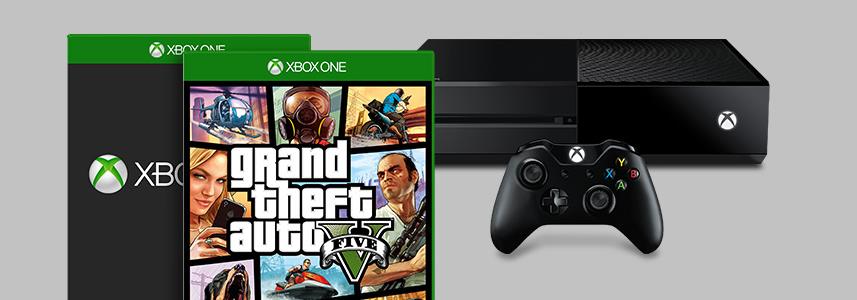
In another attempt to give the Xbox One sales a push, the company has introduced a new promotion where gamers will get a free copy of Grand Theft Auto V with the purchase of the Xbox One. This is in addition to another free game which customers can receive with the Xbox One bundle.

The offer is live at the moment through Microsoft Store, but if you’re interested, you should act fast as the promotion is set to expire on March 19th. Head over to the Microsoft Store to check out the bundle, or any other bundle if you’re interested.