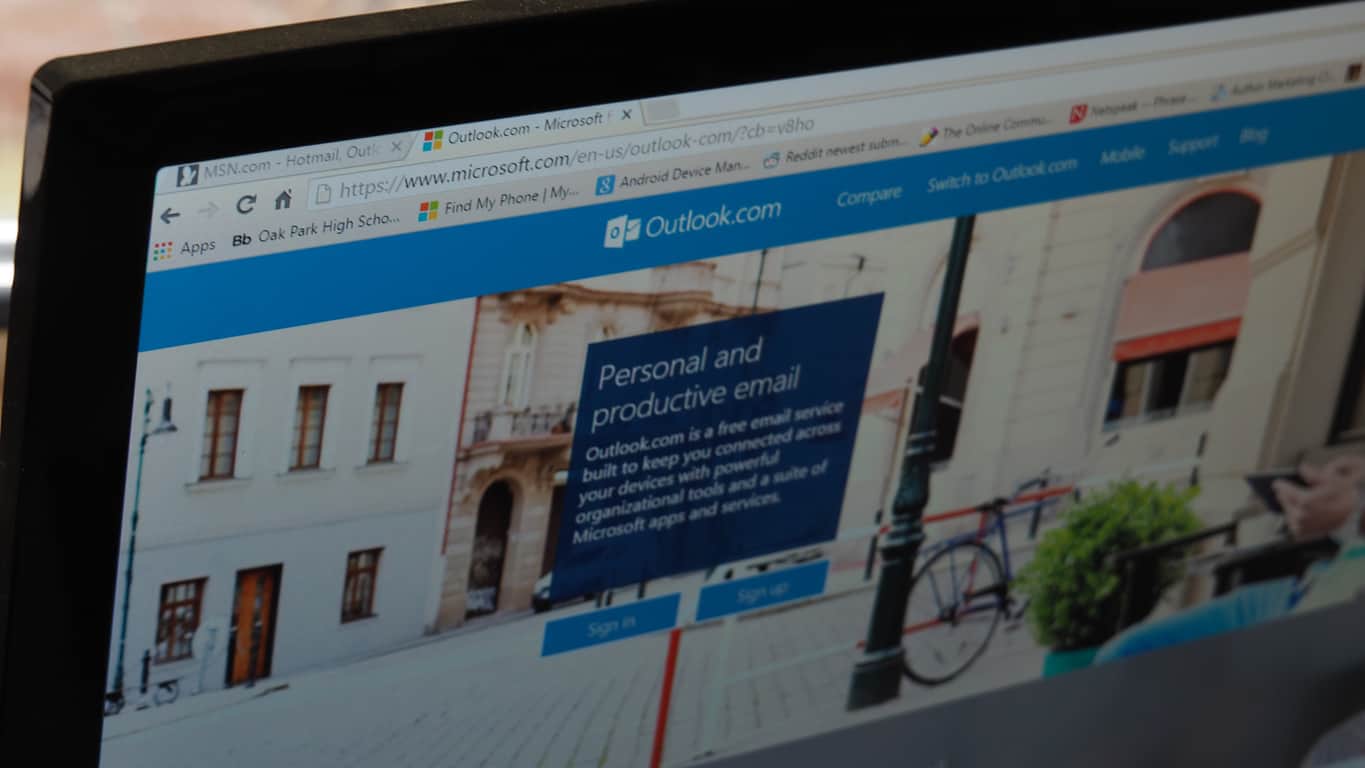
Outlook on the Web gaining more intelligent address book and flight confirmations

If you’re an Office 365 user who also accesses your Outlook information on the Web, then Microsoft has some updates coming up that should add some intelligence to your process. The Office blog spent a few minutes today talking about how Outlook on the Web address book functionality and flight confirmations are becoming smarter.
First up is the address book, where Microsoft is making working with recipients a bit easier by evaluating your habits and anticipating some of your actions. The updates include:
Placing your cursor in the To: or CC: fields and Outlook on the Web will provide a drop-down list of suggested contacts based on your history, specifically people you’ve sent emails to most frequently and recently.
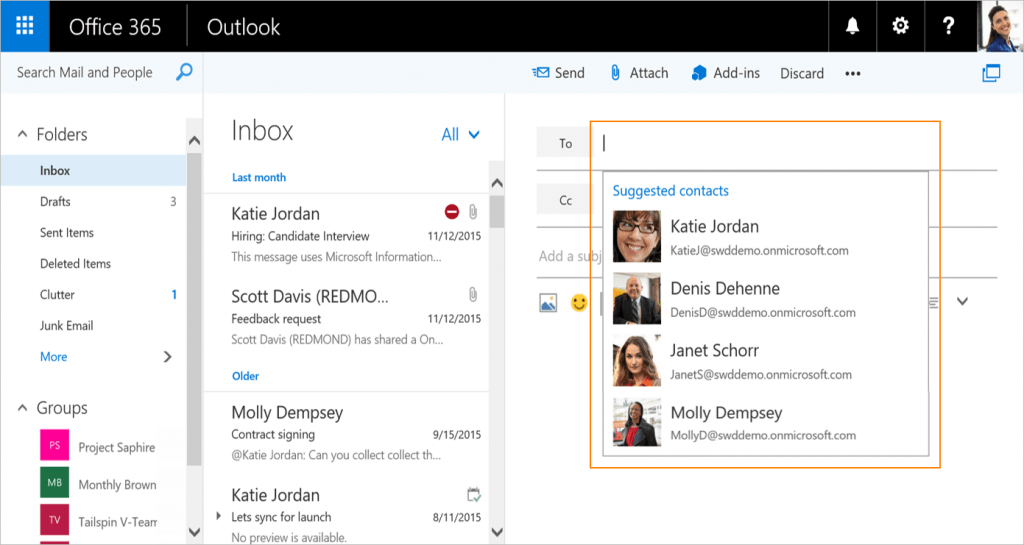
Outlook on the Web Suggested Contacts
Outlook on the Web will provide a drop-down list of suggested contacts based on your most common recipients.

Ever commonly misspell the name of someone in your contact list? Never fear: the Outlook on the Web spell checker can now anticipate that, say, “Kathryn” is who you really meant when you typed “Catherine” in the body of an email.
If you have a tendency to send email to particular people at the same time, Outlook on the Web will not make sure you’ve included all of them. For example, if you usually send to Ron, Kip, and Kareem, and then address an email to only Ron and Kip, Outlook will ask if you also wanted to include Kareem.
Next, Outlook on the Web will make sure to add your flights to your calendar (for supported providers, of course). The entries will include all pertinent information including flight number, destination, and airport, as well as blocking out the flights duration.

Outlook on the Web Events in Email
Outlook on the Web will locate flight information in your email and place flights in your calendar. Other event types will be supported in the future.

Turn “Events from email” on and off by going to Settings > Options > Calendar, and toggling the feature. You’ll want to do that pronto, mostly likely, because future Outlook on the Web updates will enable tracking more event types.
Of course, there are caveats, and Microsoft provided a helpful FAQ:

Q. When will these features roll out?
A. Events from email, which includes automatic flight confirmations, will begin rolling out in early January 2016 to Office 365 First Release customers and the new Outlook.com, which is currently in preview. We expect the feature to roll out broadly in March 2016.
The new features that learn from you to help you write emails faster will follow roughly a month later, starting in mid-January to First Release customers and then to a broad rollout by early March, including the new Outlook.com.
Q. What Office 365 subscriptions are eligible?
A. The features will be available to all Office 365 commercial subscriptions that include Outlook on the web, including Business, Enterprise and EDU plans.
Q. When will other versions of Outlook support these features?
A. The new features that learn from you to help you write emails faster will be available on Outlook for PC and Outlook for iOS and Android in the first half of 2016. We are evaluating a timeline for Outlook for Mac.
Events from email are stored in your calendar, so they will show automatically in all versions of Outlook (PC, Mac, iOS, Android and Windows Phone) that connect to your Office 365 or Outlook.com mailbox.
Q. What flight providers are supported on Events from email?
A. Flight confirmation emails sent directly to you from Expedia, Southwest Airlines, American Airlines, United Airlines, Delta Airlines and Alaska Airlines will be supported at launch. We are moving rapidly to support other providers as well as expand the scope of events beyond flights.
Q. If I share my calendar with someone, will they see my flight information?
A. Only if you want them to. The events are marked private by default, so the details will not be visible to someone with whom you shared your calendar.
Q. I like these features and I have some ideas I’d like to share. How do I do that?
A. Microsoft is focused on building products you love, and your feedback is fundamental to our development process. Please tell us what you think and what you would like to see by using Outlook UserVoice.

Sounds like good stuff in both Outlook on the Web and various Outlook clients are coming, both now and in the future. We’ll keep you updated as new features and functionality arrive.

Microsoft provides some tips and tricks for using the new Surface Pen

While routinely promoted by Microsoft, the Surface Pen seemingly has been an under-reviewed piece of tech in comparison to the engineering wizardry of the Surface Pro 4 and Surface Book. Microsoft is taking some time to educate Surface Pro and Surface Book owners about the new complimentary device and its equally impressive ability to help users #DoGreatThings.
First off, Microsoft is suggesting that users get acquainted with what and how the hardware interacts with in regards to Windows 10 and Surface devices.
One click to OneNote

  • Click the eraser button on the Surface Pen once to launch a blank OneNote page on your Surface. It’s a fast way to start a handwritten note or jot down a few items for your grocery list.

Double click for screen capture

  • Click the eraser button on the Surface Pen twice to snap a picture of whatever is on your Surface screen. OneNote will also automatically launch so you can edit what you captured—or maybe draw or write on it with your Surface Pen.

Click and hold for Cortana

  • Hold down the eraser button on the Surface Pen to activate Cortana, your personal digital assistant.


The new click-and-hold for Cortana is perhaps the pen’s best quality outside of its pressure sensitivity. Surface owners can now utilize an entirely hands-off approach to file, subject, image, and web searching with their device. Bringing up Cortana and using voice navigation can be helpful when the Surface is used during presentations or for bringing up info when the device is in the hands of others.
The Surface Pen is also extensible in its ability to add pen tips with the Surface Pen Tip Kit. For a professional or aspiring artist, the Pen Tip Kit comes with four tips varying in different degrees of angles, brush strokes, and friction. Exchanging tips is also a relatively easy affair according to Microsoft. A Surface Pen owner merely pulls on the current tip with either their fingers or a tweezer from the Pen Tip Kit to remove a tip and pop a new one by pushing it into place.

For some, the Surface Pen doesn’t match other well-established stylus solutions or the relative newcomer, iPad Pro Pencil, regarding natural inking ability. For others, though, any deficiencies along those lines are more than made up for by the Surface Pen in terms of utility and ease of use.

Microsoft VP talks about OneDrive 'placeholders' vs 'selective sync' in Windows 10

Just when users had begrudgingly accepted Microsoft’s terms with OneDrive’s less-than-ideal integration with Windows 10, it looks like the company may be gearing up to throw users another curveball. Re-appointed head of Microsoft’s coalesced SharePoint and OneDrive businesses, Jeff Teper, recently shared some insights into changes coming to the services for users.
As is becoming common with corporate communications, Teper reached out to users via Twitter to announce the long-awaited next-gen sync client for OneDrive is landing on iOS and the Mac with support for offline viewing. But what about Windows? Mac and iOS support is great but does very little for the Windows users who have found the current OneDrive ‘selective sync’ integration lacking. Resident Microsoft watcher and reporter, Mary Jo Foley was able to catch up with Teper and sort out the mess that is becoming OneDrive.
Teper explained to Mary Jo, “Selective sync in OneDrive now provides ‘some of the scenarios that people want.’” However, Windows 8.1-style placeholders “mostly worked, but never integrated with the Windows file system, meaning some apps, APIs and command line tools didn’t work as they should.”
[pullquote align=”full” cite=”” link=”” color=”” class=”” size=””]OneDrive functionality should have been implemented at the file-system level, not the UI level, says Teper[/pullquote]
According to Teper, he and the OneDrive team are re-evaluating functionality at a file system level with the Windows team. Teper didn’t confirm nor deny the reemergence of Windows 8.1-like placeholder sync, but he is making it clear that the OneDrive team is working closely with the Windows team to come up with a solution that scales as well as fundamentally re-works file integration within Windows 10, and we’re hearing we might see this implementation around the time of Redstone, the next big update to Windows 10, unless plans change.
For those unfamiliar with Teper’s claims, the OneDrive team removed the arguably more convenient ‘placeholder’ integration found in older versions of Windows and Mac, while reassuring users that a new and improved method would fill the void. Until recently, those claims fell on the deaf ears of mostly Windows 10 users struggling to sort folders and assign documents using a seemingly inferior OneDrive ‘selective-sync’ integration method.
Placeholders essentially were KB size markers for every file stored in OneDrive. Placeholders were also viewable and manageable like native files found in File Explorer, meaning users could copy, paste, and download or move the items with relative ease to and from OneDrive. Unfortunately, even as condensed as placeholders were, they were still files with the potential to take up swaths of storage dependent on the size of a user’s OneDrive account and subject to online and offline availability. As ultrabooks, 2-in-1’s and tablets continue to sell SSDs with lower capacity storage limits, Microsoft attempted to preempt potential storage concerns by implementing a new OneDrive sync approach. For most, the new OneDrive sync has fallen well short of previous implementations.

The Future of OneDrive and SharePoint

Aside from being asked to leave his current position as vice president of Microsoft’s Corporate Strategy team and head up the newly combined SharePoint and OneDrive businesses, Teper was also given the businesses’ new mission by CEO Satya Nadella.

We want to make the (storage) experience consistent across users’ personal and professional lives. Browsing and sharing documents should be consistent. Yes, some things in business need to be more locked down. But those should be extra things on top, not a completely different experience.”

Primarily a SharePoint expert, in sitting down with Mary Jo, Teper opens up about the issues both the OneDrive and SharePoint teams ran into with the former structural divides in place at Microsoft. Previously, the OneDrive team was under the Windows division and as a result solely focused on consumer implementations of the service. A benefit to consumers but OneDrive’s consumer focus posed an issue for items such as mobile-device management and enterprise-level security for Microsoft as it attempted to expand the service. The opposite held true for SharePoint, being born of business-level usefulness, it’s rather complicated management settings are now benefiting from a consumer-simplicity approach.
Mary Jo also sees the potential at Teper’s fingertips to leverage SharePoint and OneDrive’s businesses resting atop Azure, to promote Microsoft’s new Power Apps to garner development of mobile apps for the platform.
JeffTeperattheShareP_Web
As Microsoft moved from Windows 8.1 to Windows 10, the company, as well as its crown jewel operating system, underwent massive structural overhauls. Analogous to Windows 10 development, large portions of Microsoft’s management structure, engineering teams, and marketing departments were reorganized, decoupled, removed or reimplemented into different departments.
As much as observers are waiting for the dust to settle at Microsoft, it looks like the company is still attempting to find a fully integrated workflow among businesses and strategies. For OneDrive users, the return of Teper has already signaled a retraction on some questionable business policies. In the future, Teper may use his SharePoint knowledge to help structurally organize OneDrive for the expansion and utility it sorely needs.

The best apps and games to celebrate Star Wars: The Force Awakens

With today’s release of the latest in the Star Wars saga, The Force Awakens, I found some apps, games, and movies in the Windows Store that are worth taking a look. Some will keep you up-to-date with all your Star Wars trivia, while others keep you entertained with Star Wars-themed fun.

Star Wars Almanac

“Star Wars Almanac” is the must-have Windows 10 app for any true Star Wars fan. It includes all the key characters like Mace Windu and Yoda as well as vehicles like the Millennium Falcon and the Y-Wing. There’s even a picture game that asks you to guess which character is being revealed. “Star Wars Almanac” is a free Windows 10 Universal app, but it does have in-app purchases.

Star Wars Almanac
Star Wars Almanac
Price:
Free

angry birds star wars

Angry Birds: Star Wars

“Angry Birds: Star Wars” is an obvious pick for anyone infatuated with Star Wars and birds, and it’s available on Windows, Windows 10 Mobile, Windows Phone 8.1, Xbox One, and Xbox 360. Wield your lightsaber and blaster as you blast away Pig stormtroopers through the deserts of Tatooine all the way until you face off against Darth Vader.

Angry Birds
Angry Birds
Price:
Free

Ultimate Light Saber

“Ultimate Light Saber” lets you choose your light saber sounds and colors, and choose from 8 different guns as a light saber alternative. Create a username and compete on the global scoreboard. Earn points and achievements from your user statistics. And, maybe best of all, the app is free.

Ultimate Saber
Ultimate Saber
Developer:
Gingerware
Price:
Free

Disney Infinity 3.0

Just in time for The Force Awakens, “Disney Infinity 3.0” has added Star Wars characters to its already extensive lineup of Marvel, Pixar, and Disney characters. You can play the way you want in the open-world sandbox or play the character-driven story that comes with each character (sold separately).

Disney Infinity 3.0
Disney Infinity 3.0
Developer:
Disney
Price:
Free

Star Wars Battlefront

Available for Xbox One and PC, “Star Wars Battlefront” is one title that I think should have been delayed a little longer. Don’t get me wrong, the graphics and gameplay are awesome, but I think they rushed to get it out in time for The Force Awakens before cultivating the story more. It has plenty of gameplay and graphics to keep you going for hours, but the storyline fell short and made me feel cheated for paying the full $59.99.

Star Wars Battlefront for Xbox One

Fanboys

A fun movie that looks at Star Wars fanboys Eric, Linus, Hutch and Windows (yes, Windows) who think the term “fanboy” is more than just a title, it’s a badge of honor. It’s 1998 and these four friends aim to break into George Lucas’ Skywalker Ranch to steal Episode I: The Phantom Menace before it hits theaters and watch it before anyone else in the world does.

Fanboys is available to rent or buy in the Windows Movies & TV Store.

Pre-order Star Wars: The Force Awakens

Even before it hit theaters, Microsoft offered The Force Awakens for pre-order in the Windows Movies & TV section. Once you buy it, you can avoid the long lines and crowded theaters, and watch it from the comfort of your own home. If you are looking for the experience, you’ll have to go to the theater for the ultimate IMAX, 3D effects. Or you can just rent it for $14.95. It should be available to watch soon.

Finally, I saved my favorite app for last. This app does one thing and one thing only. It’s Darth Vader’s iconic “NOOOO!’ from Return of the Jedi. Not the most graphically stunning app, but it gets the job done. I use it when I absolutely do not want to do something–meaning, only in the most dire of situations.

No
No
Developer:
Soft Silverwind
Price:
Free

Microsoft acquires data analytics company Metanautix

Microsoft has always been a company that knows how to bring on the best talent from around the world to further its ends. With Microsoft’s business spread just about everywhere, it’s the smart thing for them to do to make sure they don’t get spread too thin. Today, there’s another team of talented people joining up with the Microsoft team.
Metanautix, a data analytics company, has just been acquired by Microsoft for reasons unknown.  The announcement was made today with blog posts from both Microsoft and Metanautix. In the brief write-up from Microsoft, they detailed a the problem with data analytics and how they want Metanautix to help fix it.

“Companies continue to generate enormous volumes of information and aspire to be more data-driven in their strategies and operations. But many struggle to bring together their various sources and siloes of data, and only analyze and use a fraction of all the available information. Metanautix’ technology breaks these boundaries to connect the “data supply chain,” no matter what the type, size or location of an organization’s data.”

With the organization of Metanautix on board helping with the vast amounts of information being dealt with both internally at Microsoft and in its customers, its addition is going to be a great help to the company as it moves forward into its most ambitious years.

Gameloft's Gods of Rome lands on Windows 10

It’s hard to argue against the statement that Gameloft has shaped the landscape of mobile gaming, with series like Asphalt and N.O.V.A. always pushing the limits of technical prowess and mobile UI design. The team has come out again with a brand new IP, Gods of Rome. The game was announced just two weeks ago and has launched on Windows 10 today.
Gods of Rome is a fighting game that displays significant graphical fidelity for a game made with mobile in mind. Its roster of fighters are made up by the Olympian pantheon, as the name might suggest. Adding the fighting game genre to Gameloft’s already considerable set of talents is a big step for the company, and can only be a positive thing for people who enjoy fighting games.

While the game hasn’t been out long enough yet to receive any substantial reviews, playing through its tutorial is promising. The game manages to set up an interesting-enough story, and delivers on the promise of giving us varied environments in the theme of the old Gods of Olympus.

Gods of Rome
Gods of Rome
Developer:
Gameloft SE
Price:
Free

Developers urged to submit Windows Store apps by tonight for January 1st debut

For those of you who are Windows 10 app developers, Microsoft has issued a tweet asking you to submit your apps by tonight (December 18th), in order to have your app make it into the Windows Store in time for New Years (January 1st, 2016). This doesn’t mean you can’t upload your app later in December, it just means due to the holidays, now is the best time to get your app uploaded to the Store to have it approved in time for New Years. Naturally, as the year comes to an end, things will be slowing down. So if you want your app or app update approved and published, now is the time to submit. Check out the tweet below.

Cumulative Update KB3124200 Arrives to Windows 10

We thought that Microsoft is finished with the Threshold 2 Update, and that the company changed its focus to the next major update for Windows 10, Redstone. But, it appears that Microsoft isn’t done when with the November Update yet, as the new Cumulative update was delivered today.

The update goes by the code of KB3124200, and it pushes Windows 10’s version number to 10586.36, the same one as on Windows 10 Mobile. This update is part of Microsoft’s plan to deliver the same Windows 10 version number on all devices.

If you’re into Windows 10, you probably know that Microsoft doesn’t provide release notes for cumulative updates, which is also the case with today’s KB3124200. The company does mention that the update brings improvements to the operating system, but that’s a standard procedure.

Cumulative Update KB3124200 Delivered Only to PCs Running Windows 10 November Update

As we told you, this update is related to Windows 10 November Update, so unless you installed it on your computer, you won’t receive KB3214200 update, either.

“This update offers improved functionality for Windows 10 Version 1511. Windows 10 Version 1511 updates are cumulative. Therefore, this package contains all previously-released fixes (see 3116900). If you have installed previous updates, only the new fixes that are contained in this package will be downloaded and installed to your computer,” Microsoft explains on the KB page.

Cumulative updates are part of Microsoft’s plan to deliver Windows as a Service, and are released mainly to bring some improvements to the system.

The only problem with this kind of updates is that we have a very little info about them. We know they bring certain changes and improvements, but we don’t know what exactly are these improvements, as Microsoft doesn’t provide any details.

A lot of users don’t like this Microsoft’s approach, as they request from Microsoft to change the current policy, but the company doesn’t seem to pay attention to complaints.

Install issues with KB3124200

The most recent cumulative update KB3124200 is fresh but there are already users who complain that it will not install on their Windows 10 devices. So far, it seems that there are only install issues being reported for this specific update, as no other problems have been appearing so far. But if you have some, don’t hesitate and use the comments box from below to let us know what’s wrong.

Microsoft expands Cloud Solution Provider Program with addition of Evolve IP

The cloud is a rapidly expanding business within the enterprise field, with many companies looking for unified experiences to implement into their infrastructure. Microsoft being one of the leaders in this field, launched the Cloud Solution Provider Program allowing companies to offer an integrated suite of Microsoft applications like Office 365, Skype for Business, Hosted Exchange, and Windows Intune, into a company’s existing services.
Evolve IP, a fast-growing cloud services company, has recently joined this program, allowing them to expand their business opportunities and client relationships. Offering a suite of Microsoft’s business applications will further Evolve IP’s business model and opens up their capabilities to a broader client base.

Our market surveys show that customers are very comfortable working in Microsoft products and are not looking to change. Accordingly, they need a cloud provider with a unified services strategy who can deliver, manage and integrate them seamlessly along with services like enterprise voice and hosted call centers. Our inclusion in Microsoft’s cloud partner program gives us that capability

Evolve IP is involved with almost all major industries from healthcare, technology, banking, travel to retail. Supplying clients with services like virtual data centers, IP phone systems, disaster recovery and contact centers. Having Microsoft’s suite of services within their portfolio makes Evolve IP one of the leading cloud services companies in this country.

DJ app 'edjing' lands on the Windows Store with support for Continuum

The popular audio mixing app, edjing, has launched for Windows 10 and supports the operating system’s new Continuum feature that allows users to drag and drop content between the mobile and desktop versions.
Here’s the official description:
Remix in an instant thanks to edjing’s ultra user-friendly interface and its palette of over 20 DJ effects and functions. Then share your best work and let your talent be discovered!
With the new edjing 5 audio system, the result of five years of R&D, you can benefit for free from the best sound rendition ever developed. This revolutionary technology enables you to scratch and mix like a pro on vinyl turntables.
The latest version of the app sports several new features with the most notable being advanced BPM adjustment using the ‘Tap BPM’ function, automated audio effects sync on the beats of songs, a ‘Slip’ mode that can be activated for Loops and Scratch, new manual options for editing sound effects, the ability to create edjing playlsits directly from within the app, a redesigned interface for managing DJ FX, and faster access to favorites directly from the turntables.
Do you use apps to mix audio? Let us know your recommendations in the comments below.

ABC iView app finally launches on Xbox One

Great news for Australians today as ABC (the Australian channel of the same name, not the North American channel) has finally brought its ABC iview app to Xbox One.
The ABC iview app allows for on demand viewing of programs that air on ABC affiliated channels ranging from domestic Australian news broadcasts and dramas to the occasional international series such as Doctor Who which actually premieres on the ABC iview service almost a half day ahead of its Australian televised premiere.

ABC iview is free to use and can be downloaded from the Apps section of the Store on the Xbox One console. ABC channels showing content on the app include ABC 1, ABC 2, ABC 3, ABC Kids, ABC News 24, and ABC Arts. The app can be viewed in either snapped or fill mode and programs can be sorted by genre, alphabetically, or by channel.
Do you use apps like ABC iview to view media on your Xbox One? Let us know which ones in the comments below.

Plenty of Windows 10 Build 11082 Issues Start Appearing

Microsoft has recently released the Windows 10 Insider Preview Build 11082, which is also considered the first Windows 10 Redstone update. With this specific build, it seems that Microsoft is preparing the ground for the upcoming Windows 10 Redstone update.

Windows 10 Build 11082 problems

Build 11082 has been released for Windows Insiders on the Fast ring, and, as always, Microsoft has listed a couple of common issues that you might encounter. Here they are:

  • Languages packages and Features on Demand will fail to install on this build. We are investigating workarounds.
  • When copying, deleting, or moving files there will be no progress dialog shown. The file action will complete without intervention. This can cause confusion when acting on large files or directories.
  • With this build, application defaults for some applications will be reset. Music & Video will default to Windows Media Player. This can be reconfigured opening Cortana or Search and searching for “Choose default apps by file type” to open the correct settings page.

However, as it’s always the case, issues don’t stop here, as the support forums have been taken by storm by those who have installed the 11082 build for Windows 10 v1511 and they have report a bunch of more problems. Here are just some of them:

One user says that this specific update stops at a certain percentage when trying to download and install:

  • i tried to install the preview build 11082 … it stops @76% forever for few hours … will not continue…what is issue? … any solution or this is a build with bugs will not install…

Another Windows 10 user says that he is having several issues on the ATI Radeon 4800 driver:

  • New builds of Windows 10 install the 7/15/2015 version of the ATI Radeon 4800 driver and it does not support multiple displays. I have to keep selecting the driver that was released in January 2015 to get back multiple display support.

Somebody else complains that Windows 10 11082 is “by far the slowest of builds and it also has a problem loading flash player“. The user says that it takes over 90 seconds to load this new build and that he has various problems with the flash player. Windows 10 Build 11082 issues

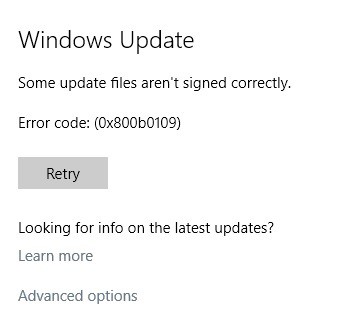
Another user says he is getting error code 0x800b0109 when trying to download build 11082. And, of course, there are plenty of users who claim that Build 11082 fails to install, which is probably the most commonly encountered issue whenever a new Windows 10 build gets released.

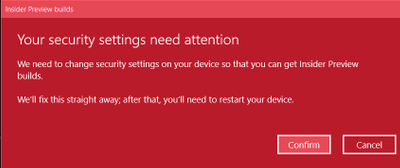
One Microsoft representative has reached out with a couple of fixes regarding the “Your security settings need attention” which appears on the update screen when trying to check for the new build.

Windows 10 Build 11082 problemsIn order to fix this specific error, go ahead and follow his instructions in this support article. Moving onward, it seems that this build brings a plethora of issues affecting all sorts of functions, with one user actually complaining that since installing 11082, he can’t rip CDs anymore. Somebody else says he is having problems with the copy/move dialog box:

Just wondering if anyone else is seeing this or just me: in today’s Fast Ring build, when I go to copy or move a file or group of files, the operation appears to take place, judging by watching the destination directory, but the dialog box that shows progress doesn’t show up, and there’s no green indicator in the taskbar to tell how far along the process is.

A couple of Windows 10 users say that they are having fingerprint reader issues, as well:

In PC Build 11082 released 12/16/2015, you cannot login using the fingerprint reader on the SP4 typecover. However, the fingerprint reader will still work when verifying your identity during Windows Store or In-App purchases.

As we can see, there are quite a few errors, bugs, glitches and various other problems caused by Windows 10 Build 11082, and we will be constantly updating this article with more as this gets downloaded on more devices. Meanwhile, leave your comment below and let us know what’s your experience with the first Windows 10 Redstone update.

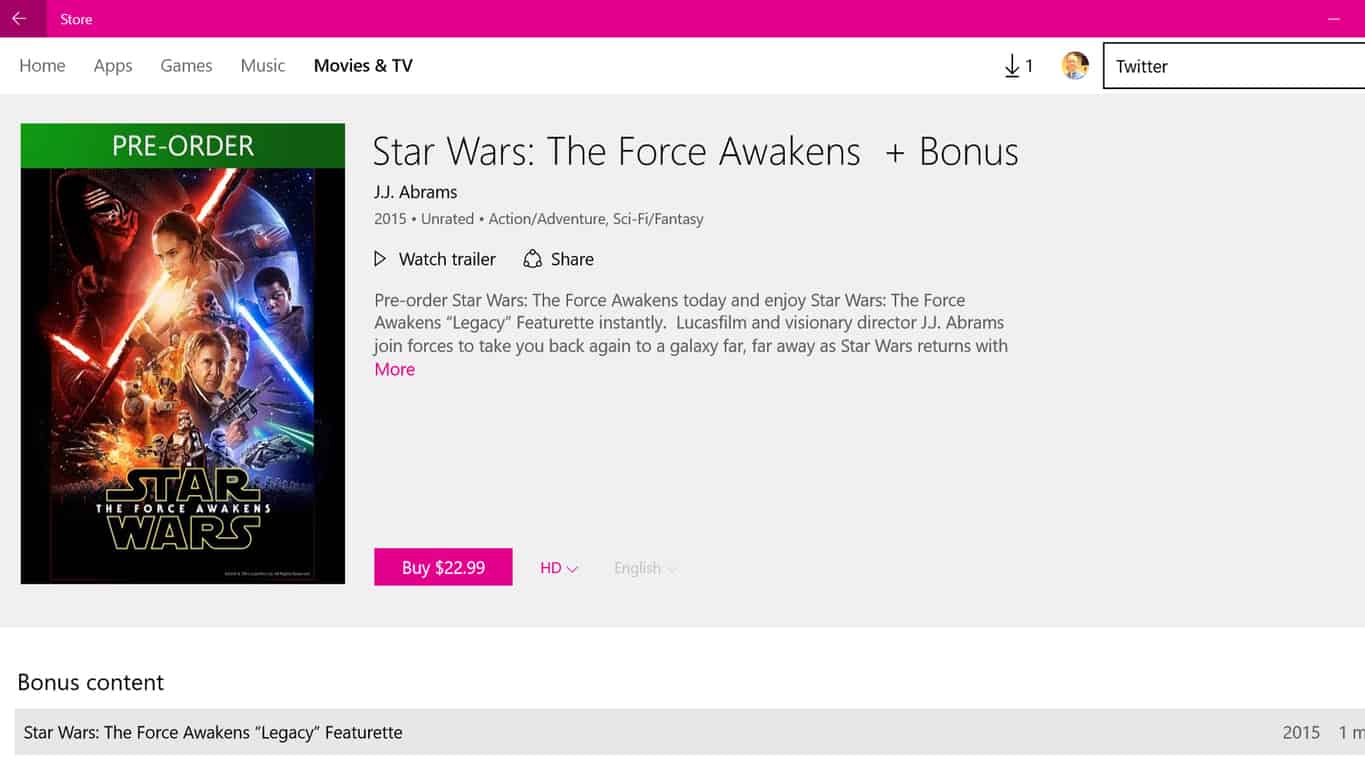
The Force Awakens is already available for digital pre-order on Windows 10 devices

Star Wars Episode VII: The Force Awakens may have only come out a few days ago but the latest entry in the Star Wars film franchise is already up for digital pre-order on Microsoft’s movie platforms. That means that it can now be bought in the Store app on Windows 10 devices, the Xbox Video app on Windows Phones running pre-Windows 10 Mobile software, and in the Movies & TV app (or Films & TV app in some regions) on Xbox One. Buying the film on one platform will enable it for viewing on all others which use the same Microsoft account.

There has been no release date given for the eventual home release but those who pre-order now will gain instant access to the short featurette, Legacy.
The original six Star Wars films only premiered in the digital format earlier in 2015. Before then the only way to watch them was through purchasing a physical VHS, DVD, or Blu-ray. With The Force Awakens being offered for digital pre-order during the same week it premieres on cinema screens, it would appear that the franchise will be embracing the digital format from here on out. A physical DVD/Blu-ray release is also expected in the near future though.

Star Wars: The Force Awakens in the Films & TV app on Windows 10

Are you going to pre-order the digital version of The Force Awakens or do you need to see it again before deciding if it’s a worthy addition to the saga? The film has been garnering mostly positive reviews in general but like other entries in the saga, there are also aspects of it that have drawn criticism from fans and media. Perhaps you prefer to stick with the eventual The Force Awakens Blu-ray release which will likely come with more special features like audio commentary and deleted scenes? Are you happy we managed to get through one The Force Awakens article without using at least one cringe-inducing Star Wars pun? Let us know in the comments below.

Build 11082 is the First Windows 10 Redstone Release for Insiders

Microsoft finally finished its job with the first major update for Windows 10, Threshold 2, and the company doesn’t waste any time, as the new big update is in the works. We recently told you that Microsoft is preparing its first Redstone build for Windows 10 Insiders, and it’s finally released now.

The first Redstone build for Windows 10 is labelled as Build 11082, and it is now available to all insides on the Fast Ring. Chief of Windows 10 Insider program, Gabe Aul, introduced this build by saying:

“With this build, you won’t see big noticeable changes or new features just yet. Right now, the team is focused on product improvements based on the feedback we’re hearing on the November update to Windows 10. This includes the changes that have also been going out as cumulative updates through Windows Update on your PCs running the Windows 10 November Update as well as on phones running Windows 10 too.

We’re also working on some structural improvements to OneCore, which is the shared core of Windows across devices. Essentially, OneCore is the heart of Windows, and these improvements to OneCore make building Windows across PC, tablet, phone, IoT, Hololens and Xbox more efficient. We’re doing some code refactoring and other engineering work to make sure OneCore is optimally structured for teams to start checking in new features and improvements in the new year.”

Unfortunately, this build also brings some issues with itself. But this is relatively normal, since it’s the very first Redstone build. However, the purpose of Windows 10 Insider program is to test the new builds, and find solutions for problems, so it’s not serious. Here are the known issues of Windows 10 Build 11082:

  • Languages packs and features on demand will fail to install on this build.
  • When copying, deleting or moving files there will be no progress dialog box shown. The file action will complete without intervention. This can cause confusion when acting on large files or directories.
  • With this build, application defaults for some applications will be reset. Music & Video will default to Windows Media Player. This can be reconfigured from settings app.

If you’re installing Windows 10 Insider Preview build 11082, let us know in the comments, what do you think about the first Microsoft’s Redstone build?

Windows 10 scores Minecraft: Story Mode – Episode One

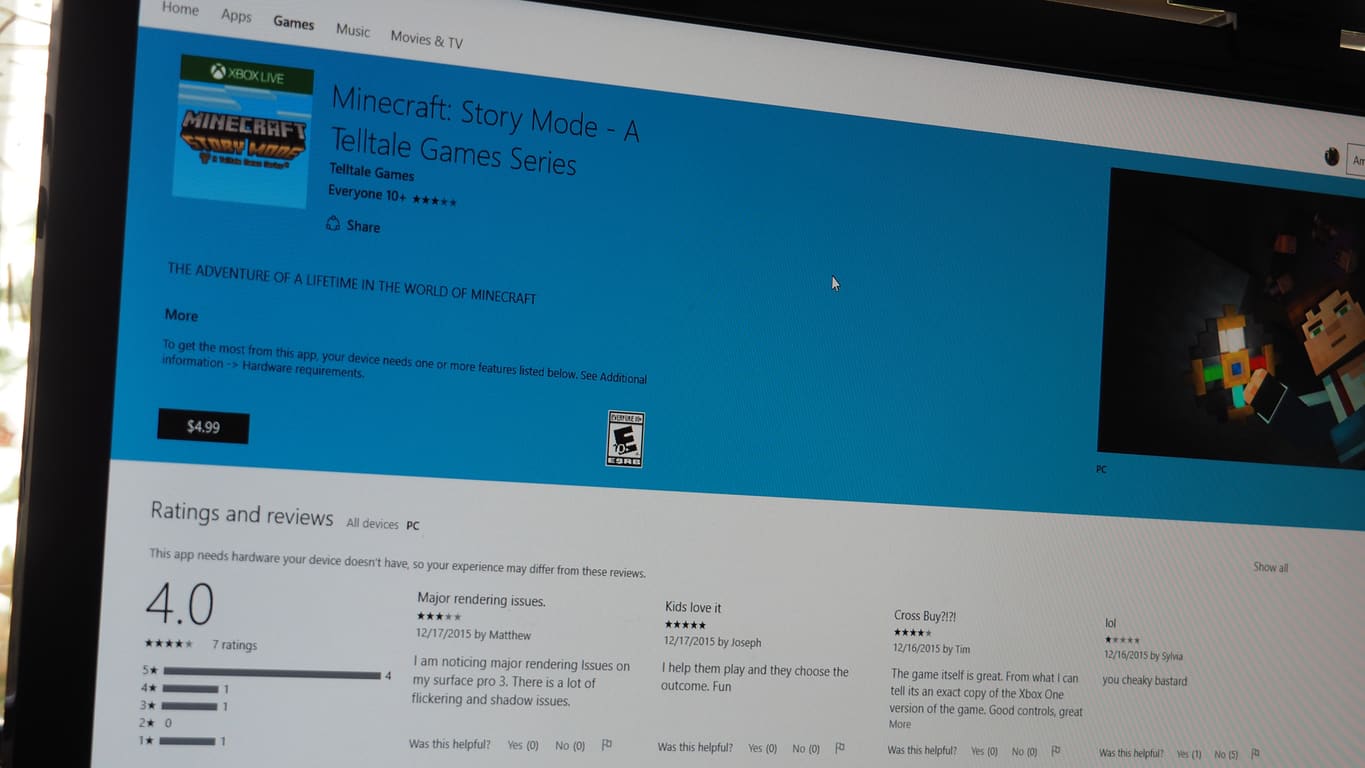
Minecraft: Story mode has been available on a number of platforms for a while now, offering up fun episodic adventures for the Minecraft fan. Now, Microsoft has made Minecraft: Story Mode – Episode One available on Windows 10.

Minecraft Story Mode Windows 10
Minecraft: Story Mode is now available on Windows 10.

Here are the game’s features:
Created by award-winning adventure game powerhouse Telltale Games, in partnership with Minecraft creators, Mojang
Featuring the voices of Patton Oswalt (Ratatouille, Agents of S.H.I.E.L.D), Brian Posehn (The Sarah Silverman Program, Mission Hill), Ashley Johnson (The Last of Us, Tales from the Borderlands), Scott
You will drive the story through the decisions you make: what you say to people (and how you say it), and what you choose to do in moments of thrilling action will make this YOUR story
In other Minecraft: Story Mode news, Episode Four – Winter Storm Finale will be available starting on December 22 for most Minecraft platforms. Episode Five is also upcoming, and you can keep up with the news at the Telltale Games blog.

There you go, Minecraft fans. If you’ve been waiting for a Windows 10 version to start playing, you can shell out your $4.99 now and jump into the story.

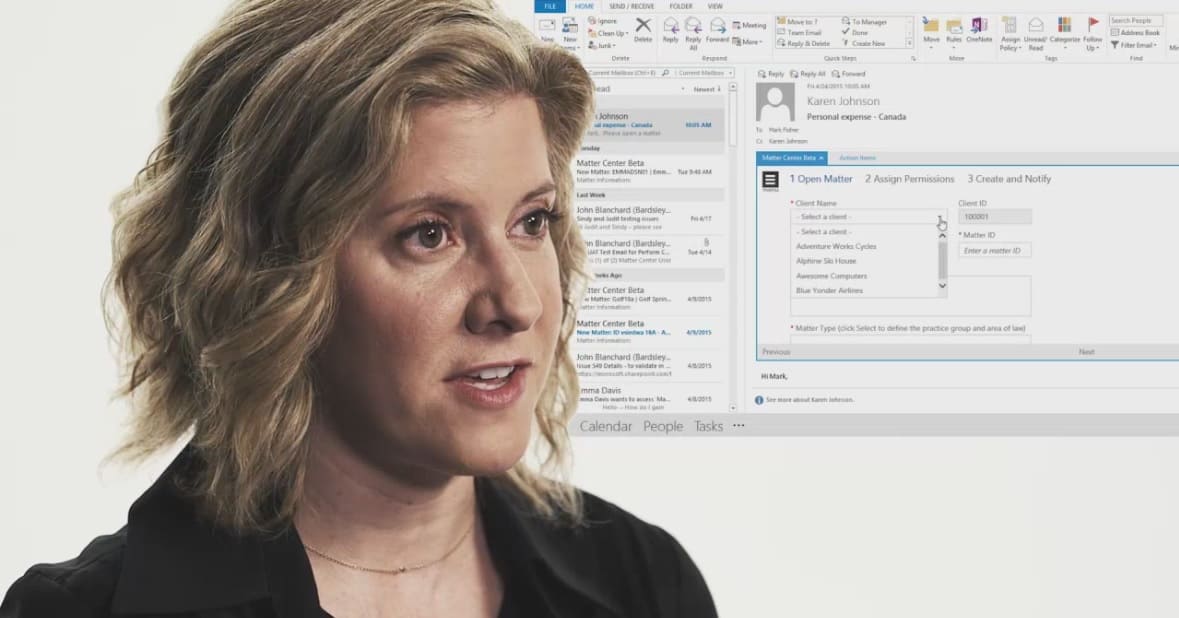
The Office 365 Add-In Matter Center is now available on GitHub

Part of Microsoft’s pitch to developers during Build 2015 was to build platforms atop services such as Office 365 and Azure. Over the past few months, Office 365 users are gaining new features and services thanks in part to Office Extensibility.
Office Extensibility is designed to spark new creativity and vision from third-party developers around the world to help expand Office 365’s user experience. Recently, Microsoft introduced Matter Center as an Office 365 Add-in and Sharepoint-based collaborative documenting solution. While Microsoft is actively looking for inspiration and solutions from third party developers, Matter Center actually originated from a collective group within the company’s Corporate, External, & Legal Affairs or (CELA).
The CELA and Microsoft collaboration, Matter Center, will no longer be a Microsoft only affair, it is now making its way to more developers through GitHub. Microsoft is pushing Matter Center to GitHub for a number of reasons but chiefly for its proven usefulness, continued demonstration of Office as a platform and its collaborative nature.
In legal professions, Microsoft has noted that its legal staff have roughly the same set of business “productivity demands” as most others, and Matter Center has managed to accommodate them. Other legal professionals agree, Matter Center has been a tool they find very useful in organizing projects and collaborative efforts amongst team members.

By integrating Litéra ChangePro into Matter Center, lawyers can not only see immediately the changes in documents received as attachments, they can also file a redline mark-up version into their Matter libraries along with the original. In fact, all revisions made to a Matter Center library document can be instantly viewed and accurately compared so that a history of all changes are tracked and auditable. Conversely, when lawyers send attachments from a Matter Center library, Litéra Metadact automatically cleans the hidden metadata contained in all documents, so that ABA Ethics Codes for protecting client privacy are honored and the firm’s IT compliance requirements are maintained.
—Norm Thomas, vice president of Business Development at Litéra

Within Microsoft, Matter Center has been taking advantage of a plethora of broad enterprise content management capabilities of the company’s SharePoint service while offering additional benefits through Office 365 integration. The Office 365 integration extends to  Outlook and Word, content rich search and Delve discovery. Now, Microsoft is looking to offer this same level of integration and management to the broader GitHub audience.

The solution has been was such a hit internally that we decided to extend it beyond our four walls. We’ve since worked with IT solution providers and software vendors who service the legal industry to use Matter Center as a model for how solutions can be built with Office 365. Our partners were empowered to deploy the solution to their customers and build on top of our technology and extend Matter Center in a customized way that addresses the entire matter document management lifecycle—including bulk email management and ethical wall integration scenarios.”

Microsoft is publishing the full source code, deployment guidance, and additional resources to help developers get their version of Matter Center running. Microsoft will also be publishing a solutions roadmap in the coming months for Matter Center to its GitHub repository.
Matter Center is another example of Microsoft’s continued transition to offering open source solutions to developers who can help expand its many services and products. Interested parties can join Matter Center and offer Pull Request and codes to the project here.

Microsoft finishes up Windows Insider program for the year

Microsoft just finished updating both Windows 10 and Windows 10 Mobile Windows Insider builds, updating Windows 10 to 11082.1000, and Windows 10 Mobile to 10586.36. In addition, non-Windows Insiders have also been updated on the desktop version of Windows 10 to 10586.36, making a nicely wrapped package out of it all.
With that, Microsoft has announced that it’s done with Windows Insider updates for the year, as engineers and corporate vice presidents alike head off for the holidays.  The announcement was made in a blog post coinciding with today’s Windows 10 Mobile update:

I also want to set expectations for new builds for both PC and mobile between now and the end of 2015. This time of year many of us take the opportunity to spend time with family and take some vacation time, so the engineering team will be running at a slower pace and many of our key people who drive our flighting process will be out (including me :-) ) This means we won’t be releasing any new builds to Windows Insiders until January, for both PC and mobile.
Those words come from Gabe Aul, who has done a heck of a job leading and building out the Windows Insiders program.  We’re excited to learn what’s coming up in the new year, everything from Redstone, to Edge extensions, to Windows 10 Mobile on “select” Windows Phones, to who knows what else. As always, stay tuned to WinBeta for the latest news!

Microsoft reviews Skype's "big year", highlights Skype Translator, Mojis, and more

Microsoft’s Skype team has been as busy as any and probably more than most, pumping out cross-platform updates to the personal communicator’s various apps and incorporating new innovative technologies. Today, Microsoft took a look back on Skypes “big year,” providing an overview of everything the team has accomplished in 2015.
From the fun and frivolous, such as new emojis and video Mojis, to more serious and impactful innovations like Skye Translator, Microsoft’s personal communicator has gone through some serious improvements. Here are the highlights.

Skype Translator

Skype can translate your voice and text, in real-time, ushering in a pretty cool new way to communicate with people of other locations and languages. Skype Translator can handle voice translation for Chinese Mandarin, English, French, German, Italian, Spanish, and Brazilian Portuguese, and text translation for over 50 languages. Of course, all of that is available via the Windows desktop app.

Skype Translator Windows Desktop App
Skype Translator lets you talk in your native language with others around the world, in real-time. How cool is that?

Skype Invitations

Invite anyone to a Skype chat via a unique link, which is made even more ubiquitous by virtue of the new Skype for Web beta.

Cross-Platform Apps

Skype is everywhere, running on every major platform and device type including iOS, Android, Windows 10, Windows 10 Mobile, iPhone iPad, Lumia smartphones, and Android devices. In fact, Skype was selected by Google as one of the “Best Apps of 2015” available to Google Play Store users.

Mojis and Emoticons

Skype Mojis are fun little video clips that can accentuate a conversation or poke fun at a chat partner. And new emoticons add additional frivolity to otherwise serious discussions.

New Skype Emoticons
Just a handful of the new emoticons available in the various Skype apps.

Social and Campaign Highlights

The Skype team was busy letting us know what’s going on with them, the world, and even ourselves. Here are a few highlights:

We’re looking forward to what Skype makes possible in 2016, and will be sure to keep you up to date on everything you can do with Skype.
You can download the Skype desktop apps here, and the mobile apps via the links below.

Skype
Skype
Developer:
Skype
Price:
Free


‎Skype
‎Skype
Price:
Free+


Skype
Skype
Developer:
Skype
Price:
Free

Microsoft expands hybrid cloud solution StorSimple for smaller enterprises

Microsoft has taken a bit of a different approach to offering cloud solutions for enterprise. Hybrid cloud solutions, where some storage is held in the cloud, but leaving some critical data stored on premises, means that Microsoft cloud users can control their data while gaining some of the cost and access improvements offered by cloud solutions. StorSimple is one of those offerings, allowing enterprises to take advantage of economical cloud storage for inactive data, but keeping critical data on-prem.
Now, Microsoft is expanding StorSimple to make it easier for companies to take advantage of the hybrid cloud, and extends it to smaller enterprises.  Microsoft’s StorSimple Virtual Array allows customers to run StorSimple in Hyper-V or VMWare virtual machines, cutting hardware costs and making it easier to deploy in small enterprises with minimal IT staffs.
Another new StorSimple update introduces “StorSimple 8000 Series Update 2” (you go with the naming, Microsoft! Steve Ballmer would be so proud!), which provide local volumes, either in hardware or virtualization, so that some local high demand workloads can take place without introducing any Azure or cloud based latencies. For hardware requirements, Microsoft is also introducing the StorSimple Cloud Appliance, updated to use SSD for its local storage tier, updating performance.
You can learn more about StorSimple from its Microsoft website.
 

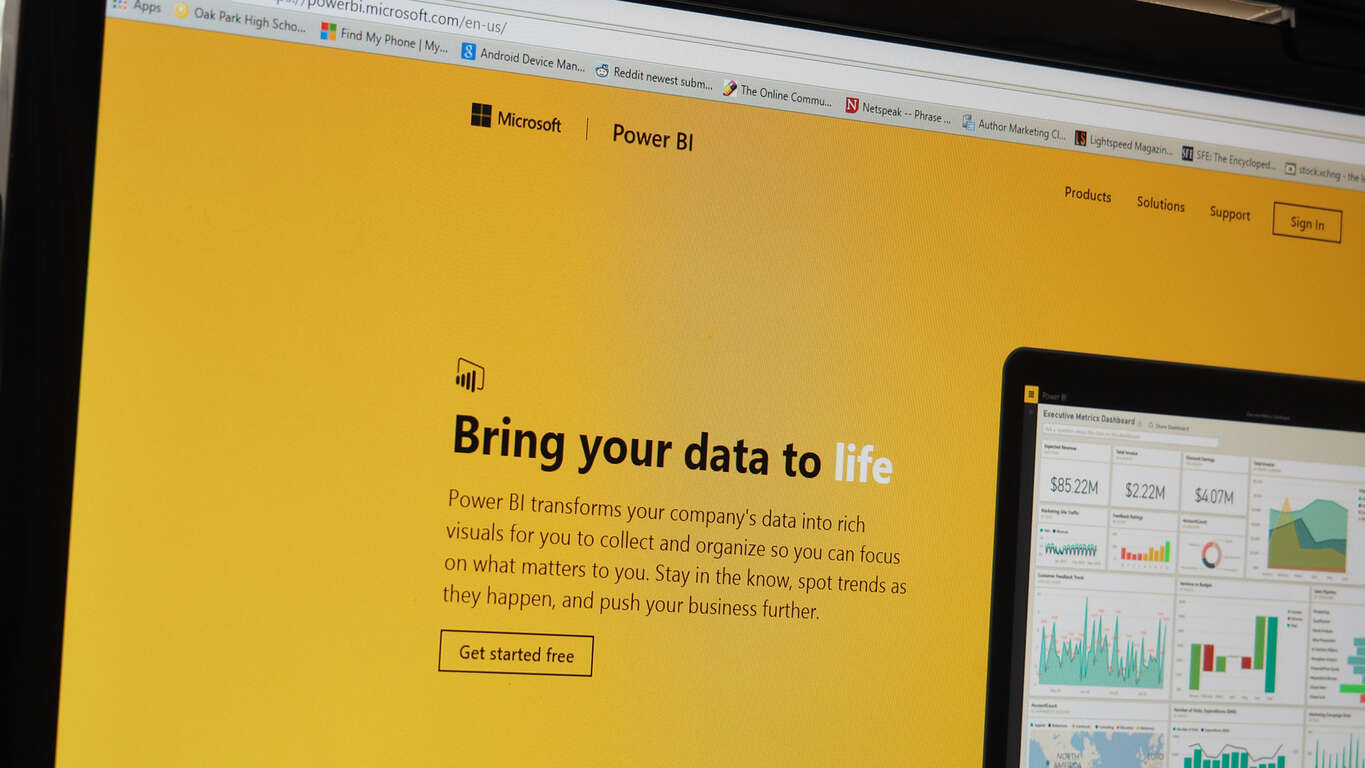
Microsoft's Power BI service massive new update improves formatting and visualizations

Fans of Microsoft’s cloud-based business analytics service, Power BI, will find a happy little update in their stockings this Christmas. Microsoft recently released a rather significant update to Power BI that includes changes and improvements to Report Authoring features.
Specifically, the Power BI team claims improvements to Report Authoring capabilities in Power BI Desktop. The new changes to Report Authoring are also supported in the Power BI service for consumption whatever light editing might be done. Much of the improvements involve formatting options being added, along with a few new visualizations intended to improve usability.

  1. Format data labels per category series

We have added more options to allow full flexibility in formatting charts where multiple measures are displayed. With this update, it is possible to format each measure within the chart differently.
In order to achieve this, users can enable the “Show All” option within the Data Labels section of the Formatting pane for any given visual where two or more measures as used in the Values section. This allows users to specify formatting settings for each of the measures.

2084.1

  1. Change number of decimal places showed in visuals

Users can now customize the number of decimal places showed in visuals (i.e. Data Labels). This option is available in the Formatting pane, under the Data Labels section.

  1. Change text size in visuals

It is now possible to change the font size for text displayed in visualizations. This Text Size option is available in the Formatting pane.

  1. Ability to lay out visuals accurately (alignment, distribute, size, position)

In this update, we’re introducing a number of new features in Power BI Desktop to allow users to lay out visuals accurately. These new features are:

  • Alignment Options: It is now possible to align two or more visuals by using the new Alignment options (align to left, center, right, top, middle, bottom).
  • Distribute Options: In addition to controlling the alignment between two or more visuals, users can also distribute three or more visuals, vertically or horizontally. This will ensure there is the same space between the visuals selected.
  • Size & Position: The Formatting pane now includes the option to set the exact size (width, height) and position (X, Y) for each visual. These options are available under the General section for any given visual.


Other improvements include Format options being copied over from Format painter, and visualization enhancements such as the inclusion of a visual indicator on the table column headers, stacked area charts, hover-over tooltips for area and line charts, and reference line creations. With this being such a massive update to Power BI, the list of improvements goes on at length covering other items such as a new Preview Feature, improved data tables, an optimized Home ribbon layout, new data modeling, more options to control data connectivity and more.
The update is available now for current customers, and Microsoft is also encouraging users to sign up for Microsoft’s Data Insights Summit on March 22-23, to meet face to face with other Power BI users as well as one-on-one meetings with its engineering teams.

Microsoft partners with the American Council of the Blind for more powerful assistive technologies

Microsoft has taken to their website to announce a partnership with American Council of the Blind (ACB) to improve accessibility to various Microsoft products for visually impaired individuals.

“Having access to information through accessible technology is critical for our members as they pursue education, employment and perform everyday tasks,” – Eric Bridges, Executive Director of the ACB.

The partnership will see Microsoft having access to valuable user experience data from the ACB. The data will then be used to develop assistive technology, as well as improving the usability of Microsoft’s software. The response to the partnership has reportedly been “incredibly positive.”

Microsoft’s solutions, given their ubiquity in the productive world, has had a long history of catering to people with various disabilities. From built-in text-to-speech in Windows, to voice and motion control with Kinect, Microsoft’s technology is constantly evolving to not leave anyone behind. Projects like these showcase an inspirational Microsoft, and we’re excited to see how far the company will go to fulfill its mission of ’empowering every person and every organization on the planet to achieve more.’

Microsoft enters into joint venture to bring Windows 10 to China's public sector

China has always been a tough nut to crack for Western tech companies due to domestic protection policies and heavy-handed governmental controls.  Microsoft, in particular, has been at the pointy end of the Chinese government’s attention as China tries to break free from the reliance on the tech giant’s universally dominant software, namely Windows and Office.
Of course giving up on such a large potential market is not an option, and Microsoft’s latest effort in rekindling its relationship China is a joint venture that will increase Windows 10’s adoption in the Chinese governmental sector. The news was announced on the Windows blog.
“Provisionally” called C&M Information Technologies (C&MIT hereafter), the new joint venture is established in partnership with China Electronics Technology Groups, with roots from a previous announcement back in September. C&MIT will exclusively license a custom, government-approved image of Windows 10 to the China’s government and state-owned enterprises, provide related services and supports, and collect feedback to further update the specialized Windows 10 image.

“..this venture signals the possibility for new opportunities for Windows 10 in the many government entities in China.”

Microsoft commands a significant presence in the Chinese desktop OS market, despite not making much revenue out of it due to the country’s piracy situation. On the mobile front however, Microsoft’s market share is all but non-existent, ceding entirely to Android and iOS. As Windows 10 carries Microsoft’s unified vision across all of it current and future platforms, it’s no wonder the company feels the need to push adoption of the OS.
Previous attempts include a partnership with leading social network and gaming service Tencent, internet security giant Qihoo 360, Lenovo, and search behemoth Baidu. With the newest joint venture, Microsoft is tackling one of its key business areas in all countries, which is the governmental sector.
After a brief stint, the softening tension between the company and the Chinese government was seemingly hinted at by President Xi Jinping’s visit to Redmond, where he met with Microsoft’s founder, Bill Gates, as well as its current CEO, Satya Nadella, among others. It looks like, step by step, Microsoft is succeeding changing its image in China for the better, and we are looking forward to its further advance in the market.

Pandora Releases its App for Windows 10

Pandora made a comeback to Windows 10 Mobile platform a few weeks ago, with its new app, which also worked in Continuum. And now, a popular radio player expanded its range across all Windows 10 platforms, as it delivered a new app for Windows 10 PCs

Pandora Windows 10 App Arrives to PCs and Brings a Strange Issue

If you already used the mobile version of the app, you won’t notice a lot of changes in the PC version, as it’s only adapted to the PC display, and a couple more features are added. It also has integrated lock screen support, which is a nice touch by the developers.

There’s of course a Live Tile support, which allows you to pin your favorite radio stations to the Start Menu. You can also see what song is currently playing on your pinned Live Tile. It looks like integrating Universal apps with Windows 10’s personal assistant, Cortana is becoming a trend these days, as Pandora also offers you an option to play your music by telling commands to Cortana. Another nice addition is the ability to run Pandora in Kid’s Corner, and automatically filter the explicit content.

We also have to report about a strange issue with newly-released Pandora app that a few users noticed. Namely, when you minimize the app, it stops playing music. We remind you that users of Microsoft’s own music service, Groove Music encountered the same issue this summer. We hope the developers will soon resolve this problem with the update soon, in the meantime, you can try with solutions that helped users to solve the minimizing problem with Groove Music, hopefully some of them will work for Pandora, as well.

Let us know if you’re thrilled about the release of Windows 10 Pandora app in the comments. Or you prefer some other radio playing/music streaming services, like TuneIn?

Garmin Connect Mobile App Comes to Windows 10 Mobile

Garmin is one of the most popular manufacturers of car navigation system, but it also cares about your fitness. The company released its new Garmin Connect Mobile app for Windows 10, which works with Garmin fitness devices. Besides the regular sync, Garmin Connect Mobile app allows you to upload to the cloud, by syncing with user’s device via Bluetooth.

“We’re excited to today announce Windows 10 compatibility for Garmin Connect Mobile, an intuitive application where Garmin users can easily find the information, data and features that are important to them.” – Garmin Official Blog

Garmin Connect Mobile Brings Some New Features and Cortana Integration

Garmin Connect Mobile comes with a new, modern design, with customizable user interface. The app is very easy to navigate, and it features daily snapshots, leaderboards and a newsfeed. And of course, there’s a progress tracker of your training, which allows you to track all your activities.

Just like most of the newly released app, Garmin Connect Mobile is integrated with Cortana. You can use Windows’ virtual assistant to search for your activity data from the app, like for example: “How many steps did I take yesterday”

The app supports Microsoft Live Tile, as you’re able to pin some of your stats to the Start Menu, including active calories, last activity information, how much sleep you got the previous night, how many steps you have taken toward your goal, etc.

And finally, the new Garmin’s app allows you to share your activities and leaderboards to other users, as well as participate in weekly Challenges where you compete with other users in a certain fitness category, or activity.

You can check for the app in the Windows Store, but it looks like it still isn’t available for download. However, the app probably just hasn’t fully propagated yet, and it should become available shortly.

What’s your number one choice for fitness tracking? Garmin, Fitbit, or something third? Tell us in the comments.

Minecraft Holiday Skins Pack now available for Windows 10 and Pocket Edition

Mojang and Microsoft have just released a special Holiday Skins Pack for the Windows 10 Edition Beta and Pocket Edition versions of the popular Minecraft video game franchise. The Holiday Skins Pack contains 15 different skins to get gamers in the Christmas mood and allows them to customize their in-game characters. Here’s the complete list of content in the pack:

  • Gingerbread Creeper
  • Tomte
  • Casual Comfy
  • Snug Snoozy
  • Warm Wooly
  • Puffed Padded
  • Parka?
  • Jumper?
  • Mother Christmas
  • Father Christmas
  • Santa Clause
  • Mrs. Claus
  • Toy Crafter
  • Tasty Gingerbread
  • Red-Nose

The Holiday Skins Pack can be bought digitally for US$1.99 while the Warm Wooly and Jumper? Skins can also be bought separately for free. To coincide with this release, a special Mojang/Microsoft livestream is planned for December 18 at 10 a.m. PST via the official Mojang YouTube channel. Specific details have yet to be announced.
Last month, Microsoft and Mojang released a massive collection of skins for the Xbox One version of Minecraft which came with several holiday-themed items as well as some of the previously released DLC packs. Are there any skins you would like to see in a future update? Let us know in the comments below.

Minecraft for Windows
Developer:
Microsoft Studios
Price:
Free


‎Minecraft
‎Minecraft
Developer:
Mojang
Price:
$6.99+


Minecraft
Minecraft
Developer:
Mojang
Price:
$6.99

Skype, People Messaging and Video Apps Brings UI Improvements and New Emojis

Microsoft recently brought Universal Skype apps (Messaging, People, and Video) to Windows 10 with the November Update, and now we have the first update for this ‘pack.’ This is an UI update, which brings some additions and improvements to the user interface of Skype apps.

The update has been delivered silently, as the Windows Store page of these apps doesn’t show any changelog, but the change in the version number is more than noticeable, as it went from 1.11.19004.0 to 2.12.9011.0. But although the changelog is not presented, users found out the changes by themselves.

Update for Skype Apps Brings UI Changes and New Emojis

The first noticeable change is an enhanced user experience of Skye Messaging app in ‘phablet mode,’ as the contact pictures are now larger, and there are new animated emojis in the offer.

Just like the Messaging app, People app also received some improvements, as it now contains a smaller AppBar and individual refresh button for every single contact. The app version also went from 3351 to 3451.

Although these apps are available for more than a month on Windows 10, they’re still in the Preview version, as Microsoft wants to develop them even further. If you want to participate in the developing process, and give Microsoft some suggestions about new features, or tell the company what you don’t like (or like) about these apps, you can submit your review through Windows Feedback.

These apps are present on Windows 10 Mobile as well, but the version number of Messaging app is 2.12.11012.0, which indicates that this update has been delivered to the PC version only, as version number is slightly different.

Tell us in the comments, what do you think about new Skye apps? Do you prefer using them over the original Skype program, or you’re still going old school?

Windows Hello gets support from Tobii eye-tracking platform

Microsoft’s Windows Hello has yet to take the world by storm, and early hardware roll out indications seem to posit that it will be a Windows feature that may grow slowly over the years. Aside from a few nascent quirks, Windows Hello adoption currently suffers from a lack of hardware support as well extensibility of the feature.
While Microsoft is working on partnering with more hardware vendors to up their support for the new authentication feature, the company is also looking for software to expand Hello’s feature set. Microsoft and Tobii recently announced their joint venture in validating the global leader’s eye-tracking tech now supports Windows Hello facial recognition.
The recent validation means that device manufacturers who use Windows 10-ready biometric authentications in combination with eye tracking functionality will now be able to do so on the same sensor across all of their device offerings. Tobii’s eye-tracking platform also highlights how granular Windows Hello evolution can be in the future. Starting out, most devices with Windows Hello used mere facial composting and recognition to identify users. However, with Tobii’s world class eye-tracking platform, Windows Hello can now authenticate using a bevy of identity points, adding yet, another layer of protection to a user’s account.

Available now for peripheral eye trackers on the Tobii IS3 platform, including Tobii EyeX and SteelSeries Sentry devices, facial recognition support for Windows Hello is intended to be standard on all future Tobii eye tracking platforms, including the recently announced Tobii IS4 platform with Tobii EyeChip™.”

Tobii Tech, the business unit within Tobii that developed Windows Hello support, is encouraging device makers to take its eye-tracking platform for a spin. For any existing devices that already incorporate Windows Hello support, all that is needed to try out Tobii’s eye-tracking support is the addition of a Tobii EyeX Controller.
Perhaps, if the tech matures enough, we Windows 10 Mobile devices may also see Tobii eye-tracking tech in their devices shortly.

Microsoft updates SmartScreen to help keep 'drive-by' attackers at bay

Internet security remains a hot topic, and likely always will as technology continues to become ever-more entwined in our personal and professional lives. Microsoft understands this and continues to update its various platforms with new and enhanced security capabilities. The Microsoft Blog announced today that it’s updating the SmartScreen technology that works inside of Windows 10 and Microsoft browsers to protect against drive-by attacks.
First, what exactly is a drive-by attack? Microsoft has a description handy:

Drive-by attacks are malicious web attacks that tend to start on trusted websites, targeting security vulnerabilities in commonly used software. What’s more, they often don’t require any user interaction – so there’s nothing to click, nothing to download – and infection is usually invisible.
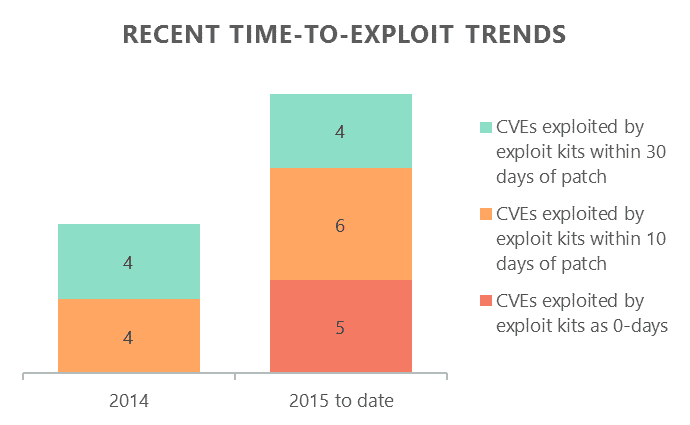
Drive-by attacks make use of services known as exploit kits (EKs) to scale effectively. These are tools that first check your PC for software vulnerabilities (tracked publicly as CVEs) and then try to exploit them. The vulnerabilities can be either newly discovered ones – also known as 0-days – or ones that have already been fixed in popular software. Over the past year, we’ve seen EKs moving faster to target vulnerabilities in apps with available patches, while also exploiting 0-day vulnerabilities more frequently as well.

Trends in time-to-exploit
Recent trends in how long it takes for CVEs to be exploited.

The concept behind SmartScreen is to prevent these threats before a machine is infected, with or without an available patch. This means catching drive-by attacks before the parsing and rendering of web content–precisely what SmartScreen has evolved to accomplish. Performance is maintained by the use of caching and limiting SmartScreen calls to only those instances where malicious content is a high probability.

SmartScreen Warning Page
SmartScreen makes it quite obvious when there’s something malicious going on.

Also, SmartScreen can notify when a frame has malicious content, rather than entire pages as in past iterations. This avoids implicating a host web page when only an embedded frame is infected.

SmartScreen malicious frame warning
SmartScreen can let you know when a frame contains malicious content while leaving the rest of a page alone.

Of course, ongoing reporting is vital to security improvements, and Microsoft has a number of ways to provide feedback:

– Microsoft Edge on Windows 10. Tap or click the More menu, choose Send feedback, and then choose Report unsafe website.
– Internet Explorer 11 on Windows 10. Tap or click the Tools button, point to Safety, and then choose Report unsafe website.

Follow @MSEdgeDeve on Twitter to keep up with Edge enhancements and interact directly with the team, and we’ll continue to keep you update on improvements.

Microsoft Research pulls in another award, this time the Marr prize for computer vision research

It’s almost been a whole week since someone at Microsoft won a big award for revolutionary research, and that’s just peculiar. Thankfully, Antonio Criminisi and his team have managed to win another award since then – and in the same field, no less. This award, the Marr prize, is something that’s awarded once every two years to those who make strides in the field of computer vision. Antonio Criminisi and his team have done just that, doing Microsoft proud by putting out a paper that questions the established conventions of the field and improves upon them.

Antonio Criminisi
Microsoft’s Antonio Criminisi.

The paper in question, Deep Neural Decision Forests, came out in order to shake the foundations of research in the field of computer vision, which has recently been in something of a rut. Recently, researches in computer vision designed a system of image recognition that managed to use neural pathways – inspired by that of humans – that could help machines process information quickly and accurately, going so far as being able to ask the machine questions about an image and have them answer accurately.
With the success of that research taking the field by storm, many researches started getting a sort of tunnel vision, and stopped thinking more broadly about the state of computer vision as a field. The folks in Antonio Criminisi’s team, however, value diversity in their research, and decided to take another approach to try and improve upon the work being done with neural pathways.
The paper mixes the pre-existing knowledge of neural pathways with “random forests,” a set of decision trees used to solve problems. With this combination, Criminisi’s team was able to make the neural pathways much more efficient. Using this new research, they were able to revitalize the theories involving neural pathways in computer vision, and in so doing, revitalize the field as a whole.
According to Cristopher Bishop, Microsoft Research Cambridge’s laboratory director, the combination of advances in neural networks and precious research is quite significant:

“This prize-winning paper unites these two technologies in a single architecture, creating an opportunity to deliver high accuracy at low computational cost,” (Bishop) said.

Microsoft Research continues to make strides in moving technology forward. As always, we’ll try to keep you abreast of the company’s accomplishments in furthering important technologies like computer vision.

Microsoft updates Kinect developer preview on Windows 10

If you’ve been intending on developing a product with Kinect in mind, you may be interested in knowing that Microsoft has released a new developer preview for Kinect on Windows 10. While Kinect hasn’t been getting all that much love recently – the Xbox One’s system sellers have bee consistently not making use of the kinect – it’s still an impressive piece of technology at its core, and one that Microsoft realizes should continue to be developed for.
By using Kinect with your Windows 10 device, you open yourself up to a few features you might not otherwise have. For instance, beyond just being a webcam and a microphone, the Kinect is a device that’s compatible with Windows Hello. If you’re not one of the people who was already enjoying Windows Hello on a high-end Surface, the Kinect’s going to be opening up the opportunity for you to enjoy one of the more entertaining features of the OS.
The blog post from MSDN shows off in pretty decent detail how you can go about installing the software if you’re interested. Once you run the Kinect Configuration Verifier and set up the connect (the blog recommends it be placed as close to the bottom or top as possible, and kept .5 meters from the position of your face) you’re free to start the installation process.
Beyond explaining how to get the new SDK, the blog post spoke about the new webpage for it in the Windows Dev Center, and reminded developers that they can stop by Channel 9, a series of videos where Microsoft employees run down the latest relevant discussions about Windows tech. If that’s not enough, developers can check out the Microsoft Virtual Academy, where they can test their knowledge on Microsoft devices with free training sessions.

Windows 10 Insiders build 11082 with changes to OneCore, faster Insider builds on the way

Microsoft released Windows 10 Insiders build 11082 a few minutes ago, making its latest Windows Insider code available to the Fast Ring. This build doesn’t include any readily apparent changes, but rather focuses on firming up the underlying Windows 10 fundamentals.
Here’s what’s up, by way of King of the Red Button Gabe Aul:

With this build, you won’t see big noticeable changes or new features just yet. Right now, the team is focused on product improvements based on the feedback we’re hearing on the November update to Windows 10. This includes the changes that have also been going out as cumulative updates through Windows Update on your PCs running the Windows 10 November Update as well as on phones running Windows 10 too. We’re also working on some structural improvements to OneCore, which is the shared core of Windows across devices. Essentially, OneCore is the heart of Windows, and these improvements to OneCore make building Windows across PC, tablet, phone, IoT, Hololens and Xbox more efficient. We’re doing some code refactoring and other engineering work to make sure OneCore is optimally structured for teams to start checking in new features and improvements in the new year.

That all makes perfect sense, given that it’s the end of the year and everyone is getting ready for 2016. To that end, Gabe also provided an update on the Windows Insider program going forward. Essentially, Fast Ring Insiders can look forward to builds coming faster and faster as 2016 kicks off.

One of the things that I have heard many times from Insiders in the Fast ring is that they want to see a faster pace of build availability. We’ve been considering how we want to respond to this feedback, and in January we expect to pick up the pace. To do this, we are re-evaluating the ring promotion criteria to allow more builds to reach Windows Insiders. The new criteria will be much closer to our criteria for flighting to our internal rings, which means more builds will pass it and be released externally to the Fast ring. This also means however that the builds we release to the Fast ring may include more bugs and other issues that could be slightly more painful for some people to live with. It’s a tradeoff – as the thing that throttles the rate of builds is the promotion criteria.

This means more bugs, more problems, and more hassle to go with quicker access to new features and performance enhancements. The process to slow things down is simple: open Settings > Update & Security > Windows Update > Advanced options, then slide over to the Slow Ring under “Get Insider Preview builds.”
Finally, you’ll need to head over to the Insider Hub to get a list of known issues, which will be the practice going forward. If you’re running a Windows Insider build, check out the Insider Hub and see what’s not going to work well.
And don’t forget: you can take a Windows Insider survey and get entered to win your very own Surface Book.

Microsoft adds new features to Family Safety, drops 3rd party browser support

It was three years ago when Microsoft introduced Kids Zone in Windows Phone 8, but since then we have not heard the Redmond based company promote much else about family features in Windows mobile, or Windows for desktops for that matter. That being said, Microsoft offers a slew of family featuers that allow parents to customize their children’s Windows experience based on the child’s age. This is set up through Microsoft’s Family Safety page and is linked directly through to the child’s Microsoft account (the one in which parents will want to set up for their children might I add). With Windows 10, Microsoft is looking to lend a hand to the busy parents of the world, updating their Family Safety features for both PC’s and mobile devices.
Family Safety
Through the Family Safety site, parents can set screen time, limiting the amount of time their children use a Windows-based device, and with the latest update, parents can now add screen time extensions, giving their children 15 minutes to 8 hours more allowances on their PC or tablets. These screen-time settings are automatically set for children under 8 years of ago and can be manually applied to an older child’s account as well.
Through the Family Safety webpage, parents now have a one-stop-shop for customizing a child’s web experience. These restrictions and limits work with both Internet Explorer and Microsoft Edge and apply to both Windows 10 PCs and Windows 10 Mobile devices. Microsoft has changed their policy on browsers, and now only supports Internet Explorer and Edge, a change explained on Family Safety’s FAQ page:

Going forward, web browsing limits and web browsing activity reporting will now only apply to Microsoft Edge and Internet Explorer. Until now, our family settings have worked on other browsers, but the companies that provide those browsers frequently make changes, which can break the technology we created for their last version. Since we don’t know about those changes before they happen, we can’t fix those breaks fast enough to keep kids protected. Therefore, we will focus on making family settings work seamlessly for Microsoft products and services, including Microsoft’s web browsers, Microsoft Edge and Internet Explorer. We still provide web browsing limits on Microsoft Edge and Internet Explorer, and will only report web browsing activity from those browsers. We’ve extended that protection to Windows 10 mobile devices, too. To keep your kids from using browsers not supported by Family, choose Block where you see those browsers in each child’s Recent activity.

For children setting up a Windows 10 Mobile device, all previous settings for their account will carry over to their new phone. This will include parent access to any recent activity on their device, web browsing limits and blocks, limits on media including games, music, and movies, as well as “Find your child” feature that allows parents to locate their children via GPS.
Microsoft has even made it easier and safer for kids to browse the Windows Store. Parents now have the option of providing their children with money without adding their own credit card to the child’s account. Parents also no longer have to worry about the content from within the Windows store. Kid-friendly store browsing will only display age appropriate content from within the Windows Store in addition to notifying parents of all recent purchase made.
As a parent to a 7 year old who wants a Windows Mobile device like her dad, these family features make the idea of placing a phone into her hands a little less terrifying. Whether or not she is ready for a device is another story altogether, but it is nice to know Windows 10 and Windows 10 Mobile will make that decision much safer. If you have any children using Windows 10, let us know if you these updates to Microsoft’s Family Safety features are right for you.
 

LG launches new monitors and a Windows 10 laptop ahead of CES 2016

CES 2016 is just around the corner and manufacturers are gearing up to introduce their new gear and technologies. Ahead of the Consumers Electronics Show, LG has introduced a new range of monitors and laptops which will be showcased at the big event next month. LG is set to showcase 21:9 UltraWide monitors, 4K gaming monitors and Ultra PC gram laptop designed for gamers and digital professionals.

“We are always thrilled to be able to show international audiences our newest monitor and PC innovations at CES,” said Jang Ik-hwan, head of the monitor and PC division at LG Electronics. “LG is always innovating to exceed customers’ expectations by creating products that provide breathtaking aesthetics and unparalleled user experience.”

Included in the list is the 34-inch 21:9 UltraWide Monitor (model 34UC98) featuring Thunderbolt 2 boasting a resolution of 3,440 by 1,440 pixels with IPS display technology. The manufacturer will also showcase other 4K powered UltraWide Monitors, utilizing AMD’s advanced FreeSync technology for seamless gaming and working experience.
LG will also showcase a 27-inch QHD display monitor which will come with USB Type-C port, and features the company’s “proprietary color-enhancing IPS display technology” to offer sharp display while performing a variety of tasks, whether its gaming or any other work.
Next up is the LG Gram 15, which comes with a 15.6-inch display but it’s “barely larger than a conventional 14-inch laptop.” The company touts it as the lightest 15-inch laptop weighing only 980 grams — this is extremely helpful especially for people whose involves a lot of travelling. As for the specifications, it will come with the latest 6th Generation Intel processors and Windows 10 pre-installed out of the box.
The Consumers Electronics Show is one of the biggest electronics exhibition which will kick off on January 4th in Las Vegas. Customers interested to give the new LG devices a test run can visit the company’s booth #8204 from January 6th to January 9th.

PicsArt Photo Studio is now a Universal Windows 10 app

It’s not just NBC’s Breaking News app which received the “universal app” status, the popular image editing app PicsArt has, too. This means that you can now use the app on any Windows 10 powered device, whether it’s a tablet, smartphone or a tablet.
The app offers a variety of interesting features to give users the ability to add filters and various effects to their images. There are hundreds of photo editing tools to play around, as well as advanced brushes and drawing tools, which can be used to enhance the images. Users can also create photo collages and communicate with other designers who are using the app on their devices.
The app description says,

Creativity is more than just a photo filter—PicsArt provides you with everything you need to make amazing photo edits, artistic camera shoots, photo collages, create digital drawings, and communicate with other creatives who have joined our mission to beautify the world.

Here’s a summary of the features the app has to offer:

  • A global community of creatives
  • Hundreds of photo editing tools
  • Customizable filters and effects
  • Text, sticker, and image overlays
  • Collage maker
  • Photo camera
  • Drawing and painting tools with layers
  • Advanced artistic brushes

Head over to the Windows Store to grab the PicsArt app, and let us know about your thoughts if you’re trying it out for the first time.

Picsart Photo Editor
Developer:
PicsArt Inc.
Price:
Free

NBC's Breaking News is now a Universal Windows 10 app

NBC’s Breaking News app is now available for download as a universal app for Windows 10 devices with several useful features and enhancements on board. The app bring all the latest happenings around the globe, offering users with real-time updates about the events taking place allowing users to get the latest updates in minutes. Furthermore, the app also brings push notifications for major and emerging stories.
The app still lacks some of the major features that have made it popular on other platforms, including live video and proximity alerts, but it’s good to see the app updated, which hasn’t happened for Windows since back in 2014.
The app is now live for Windows 10 desktop, although it doesn’t appear to be available for Windows 10 Mobile just yet. Head over to the Windows Store and grab the updated NBC Breaking News app for your Windows 10 device.

Breaking News
Breaking News
Price:
Free

See how the Microsoft Surface Pro 4 improves creativity

For designers being creative is in their blood. Inspiration can come from a variety of things from what they eat to the places they travel to the things they see with their own eyes; inspiration is everywhere they go. When such inspiration hits, we use these moments to expound upon an idea, draw up a new sketch, design a new pattern or capture a moment in a new way. For these moments being able to quickly record this inspiration is key to their success. The pen and paper for people of this profession has for years been a go-to item. However, with the rise of technology, how would a device like the Surface Pro 4 help a professional become more creative and achieve a higher level of work?
Microsoft teamed up with interior designer and blogger Justina Blakeney, a graduate of UCLA in World Arts and Culture, to use the new Surface Pro 4 in her line of work. With the launch of the Surface line, Microsoft has a goal of giving creative professionals the ability to manifest their ideas wherever they go. With the ability to run design-oriented programs like Adobe Photoshop and Illustrator, a designer like Justina Blakeney has the power to create at any moment.


Having a design geared towards portability and light weight the Surface Pro 4 gives its owner the opportunity to lighten their load. Offering the full power of Intel Core processors and Windows 10, designers have all the capabilities of a much heavier laptop, but with exciting additional features like pen and touch support. Adobe has partnered with Microsoft as well to update their popular applications to take advantage of the touch and pen technology of the Surface Pro 4.
Having  a full-powered PC in the weight and design of a tablet, natural Pen support and a touch-enabled interface gives designers the ability to capture new ideas whenever inspiration hits. Microsoft and designer Justina Blakeney have together proven once more the power of the Surface Pro 4 in the professional field.