Watch Microsoft's WPC 2015 Vision Keynote LIVE here

WPC 2015

Microsoft is holding it’s annual Worldwide Partner Conference Vision Keynote today in Orlando, and those who are unable to attend the event can watch LIVE over the web. As per usual, we’ve embedded the live stream below for your viewing pleasure. Make sure you check out the comments section and let us know what your favorite announcements are throughout the event.

The event kicks off at 8:45am EDT, or 1:45PM BST.

Microsoft to hold press conference on September 4th at IFA 2015 in Berlin

Microsoft set to hold a press conference on September 4th at IFA 2015 in Berlin

IFA is a leading technology trade show for consumer electronics and home appliances, held every year in Berlin, Germany in September. This year, the event is set to take place between September 4th and September 9th, with many key players expected to take the stage to announce their new products. Microsoft was missing in the past few shows, holding separate events for product launches, but it seems the company won’t miss it this year.

Microsoft announced its press conference at IFA 2015 (via Windows Central) will take place on September 4th at the CityCube event hall on the Messe Berlin fairgrounds in Berlin, Germany. Nick Parker, corporate vice president, OEM Division, Microsoft, will deliver a keynote titled “Windows 10 Lights up New Devices” which will focus on several upcoming Windows 10 products, including tablets, gaming devices, 2-in-1 PCS, and more. 

“It’s about the software and the experiences it enables on devices!” said Jens Heithecker, IFA Executive Director. “Windows 10 is coming – with new capabilities and experiences for consumers and businesses. “We are excited to see Microsoft take the keynote stage at IFA to give us a glimpse at how its partners plan to incorporate that future into the devices we rely on for work, home and play.”

Before you get too excited, Nick Parker doesn’t deal with phones so it’s unlikely that the keynote will be focused about Windows 10 Mobile handsets. But, we’ll definitely see new Windows 10 machines and PCs at the big event in Berlin. As for Windows 10 Mobile handsets, it’s also expected to launch in September/October so there’s a possibility that Microsoft may hold a separate event, focusing solely on Windows 10 Mobile and devices.

Nick Parker also took the main stage at the Computex 2015 in Taiwan last month, and launched a number of new Windows 10 devices. Anyway, we’ll bring all the latest happenings from the show floor on September 4th so make sure to mark your calendars if you don’t want to miss anything related to Windows 10. 

This Week in PC Hardware: Processors throttle down, graphics boost forward, and storage scales up

This Week in PC Hardware: Processors throttle down, graphics boost forward, and storage scales up

Every week, we bring you the latest in PC hardware news, keeping you up-to-date with the interesting developments in the industry. We bring together the major announcements of new processors, graphics, motherboards, memory, displays, and other developments. So read on for your dose of This Week in PC Hardware.


Processors

This Week in PC Hardware: Processors throttle down, graphics boost forward, and storage scales up

There’s no good news for processors this week, only bad news from both major players. Starting with Intel, a couple of weeks back, we caught wind that the company was breaking away from its tick-tock release cycle and delaying its 10nm Cannonlake processors. Instead, the company would release Kaby Lake as the successor to Skylake. Because of the delays and pushbacks that started with Broadwell, Intel’s entire lineup of future processors will also be pushed back.

A recent report from DigiTimes claims that Kaby Lake will now be delayed from its intended early 2016 launch to September 2016 for consumer processors, and January 2017 for enterprise processors. These delays may not mean much for consumers as Intel nonetheless continues to deliver more efficient and more powerful processors, it is a testament that the industry is unable to mass produce chips using newer manufacturing processes.

This Week in PC Hardware: Processors throttle down, graphics boost forward, and storage scales up

Over at team AMD, the company has officially announced that it is cancelling all of its 20nm processor plans, taking a $33 million hit for a technology node transition from 20nm to FinFET. Last year, the company announced plans to produce the first hybrid x86-ARM APUs with integrated Radeon graphics, these SoCs were to be built using a 20nm process but it seems that’s not going to happen before AMD further develops them, and especially now that all 20nm plans are canceled.

The company has also lowered its revenue expectations for its current APUs. AMD is anticipating an 8% decrease in revenue in Q2, translating to around $950 million. The decrease is associated with lower demand for consumer PCs, which as a result, OEMs are ordering less APUs from the company. Although, the company is expecting next quarter’s results to be in line with its current estimates.

This Week in PC Hardware: Processors throttle down, graphics boost forward, and storage scales up

There is a silver lining to all this misery though. IBM, in collaboration with Samsung and AMD spin-off GlobalFoundries showed off the first fully-functioning 7nm FinFET chip. The chip isn’t pure silicon like other processors, it uses a silicon-germanium mix that allows for faster transistor switching and lower power requirements. Just to put into perspective how small 7nm is, look really, really closely at your fingernail and count up to 7 seconds. Your fingernail has now grown larger than 7nm. Did you notice? No? Maybe that’s because 7nm is just over the size of 3 stacked strands of DNA. It’s very miniscule, let’s leave it at that. It would make way for processors packing up to 20 billion transistors. That’s lot of power, in a very small, energy efficient package. Unfortunately, IBM has declined to estimate when the tech will be viable for mass production.

Graphics

This Week in PC Hardware: Processors throttle down, graphics boost forward, and storage scales up

What was a rumor last week, is official now. AMD and its partners have officially announced the Radeon R9 Fury. As rumored, this GPU is a cut-down version of the flagship Fury X. It features 3584 stream processors (compared to the 4096 on the Fury X), 64 ROPs, 4GB of high-bandwidth 4096-bit memory, and clock speeds of 1000 MHz and 500 MHz of the core and memory respectively.

Recent benchmarks show the Fury outperforming the NVIDIA GTX 980, particularly at 4K resolutions, where it just about matches the type of performance the newer GTX 980 Ti delivers. At $549, the Radeon R9 Fury is a bargain, with AMD once again hitting the sweetspot price-performance ratios it’s known for. Speaking of which, those of you on Windows 10 running an AMD graphics card, there’s a new Catalyst driver for you, we recommend you keep your drivers up-to-date for the best performance results.

This Week in PC Hardware: Processors throttle down, graphics boost forward, and storage scales up

NVIDIA partners have also been busy customizing the flagship GTX 980 Ti. Last week, we looked at one such offering from ZOTAC, which went crazy by factory overclocking the card by 25%. This week, Asus takes the spotlight, unveiling four new custom-designed cards. Soon, customers will get to choose from the ROG MATRIX, fitted with a custom PCB designed for extreme overclocking; the 980 Ti STRIX, which comes with a new DirectCU III cooling solution; the POSEIDON, which can be optionally water-cooled; and finally, the GTX 980 Ti 20th Anniversary Edition Gold Platinum to celebrate 20 years of GPU manufacturing at Asus. Details are scarce for most of these cards, so we don’t have info on detailed specs, pricing, or availability just yet, but we should hear more in the near future.

Displays

This Week in PC Hardware: Processors throttle down, graphics boost forward, and storage scales up

More curved PC displays! We saw one from Acer last week, and we have a new one for you to feast your eyes on this week. BenQ’s XR3501 is a 35” cinematic-widescreen display. It has a resolution of 2560 x 1080, a refresh rate of 144 Hz, 3ms response times, and a 2000:1 contrast ratio. Towards the back, it includes one DisplayPort 1.2 input, mini-DisplayPort, two HDMI 1.4, and analog input. Price hasn’t been announced yet, but it should be a lot cheaper than the $1000 Acer model considering it’s not 4K and doesn’t use AMD’s FreeSync or NVIDIA’s G-Sync technology.

Storage

This Week in PC Hardware: Processors throttle down, graphics boost forward, and storage scales up

Earlier this week, Samsung took the wraps of new 2TB drives. There’s nothing spectacular about the capacity, except for the fact that we’re talking about SSDs! The new 2TB EVO 850 and 850 Pro are based on Samsung’s 3D Vertical NAND and come in a standard 2.5-inch enclosure, meaning you easily install them in laptop computers. Read and write speeds for EVO 850 are 540 and 520MB/s respectively while the EVO 850 Pro comes in at 550 read and 520MB/s write. So they’re pretty fast drives.

The drives will be available in 50 countries and will cost $799.99 for the EVO 850 and $999.99 for the EVO 850 Pro. Certainly not cheap, but considering the capacity and speed, you may finally be able to use one SSD for all your storage needs. You may be wondering why the price discrepancy between the drives is so large despite the read/write speeds being very similar, that may come down to reliability. Samsung rates the EVO 850 at 5 years, or 150 terabytes written (TBW), but the EVO 850 Pro is rated at 10 years, or 300 TBW, so you get a much longer lasting drive.

That’s it for This Week in PC Hardware, and now it’s your turn. Let us know what you like or dislike from this week’s announcements in the comments section below. 

Windows 10 news recap: RTM sign-off, build 10166 and 10176, Windows Hello, and more

Windows 10 news recap: RTM sign-off, build 10166 and 10176, Windows Hello, and more

Yet another informative and exciting week of Windows 10 news has come and gone. Let’s take a quick look back at the biggest news stories of the week in a little feature we like to call “Windows 10 news recap.”

At the start of the week, we learned that Windows 10 RTM candidate build 10176 had been compiled and that RTM sign-off was imminent. For those that didn’t know, RTM stands for “Release to Manufacturing.” Generally, this means the software is complete, but with Windows 10, things are going to be a little bit different. Windows 10 RTM will be a build of Windows 10 that is stable and not buggy, and it will be missing a number of features that will be coming in later builds of Windows 10 as that is simply the nature of WaaS (Windows as a Service). 

For those curious how the sign off process works, our own Zac Bowden has an explanation: “Microsoft will compile a number of builds they consider ‘worthy’ of RTM, these are called RTM candidates. These builds will be tested, and if the builds are found to have no bugs or issues, will be then voted on by employees. The build which is voted for the most is then selected as the RTM build, and recompiled into the winmain branch. The build number then usually jumps to a number which is divisible by 16 and 100, like 10400.”

Screenshots of build 10163 leaked onto the internet at the start of the week, revealing nothing new. Microsoft also rolled out build 10162 to the slow ring for Windows Insiders. A few days later, Microsoft rolled out Windows 10 build 10166 to participants of the Windows Insider program. You can check out our hands on demo of the build below — showcasing game streaming, since there isn’t much else to show off that we haven’t already shown off.

Windows 10 build 10176 leaked onto the internet on Friday, and we also went hands on with this build. There are no new features in this build, but you will notice that there is no watermark (this is because the RTM will not have a watermark). Microsoft has also added the Windows 10 branding to the About Windows dialog. You can check out our hands-on demo of the build below. 

Microsoft rebranded Xbox Music to Groove earlier this week, and looks to reignite music on Windows 10. “The name Groove was chosen based on customer feedback from Windows fans, and it best represents Microsoft’s music strategy: to be fun, engaging and intuitive.” Joe Belfiore would further expound upon the necessity of Groove’s need for intuitiveness and how Xbox Music failed to accomplish that goal.

Alleged Windows 10 retail packaging box art leaked onto the internet, giving us a close look at what appears to be the retail box for Windows 10. You can check that out here.  

Microsoft has been working hard to beef up Windows 10 with enterprise-grade security, making sure that both consumers and businesses are protected from threats. One particular feature in Windows 10 is called Windows Hello, which allows users to seamlessly and securely log into their PCs. Check out the video below showcasing Windows Hello in action. Stay tuned for yet another exciting week of Windows 10 news!

Here's a video demo of the Windows Hello facial recognition feature in Windows 10

Here's a video demo of the Windows Hello facial recognition feature in Windows 10

Microsoft has been working hard to beef up Windows 10 with enterprise-grade security, making sure that both consumers and businesses are protected from threats. One particular feature in Windows 10 is called Windows Hello, which allows users to seamlessly and securely log into their PCs. Windows Hello supports three types of biometric entry, which includes fingerprint recognition, iris, and facial recognition. 

“With Windows Hello, you’ll be able to just show your face, or touch your finger, to new devices running Windows 10 and be immediately recognized.  And not only is Windows Hello more convenient than typing a password – it’s more secure!  Our system enables you to authenticate applications, enterprise content, and even certain online experiences without a password being stored on your device or in a network server at all,” Microsoft explained in an official blog post back in March of this year.

Using an Intel RealSense 3D Camera, the good folks over at WinSupersite have put together a video demonstration of Windows Hello on Windows 10. Thanks to the Windows 10 SDK build 10158 from two weeks ago, third party hardware can now use Windows Hello facial recognition. Check out the demonstration below.

Lenovo releases a PDF guide to help you get started with Windows 10

Lenovo releases a guide to help you get started with Windows 10

Windows 10 is set to launch in just a few weeks — it’s set to be made available globally on July 29th. The excitement is building up and Microsoft has already begun training retail professionals on how to sell Windows 10. Lenovo is jumping on board the hype train and has released its own guide on how to get started with Windows 10.

The guide is titled “Starting to use Windows 10” and helps Windows users find out everything new in the operating system. The 23-page guide is divided into different chapters, explaining various features and aspects of the new Windows 10 operating system. It’s divided into six chapters: “Unpack” Windows (OOBE); Microsoft account brings many benefits; The Start Menu and the Action Center; OneDrive extends your local storage; Windows Store makes getting apps easier; and Restore Windows. 

These are further divided into sub-categories going into detail of each aspect such as how to setup your new machine, benefits of using the Microsoft account on your computer, the return of the Start Menu and the Action center, pin apps, find them, how create a system backup, setting up OneDrive local drive on your computer, and lots more.  

As Lenovo explains, the operating system is a very important part of a personal computer and your experience correlates to your comfort levels with the operating system. Here’s how Lenovo describes the guide:

“The operating system is a very important part of a personal computer. Your experience with your computer will be at its best if you’re comfortable with the operating system installed on it. With that in mind, we have provided this publication to get you up and running with Windows 10. Once you feel more confident with the basics, you may refer to information provided by Microsoft to explore more advanced features of Windows 10. If there are conflicts between information provided by Lenovo and Microsoft regarding Windows 10, the information provided by Microsoft prevails.”

Stay tuned to WinBeta — we’ll update you as soon as the new operating system starts hitting existing computers. And as always, we’ll continue to bring you an extensive Windows 10 coverage.

Popular team management service Slack is "considering" a Windows 10 app

Popular team management service Slack is "considering" a Windows 10 app

Slack is a popular, real-time messaging application which give teams the ability to get in touch with each other, collaborate on projects and lots more. It’s more of a corporate app for business and a like to get together and communicate with each. The developer already has a Windows app which supports Windows 7, up to Windows 10 Technical Preview, but it seems the company is considering a dedicated Windows 10 app, as revealed on Twitter (via WMPU).

It’s good to see the developer working on its official app for Windows 10. There are apps for Android and iOS with the Windows Phone app said to be under development — there’s no official word about the launch of the app, but let’s just not lose hope.

Windows 10 is set to launch on July 29th, and since the company is considering an app for the new operating system — which they should — we may get to see it in the coming months. We’ll update you as soon as Slack releases an official Windows 10 app.

Video: Windows 10 RTM candidate build 10176 showcasing new changes

Video: Windows 10 RTM candidate build 10176 showcasing new changes

Earlier today, an RTM candidate of Microsoft’s upcoming operating system leaked onto the internet. Windows 10 build 10176 leaked in Chinese and is nearly identical to the official build available to Windows Insiders (build 10166). So what’s the primary difference between the two builds? Build 10176 is being treated like the RTM (Release to Manufacturing) build, as it was compiled as a candidate.

This is simply one of the builds Microsoft is compiling as a candidate for RTM. From what we’ve learned, this build did not pass testing as Microsoft has already complied newer builds. With that being said, build 10176 features code that is practically complete, except for a few bugs here and there.

There are no new features in this build, but you will notice that there is no watermark (this is because the RTM will not have a watermark). Microsoft has also added the Windows 10 branding to the About Windows dialog. You can check out our hands-on demo of the build below. Enjoy! As a reminder, Windows 10 is set to be released on July 29th.

Microsoft Azure announces expansion in cloud hybridization and hyperscaling for customers

Microsoft expands hybrid cloud, hyper-scale with Microsoft Azure announcements

Microsoft has been developing more and more of their infrastructure and services to support enterprising businesses new and old, and now is no different. Microsoft has announced that they are expanding cloud hybridization as well as cloud hyperscaling, which will bring unprecedented speed, economy, and accessibility for all users and consumers—and for any environment or platform.

What is Cloud Hybridization? 

First, a brief explanation of private and public clouds, which a hybrid cloud is made up of.

  • A public cloud is a cloud that quickly handles single or homogeneous and easily scalable services. When a public cloud is used, it’s generally for a wide variety of people and uses lots computing, so typically a public cloud services things like emails or photos- these things are especially scalable services for maximizing cost efficiency.
  • A private cloud is a small internalized cloud focusing on security and control. Automation is usually prioritized  to increase the manageability and predictability of the system, and due to the nature of a private cloud, (and hinted at with its name) it’s usually kept hidden behind a firewall for the business that’s running it, and for extra security.
  • A hybrid cloud is a mix of these two other kinds of clouds– that is, private, and public. A hybrid cloud is meant to combine the benefits of the private cloud with the benefits of a public one efficiently, leading to a well modeled and efficient overall design environment sometimes also called “corporate computing.” Also, not every single business that uses private and public cloud services is a hybrid– a hybrid would be a single environment that is used in conjunction with each other.

Microsoft Azure announcements expands hybrid cloud and hyper-scale for enterprise

What is Hyper Scaling?

Hyper scaling is, by name, referring to the ease of scaling in a service or infrastructure. When an infrastructure requires an increase in size or performance or decrease when scaling back, something that can be hyper scaled can easily go around increasing or decreasing size and cost where need be. This allows for a high degree of cost efficiency, which is why hyperscaling is gaining popularity.

Put into layman’s terms, imagine you have a box that you use to transport some things. If you all of the sudden need to transport something far larger than your box, you have to discard the old one as it’s no longer useful and get a larger box. Once you switch to the large one and sometimes find yourself transporting smaller items, the large one would be too cumbersome and inefficient. If you had a hyper scale box, you could increase and decrease the size of the box very efficiently and without much cost.

So what are the benefits with these new announcements?

For the end user, possibly reduced costs, increased market, and possibly more. Businesses would be able to focus on the product rather than the means, allowing for a great degree of work to be shifted towards customer experience.

For businesses, cost efficiency, in much the same way as users. For a small independent business, one would be able to scale easily their company and increase workflow. And if they hit big, they could simply increase their size dynamically, without such restricting costs.

All in all, businesses and users alike will enjoy the benefits of hybrid clouds and hyperscaling, as the benefits are all too great.

The Windows 10 Music and Movies & TV pages in the Store are expanding to additional markets

Image Credit: Microsoft

Just a few weeks before the release of Windows 10, Microsoft is finally addressing one of the company’s most vocal complaints. Being a North American, US specific, based technology company has affected the way Microsoft distributes its software. Even though Windows and Office are worldwide names, there are various localization issues that influence the daily distribution of these productivity products. However, when it comes to entertainment, the localization process sometimes seems impossible.

As the Windows 10 release looms over the horizon, Microsoft’s refocus on bundling entertainment with Windows is becoming more apparent. A few builds ago, the Windows team began incorporating entertainment options and menus into the Windows Store. A couple of days ago, Microsoft renamed their Music service offering for yet, a third time. As of yesterday, the Music page in the Windows Store had only been active for the U.S., Canada, Ireland, United Kingdom, Australia and New Zealand. Microsoft’s entertainment ambitions are expanding and as of today, the company announced that both of Music and TV & Videos pages will be reaching additional markets, finally.

Image credit: Microsoft

According to the Windows Blog, “Starting today (rolling out over the course of the next 24 hours), we’re turning on the Music page in the Store in 17 additional markets: Argentina, Austria, Belgium, Brazil, Switzerland, Germany, Denmark, Spain, Finland, France, Italy, Japan, Mexico, Netherlands, Norway, Portugal, and Sweden.”

Besides to the Music page being active to more markets, a Movies & TV page will be rolling out to fans in Brazil today. For Brazilian Insiders on the latest build, they will now be able to go to the Movies & TV page in the Store to view matching top-selling movies and TV shows offered in their region. Users will also note that their purchased or rented material will also appear in the Movies & TV app.

Secret Windows 10 retail demo is hidden in latest Insider Preview

Secret Windows 10 retail demo is hidden in latest Insider Preview

If you’re really anxious to see Windows 10 in stores, you can set your PC to a ‘retail demo’ if you are running the Windows 10 Insider Preview. The feature is hidden inside the OS but Neowin reports how to access it and has photos and a video of a screen saver that runs within the demo.

There are a couple drawbacks that may make this not worth it though. First off, it erases all of your personal content if enabled. Second, to reverse it you need a code that won’t be reported to the public. That code can’t be sent out because people might run around disabling the retail demos of devices at stores.

If you are okay with those two drawbacks, you can enable the demo using the following steps. Settings -> Windows Update and Recovery -> Activation. Once there you click the word ‘Windows’ five times. When it asks for a retail code you leave it blank and then click finish. It reboots and you’re good to go.

This is more of a fun trick than something that shows off any new features. The retail demo mode isn’t that different than the latest Build of Windows 10. It has some settings preselected and a locked control panel. There’s also an app advertising the benefits of Windows 10 and Office 365.

Additionally there is a screen saver titled ‘attract loop’ (shown above) that plays when a Windows 10 PC on the retail demo is not in use. Once more, if you enable this, you won’t be able to get your machine back out of “retail mode”, so proceed at your own risk and be ready to lose all of your data and then have to re-install Windows.

Microsoft releases Windows 10 Deployment Application tool for developers

W10

As the launch of Windows 10 to the general public comes closer and closer, Microsoft has begun releasing a number of tools in order to make the lives of developers working with Windows 10 a little easier.

The most recent of these to be released is the Windows 10 Deployment Application tool. In the words of Microsoft it is a

“command line utility that can be utilized to deploy a Universal Windows app from a Windows 10 PC to any Windows 10 mobile device. It allows users to deploy an .AppX to a device connected through USB or available on the same subnet without requiring access to the complete Visual Studio solution”

Tool

In effect, it is designed to help streamline the process of side-loading apps from a Windows 10 PC to a Windows 10 Mobile device. Microsoft has been going all out to court developers for its new platform, attempting to make their jobs easier at every turn, and this is another prime example of this trend. The tool comes included in the Windows 10 SDK for developers.

Will you be making use of this tool? Let us know in the comments below.

PC Market falls ahead of Windows 10 launch, both Gartner and IDC agree

PC Market falls ahead of Windows 10 launch, both Gartner and IDC agrees

The market research firms Gartner and IDC have both released the latest figures for the PC shipments. Both firms report that PC market will see a decline this year of around 10 percent — Gartner says the PC market will decline by 9.5 by the end of the second quarter year-on-year, while IDC puts the figure a little higher, that is, 11.8 percent. 

There are several factors which have contributed to the decline in the PC shipments across the globe with Windows 10 launch being one of them. Manufacturers are trying clear as much inventory as they can ahead of the launch of Windows 10, which is set to take place on July 29th. Furthermore, currency fluctuations have also cause a fall in the shipments as some international currencies were devalued against the dollar, reducing the purchasing power of the consumers — making PCs more expensive for them. Plus, the end of Windows XP support is yet reason for the decline. “The slow PC shipments were largely anticipated as a result of stronger year-ago shipments relating to end of support for windows XP,” says IDC. Gartner, as reported a few days back as well, also believes the PC market will see an increase in 2016.

“The price hike of PCs became more apparent in some regions due to a sharp appreciation of the U.S. dollar against local currencies,” Mikako Kitagawa, principal analyst at Gartner. “The price hike could hinder PC demand in these regions. Secondly, the worldwide PC market experienced unusually positive desk-based growth last year due to the end of Windows XP support. After the XP impact was phased out, there have not been any major growth drivers to stimulate a PC refresh. Lastly, the Windows 10 launch scheduled for 3Q15 has created self-regulated inventory control. PC vendors and the channels tried clearing inventory as much as possible before the Windows 10 launch.”

As for the manufacturers, Lenovo continues to lead market share by the end of the second quarter with a market share of 19.7 percent as per Gartner, while IDC says they have a 20.3 percent share. HP remains on the second spot followed by Dell on the third spot. Despite of leading the PC market, Lenovo has seen a decline in its shipments compared to the same quarter last year since the second quarter of 2013. IDC reports Apple to be on the fourth spot while the fifth spot is shared by ASUS and Acer Group. However, Gartner figures present a slightly different picture where Asus and Acer are on the third and fourth spot with a very minor difference in their market share.

Things are a bit different in the US, which also saw a decline in PC shipments, and HP is the leading manufacturer with a 26 percent market share. Dell and Lenovo on the second and third place respectively as per Gartner, but IDC places Apple to be on the third place followed by Lenovo.

It remains to be seen how the coming months will turn out to be for PC manufacturers, but considering the hype of Windows 10 and preliminary estimates, there’s a possibility we may get to see a growth in the PC market.

Microsoft closes Nokia Care Points throughout Europe

Microsoft closes Nokia Care Points throughout Europe

After yesterday’s news concerning the termination of 7,800 Microsoft employees’ jobs in relation to the company’s mobile sector restructuring, comes a report that the company will also be closing  a range of Nokia Care Points in Poland and other European countries.

These Nokia Care Points are essentially walk-in repair locations that provide customer services and repairs for customers with Nokia devices. Microsoft currently authorizes these locations but will be removing this authorization in three months’ time.

An employee at one of these repair facilities has stated that Microsoft has decided to invest in larger official facilities in Europe so the need for smaller third-party authorised companies has ended. The contact takes care to mention that this decision had nothing to do with the success of the Nokia Care Points, which were doing quite well, but is simply a logical change in company strategy.

The loss of anyone’s job is always a tragedy but from a business perspective, Microsoft’s decision to close these centers does make a lot of sense. Let us know what you think in the comments below.

You can now purchase Wi-Fi using the new Microsoft Wi-Fi app, if you're in Seattle

Microsoft Wi-Fi

Users who live in the Seattle area may find it interesting and probably quite useful that they can now purchase Wi-Fi with the Microsoft Wi-Fi app available on the Windows Store. This new app just became available on build 10166 of the Windows Insider Preview which we just talked about earlier.

Here’s how it works. When you’re in a location where Microsoft Wi-Fi is available, you’ll see an option from the networks list “Buy Wi-Fi from Windows Store”. If you don’t yet have the Microsoft Wi-Fi app you can quickly install it. If you do, users can securely use the Windows Store system to purchase any amount of Wi-Fi needed by 30 minutes, a day, etc., via credit card, PayPal, Microsoft gift cards, or carrier billing (if supported). There is no need to enter any additional information. 

Microsoft said in their blog post that they are starting out with testing in Seattle, but soon they will add this new service throughout the rest of the United States. 

Windows 10 Insider build 10166 gets updated SDK

Visual Studio SDK

Along with a new release of Windows 10 for Windows Insiders, build 10166 today, Microsoft also released an updated SDK Preview to go along with it.  The company has promised to try to keep the SDK updated current to the latest build, so that developers can try out the latest changes in the soon to be released operating system.

In addition to bug fixes and improvements, SDK 10166 contains changes to Windows.ApplicationModel.Email, with “additional getter properties added”.

Microsoft recommends uninstalling the build 10158 SDK and emulators if you have them installed before downloading and installing the latest SDK.

If you don’t have Visual Studio installed, you can try out the new SDK on the free Visual Studio Community 2015 edition. Visual Studio 2015 is set to come out of beta on July 20th.

Microsoft's Expert Zone teaches staff how to sell Windows 10

Microsoft's Expert Zone teaches staff how to sell Windows 10

Microsoft is all set to release its upcoming Windows 10 operating system on July 29th with the aim of making sure it’s running on over a billion devices in the next three years. Windows 8 wasn’t as successful as Windows 7 as Microsoft made the move to a more touch friendly OS, at the expense of the desktop. However, the software giant aims to change this with Windows 10, which has been tested by millions of Windows Insiders since its announcement. 

Ahead of its launch, Microsoft also has to make sure its retail staff has detailed knowledge of the operating system and for that purpose, the company has a portal it calls Expert Zone (you need to register for access). The portal has been updated with information regarding Windows 10 operating system (via Neowin) to help retail professionals sell Windows 10. The course focuses on a number of key areas of the operating system: Feels familiar and better than ever, Work across all of your devices, The most personal and natural experience, and Be more productive.

Each area deals with a specific set of features and details it to the retail professional to make sure he/she can convince the consumer on spending on the new operating system. The information in each area is presented in a summarized way so it’s easier for the employee to remember and learn about Windows 10 — more of a casual way to make sure the retail people understand everything. The portal tells how it feels familiar with the return of the Start Button, missed dearly by Windows users, as well as how the operating system syncs across all consumer devices — Microsoft is also expected to launch the new operating system for mobile later this year as well.

Training your staff is equally important and must be done ahead of launch of the products as the retail people are the ones who will showcase the new operating system.

Stay tuned to WinBeta, we’ll update you as soon as Windows 10 starts rolling out for existing users. We’re excited, are you?

Mozilla’s Firefox Browsing for Windows 10 is Coming Soon

Microsoft Edge is a default browser in Windows 10 and Microsoft relies a lot of hopes in it, but it looks like it will get serious competition. Reportedly, Mozilla plans to release Windows 10 version of its Firefox browser, but it’s still unclear if it will be available in Windows Store on the launch of new operating system, on July 29th.
firefox windows 10 wind8apps
But before anything more precise, we should go back three and and a half years ago, and remind you that Mozilla first announced Firefox for Windows 8 in February 2012, which is a couple of months before the  OS’s release. The development period took a lot of time, including many delays, and the first version of Firefox for Windows 8 was finally released in February 2014. But even after a lot of effort the company put in developing Windows 8 version of Firefox, it abandoned development just a few weeks later. So, it would be completely reasonable to take the announcement of Firefox for Windows 10 with a little reserve.

Probably based on experience with Windows 8, Mozilla didn’t precise a release date for the new app, which is wise, because it  won’t disappoint if they don’t develop the app on time. But Mozilla actually promised that Firefox will arrive soon on Microsoft’s upcoming OS.

It’s still not clear if Mozilla will release a full version in the Windows Store from day one, or if it plans to release beta versions first. But Mozilla said that it plans to deliver an “independent and high-performing alternative to the stock browser,” which means that Mozilla wants Firefox to already start competing with Microsoft’s Edge browser. It is well-known that Mozilla beat Microsoft in desktop browsers market, because Firefox is way more popular than Internet Explorer, but it’s going to be interesting to see how users will accept Universal versions.

Read Also: Recent Windows 10 Mobile Builds Brings More Reliability and a Full Version of the Windows Store

People are losing their minds over these supposed anti-diversity tweets from Microsoft

People are losing their minds over these supposed anti-diversity tweets from Microsoft

Everyone remembers Satya Nadella’s famous set of words “don’t ask for a raise” uttered during an event for women in computing held in Phoenix, Arizona last year. These words did not clearly express what Nadella intended to say, stating after the fact that he was “inarticulate” in how women should ask for raise. This was in October of last year. Now, fast forward several months later, Microsoft has been lit up by people on Twitter claiming the company’s recent tweets inaccurately portray a man in a developer role, leaving out women from the picture.

The anger is over the depiction of a software developer — which showcases a male who hasn’t shaved, has a messy office, and appears lazy. The cartoon was shown on a Microsoft blog and also in a Tweet by Microsoft’s Azure. The blog post and tweet have since been deleted but the damage has been done.

So what’s the issue? It was just a harmless cartoon, a poor attempt at humor from the software giant. Unfortunately, it has upset quite a number of people who are throwing up the gender and diversity card. “Is this gendered nonsense really how you want your company to represent engineering in 2015?” one user tweeted. Clearly, those upset have an issue with Microsoft stereotyping programmers and developers as people who do not shower for three days at a time, are unfit, wear unfashionable shoes, leave rotting food on the floor — all in one picture.

You can check out the cartoons below. Interestingly enough, Microsoft had previously tweeted similar cartoons — with one cartoon depicting a female in marketing, while the other roles were filled by males.

Sadly enough, there is likely a logical explanation to all of this. Microsoft wanted cool looking cartoons for their blog post and tweet regarding developers and these cartoons probably depict an actual employee in that role, and not a dig towards diversity or feminism. But of course, things have to be spun negatively — because why not?

In all fairness, Microsoft’s marketing team could have taken a better approach. “Do you know this dev[eloper]? Is it you?” when tweeting out a picture of the unshaven male developer, upsetting those who are clean shaven and female is clearly a risky thing to do. The same can be said about a cartoon depicting a female marketing employee who continues to water a dead plant and keeps a dog at work. Microsoft has yet to issue an official statement on the matter.

Are you upset over these tweets or do you think some people need to lighten up? Please remain civil in your responses below.

Microsoft signs up "The Microsoft Princess" Melanie Gass to community connections position

Melanie Gass

Melanie Gass may not be a familiar name to some of you. She’s an internet radio “personality” covering Microsoft related stories on a site called “The Microsoft Princess“. There, she dispenses weekly tips and discusses the latest developments in the world of Microsoft. She hasn’t escaped the notice of the tech giant because they’ve just signed her up as a senior business development manager over on Microsoft Community Connections.

Gass has been president of New York based CenterPoint Solution. She has also held several roles in the International Association of Microsoft Channel Partners (IAMCP). This new position will focus on improving Microsoft’s engagement with small and medium-sized  business (SMB) customers.

Last year, Gass helped gather partners for a Microsoft sponsored trip to the New York state capitol in Albany with Voices for Innovation where they met with elected officials. More recently in Spring this year, she traveled with Microsoft to China.

Microsoft Community Connections

She started at Microsoft on July 6 and according to her Linkedin profile, she will “focus on the strategic selection and recruitment of key influencers[,] a managed influencer portfolio and help shape Microsoft Community Connections (MCC) to deliver strong value to customers and influencers engaged in the program while negotiating new scalable methods to engage with more SMBs.”

She goes on to say she will “align with U.S. National Plan and Citizenship teams to help SMBs realize their dreams using Microsoft technologies [that] aligns with our National Plan narratives on economic development and job creation.”

Former president of the IAMCPs New York chapter, Debra Pfundstein, will step in for Gass until they can elect a new president.

This hiring is certainly keeping with Satya Nadella’s recent leaked memo to promote gender (and race) diversity.  What do you think about this new position? Do you think she will have much impact on Microsoft’s relationship with businesses? 

Microsoft expected to announce more job cuts soon

Microsoft expected to announce more job cuts soon

According to a new report from The New York Times, citing people with relevant information on condition of anonymity, Microsoft is expected announce a new round of layoffs soon, in addition to the 18,000 employees it let go off in the last year. Most of the layoffs are expected to be from the Microsoft’s hardware group, which includes the struggling smartphone manufacturer Nokia the company acquired for $7.2 billion.  

Microsoft’s CEO Satya Nadella hinted at the job cuts a number of times lately, with the CEO saying that the company had to “make some tough choices in areas where things are not working and solve hard problems in ways that drive customer value.” The upcoming changes are a part of the restructuring which has been going on for months, ever since Satya Nadella took the charge of the company.  

Microsoft is having some problems in the mobile operating system market, which is dominated by Android and iOS. The company has been struggling to make it more mainstream, but hope to change things with the upcoming Windows 10 operating system which is expected to see the light of the day by the end of this year.  

We’ll update you as soon as we get to hear anything more about the job cuts. 

Microsoft Finalizes Windows 10 and Releases it to Manufacturers

Microsoft will finally finish the development of Windows 10 this week! After ten months of testing and numerous preview builds, Microsoft will first release Windows 10 to manufacturers this week, and after that, as you probably know, to regular users, on July 29th.
windows 10 rtm release wind8apps
For previous versions of Windows RTM process was really big deal, but for Windows 10, just like a lot of other stuff, it was changed. Microsoft is pushing Windows to a “Windows as a service” mode, which means that the operating system will receive new updates regularly, and more than ever. This is exactly why it is believed that Windows 10 will be the last version of Windows, and that Microsoft won’t release the new operating system.

Windows chief Terry Meysrson said “We will never be done,” which means that Microsoft will probably focus on updating Windows 10, rather than developing a new operating system. This could be the double-edged sword, because Microsoft won’t take the risk of making another unsuccessful operating system, like it was the case with Vista after XP and Windows 8 after Windows 7, but on the other hand, people might get fed up with Windows 10 and demand a change. Only the time will show us what will be the scenario.

But Microsoft is doing a great job with Windows 10 and its updates, just as a reminder, the company released even 3 builds for Windows 10 Technical Preview last week, with more than 300 bug fixes, which is amazing. And once Windows 10 gets released to the manufacturers, the company will continue to work on final improvements and bug fixes of the system until the release of the final version on July 29th. Members of Windows Insider program will be the first ones to get the new operating system, but some users will receive Windows 10 a couple of days later than others.

Read Also: Microsoft’s Edge Browser Won’t Support Silverlight in Windows 10

Windows 10 will treat developers' Web Apps as first class citizens using Project Westminster

Image Credit: Channel 9

It’s no secret the Microsoft has an app problem. Some say the first step to fixing the problem is admitting that one exists. At Microsoft’s developer conference, Build 2015, the company finally addressed the elephant in its room, the app gap.

To combat the stigma associated with an ecosystem seemingly lacking in the app department, Microsoft is pushing forward with its Universal App platform. Universal Apps are intended to bridge the gap between devices, but more importantly, bridge the platform divide Microsoft is facing against competing companies in the mobile universe. During the two separate 3-hour long keynotes, Microsoft spent most of its time discussing the various ways developers could capitalize on the new ‘Universal’ strategy. Much of the reported news centered on iOS and Android app developers bringing over their code to create Windows versions of the same mobile apps. However, Microsoft’s Universal App strategy extends beyond back cataloging mobile apps. Microsoft also intends for web developers to be a part of the tidal wave of potential Universal app development, leveraging Project Westminster.

Kiril Seksenov, an Engineer on the Microsoft Edge Web Apps team, took some time out today to explain what and how Project Westminster could affect web developers. What Project Westminster essentially does is turn responsive websites into downloadable services. Project Westminster developers will have the ability to leverage their existing web development workflow while also publishing their app in the new Windows Store. While the end-user might see them as apps or web apps, Microsoft’s Web Apps team is calling the published websites Hosted Web Apps.

Image Credit: Microsoft

The Web Apps team is keen to the resources, cost and tendencies involved in the development process and Project Westminster attempts to mitigate any further development stipulations. The process of publishing a responsive website into the Windows Store seems rather minimal and intuitive. “Just enter your app’s start page URL and define the app’s scope of URLs in the app manifest to create a Universal Windows Platform app. Continue with platform integration by pushing code to your servers, feature detecting for and directly calling Universal Windows APIs. Once deployed, hit F12 on a Windows machine to test and debug your app,” according to the Web Apps team.

Furthermore, Project Westminster is development environment agnostic. Developers are encouraged to continue their workflow in whatever code editor, hosting service and source control they feel at ease with. Developers can continue to update and push changes through to websites already published in the Windows Store without having to re-submit. Another addition developers have at their disposal is direct integration with the Windows platform. A developers web app can now call into the Windows namespace from JavaScript hosted on their server without needing packaged code, according to the Web Apps team.

Image Credit: Microsoft

Project Westminster is also looking to pallet cleanse the taste Web App navigation Windows 8 and 8.1 left developers. Windows 8 and 8.1 Web Apps navigation was restrictive by nature, needing Web Apps to load two web frameworks when using WebView. In Windows 10, developers can skip that process and use JavaScript app hosting to directly navigate remote pages. Hosted code running the app can also call Universal Windows APIs. No more need for developers to package code to integrate with the Windows platform. Developers leveraging Project Westminster also get support for platform integrated features like Cortana’s voice commands, authentication and platform APIs for their web apps. However, some app users may expect a certain level of offline support for their apps. Developers will be able to utilize a mix of local and remote content to a certain degree.

In conclusion, it looks like web app developers who participate in Project Westminster will find their web apps behaving like first class citizens in the Windows Store. From a user perspective, a web app will retain support for Live Tiles, Cortana, Notifications, Calendar, Contacts and more, given the commitment from the developer. While this Universal App strategy has yet to prove itself, the groundwork for a successful web app push has been established. In previous iterations, Web Apps failed broad acceptance mainly due to their speed, layout and lack of platform-specific features. Since then, Web Apps and responsive websites have become faster and better designed. With Project Westminster, developers can now lean on platform specific APIs that can make Web Apps run and feel like most native apps. Project Westminster has the potential to close some ground for Windows while increasing developer interest in web apps in the Windows Store.

Error Code 0x70080025D: How to Fix it

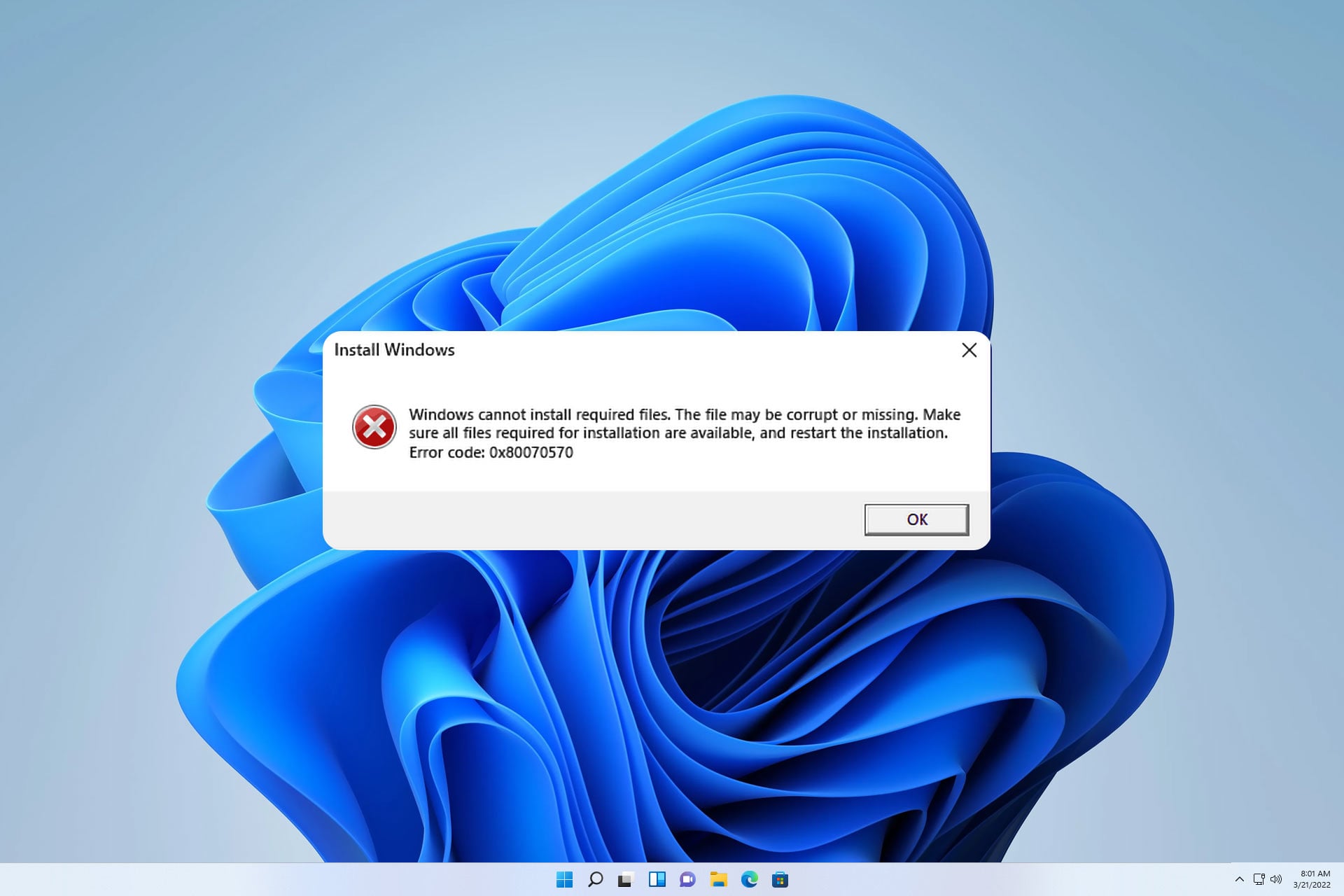
In this article, we’re going to show you how to solve error 0x70080025D, which prevents Windows from installing.

It’s not uncommon for Windows installation to fail, which can happen for various reasons, including your hardware or settings.

Fixing this error is simpler than you think, and all you have to do is change a couple of settings, and this guide will show you how to do that.

How can I fix error 0x70080025D?

Change BIOS settings

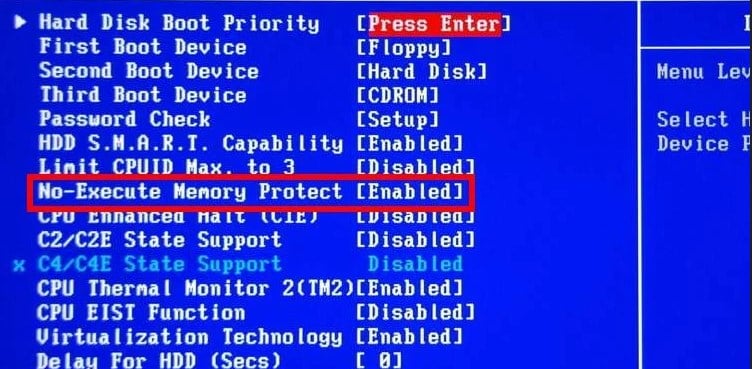
  1. Restart your computer and go to BIOS (On most computers, you need to press Del while the computer starts).
  2. In BIOS, go to Advanced Options, Processor, and then to No Execute Memory Protection.
  3. Change this feature to Enable or On.
  4. Restart your computer and try to install Windows again.

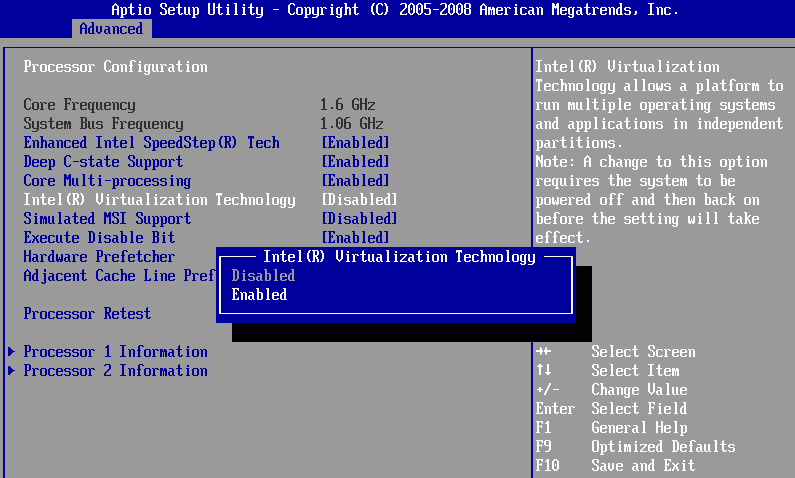
If you’re trying to install Windows on a virtual machine, you need to do this as well:

  1. Go to BIOS (as shown above).
  2. Go to Performance.
  3. Change the Virtualization feature to On.
  4. Save changes and exit BIOS.

We have a great guide on how to access BIOS, so be sure to check it out for step-by-step instructions if you have any difficulty following these steps.

After performing these simple BIOS workarounds, you should be able to install Windows on both a virtual machine and a regular PC.

If you’re somehow still unable to install Windows due to an error 0x70080025D, we suggest visiting our guide and learning what to do if Windows 10 won’t install on your PC.

Did you find a different solution? If so, feel free to share it with us in the comments section below.

Microsoft expands GitHub integration with Visual Studio

Microsoft expands GitHub integration with Visual Studio

Last week, Microsoft announced the upcoming July 20th release date of Visual Studio 2015, which is set to be one of the more ambitious releases of Microsoft’s integrated development environment. This latest edition will introduce support for new platforms, spanning from iOS and Android platforms, to game development through support for Unity, Unreal, and Cocos, and more.

The Visual Studio Engineering Team also announced today that Visual Studio 2015 will support sharing open source extensions hosted on GitHub within Visual Studio Gallery.

GitHub, the popular web-based Git repository hosting service, hosts millions of open source extensions used in software development. With the newly announced support for sharing open source extensions in Visual Studio Gallery, authors will be able to easily share their Github hosted extensions with others and gain more outlets for feedback and collaboration.

Robin Liu, Program Manager of Visual Studio China, says this is just one of the first steps in improving open source extensions in Visual Studio Gallery. Some of the other projects the Visual Studio team is planning are:

  • Pull extension description from ReadMe.md. Want to save your time on writing extension descriptions? With this change we will pull ReadMe content from your GitHub repo directly and populate the description on Visual Studio Gallery.
  • More extension statistical data. We have heard requests from you for easier ways to see statistical data for your extensions. The idea here is to not only show more statistical information on your extension page, but also provide a set of APIs for you to easily consume this data.
  • Show badges on your repo. On your repo a badge will show how many people downloaded your extension. We also think it will be fun if we can provide extension authors a way to generate badges similar to this:
  • Get rewards from your extension. Extending the reward element from badges, we also plan to provide a points and rewards system for extension authors.
  • Extension upload API. Want to have some APIs to upload extensions? Or even integrate with CI services to trigger an auto upload? This is also part of our improvement plan so keep an eye out for upcoming updates to the Gallery.

This latest news adds to the narrative of how Microsoft is following a more open path to meet developers, as well as customers, where they are at, as promised at both Build and Ignite conferences earlier this year. Given this trend in Microsoft news, the technology company will most likely continue to announce previously unanticipated support for cross platform development in hopes to gain momentum among developers as Windows 10 and universal apps launch later this month.

The 10 things in Windows 10 that most excite me

It’s now July. For most of the world, that means several things i.e. summer holidays and various national days of celebration. For those who follow Microsoft however, July 2015 means one thing alone: the launch of Windows 10.

With Windows 10, Microsoft promises to right all of the ‘wrongs’ of Windows 8, and revolutionize its software platform, so that it might be able to face the future with open arms. And given the stakes, it has certainly pulled out all of the stops in order to see its baby succeed. With the likes of the Windows Insider program, Microsoft has proven that it is willing to listen to user feedback, and, as a result, excitement around Windows 10 has reached something approaching fever pitch.

That excitement hasn’t affected everyone however, myself included, until recently that is. My history with Windows is a long one, starting with 3.1, running through 95, XP, Vista and ending with 7, which I have run for the past five years. For although I regard Microsoft and its products very highly, the truth is simple, Windows 8 terrified me. That is to say, having used Windows for years, and being uncomfortable with Mac OS, I was unwilling to learn how to use my computer again. Millions agreed, indeed 8 still inspires bitterness among many. For these users, their trust is Microsoft’s to earn, however with Windows 10 it might just manage, due to a number of rather nice features.

Start Menu
 

1) Start again

The first of these is a simple, but revolutionary addition to the new OS, the ‘Start’ bar. For many who chose not to go with Windows 8, it was the lack of a recognizable start bar, previously the linchpin of the whole Windows experience, that was evidence enough of the alien nature of Windows 8 to simply ignore it. Well, now the bar is back and more functional than ever, mixing the utility of before with the tiles of Windows 8 to make for a refreshing yet familiar experience that will no doubt delight many.

Action Center
 

2) The Action Center

If there is one area in which Windows has consistently lagged behind its competitors, it is in the delivery of notifications. In the years since the debut of 7 and 8, though Microsoft has launched a mobile operating system of its own, both still lack a centralized notifications suite. With Windows 10 and its ‘Action Center’ this is no longer an issue. Working with Windows 10 powered smartphones (when they become available), it will be possible to receive and reply to messages, all from the comfort of the desktop, all without chasing down separate apps and messaging suites.

Cortana
 

3) Cortana

There is of course another way in which Windows 10 will take more inspiration from mobile, and that is through the delivery of Cortana, Microsoft’s popular digital assistant. Cortana will be baked-in throughout the OS, helping to make sense of things and improving the power of the search function considerably. Indeed, the feature is considered to be so important that some OEMs (like Toshiba) are even placing a dedicated ‘Cortana key‘ on their new Windows 10 machines. And, as time goes by and Windows 10 is installed on hundreds of millions of machines, Cortana is only set to improve, likely becoming an even more valuable feature in the future.

Continuum
 

4) Continuum

It is safe to say, as the owner of a Windows Phone, Continuum intrigues me. Asides from the obvious benefits for enterprise consumers, there’s a reasonable chance it might help to fire up the public too. Challenging the very notion of a dedicated desktop PC, Continuum allows compatible Windows Phones to run in a ‘desktop’ mode when connected to a monitor, pairing with a wireless keyboard and mouse to become a full-fledged PC capable of performing a surprisingly large number of tasks. This of course works with the interoperability of Windows 10 between different devices, and tied with Microsoft’s new focus on cloud computing, it could make for a world in which a mobile could be one’s only computing device; this feature is one of the most boldly futuristic from Microsoft yet.

Task Switcher
 

5) Switching between different tasks

Not every feature in Windows 10 is designed to be a show-stopper, others are simple evolutions from what came before, in this case the lowly ‘alt + tab’ shortcut. Previously, this was intended as a quick means by which to switch between different programs, now it is something more. Displaying a number of Windows, switching between different tasks makes it easier to multi-task than every before on a Windows machine, with larger thumbnails and an improved layout.

Snap Assist
 

6) Snap!

Windows RT, though a much maligned foray by Microsoft into ARM territory, limited in both its functionality and execution, did one thing right: ‘Snap’. That is to say, it allowed two separate open windows to run together intelligently, finding different sides and ‘clipping together’ as it were. On a large screen, and when performing typical productivity tasks such as completing an invoice, such a feature is nearly invaluable, and is another example of how Windows 10 represents a series of intelligent improvements as much as a cobbled together assortment of ‘moonshots’.

Edge
 

7) On the Edge

In the 90s, Microsoft saw fit to muscle out the smaller (better) Netscape, and since then a modicum of that attitude has remained. Though Internet Explorer exploded in popularity and has shuffled through a number of (mostly improved) versions, since that point, it still lags behind its competitors in functionality. Microsoft’s new browser, first code-named “Project Spartan” and now given the slightly more confusing nomenclature of “Edge” is a browser worthy of the modern internet. Boasting compatibility with a number of different plugins and some sexy new features (like the ability to ‘draw’ using a stylus) Edge is Redmond’s statement that it no longer intends to rest on its laurels in the browser wars.

Universal apps
 

8) Universal (Windows) Apps

It is no secret that Windows 10 will end the long-standing fragmentation of Windows. Xbox, Windows Phone and Windows 8 machines will all run a single version of the same OS. This in of itself is interesting, however Microsoft has chosen to take things a step further with a feature that is intended to appeal to developers, ‘Universal’ apps. These will work the same regardless of the hardware on which they are running, with the only real changes being in UI, which will change intelligently. In addition to hopefully dealing with the Windows Store app gap, this creates a more modern vision for the future of the OS.

Windows Hello
 

9) Windows Hello

In the last few years, especially since the introduction of the iPhone 5S, biometric identification has become something of a hot feature in the mobile world. Windows Hello is Microsoft’s attempt to enter the game, and looks particularly promising. The idea is this: unlock your computer with either your face or iris, negating the need for anything so outdated as a password. How reliable the feature will prove to be is something that only time will tell (anyone who has used a fingerprint reader will know the horror of having a ‘bad fingerprint’), but the it looks to be promising nonetheless.

DirectX 12
 

10) DirectX 12

As computers have gotten more powerful over the past decade or so, so too has the number of cores found in both CPUs and GPUs increased almost exponentially. Until this point however, the ability of these different cores to ‘talk’ to one another has been somewhat limited, allowing only one core to ‘talk’ to another at the same time. With DirectX 12 things are destined to change, with multiple cores being able to communicate with one another simultaneously, thus increasing the efficiency of power use. With this, developers will be able to improve the likes of lighting effects among other things, though the results are potentially even further reaching.

As can be seen, there is a great deal to look forward to when Windows 10 launches on July 29. Though everything is not quite perfect, there is certainly enough for a ‘7’ dinosaur like myself to consider making the leap forward. Bring on the future!

What features are you most looking forward to in Windows 10? Let us know in the comments below.

Fix: Window Borders and Window Control Buttons are Pixelated in Windows 8.1

Window Borders And Window Control Buttons Are Pixelated in Windows 8.1

Issues with User Interface in Windows are usually very annoying. And one user of Windows 8.1 recently reported some strange issue with window boarders and control buttons. Namely, everything was pixelated and he was unable to find the solution.
Solution 1 – Update Display Driver

I said this in my previous articles that include this solution, I’ll said it again, it’s the most cliché solution ever, but it does solve the problem! Because a lot of graphics issues can be solved just with updating the display driver. This especially applies if you installed Windows 8.1 recently. So, in case you’re not sure how to do that, here’s how to update your display driver:

  1. Right-click on This PC from Desktop and go to Properties
  2. Go to Device Manager from the left pane
  3. Under Display adapters, right-click on your graphics card and go to Update driver software
  4. Wait until the process is finished and restart computer, if needed

We also recommend this third-party tool (100% safe and tested by us) to automatically download all the outdated drivers on your PC.

Solution 2 – Run System troubleshooter

If pixelated window boarders and control buttons still appear after you updated your graphics card driver, you should run the System Troubleshooter and see if this tool has some solutions for you.

  1. Press Windows and X buttons at the same time and select Control Panel
  2. Go to Troubleshooting
  3. Click on View all on the left side panel
  4. Click on System Maintenance and follow the on-screen instructions from the wizard
  5. Restart PC if needed

That’s it, one of these solutions should solve the pixelated window boarders and control buttons issue. But if you still have problems, tell us in the comments, we’ll try to find another solution.

Besides issues with pixelated user interface elements, users also report that minimize, maximize and close buttons could disappear from Windows Explorer, so if this also bothers you, check out this article.

Read Also: Fix: Unable to Install Universal Apps From Windows Store

Microsoft's Groove wasn't just a name picked out of a hat

Miage Credit: Windows

It hasn’t taken long for the internet to react to Microsoft’s new name for its music app. Early responses range from mild acceptance to utter disgust with a few respondents predictably threatening to jump ship to more preferably named music services. For some, the title Groove has invoked a friendly reminder that Microsoft can still be playful when naming services. For others, the title Groove is a lazy, misguided attempt from Microsoft to rehash an already tarnished service.

As Microsoft continues to embrace its two-way form of communication through user feedback, the company is aware of the divide the name may cause among users. As the Windows 10 team announced the Groove name for the music app, the team also accompanied the news with a brief explanation of why they chose ‘Groove’ from countless other options.

“Groove describes what people feel and do with music, and is more intuitive for our Windows 10 customers on what they’ll find with the app,” according to the Windows team. Not satisfied alone with the fluffy marketing speak, the folks over at Windows Central, dug a little deeper into the reason Groove was preferred over the current naming of Xbox Music.

“The name Groove was chosen based on customer feedback from Windows fans, and it best represents Microsoft’s music strategy: to be fun, engaging and intuitive.” Joe Belfiore would further expound upon the necessity of Groove’s need for intuitiveness and how Xbox Music failed to accomplish that goal.

For many Windows 10 Insiders and prior Xbox Music users, the title Xbox Music may have seemed intuitive. However, many mistake familiarity with intuitive. Xbox Music, formerly of Zune Pass fame, was not beholden to the Xbox brand. Xbox Music didn’t originate on the Xbox console. Xbox users were not required to have Xbox Live to use directly. The music service appeared on various platforms and operating systems other than the Xbox. Being a Xbox users offered no feature or service benefits to the subscription over any other platform. The reality was; Microsoft shoehorned the Xbox brand onto its entertainment efforts while simultaneously negating the brands effectiveness at marketing it. When the Xbox One was revealed, the Music and Video apps took a backseat to 3rd party offerings like HBO Go and Pandora as Microsoft sought to establish a developer community for the platform.

This time around, Microsoft appears to be positioning Windows 10 as the entertainment platform while allowing the Xbox One to be the entertainment device that runs Windows 10. Whether or not that becomes a successful strategy, the company will have to wait and see. As for Groove, the name might be loved, might be hated, but at least people are talking about Microsoft’s music service again.

Microsoft rebrands Xbox Music to Groove, looks to reignite music on Windows 10

Image Credit: windows blog

Microsoft seems to be on top of their social media presence as of late. Perhaps, promoted by more feedback driven forms of communication, it appears that teams within Microsoft are listening and reacting much more responsively than they have before. Granted, much of the responses are probably candid answers aligned with timely released information. However the makeup of the replies, it seems when Windows Insiders, journalists, or developers get to talking about Microsoft, the company soon responds.

Earlier today, there was Twitter discussion between a Windows observer (presumably in the Windows 10 Insider Program) and a fellow Windows journalists, Paul Thurrott, and Mary Jo Foley. The discussion circled around a reference to the music app in Windows 10. Specifically, the reference was in regards to how the music app was titled in the Windows 10 Phone companion app.

For Windows 10 Insiders on build 10162, when using the Phone companion app, the listing for the Windows music app is accompanied by the name Groove Music. Some observers and commentors dismissed the reference as a possible internal codename. Other users, began spinning the speculation wheel. After some newsworthy moves last week, that resulted in the removal of Microsoft’s ad display platform as well as 1,200 employees, the jumps to another sell off conclusion were immediate. Many also noted the multiplatform app developer, Zikera, and their Groove app for Windows and iOS. It’s yet to be seen how that apparent conflict will be resolved, or if it has been already by some sort of acquisition or agreement.

Image Credit: Groove

Well, it seems Microsoft has let the rumors simmer long enough. Just a few minutes ago,  Joe Belfiore of the Windows 10 had officially announced the new name of the Windows 10 music app, Groove Music. Prior to today, Windows 10 Insiders have been transitioning from calling the Music and Video apps, Xbox Music, and Xbox Video to directly, Music and Movies & TV.

While the new Music app has been branded with ‘Groove’, it appears that the Video app will retain its Spartan like naming convention of Movies &TV. For anyone using the Windows 10 Insider previews, Groove doesn’t seem to have any significant changes accompanying the name change. However, it does look like Microsoft is finally gearing up to market the service much more thoroughly.

You can also sign up for a Groove Music Pass subscription – a premium ad-free listening experience with no interruptions. $9.99/month or $99/year gets you complete access to stream and download music from the Windows Store —  one of the largest music catalogs on the planet with over 40 million tracks*. Subscribers can also create custom radio stations based on their favorite songs, albums and artists. If you already have a Xbox Music Pass (like me) – don’t worry! This will become Groove Music Pass, and you don’t need to do anything.

Image Credit: Groove

Over the past few months, the Internet has been buzzing over Apple’s ‘recommitment’ to music with Apple Music. Much of the discussions pit Spotify, Pandora and to a lesser extent Google Music against Apple’s new service. Rarely does the Windows music service receive attention. This has been a failing on Microsoft’s behalf. After shuttering the Zune hardware, the music experience on Windows has been left on life support. Xbox Music retained a large enough library of music but offered the bare minimum in software features.

With this new announcement, accompanying blog post, and new website Microsoft appears ready to make a much more significant splash in entertainment with Windows 10. 

Microsoft and Dell worked together to ensure devices would work with Windows 10

Microsoft and Dell worked together to ensure devices would work with Windows 10

The release of Windows 10 is fast approaching, faster than originally planned. Windows 10 was originally slated to release during the holiday season of 2015, and, in contrast to previous versions of Windows that would RTM and then have months until a release to the public, Windows 10 will release to both in the same month. These two changes have altered how Microsoft and manufacturers such as Dell are handling the release.

Windows 10’s release was moved from the holiday season late in the development process, but it’s easy to see the benefit of lining up the release with back to school sales. PC sales around back to school time are high as students, and their parents, look for devices that can guide them through the next few years. By having Windows 10 rollout before August, retail giants, manufacturers, and university stores can stock the shelves with the latest OS from Microsoft, just in time for back to school, and then the holidays beyond that. While the reasoning makes sense, steps that Microsoft had taken years in advance ensured that moving the release date forward wouldn’t adversely affect manufacturers.

Windows Hello

Microsoft journalist Paul Thurrott spoke with Dell on how these changes affected their design of PCs. Dell already has devices that you can preorder that will be run Windows 10 and has other devices that have been optimized for it that are already on the market. Windows 10 has features that are enhanced by or require specific hardware such as high quality microphones to work with Cortana, and specific types of cameras that work with Windows Hello. In order for this to be possible, Microsoft had to work with Dell to tell them what features would be in Windows 10 even if they weren’t completed.

Because the RTM and public releases are so close together and were moved up at a very late stage of development, companies like Dell had to have information like this far in advance. Peter Fontana from Dell told Thurrott

“Because we started so early, back in late 2013, we knew what was happening with the product and were ready [from a hardware perspective,” he told me. “When Microsoft changed the date, we reacted very quickly with a comprehensive plan across the product side, technical support and customer service. So it wasn’t a drastic change, just an acceleration.”

With Microsoft working with manufactures so far in advance, the move up didn’t cause as much of a scramble as it could have. It’s in Microsoft’s best benefit to tell Dell and others as much as they can as far in advance as possible. If Dell was set to release a new XPS laptop this fall and then was blindsided by features such as Windows Hello that would hurt sales for Dell and usage rate for Microsoft.

The new approach of having RTM and the release to the public will be interesting to see unfold but because of Microsoft’s work with Dell and others, there won’t be a hardware gap preventing new devices and some that are already on the market from running Windows 10 well.

Windows 10 RTM candidate build 10176 has been compiled — sign off imminent

Good news! Windows 10 might officially be signed off this week it seems, as today build 10176 from the th1 branch appeared on buildfeed, and appears to be one of the first candidates for RTM. RTM stands for “Release to Manufacturing”, which generally implies the software is complete, but this time round with RTM, that doesn’t necessarily ring true.
​The Windows 10 RTM will be a build of Windows 10 that is stable and not buggy, it will be missing a number of features that will be coming in later builds of Windows 10 as that is simply the nature of WaaS (Windows as a Service). As Terry Myerson put it recently, “we will never be done” as the software will always be updated. So this time round RTM is just a milestone, a starting point for OEMs and consumers if you will.
​If all goes well, Microsoft could have an RTM build of Windows 10 ready by the end of the week, which is very exciting.
​If you are unaware how the sign off process works, Microsoft will compile a number of builds they consider ‘worthy’ of RTM, these are called RTM candidates. These builds will be tested, and if the builds are found to have no bugs or issues, will be then voted on by employees. The build which is voted for the most is then selected as the RTM build, and recompiled into the winmain branch. The build number then usually jumps to a number which is divisible by 16 and 100, like 10400.
​WinBeta is able to confirm that build 10176 from the th1 branch is indeed an RTM candidate. For those interested, the build in question is 10.0.10176.16384.th1.150705-0552. Microsoft appears to have jumped about 10 builds from 10166 to 10176 for its first RTM candidate. It’s going to be an interesting week regarding Windows 10, so stay tuned at WinBeta for more news.

This Week in PC Hardware: Skylake pricing, graphics monstrosities, and the brain-like memcomputer

This Week in PC Hardware: Skylake pricing, graphics monstrosities, and the brain-like memcomputer

Every week, we bring you the latest in PC hardware news, informing you of the interesting developments in the category. This week, we’ve got more news on upcoming processors from Intel, what’s happening in the competitive graphics space, new displays, devices, and a peek at the potential future of computing.  

Processors

This Week in PC Hardware: Skylake pricing, graphics monstrosities, and the brain-like memcomputer

Intel’s 6th generation Skylake processors are just around the corner, and online retailers are gearing up for the launch. This is good news for us as we finally get a chance to look at the preliminary pricing of the new chips. Intel will reportedly price its new line of processors about 10% more than the previous lineup. This will range from $211 for the Core i5-6400, a successor to the Core i7 4460, to $393 for the Core i7-6700K which succeeds the Core i7-4790K. In case you were wondering, Skylake is based on the new LGA 1151 socket, so those on Haswell processors that plan on upgrading will not be able to use the same motherboard. A BIOS upgrade won’t cut it this time.

This Week in PC Hardware: Skylake pricing, graphics monstrosities, and the brain-like memcomputer

Recent reports claim that Intel will be delaying the launch of its 28nm SoFIA SoC, also known as the Atom x3 4G. As its name suggests, this low-end affordable processor features an integrated 4G LTE modem making it perfect for tablets (like a potential Surface Mini) or even phablets. The x3, due later this year now has its release date pushed back to Q1 2016 if the reports are true. Although the design of the chips is complete and ready to be mass produced, its software development is falling behind, effectively putting another dent in Intel’s effects to make a name for itself in the small form factor space.

Graphics

This Week in PC Hardware: Skylake pricing, graphics monstrosities, and the brain-like memcomputer

The graphics market is in full force now that NVIDIA and AMD are competing with the best of what they have to offer. NVIDIA’s partners have also been busy customizing the GeForce GTX 980 Ti with unique cooling solutions and factory overclocks.

Zotac has just recently started selling its GTX 980 TI AMP! Extreme Edition card. This triple-slot monstrosity is factory overclocked by 25% over the reference design, putting its core clock at 1253 MHz (which goes up to 1335 MHz boost) and a memory clock of 7220 MHz. This should put it well ahead of the GTX Titan X in benchmarks, and best of all, Zotac is only adding a $50 premium to it, selling the card for $699.

This Week in PC Hardware: Skylake pricing, graphics monstrosities, and the brain-like memcomputer

On the lower end of the spectrum, NVIDIA is reportedly preparing to launch the GTX 950. This particular graphics card is designed to compete with the recently announced Radeon R7 370. The low-end card supposedly features a cut-down version of the GM206-300 GPU found in the GTX 960 and will come with two memory options; either 2GB of 4GB depending on buyer needs. Availability should be in the coming weeks and its price should be around the $150 mark if it were to compete with AMD’s similarly positioned card.

This Week in PC Hardware: Skylake pricing, graphics monstrosities, and the brain-like memcomputer

Speaking of AMD, the company is finally back in the game with the release of its Fiji-based Fury X. When AMD announced the card, it announced several other products, but didn’t reveal much in the way of specs. We don’t know much about the Radeon R9 Fury, the dual-GPU Fury card, or the miniature R9 Nano. However, in a recent review of the R9 Fury X, Anandtech claims that the Nano will feature the full Fiji core with 4096 steam processors, similar to that of the Fury X, instead of the cut-down version that will supposedly debut on the R9 Fury. This puts it in an interesting position considering it will only require 175W to operate compared to the 275W that the Fury X needs.

This Week in PC Hardware: Skylake pricing, graphics monstrosities, and the brain-like memcomputer

In other news, early adopters of the Fury X have noticed that the integrated water cooler emits and ‘noticeable whine’ that can be very distracting to gamers. Although AMD hasn’t publicly acknowledged the issue, it seems the company has already taken action to solve it. Newer cards feature an improved water cooler – also designed by Cooler Master – that is practically silent with the exception of the fan. Reports state that there is no way to differentiate the new cards from the old ones by looking at the retail packaging, but once opened, the new cards apparently feature a monochrome Cooler Master logo instead of the multi-color logo used on the first batch. Something to keep in mind if you plan on buying the Fury X.

Displays

This Week in PC Hardware: Skylake pricing, graphics monstrosities, and the brain-like memcomputer

There isn’t much of a choice when it comes to curved 4K displays designed for gamers, so it’s always good to see more of such displays make it to market. The latest entrant comes from Acer, which has developed a 34” cinematic-widescreen display with a resolution of 3440 x 1440. The display packs a full-size DisplayPort 1.2a connection in addition to a mini-DisplayPort and HDMI 2.0 ports. It also comes with a USB 3.0 hub and a built-in stereo speaker system with a 3.5mm headphone jack. To sweeten the deal, it comes with AMD FreeSync technology for perfect frame synchronization when used with supported AMD graphics cards. All this does come at a price though and is expected to hit retail at around $1000. No news on availability just yet.

Devices

This Week in PC Hardware: Skylake pricing, graphics monstrosities, and the brain-like memcomputer

This may not be for the average Joe, but it is a PC, so we’ll tell you about it anyway. The Surface Hub is now available for pre-order, this giant TV/PC/Oversized tablet is designed primarily for businesses that need a powerful presentation and collaboration tool in their offices. The Surface Hub comes in two display sizes, 55” (Full HD) and 84” (4K), both support 100 touch-points and come with a 128GB SSD and 8GB of RAM. The 55” model comes with a 4th generation Intel Core i5 processor with Intel HD 4600 graphics, while the 84” model comes with a beefier Core i7 processor and NVIDIA Quadro K2200 graphics. Both run Windows 10 out-of-the-box and yes, you can use them as glorified TVs if you want thanks to the numerous modes of display input supported including DisplayPort, HDMI, and VGA.

Check out the full list of specifications over at the Surface Hub website, and if you’re interested, Microsoft prices the devices at $6,999 and $19,999 for the 55” and 84” models respectively.

This Week in PC Hardware: Skylake pricing, graphics monstrosities, and the brain-like memcomputer

What if I told you, that contrary to what you may think, today’s computers, from your smartphone to the most powerful supercomputers, are actually “intrinsically slow and wasteful”? Last week, we talked about Moore’s Law, and how todays manufacturing processes are unable to keep up with is proposed trajectory. We will eventually reach a point where we can no longer shrink microprocessors, at least not with current materials. Quantum computing has for a long time been regarded as a potential solutions, be we are not technically capable of building them just yet. So what now?

Well, scientists over at the University of California developed a new type of computer called a memcomputer. Inspired by the human brain, this computers stores and processes information simultaneously. The best part is that unlike quantum computers which require a carefully controlled environment to operate, memcomputers can be built using today’s technology and can operate at room temperature.

This Week in PC Hardware: Skylake pricing, graphics monstrosities, and the brain-like memcomputer

So how do memcomputers work? Think of it this way, when a traditional computer is faced with a mathematical problem, it would utilize both the memory and the CPU to come up with a solution. For example, when given a massive set of numbers, and asked to determine how many of those numbers add up to say, 10, the computer would first store those numbers in memory, then send two numbers at a time to the CPU to calculate if they add up to ten, each time bringing the answer back to memory. This goes back and forth until all the numbers have been calculated. If given a set of say, 1 million numbers, it could take a traditional computer ages to process that information. A memcomputer would complete it in seconds. How? Hear it from Massimiliano Di Ventra, and physicist and computer scientist at the university:

“…this very sort of problem, which could take our most advanced computer decades, could take a memcomputer only seconds. That’s because rather than hassling with a back-and-fourth data-shuffle, the internal architecture of the memcomputer essentially sets up a giant maze for electricity to run through. To oversimplify whats going on: In the maze, you can imagine the entrance is a single number and all the possible exits are every other possible number it could be combined with. The maze is also constructed so that electric current can only jolt through to correct combinations (combinations that add up to 10, for example). In a single blast the memcomputer will set up a maze, have electricity run it, and store which the numbers combined with the first number to add up to 10.

Instead of taking 10 trillion back-and-fourth runs, a memcomputer will run 10 million mazes. Imagine each maze and each back-and-fourth run takes a sluggish 1 second. Our memcomputer is done in 116 days, yet 300,000 years later a classic computer is still number-crunching.”

We highly encourage you to head over to PopularMechanics to read the full article on memcomputers and Di Ventra’s work.

That’s all for this week in PC hardware, as usual, we ask you to head over to the comments section below to let us know what your thoughts are on this week’s news. Are you planning on upgrading to the new Skylake processors, or new graphics from AMD or NVIDIA, are you in the market for a new display? Sound off below!

Windows 10 build 10163 screenshots leak as July 29th release date nears

Windows 10 build 10163 screenshots leak as July 29th release date nears

As we inch closer to the July 29th release date for Windows 10, a new build has been shown off on the internet courtesy of Wzor. Judging from the leaked screenshots, Windows 10 build 10163 appears to be another build focused on bug fixes and improvements under the hood.

Last week, Microsoft rolled out three new Windows 10 desktop builds (yes, three!), including Windows 10 build 10162 which features bug fixes and better reliability, performance, battery life, and compatibility. Build 10162 is currently the latest build available via the Windows Insider Program. 

Keep in mind that as we approach the July 29th release date, any new build for Windows 10 will feature fixes and refinements, rather than new features or visual changes. Take a look at some of the screenshots of build 10163 below and keep in mind that it looks very similar, if not identical, to build 10162. 

According to the leaked release notes for build 10163, there are no new software updates in this build. Instead this build focuses on bug fixes and also features new issues (for example, after upgrading to Windows 10 Insider Preview, some apps cannot be launched after you log on for the first time, rather, you will need to reboot and log on again for them to work).

Microsoft still has their work cut out for them and we hope to see a completed product before the July 29th release date. How do you feel about Microsoft’s progress so far when it comes to Windows 10? Were any of your feedback suggestions implemented?

Windows 10 build 10163 screenshots leak as July 29th release date nears

Windows 10 build 10163 screenshots leak as July 29th release date nears

Windows 10 build 10163 screenshots leak as July 29th release date nears

Windows 10 build 10163 screenshots leak as July 29th release date nears

Microsoft's display ad partnership with AOL is just a 'sweetener' for bigger Bing search deal

Image Credit: Bing YouTube

Earlier this week, Microsoft tossed chum into shark infested journalistic waters when it announced its departure from the display advertisement business. Pundits, journalists, and analysts were elated by the news, creating a feeding frenzy of baseless predictions and doomsday prophecies for the company. Over the past couple of days, the news cycle picked at the tattered carcass of Microsoft’s decision. In the immediate wake of the announcement, very few details about Microsoft’s departure were given by the company or ‘experts’.

Known details of Microsoft’s exit from the hyper-competitive market included AOL absorbing the direct sales of ads across Microsoft’s content sites including MSN title sites. The deal also called for the transfer of 1,200 Bing Display Ad employees from Microsoft to AOL. As a result of taking over Microsoft’s display ads, AOL would inherit advertisement from the nine biggest markets Microsoft was in, including the US and the UK. As the days have gone on, lesser known details have surfaced about Microsoft and AOL’s new deal. Part of the deal included Adtech company AppNexux selling programmatic ads for Microsoft in 39 worldwide markets. In return for Microsoft’s established ad display network, AOL would replace Google Search across their AOL branded sites with Microsoft’s Bing Search.

As it stands now, Microsoft is mostly out of display advertising, and AOL is in even deeper. Questions remained. Why would Microsoft leave a $74 billion industry, and why now? Well, author Lara O’Reilly over at Business Insider has used some very keen observations to deduce that Microsoft left the advertisement arena to grow search and possibly side step Google on mobile. Thanks to Google, many people have been trained to associate online advertisement with search. Microsoft’s move to rid itself of advertisement while keeping search might come as a bit of head-scratcher at first glance. Looking beyond the trees, Microsoft’s Bing ambitions lay in plain site.

Image Credit:brafton.com

Looking at the numbers, Microsoft’s share of the global display advertising market is worse looking than its Windows Phone presence in the US. Back in 2013, Microsoft’s display advertising market share stood at a shrunken 2.1%. Since 2013, Microsoft has seen that number decline to 1.4% in 2014, and eMarketer (an independent market research company) predicts that Microsoft could see shares as low as 1.2% this year. Microsoft’s market share looks even bleaker when eMarketer is reporting the global display ad market grew 22.4% last year while Microsoft’s revenue dropped 15.5%. It may be easy to think Google sits atop the pile with some astronomical amount of market share, but that would be incorrect. According to the same eMarketer report, Google maintains 15% global market share, just behind Facebook’s predicted 25% for this year.

Unlike the Google and Facebook of the world, Microsoft’s strengths do not lie in advertisement. After the $6.2 billion dollar aQuantive write down in 2012, analysts and investors were asking for Microsoft’s resignation from advertisement. Microsoft eventually unloaded most of aQuantive to the largest seller of display advertising, Facebook. Another advertisement related market Microsoft attempted but wisely removed itself from was its Xbox Entertainment Studios content division this year. In lesser reported news, Microsoft has also been laying off substantial amounts of global advertising sales teams.

Image Credit: vg27.com

With the numbers and recent transitions all but paving the way for Microsoft’s removal from display ads, there was very little left for the company to do but make it official. Monday morning coaches and armchair quarterbacks ironically, on a Monday, postured about Microsoft moving away from its previous advertising ambitions and becoming laser focused on its core proficiencies, like software. A Business Insider source all but reaffirms that notion, “I think they’re definitely going to exit the ad business. They’ve gradually dismantled their ad sales teams over the past couple of years.”

“Nadella has been vocal about transitioning to a software company and that largely means how they will spend their R&D – ad products are not as good an investment as higher margin SaaS (software as a service) and licenses – and sales focus. With the massive install base Microsoft has, advertising is incongruous with their growth opportunities.”

With much of the negative news regarding Microsoft and display advertising out of the way, the new AOL deal now opens up larger search opportunities for Microsoft. Now in a ten-year agreement, AOL will forego its reliance on Google powering its search listings and hand over the search work to Microsoft’s Bing. Perhaps, the timing of the deal is a subset of events related to Microsoft’s recent Yahoo negotiations. With rumors of Yahoo looking to worm its way out of a ten year deal with Microsoft in the coming months coupled with the companies testing of Google search, Microsoft’s new deal with AOL just may keep Bing afloat. However, if things remain steady between Yahoo, AOL and Microsoft, Bing could stand to increase its current 20% share of search in the US.

Image Credit: Bing YouTube

Laura also makes the salient observation that Microsoft may have seen an opportunity to reduce its spend on ads while simultaneously cementing its necessity as a search engine.

“There are several advantages for Microsoft switching focus almost solely to Bing. There are fewer search operators out there than display advertising companies (despite the fact that search ads make up around half of the ads sold online). Microsoft Bing is the clear number two when it comes to search (Yahoo, in third place, has a 12.7% share, according to comScore,) whereas it is leagues behind many other larger players (not just Google and Facebook – but Twitter, Yahoo, AOL, and Amazon) when it comes to display advertising reach and revenue.”

Image Credit: Bing YouTube

Further reaffirming of Microsoft’s synergistic realignment and Bing’s expanded search engine potential comes from a strategic partner who spoke with Business Insider.

Naomi Hands, strategic partnership manager, at mobile marketing and technology agency Somo, told Business Insider the Bing search deal with AOL could “move the needle” when it comes to Microsoft’s mobile search revenues. Hands added: “The deal with Verizon will be key in this as due to market share of handset distribution in the US they can default browsers and search engines on mobile devices, moving away from Google here too. This could help streamline the advertising opportunities across Microsoft’s properties, reducing the fragmentation and clunkiness of its offering and provide a much more seamless experience.”

So it seems, Microsoft’s continued push for strategic partnerships over in-house solutions has opened the door for far more opportunities than before. If Microsoft can navigate this transition along with previously announced collaborations successfully, then Office, Skype, and Bing could become the default apps and services on a multitude of phones and tablets, while Bing also increases its search share in the US.

Mojang announces Minecraft Windows 10 Edition Beta

Mojang releases Minecraft Windows 10 Edition Beta

If you happen to be a regular Minecraft player, there’s some good news for you. Ahead of the launch of Microsoft’s upcoming Windows 10 operating system, Microsoft has announced Minecraft for Windows 10. The company calls it “Minecraft: Windows Edition Beta”. 

The game offers the same mechanics, but some changes can be expected. However, like all versions of Minecraft, the game offers two distinct modes: Creative and Survival.  Here’s the list of features Minecraft: Windows 10 Edition Beta has to offer:

  • Craft, create, and explore online with up to seven friends playing Windows 10 Edition Beta, through local multiplayer or with your Xbox Live friends online.
  • Play online and local multiplayer with other Pocket Edition players thanks to a free update, due to arrive soon after launch.
  • Multiple control schemes! Switch between controller, touch, and keyboard controls with little to no effort!
  • Record and share gameplay highlights with built-in GameDVR.
  • Help shape the future of Minecraft: Windows 10 Edition Beta with our built player feedback mechanisms!
  • Chickens, zombies, pigs, boats, armed skeletons, potatoes, zombies, baby squids, enchantment tables, villagers, naked sheep, iron golems, potions, ghasts, pickaxes, carrots, and all the weird and wonderful goodness you’ve come to expect from Minecraft.

Minecraft has around 20 million users on PC and they can can download the game from the Windows 10 store for free. As for other players, they have to pay $10 to get the game during the “beta” period, a savings from the $29 regular price for Minecraft on PC. The game is not completely finished yet, it’s still in beta and there may be some bugs present, but Microsoft will continue to work on the Windows 10 Edition as it comes out of beta.

Minecraft is already available on a wide range of gaming platforms, including Windows, Mac, Windows Phone, iOS, Android, Xbox 360, Xbox One, PS3, PS4 and PS Vita, and now Windows 10 is yet another addition. Microsoft is expected to launch Windows 10 operating system for desktops on 29th July, with Minecraft: Windows Edition Beta coming out on the same day. 

One of Microsoft's 'tough choices' could be a write-down of Nokia

One of Microsoft's 'tough choices' could be a write-down of Nokia

It’s rumored that Microsoft may lay off some of its employees at its Nokia acquisition as well as to write-down on its estimated value. 

Just this Monday, Microsoft struck a deal with AOL that involved internet advertising. Under the agreement, AOL will handle management, sale display, and video advertising on MSN, Skype, Xbox, and other Microsoft products around the world. In addition, AOL’s search and advertisement will be powered by Microsoft’s Bing. In return, the two companies will share profits from the advertising of each other’s products. 

It’s reported that Microsoft will move about 1,200 of their employees over to AOL. John DiFucci, analyst at Jefferies, says Microsoft’s decision to exit the display ad business shows “management’s continued discipline around allocation of resources and costs,” on a research report. He also says that there’s a good chance Microsoft could write-down about $5.2 billion in with its Nokia acquisition. He explains, 

“An aggressive write-down and restructuring would mitigate future losses, but we note that the business would still likely burn cash. We see the Phone Hardware business as poorly positioned versus the established Apple and Android ecosystems and believe Microsoft will have to either make significant investments to drive scale or accept lower market share and market relevance.” 

It would still pretty surprising to see such large of a write-down on the value of Nokia. After all, a huge majority of Windows phones are manufactured by Nokia.