Microsoft finalises termination of Barnes & Noble partnership with payment and account changes

Microsoft finalises termination of Barnes & Noble partnership with payment and account changes

Barnes & Noble terminated their relationship back in December 2014 and the book giant has now informed its customers that as a result of this termination, the use of Microsoft payment information will no longer work as of the 7th of August 2015 and MS Login will cease to function by the 30th of October 2015.

Barnes & Noble and NOOK users are encouraged to update their information ahead of those deadlines and, if needed, create a new BN.com account which can be linked to any existing Microsoft account information so users can maintain ownership of their purchased books and magazines.

Microsoft’s partnership with Barnes & Noble always had a lot of potential but very little became of it. The two companies even came to blows in a lawsuit related to patented technology. There was speculation that Microsoft would use Barnes & Noble to release their own, Windows branded, e-reader and Microsoft even created their own group called, “Xbox Music, Video, and Reading” but the “Reading” aspect was never really explored.

Would you have liked to see more come from the Barnes & Noble and Microsoft partnership? Share your shattered dreams in the comments below.

Microsoft is launching a fan-focused ad campaign celebration alongside Windows 10 release

#UpgradeYourWorld

Windows 10 is perhaps the biggest and most exciting future release of the Windows operating. It feels completely refreshed, and almost feels completely new. With that, Microsoft wants to create new Windows fans with the launch of a new advertising campaign happening on the day of release of Windows 10, which is expected on July 29. 

Microsoft is hosting several celebrations for its 5 million insiders in 13 cities all over the world including New York, London, Tokyo, Beijing, Singapore, and others. The events will give some Insiders the opportunity to test devices hands-on, as well as a possible opportunity to meet the the team behind Windows 10. 

The company is also starting some programs that will help new customers to upgrade to the new operating system. Retailers who are participating in this program include Best Buy, Walmart, Dixons, and others. 

Starting July 20 in the United States, and July 29 everywhere else, Microsoft will also launch a few video and television ads that promote Windows 10 and how it gives a “more human way to do” stuff. The advertisements will be promoting other things such as Windows Hello, which makes unlocking your device as quick and easy as a fingerprint or facial scan, and Microsoft Edge, the company’s brand new web browser. 

The theme of the campaign Microsoft is using is to “Upgrade Your World,” which is the company’s initiative to partner with over 100 nonprofits and help them to “upgrade the world”. In addition, the company will also be helping ten non-profits by investing a total of about $10 million to companies such as Code.org, CARE, Keep a Child Alive, Global Poverty Project, The Nature Conservancy, and a few others. 

For our readers who aren’t familiar with the release strategy of Windows 10, it’ll be a staggered release. Insiders will get it first, and it will eventually become available for OEMs and everyone else.

Microsoft Stores will update new devices to Windows 10 for free at launch

Microsoft Stores will update new devices to Windows 10 for free

Certainly there has been some confusion on whether there will be new Windows 10 PCs available for purchase when Windows 10 launches on July 29th. There is still a pre-order page on Dell’s website taking orders for their allegedly Windows 10-ready PCs. There are conflicting reports on whether Microsoft will have PC OEMs out there that will have Windows 10 PCs available for purchase. Microsoft is also not confirming any specific date as to when Windows 10 will become available on the Surface 3 or Surface Pro 3 tablets either.

Microsoft responded to an inquiry by Windows Central:

“As with any Windows launch, we are working quickly to stock shelves with Windows 10 devices, including Surface. While you can expect to see Surface devices running Windows 10 on shelves soon, Windows 8.1 devices still provide an exceptional experience and are easily upgraded to Windows 10 for free. Additionally, all Microsoft Stores have the ability to upgrade new devices to Windows 10 on site.”

While you may not be able to purchase a Windows 10-ready PC, you will likely be able to buy a Surface Pro 3 or Surface 3 and get an on-site upgrade at any Microsoft Store in North America when Windows 10 launches on July 29th. Nevertheless, Microsoft still doesn’t have a concrete date for when Windows 10 will be available on a Surface Pro 3 or Surface 3 without the need to upgrade from Windows 8.1. 

Dev Center receives new dashboard and crash reports for Windows apps

Dev Center receives new dashboard and crash reports for Windows apps

Microsoft is expanding the crash reporting function of Dev Center, allowing Windows and Windows Phone app developers to have quicker access to more detailed set of crash data.

The Dev Center’s new unified dashboard gives app developers more comprehensive crash information that was previously not available and sends the reports to the developer quicker. Before, only crash data associated with a .cab file (a compressed library of files) was shown. But now the new unified Dev Center shows crash data as soon as it is available regardless of whether there is a .cab file for it. The Dev Center also provides a number of new reports, some of which are:

  • Total Crashes and Events
  • Crash event breakdown – shows hangs, crashes, JavaScript exceptions and/or memory failures by OS version, device type, memory, storage or CPU speed
  • Failure by market – shows the failures by market
  • Failure log (shown below) – shows the logs that include a .cab file, and displays the stack trace directly in Dev Center, without the need of a .cab file. The percentage of events sampled, displayed above the failure log, indicates the percentage of events that had a .cab collected. Crashes reported by Windows 8.x and Windows Phone have less information than Windows 10 crashes, so reports show the OS version as ‘unknown.’
  • Data Export: Health: crashes and events: counts how many events happened of each type of failure
  • Data Export: Health: failure log: provides the details for the distinct types of failure, as well as the stack traces

Dev Center receives new dashboard and crash reports for Windows apps

The new reports can be found by going to ‘App overview’ in the Dev Center, in either the ‘Health’ or ‘Download Reports’ options under the ‘Analytics’ menu.

Today’s announcement also highlights a few steps a developer can take with the new Dev Center to start debugging apps and also asks the developer community to let Microsoft know what kind of additional information would be helpful for debugging apps.

Microsoft awarded patent for "hover sensitive" 3D Touch

Lumia 830 back

A patent has been granted to Microsoft for 3-D touch. We’ve known about Microsoft’s desire to use this technology for over a year but the panted was not granted until recently.

In the not so distant past, Microsoft had plans for a McLaren smartphone with 3-D touch that would let you hover over your screen to perform certain tasks and enter inputs. According to Windows Central, Microsoft still wants to utilize 3-D touch in a smartphone.

The official patent from the US Patent & Trademark Office is rather lengthy but begins with a brief description “Example apparatus and methods concern detecting an angle at which an object is interacting with a hover-sensitive input/output interface.”

The angle detection is likely a key factor here. Being able to identify which way a hand or finger is pointing would be useful, if not required, to make a 3-D touch phone unique. Of course, this is only a patent being granted that we’ve known about before. It could be for a new phone, it could be a patent leftover for the McLaren, or it could be for something else entirely.

Goldman Sachs claims Windows is holding Microsoft back

Goldman Sachs claims Windows is holding Microsoft back

Investment banking firm, Goldman Sachs, has reported that they believe Microsoft will report quarterly revenue of $US 22 billion, which is just under the $US 22.1 billion amount previously speculated.

Reasons for the lower profit estimation include the lack of enterprises using Windows 10 and earning Microsoft money through corporate contracts, the relatively low popularity of Windows Server 2003, and a reduced number of enterprises renewing their Enterprise License Agreements (ELAs).

Another factor mentioned for the low expectation was the PC market which had been a major source of income for the company during the last two decades but has now begun to shrink significantly. It wasn’t all bad though. Goldman Sachs reports that the cloud-based, Microsoft Office 365 shows particular promise and is doing fairly well, though admits its success isn’t great enough to make up for deficits in other areas.

It will be interesting to see how next year’s report reads as the launch of Windows 10 later this month is sure to shake up things up quite a bit in several sections of Microsoft’s business. Do you see Microsoft becoming more successful over the next year or do you expect the company’s profits to decline even more? Share your opinions with us in the comments.

Why Microsoft skipping this year's Tokyo Game Show is not that big of a deal

Why Microsoft skipping this year's Tokyo Game Show is not that big of a deal

Microsoft has confirmed that it won’t have an official presence at this year’s Tokyo Game Show though hints at the possibility of an alternate format for delivering news and information on the brand to its local consumers via another method or event to be announced at a later date.

While it’s well known that Microsoft’s Xbox One console is often outsold by Sony’s PlayStation 4 and Nintendo’s WiiU, any speculation that Microsoft’s absence from the Tokyo Game Show is a sign of the company’s withdrawal from Japan is premature. Despite being one of the largest gaming events in Japan, the Tokyo Game Show has nowhere near the equivalent popularity of North America’s E3. Also, companies that are remarkably successful in Japan, such as Nintendo, have never had an official presence at the show either, so involvement with the show shouldn’t be overanalysed as a sign of strength or weakness. There’s also the fact that this isn’t the first time Microsoft has refrained from appearing at the Tokyo Game Show in an official capacity and the company could always return for future shows (as they have done numerous times in the past).

It will be a shame to not see Microsoft at the Tokyo Game Show this year. Their 2014 presence was one of the strongest they’ve ever had and their section of the show floor became very popular with both the press and public visitors.

Tokyo Game Show is similar to E3 but is much smaller in scale. While E3’s main attraction is its massive press conferences where companies reveal new hardware, software and services, Tokyo Game Show features more technical presentations for developers and businessmen and women in the video game industry that offer very little in the way of breaking news and are more for making industry connections than advertising. Any news revealed at the show is often shown to press during one-on-one or small group interviews with game developers and is much more low-key than many Western presentations.

It should be noted that while Microsoft will not be having an official company presence at 2015’s Tokyo Game Show, there will still be plenty of Windows and Xbox One games on display due to the numerous game developers attending.

Microsoft recently reaffirmed their commitment to Japan during a small press conference last month which formally introduced Microsoft Japan’s new Vice President, Takuya Hirano. During his talk to the Japanese press, Takuya Hirano expressed his excitement for the upcoming launch of Windows 10 in Japan and also mentioned the Microsoft Band and HoloLens, both of which have yet to be given any specific launch window for the Japanese market.

What do you think about Microsoft’s strategy for the Xbox One in Japan? Do you think Microsoft taking a year off from the Tokyo Game Show was a bad decision or do you think they could find success in an alternate presentation model, much like Nintendo did with their internet presentations after their withdraw from E3 a few years back? Let us know in the comments below.

Microsoft will be attending IFA 2015 to show off new Windows 10 devices

Image Credit: IFA

With much of the massive Windows 10 development in the rear view mirror for Microsoft, now comes the time to sell its vision of computing to the masses. Selling Windows 10 to the public may prove to be a difficult endeavor after the reception Windows 8 received. Hopefully, this time around, Microsoft’s partners will offer the needed push to help Windows 10 wash away the dirt that became associated with Windows 8. PC manufacturers found it increasingly difficult to celebrate the virtues of Windows 8. Aside from touchscreen options, the OS offered little in the way of feature differentiation for hardware makers. Perhaps, Windows 8’s additional input method should have been enough. However, for a market that swelled with stagnation for so long, Windows 8 offered little to curb the trend.

While Windows 10 is being viewed as a return to more ‘traditional’ computing on PCs, the retooled OS will come with some bells and whistle, hardware manufacturers will be able to champion with new devices. Among the new features accessible to partners is the integrated digital assistant Cortana in Windows 10. There are reports of PC manufacturers designing brand specific implementations and interactions to help users engage with the service more.

Image Credit: IFA

At IFA 2015, OEMs will be able to showcase their integration of Windows 10 on their devices. OEMs will now be able to choose how they showcase Cortana, Windows Hello, a retooled tablet interface, fingerprint authentication support, virtual desktops, and other applications and service bundled into Windows 10. Nick Parker, Microsoft’s Corporate Vice President responsible for device partnerships will take the stage at IFA in Berlin on September 4th to talk about ‘new devices’ for Windows 10. Parker’s keynote is titled ‘Windows 10 Lights up New Devices,” and should discuss Windows 10 on 2-in-1s, premium notebooks, gaming devices and all-in-ones. 

While Microsoft has been withdrawn from the IFA conference the past couple of years, its Windows presence has remained. However, this year, Microsoft is making a personal appearance at the conference to help celebrate Windows 10 alongside the OEMs that will help shape the adoption of the new OS. It should also be noted, while Microsoft is “committed” to bringing flagship Windows 10 mobile devices to market, IFA will probably not be the place they announce them. Perhaps, other phone OEMs will finally step up and make an appearance for the Windows 10 mobile effort. However, phones with Windows 10 Mobile at IFA seem unlikely, as the Windows 10 team is still hard at work at finalizing the code.

Microsoft and Bromium announce new technical partnership for Windows 10

Microsoft and Bromium announce new technical partnership for Windows 10

Today at the World Partner Conference, Bromium announced a new technical partnership with Microsoft to ensure Bromium’s micro-virtualization security solutions are supported in Windows 10.

A company’s data is only as safe as the threats on the end user’s computer. When an employee clicks that suspicious link or downloads something they shouldn’t, the entire organization can be exposed to unwanted malware. To protect against the inevitable accidental click by an employee, Bromium introduced its unique endpoint security solution called micro-virtualization to isolate threats through virtualization of a device’s hardware so malware can’t infect a system of spread into an entire network.

Now with this new technical partnership, Bromium will be bring its micro-virtualization security solution to Windows 10 to help companies keep their systems and networks safe.

Ian Pratt, CEO and Co-founder of Bromium stated:

“Our strategic partnership with Microsoft is centered on a common technology heritage and a shared goal of hardening the endpoint to prevent enterprise breaches. This partnership validates micro-virtualization as a foundation for future desktop security and assures Bromium’s security products are compatible and complementary to Microsoft’s efforts to enhance security in Windows. Microsoft and Bromium together make Windows endpoints secure, defeating attacks by design and delivering real-time threat insights. We are proud to be working closely with Microsoft to help end the era of enterprise breaches.”

With Windows 10 set to introduce a number of new security features, notably Windows Hello, which hopes to kill off the dreaded password in favor of biometric logins, the newly announced support for Bromium will give companies more control and choice of how they keep their data secure.

Microsoft seeks to expand number of Surface Hub partners, delays initial shipping

Surface Hub shipments delayed until September 1 this year

Businesses and customers purchasing the new Surface Hub will have to wait longer than initially expected. The original shipping date was September 1, 2015 but that has been pushed back. No new date was specific but more details are on the way. The Surface Hub is a highly anticipated device within business circles and according to a blog post by Microsoft its popularity has required Microsoft to adjust their manufacturing process.

“Based on the early interest we see, we’re tuning our manufacturing process to prepare for production at broader scale. To do this, we are adjusting our product roll-out schedule to ensure we deliver a great customer experience and set our partners up for success. We will not start shipping on September 1 now.”

Surface GM Brian Hall added that they will “continue to take pre-orders” while they alter the manufacturing process.

The aim of the device is to help users collaborate. It has multi pen support, 55” and 84” models, works well with other devices, and is designed to facilitate collaboration in meetings. Some features of the Surface Hub were shown off at today’s Worldwide Partner Conference.

In addition to the announcement of the shipping delay, the blog post also states that Microsoft is increasing the number of partners that sell and service Surface devices from “a few hundred” to “a few thousand” around the world. It directs potential partners to the Microsoft Partner Network Device Partner Portal.

It’s also worth noting that Microsoft talks about the Surface line as a single brand in this post. They mention the Surface 3, Surface Pro 3, and the Surface Hub. This makes sense based on the naming convention that Microsoft chose to go with regarding the Surface Hub but also indicates that Microsoft is committed to selling the brand across multiple device lines.

Microsoft to kick off worldwide Windows 10 marketing campaign next week

Windows 10

On July 29, Windows 10 is set to debut worldwide in 190 countries as a free upgrade. Windows 10, in my honest opinion, will be the best Windows ever, and is made possible through the user feedback of millions of users. As part of the new Upgrade Your World initiative, Microsoft will be partnering with 10 global and 100 local non-profits to help spread Windows 10 across the world. Windows 10 is built to empower people to do great things. It has new innovations like Cortana, Microsoft Edge and the new and improved Xbox app.

When Windows 10 is available on July 29, Microsoft will look to deliver a smooth upgrade for the 5 million Windows Insiders that helped shape Windows 10. Microsoft will host global fan celebrations, join thousands of retailers to help customers upgrade to Windows 10, and push a new global advertising campaign through online content. The new year-long initiative, called Upgrade Your World, will work with global charities and companies that help and try to make a positive influence by helping others throughout the globe.

As part of the Upgrade Your World initiative, Microsoft announced nine of the global nonprofits: CARE, Code.org, Keep a Child Alive, Malala Fund, Pencils of Promise, Save the Children, Special Olympics, The Global Poverty Project, and The Nature Conservancy. Starting on July 29th, Microsoft will invite people across the globe to vote for the 10th global nonprofit to participate. 

Special Windows 10 events will take place in 13 cities around the world, including Sydney, Tokyo, Singapore, Beijing, New Delhi, Dubai, Nairobi, Berlin, Johannesburg, Madrid, London, Sao Paolo, and New York City. These celebrations will offer a hands-on look at Windows 10 exclusive features, experimental demos, entertainment, and a chance to meet with members of the Windows 10 team. Microsoft Stores will celebrate the launch of Windows 10 in more than 110 stores in the U.S., Canada and Puerto Rico. 

Microsoft is looking to hear about the big and small things that people are doing to make a positive impact in their community and how they spread their inspiration in helping people in need throughout the world. On July 29th, Microsoft invites everyone to share their stories through #UpgradeYourWorld on Twitter.

The Windows 10 celebration is sure to be epic; whether it be at a whether at a fan celebration event, at a retail store, or through sharing stories online through #UpgradeYourWorld. Don’t forget to register for your copy of WIndows 10 on Windows.com!

Watch Microsoft's WPC 2015 Vision Keynote LIVE here

WPC 2015

Microsoft is holding it’s annual Worldwide Partner Conference Vision Keynote today in Orlando, and those who are unable to attend the event can watch LIVE over the web. As per usual, we’ve embedded the live stream below for your viewing pleasure. Make sure you check out the comments section and let us know what your favorite announcements are throughout the event.

The event kicks off at 8:45am EDT, or 1:45PM BST.

Microsoft to hold press conference on September 4th at IFA 2015 in Berlin

Microsoft set to hold a press conference on September 4th at IFA 2015 in Berlin

IFA is a leading technology trade show for consumer electronics and home appliances, held every year in Berlin, Germany in September. This year, the event is set to take place between September 4th and September 9th, with many key players expected to take the stage to announce their new products. Microsoft was missing in the past few shows, holding separate events for product launches, but it seems the company won’t miss it this year.

Microsoft announced its press conference at IFA 2015 (via Windows Central) will take place on September 4th at the CityCube event hall on the Messe Berlin fairgrounds in Berlin, Germany. Nick Parker, corporate vice president, OEM Division, Microsoft, will deliver a keynote titled “Windows 10 Lights up New Devices” which will focus on several upcoming Windows 10 products, including tablets, gaming devices, 2-in-1 PCS, and more. 

“It’s about the software and the experiences it enables on devices!” said Jens Heithecker, IFA Executive Director. “Windows 10 is coming – with new capabilities and experiences for consumers and businesses. “We are excited to see Microsoft take the keynote stage at IFA to give us a glimpse at how its partners plan to incorporate that future into the devices we rely on for work, home and play.”

Before you get too excited, Nick Parker doesn’t deal with phones so it’s unlikely that the keynote will be focused about Windows 10 Mobile handsets. But, we’ll definitely see new Windows 10 machines and PCs at the big event in Berlin. As for Windows 10 Mobile handsets, it’s also expected to launch in September/October so there’s a possibility that Microsoft may hold a separate event, focusing solely on Windows 10 Mobile and devices.

Nick Parker also took the main stage at the Computex 2015 in Taiwan last month, and launched a number of new Windows 10 devices. Anyway, we’ll bring all the latest happenings from the show floor on September 4th so make sure to mark your calendars if you don’t want to miss anything related to Windows 10. 

This Week in PC Hardware: Processors throttle down, graphics boost forward, and storage scales up

This Week in PC Hardware: Processors throttle down, graphics boost forward, and storage scales up

Every week, we bring you the latest in PC hardware news, keeping you up-to-date with the interesting developments in the industry. We bring together the major announcements of new processors, graphics, motherboards, memory, displays, and other developments. So read on for your dose of This Week in PC Hardware.


Processors

This Week in PC Hardware: Processors throttle down, graphics boost forward, and storage scales up

There’s no good news for processors this week, only bad news from both major players. Starting with Intel, a couple of weeks back, we caught wind that the company was breaking away from its tick-tock release cycle and delaying its 10nm Cannonlake processors. Instead, the company would release Kaby Lake as the successor to Skylake. Because of the delays and pushbacks that started with Broadwell, Intel’s entire lineup of future processors will also be pushed back.

A recent report from DigiTimes claims that Kaby Lake will now be delayed from its intended early 2016 launch to September 2016 for consumer processors, and January 2017 for enterprise processors. These delays may not mean much for consumers as Intel nonetheless continues to deliver more efficient and more powerful processors, it is a testament that the industry is unable to mass produce chips using newer manufacturing processes.

This Week in PC Hardware: Processors throttle down, graphics boost forward, and storage scales up

Over at team AMD, the company has officially announced that it is cancelling all of its 20nm processor plans, taking a $33 million hit for a technology node transition from 20nm to FinFET. Last year, the company announced plans to produce the first hybrid x86-ARM APUs with integrated Radeon graphics, these SoCs were to be built using a 20nm process but it seems that’s not going to happen before AMD further develops them, and especially now that all 20nm plans are canceled.

The company has also lowered its revenue expectations for its current APUs. AMD is anticipating an 8% decrease in revenue in Q2, translating to around $950 million. The decrease is associated with lower demand for consumer PCs, which as a result, OEMs are ordering less APUs from the company. Although, the company is expecting next quarter’s results to be in line with its current estimates.

This Week in PC Hardware: Processors throttle down, graphics boost forward, and storage scales up

There is a silver lining to all this misery though. IBM, in collaboration with Samsung and AMD spin-off GlobalFoundries showed off the first fully-functioning 7nm FinFET chip. The chip isn’t pure silicon like other processors, it uses a silicon-germanium mix that allows for faster transistor switching and lower power requirements. Just to put into perspective how small 7nm is, look really, really closely at your fingernail and count up to 7 seconds. Your fingernail has now grown larger than 7nm. Did you notice? No? Maybe that’s because 7nm is just over the size of 3 stacked strands of DNA. It’s very miniscule, let’s leave it at that. It would make way for processors packing up to 20 billion transistors. That’s lot of power, in a very small, energy efficient package. Unfortunately, IBM has declined to estimate when the tech will be viable for mass production.

Graphics

This Week in PC Hardware: Processors throttle down, graphics boost forward, and storage scales up

What was a rumor last week, is official now. AMD and its partners have officially announced the Radeon R9 Fury. As rumored, this GPU is a cut-down version of the flagship Fury X. It features 3584 stream processors (compared to the 4096 on the Fury X), 64 ROPs, 4GB of high-bandwidth 4096-bit memory, and clock speeds of 1000 MHz and 500 MHz of the core and memory respectively.

Recent benchmarks show the Fury outperforming the NVIDIA GTX 980, particularly at 4K resolutions, where it just about matches the type of performance the newer GTX 980 Ti delivers. At $549, the Radeon R9 Fury is a bargain, with AMD once again hitting the sweetspot price-performance ratios it’s known for. Speaking of which, those of you on Windows 10 running an AMD graphics card, there’s a new Catalyst driver for you, we recommend you keep your drivers up-to-date for the best performance results.

This Week in PC Hardware: Processors throttle down, graphics boost forward, and storage scales up

NVIDIA partners have also been busy customizing the flagship GTX 980 Ti. Last week, we looked at one such offering from ZOTAC, which went crazy by factory overclocking the card by 25%. This week, Asus takes the spotlight, unveiling four new custom-designed cards. Soon, customers will get to choose from the ROG MATRIX, fitted with a custom PCB designed for extreme overclocking; the 980 Ti STRIX, which comes with a new DirectCU III cooling solution; the POSEIDON, which can be optionally water-cooled; and finally, the GTX 980 Ti 20th Anniversary Edition Gold Platinum to celebrate 20 years of GPU manufacturing at Asus. Details are scarce for most of these cards, so we don’t have info on detailed specs, pricing, or availability just yet, but we should hear more in the near future.

Displays

This Week in PC Hardware: Processors throttle down, graphics boost forward, and storage scales up

More curved PC displays! We saw one from Acer last week, and we have a new one for you to feast your eyes on this week. BenQ’s XR3501 is a 35” cinematic-widescreen display. It has a resolution of 2560 x 1080, a refresh rate of 144 Hz, 3ms response times, and a 2000:1 contrast ratio. Towards the back, it includes one DisplayPort 1.2 input, mini-DisplayPort, two HDMI 1.4, and analog input. Price hasn’t been announced yet, but it should be a lot cheaper than the $1000 Acer model considering it’s not 4K and doesn’t use AMD’s FreeSync or NVIDIA’s G-Sync technology.

Storage

This Week in PC Hardware: Processors throttle down, graphics boost forward, and storage scales up

Earlier this week, Samsung took the wraps of new 2TB drives. There’s nothing spectacular about the capacity, except for the fact that we’re talking about SSDs! The new 2TB EVO 850 and 850 Pro are based on Samsung’s 3D Vertical NAND and come in a standard 2.5-inch enclosure, meaning you easily install them in laptop computers. Read and write speeds for EVO 850 are 540 and 520MB/s respectively while the EVO 850 Pro comes in at 550 read and 520MB/s write. So they’re pretty fast drives.

The drives will be available in 50 countries and will cost $799.99 for the EVO 850 and $999.99 for the EVO 850 Pro. Certainly not cheap, but considering the capacity and speed, you may finally be able to use one SSD for all your storage needs. You may be wondering why the price discrepancy between the drives is so large despite the read/write speeds being very similar, that may come down to reliability. Samsung rates the EVO 850 at 5 years, or 150 terabytes written (TBW), but the EVO 850 Pro is rated at 10 years, or 300 TBW, so you get a much longer lasting drive.

That’s it for This Week in PC Hardware, and now it’s your turn. Let us know what you like or dislike from this week’s announcements in the comments section below. 

Windows 10 news recap: RTM sign-off, build 10166 and 10176, Windows Hello, and more

Windows 10 news recap: RTM sign-off, build 10166 and 10176, Windows Hello, and more

Yet another informative and exciting week of Windows 10 news has come and gone. Let’s take a quick look back at the biggest news stories of the week in a little feature we like to call “Windows 10 news recap.”

At the start of the week, we learned that Windows 10 RTM candidate build 10176 had been compiled and that RTM sign-off was imminent. For those that didn’t know, RTM stands for “Release to Manufacturing.” Generally, this means the software is complete, but with Windows 10, things are going to be a little bit different. Windows 10 RTM will be a build of Windows 10 that is stable and not buggy, and it will be missing a number of features that will be coming in later builds of Windows 10 as that is simply the nature of WaaS (Windows as a Service). 

For those curious how the sign off process works, our own Zac Bowden has an explanation: “Microsoft will compile a number of builds they consider ‘worthy’ of RTM, these are called RTM candidates. These builds will be tested, and if the builds are found to have no bugs or issues, will be then voted on by employees. The build which is voted for the most is then selected as the RTM build, and recompiled into the winmain branch. The build number then usually jumps to a number which is divisible by 16 and 100, like 10400.”

Screenshots of build 10163 leaked onto the internet at the start of the week, revealing nothing new. Microsoft also rolled out build 10162 to the slow ring for Windows Insiders. A few days later, Microsoft rolled out Windows 10 build 10166 to participants of the Windows Insider program. You can check out our hands on demo of the build below — showcasing game streaming, since there isn’t much else to show off that we haven’t already shown off.

Windows 10 build 10176 leaked onto the internet on Friday, and we also went hands on with this build. There are no new features in this build, but you will notice that there is no watermark (this is because the RTM will not have a watermark). Microsoft has also added the Windows 10 branding to the About Windows dialog. You can check out our hands-on demo of the build below. 

Microsoft rebranded Xbox Music to Groove earlier this week, and looks to reignite music on Windows 10. “The name Groove was chosen based on customer feedback from Windows fans, and it best represents Microsoft’s music strategy: to be fun, engaging and intuitive.” Joe Belfiore would further expound upon the necessity of Groove’s need for intuitiveness and how Xbox Music failed to accomplish that goal.

Alleged Windows 10 retail packaging box art leaked onto the internet, giving us a close look at what appears to be the retail box for Windows 10. You can check that out here.  

Microsoft has been working hard to beef up Windows 10 with enterprise-grade security, making sure that both consumers and businesses are protected from threats. One particular feature in Windows 10 is called Windows Hello, which allows users to seamlessly and securely log into their PCs. Check out the video below showcasing Windows Hello in action. Stay tuned for yet another exciting week of Windows 10 news!

Here's a video demo of the Windows Hello facial recognition feature in Windows 10

Here's a video demo of the Windows Hello facial recognition feature in Windows 10

Microsoft has been working hard to beef up Windows 10 with enterprise-grade security, making sure that both consumers and businesses are protected from threats. One particular feature in Windows 10 is called Windows Hello, which allows users to seamlessly and securely log into their PCs. Windows Hello supports three types of biometric entry, which includes fingerprint recognition, iris, and facial recognition. 

“With Windows Hello, you’ll be able to just show your face, or touch your finger, to new devices running Windows 10 and be immediately recognized.  And not only is Windows Hello more convenient than typing a password – it’s more secure!  Our system enables you to authenticate applications, enterprise content, and even certain online experiences without a password being stored on your device or in a network server at all,” Microsoft explained in an official blog post back in March of this year.

Using an Intel RealSense 3D Camera, the good folks over at WinSupersite have put together a video demonstration of Windows Hello on Windows 10. Thanks to the Windows 10 SDK build 10158 from two weeks ago, third party hardware can now use Windows Hello facial recognition. Check out the demonstration below.

Lenovo releases a PDF guide to help you get started with Windows 10

Lenovo releases a guide to help you get started with Windows 10

Windows 10 is set to launch in just a few weeks — it’s set to be made available globally on July 29th. The excitement is building up and Microsoft has already begun training retail professionals on how to sell Windows 10. Lenovo is jumping on board the hype train and has released its own guide on how to get started with Windows 10.

The guide is titled “Starting to use Windows 10” and helps Windows users find out everything new in the operating system. The 23-page guide is divided into different chapters, explaining various features and aspects of the new Windows 10 operating system. It’s divided into six chapters: “Unpack” Windows (OOBE); Microsoft account brings many benefits; The Start Menu and the Action Center; OneDrive extends your local storage; Windows Store makes getting apps easier; and Restore Windows. 

These are further divided into sub-categories going into detail of each aspect such as how to setup your new machine, benefits of using the Microsoft account on your computer, the return of the Start Menu and the Action center, pin apps, find them, how create a system backup, setting up OneDrive local drive on your computer, and lots more.  

As Lenovo explains, the operating system is a very important part of a personal computer and your experience correlates to your comfort levels with the operating system. Here’s how Lenovo describes the guide:

“The operating system is a very important part of a personal computer. Your experience with your computer will be at its best if you’re comfortable with the operating system installed on it. With that in mind, we have provided this publication to get you up and running with Windows 10. Once you feel more confident with the basics, you may refer to information provided by Microsoft to explore more advanced features of Windows 10. If there are conflicts between information provided by Lenovo and Microsoft regarding Windows 10, the information provided by Microsoft prevails.”

Stay tuned to WinBeta — we’ll update you as soon as the new operating system starts hitting existing computers. And as always, we’ll continue to bring you an extensive Windows 10 coverage.

Popular team management service Slack is "considering" a Windows 10 app

Popular team management service Slack is "considering" a Windows 10 app

Slack is a popular, real-time messaging application which give teams the ability to get in touch with each other, collaborate on projects and lots more. It’s more of a corporate app for business and a like to get together and communicate with each. The developer already has a Windows app which supports Windows 7, up to Windows 10 Technical Preview, but it seems the company is considering a dedicated Windows 10 app, as revealed on Twitter (via WMPU).

It’s good to see the developer working on its official app for Windows 10. There are apps for Android and iOS with the Windows Phone app said to be under development — there’s no official word about the launch of the app, but let’s just not lose hope.

Windows 10 is set to launch on July 29th, and since the company is considering an app for the new operating system — which they should — we may get to see it in the coming months. We’ll update you as soon as Slack releases an official Windows 10 app.

Video: Windows 10 RTM candidate build 10176 showcasing new changes

Video: Windows 10 RTM candidate build 10176 showcasing new changes

Earlier today, an RTM candidate of Microsoft’s upcoming operating system leaked onto the internet. Windows 10 build 10176 leaked in Chinese and is nearly identical to the official build available to Windows Insiders (build 10166). So what’s the primary difference between the two builds? Build 10176 is being treated like the RTM (Release to Manufacturing) build, as it was compiled as a candidate.

This is simply one of the builds Microsoft is compiling as a candidate for RTM. From what we’ve learned, this build did not pass testing as Microsoft has already complied newer builds. With that being said, build 10176 features code that is practically complete, except for a few bugs here and there.

There are no new features in this build, but you will notice that there is no watermark (this is because the RTM will not have a watermark). Microsoft has also added the Windows 10 branding to the About Windows dialog. You can check out our hands-on demo of the build below. Enjoy! As a reminder, Windows 10 is set to be released on July 29th.

Microsoft Azure announces expansion in cloud hybridization and hyperscaling for customers

Microsoft expands hybrid cloud, hyper-scale with Microsoft Azure announcements

Microsoft has been developing more and more of their infrastructure and services to support enterprising businesses new and old, and now is no different. Microsoft has announced that they are expanding cloud hybridization as well as cloud hyperscaling, which will bring unprecedented speed, economy, and accessibility for all users and consumers—and for any environment or platform.

What is Cloud Hybridization? 

First, a brief explanation of private and public clouds, which a hybrid cloud is made up of.

  • A public cloud is a cloud that quickly handles single or homogeneous and easily scalable services. When a public cloud is used, it’s generally for a wide variety of people and uses lots computing, so typically a public cloud services things like emails or photos- these things are especially scalable services for maximizing cost efficiency.
  • A private cloud is a small internalized cloud focusing on security and control. Automation is usually prioritized  to increase the manageability and predictability of the system, and due to the nature of a private cloud, (and hinted at with its name) it’s usually kept hidden behind a firewall for the business that’s running it, and for extra security.
  • A hybrid cloud is a mix of these two other kinds of clouds– that is, private, and public. A hybrid cloud is meant to combine the benefits of the private cloud with the benefits of a public one efficiently, leading to a well modeled and efficient overall design environment sometimes also called “corporate computing.” Also, not every single business that uses private and public cloud services is a hybrid– a hybrid would be a single environment that is used in conjunction with each other.

Microsoft Azure announcements expands hybrid cloud and hyper-scale for enterprise

What is Hyper Scaling?

Hyper scaling is, by name, referring to the ease of scaling in a service or infrastructure. When an infrastructure requires an increase in size or performance or decrease when scaling back, something that can be hyper scaled can easily go around increasing or decreasing size and cost where need be. This allows for a high degree of cost efficiency, which is why hyperscaling is gaining popularity.

Put into layman’s terms, imagine you have a box that you use to transport some things. If you all of the sudden need to transport something far larger than your box, you have to discard the old one as it’s no longer useful and get a larger box. Once you switch to the large one and sometimes find yourself transporting smaller items, the large one would be too cumbersome and inefficient. If you had a hyper scale box, you could increase and decrease the size of the box very efficiently and without much cost.

So what are the benefits with these new announcements?

For the end user, possibly reduced costs, increased market, and possibly more. Businesses would be able to focus on the product rather than the means, allowing for a great degree of work to be shifted towards customer experience.

For businesses, cost efficiency, in much the same way as users. For a small independent business, one would be able to scale easily their company and increase workflow. And if they hit big, they could simply increase their size dynamically, without such restricting costs.

All in all, businesses and users alike will enjoy the benefits of hybrid clouds and hyperscaling, as the benefits are all too great.

The Windows 10 Music and Movies & TV pages in the Store are expanding to additional markets

Image Credit: Microsoft

Just a few weeks before the release of Windows 10, Microsoft is finally addressing one of the company’s most vocal complaints. Being a North American, US specific, based technology company has affected the way Microsoft distributes its software. Even though Windows and Office are worldwide names, there are various localization issues that influence the daily distribution of these productivity products. However, when it comes to entertainment, the localization process sometimes seems impossible.

As the Windows 10 release looms over the horizon, Microsoft’s refocus on bundling entertainment with Windows is becoming more apparent. A few builds ago, the Windows team began incorporating entertainment options and menus into the Windows Store. A couple of days ago, Microsoft renamed their Music service offering for yet, a third time. As of yesterday, the Music page in the Windows Store had only been active for the U.S., Canada, Ireland, United Kingdom, Australia and New Zealand. Microsoft’s entertainment ambitions are expanding and as of today, the company announced that both of Music and TV & Videos pages will be reaching additional markets, finally.

Image credit: Microsoft

According to the Windows Blog, “Starting today (rolling out over the course of the next 24 hours), we’re turning on the Music page in the Store in 17 additional markets: Argentina, Austria, Belgium, Brazil, Switzerland, Germany, Denmark, Spain, Finland, France, Italy, Japan, Mexico, Netherlands, Norway, Portugal, and Sweden.”

Besides to the Music page being active to more markets, a Movies & TV page will be rolling out to fans in Brazil today. For Brazilian Insiders on the latest build, they will now be able to go to the Movies & TV page in the Store to view matching top-selling movies and TV shows offered in their region. Users will also note that their purchased or rented material will also appear in the Movies & TV app.

Secret Windows 10 retail demo is hidden in latest Insider Preview

Secret Windows 10 retail demo is hidden in latest Insider Preview

If you’re really anxious to see Windows 10 in stores, you can set your PC to a ‘retail demo’ if you are running the Windows 10 Insider Preview. The feature is hidden inside the OS but Neowin reports how to access it and has photos and a video of a screen saver that runs within the demo.

There are a couple drawbacks that may make this not worth it though. First off, it erases all of your personal content if enabled. Second, to reverse it you need a code that won’t be reported to the public. That code can’t be sent out because people might run around disabling the retail demos of devices at stores.

If you are okay with those two drawbacks, you can enable the demo using the following steps. Settings -> Windows Update and Recovery -> Activation. Once there you click the word ‘Windows’ five times. When it asks for a retail code you leave it blank and then click finish. It reboots and you’re good to go.

This is more of a fun trick than something that shows off any new features. The retail demo mode isn’t that different than the latest Build of Windows 10. It has some settings preselected and a locked control panel. There’s also an app advertising the benefits of Windows 10 and Office 365.

Additionally there is a screen saver titled ‘attract loop’ (shown above) that plays when a Windows 10 PC on the retail demo is not in use. Once more, if you enable this, you won’t be able to get your machine back out of “retail mode”, so proceed at your own risk and be ready to lose all of your data and then have to re-install Windows.

Microsoft releases Windows 10 Deployment Application tool for developers

W10

As the launch of Windows 10 to the general public comes closer and closer, Microsoft has begun releasing a number of tools in order to make the lives of developers working with Windows 10 a little easier.

The most recent of these to be released is the Windows 10 Deployment Application tool. In the words of Microsoft it is a

“command line utility that can be utilized to deploy a Universal Windows app from a Windows 10 PC to any Windows 10 mobile device. It allows users to deploy an .AppX to a device connected through USB or available on the same subnet without requiring access to the complete Visual Studio solution”

Tool

In effect, it is designed to help streamline the process of side-loading apps from a Windows 10 PC to a Windows 10 Mobile device. Microsoft has been going all out to court developers for its new platform, attempting to make their jobs easier at every turn, and this is another prime example of this trend. The tool comes included in the Windows 10 SDK for developers.

Will you be making use of this tool? Let us know in the comments below.

PC Market falls ahead of Windows 10 launch, both Gartner and IDC agree

PC Market falls ahead of Windows 10 launch, both Gartner and IDC agrees

The market research firms Gartner and IDC have both released the latest figures for the PC shipments. Both firms report that PC market will see a decline this year of around 10 percent — Gartner says the PC market will decline by 9.5 by the end of the second quarter year-on-year, while IDC puts the figure a little higher, that is, 11.8 percent. 

There are several factors which have contributed to the decline in the PC shipments across the globe with Windows 10 launch being one of them. Manufacturers are trying clear as much inventory as they can ahead of the launch of Windows 10, which is set to take place on July 29th. Furthermore, currency fluctuations have also cause a fall in the shipments as some international currencies were devalued against the dollar, reducing the purchasing power of the consumers — making PCs more expensive for them. Plus, the end of Windows XP support is yet reason for the decline. “The slow PC shipments were largely anticipated as a result of stronger year-ago shipments relating to end of support for windows XP,” says IDC. Gartner, as reported a few days back as well, also believes the PC market will see an increase in 2016.

“The price hike of PCs became more apparent in some regions due to a sharp appreciation of the U.S. dollar against local currencies,” Mikako Kitagawa, principal analyst at Gartner. “The price hike could hinder PC demand in these regions. Secondly, the worldwide PC market experienced unusually positive desk-based growth last year due to the end of Windows XP support. After the XP impact was phased out, there have not been any major growth drivers to stimulate a PC refresh. Lastly, the Windows 10 launch scheduled for 3Q15 has created self-regulated inventory control. PC vendors and the channels tried clearing inventory as much as possible before the Windows 10 launch.”

As for the manufacturers, Lenovo continues to lead market share by the end of the second quarter with a market share of 19.7 percent as per Gartner, while IDC says they have a 20.3 percent share. HP remains on the second spot followed by Dell on the third spot. Despite of leading the PC market, Lenovo has seen a decline in its shipments compared to the same quarter last year since the second quarter of 2013. IDC reports Apple to be on the fourth spot while the fifth spot is shared by ASUS and Acer Group. However, Gartner figures present a slightly different picture where Asus and Acer are on the third and fourth spot with a very minor difference in their market share.

Things are a bit different in the US, which also saw a decline in PC shipments, and HP is the leading manufacturer with a 26 percent market share. Dell and Lenovo on the second and third place respectively as per Gartner, but IDC places Apple to be on the third place followed by Lenovo.

It remains to be seen how the coming months will turn out to be for PC manufacturers, but considering the hype of Windows 10 and preliminary estimates, there’s a possibility we may get to see a growth in the PC market.

Microsoft closes Nokia Care Points throughout Europe

Microsoft closes Nokia Care Points throughout Europe

After yesterday’s news concerning the termination of 7,800 Microsoft employees’ jobs in relation to the company’s mobile sector restructuring, comes a report that the company will also be closing  a range of Nokia Care Points in Poland and other European countries.

These Nokia Care Points are essentially walk-in repair locations that provide customer services and repairs for customers with Nokia devices. Microsoft currently authorizes these locations but will be removing this authorization in three months’ time.

An employee at one of these repair facilities has stated that Microsoft has decided to invest in larger official facilities in Europe so the need for smaller third-party authorised companies has ended. The contact takes care to mention that this decision had nothing to do with the success of the Nokia Care Points, which were doing quite well, but is simply a logical change in company strategy.

The loss of anyone’s job is always a tragedy but from a business perspective, Microsoft’s decision to close these centers does make a lot of sense. Let us know what you think in the comments below.

You can now purchase Wi-Fi using the new Microsoft Wi-Fi app, if you're in Seattle

Microsoft Wi-Fi

Users who live in the Seattle area may find it interesting and probably quite useful that they can now purchase Wi-Fi with the Microsoft Wi-Fi app available on the Windows Store. This new app just became available on build 10166 of the Windows Insider Preview which we just talked about earlier.

Here’s how it works. When you’re in a location where Microsoft Wi-Fi is available, you’ll see an option from the networks list “Buy Wi-Fi from Windows Store”. If you don’t yet have the Microsoft Wi-Fi app you can quickly install it. If you do, users can securely use the Windows Store system to purchase any amount of Wi-Fi needed by 30 minutes, a day, etc., via credit card, PayPal, Microsoft gift cards, or carrier billing (if supported). There is no need to enter any additional information. 

Microsoft said in their blog post that they are starting out with testing in Seattle, but soon they will add this new service throughout the rest of the United States. 

Windows 10 Insider build 10166 gets updated SDK

Visual Studio SDK

Along with a new release of Windows 10 for Windows Insiders, build 10166 today, Microsoft also released an updated SDK Preview to go along with it.  The company has promised to try to keep the SDK updated current to the latest build, so that developers can try out the latest changes in the soon to be released operating system.

In addition to bug fixes and improvements, SDK 10166 contains changes to Windows.ApplicationModel.Email, with “additional getter properties added”.

Microsoft recommends uninstalling the build 10158 SDK and emulators if you have them installed before downloading and installing the latest SDK.

If you don’t have Visual Studio installed, you can try out the new SDK on the free Visual Studio Community 2015 edition. Visual Studio 2015 is set to come out of beta on July 20th.

Microsoft's Expert Zone teaches staff how to sell Windows 10

Microsoft's Expert Zone teaches staff how to sell Windows 10

Microsoft is all set to release its upcoming Windows 10 operating system on July 29th with the aim of making sure it’s running on over a billion devices in the next three years. Windows 8 wasn’t as successful as Windows 7 as Microsoft made the move to a more touch friendly OS, at the expense of the desktop. However, the software giant aims to change this with Windows 10, which has been tested by millions of Windows Insiders since its announcement. 

Ahead of its launch, Microsoft also has to make sure its retail staff has detailed knowledge of the operating system and for that purpose, the company has a portal it calls Expert Zone (you need to register for access). The portal has been updated with information regarding Windows 10 operating system (via Neowin) to help retail professionals sell Windows 10. The course focuses on a number of key areas of the operating system: Feels familiar and better than ever, Work across all of your devices, The most personal and natural experience, and Be more productive.

Each area deals with a specific set of features and details it to the retail professional to make sure he/she can convince the consumer on spending on the new operating system. The information in each area is presented in a summarized way so it’s easier for the employee to remember and learn about Windows 10 — more of a casual way to make sure the retail people understand everything. The portal tells how it feels familiar with the return of the Start Button, missed dearly by Windows users, as well as how the operating system syncs across all consumer devices — Microsoft is also expected to launch the new operating system for mobile later this year as well.

Training your staff is equally important and must be done ahead of launch of the products as the retail people are the ones who will showcase the new operating system.

Stay tuned to WinBeta, we’ll update you as soon as Windows 10 starts rolling out for existing users. We’re excited, are you?

Mozilla’s Firefox Browsing for Windows 10 is Coming Soon

Microsoft Edge is a default browser in Windows 10 and Microsoft relies a lot of hopes in it, but it looks like it will get serious competition. Reportedly, Mozilla plans to release Windows 10 version of its Firefox browser, but it’s still unclear if it will be available in Windows Store on the launch of new operating system, on July 29th.
firefox windows 10 wind8apps
But before anything more precise, we should go back three and and a half years ago, and remind you that Mozilla first announced Firefox for Windows 8 in February 2012, which is a couple of months before the  OS’s release. The development period took a lot of time, including many delays, and the first version of Firefox for Windows 8 was finally released in February 2014. But even after a lot of effort the company put in developing Windows 8 version of Firefox, it abandoned development just a few weeks later. So, it would be completely reasonable to take the announcement of Firefox for Windows 10 with a little reserve.

Probably based on experience with Windows 8, Mozilla didn’t precise a release date for the new app, which is wise, because it  won’t disappoint if they don’t develop the app on time. But Mozilla actually promised that Firefox will arrive soon on Microsoft’s upcoming OS.

It’s still not clear if Mozilla will release a full version in the Windows Store from day one, or if it plans to release beta versions first. But Mozilla said that it plans to deliver an “independent and high-performing alternative to the stock browser,” which means that Mozilla wants Firefox to already start competing with Microsoft’s Edge browser. It is well-known that Mozilla beat Microsoft in desktop browsers market, because Firefox is way more popular than Internet Explorer, but it’s going to be interesting to see how users will accept Universal versions.

Read Also: Recent Windows 10 Mobile Builds Brings More Reliability and a Full Version of the Windows Store

People are losing their minds over these supposed anti-diversity tweets from Microsoft

People are losing their minds over these supposed anti-diversity tweets from Microsoft

Everyone remembers Satya Nadella’s famous set of words “don’t ask for a raise” uttered during an event for women in computing held in Phoenix, Arizona last year. These words did not clearly express what Nadella intended to say, stating after the fact that he was “inarticulate” in how women should ask for raise. This was in October of last year. Now, fast forward several months later, Microsoft has been lit up by people on Twitter claiming the company’s recent tweets inaccurately portray a man in a developer role, leaving out women from the picture.

The anger is over the depiction of a software developer — which showcases a male who hasn’t shaved, has a messy office, and appears lazy. The cartoon was shown on a Microsoft blog and also in a Tweet by Microsoft’s Azure. The blog post and tweet have since been deleted but the damage has been done.

So what’s the issue? It was just a harmless cartoon, a poor attempt at humor from the software giant. Unfortunately, it has upset quite a number of people who are throwing up the gender and diversity card. “Is this gendered nonsense really how you want your company to represent engineering in 2015?” one user tweeted. Clearly, those upset have an issue with Microsoft stereotyping programmers and developers as people who do not shower for three days at a time, are unfit, wear unfashionable shoes, leave rotting food on the floor — all in one picture.

You can check out the cartoons below. Interestingly enough, Microsoft had previously tweeted similar cartoons — with one cartoon depicting a female in marketing, while the other roles were filled by males.

Sadly enough, there is likely a logical explanation to all of this. Microsoft wanted cool looking cartoons for their blog post and tweet regarding developers and these cartoons probably depict an actual employee in that role, and not a dig towards diversity or feminism. But of course, things have to be spun negatively — because why not?

In all fairness, Microsoft’s marketing team could have taken a better approach. “Do you know this dev[eloper]? Is it you?” when tweeting out a picture of the unshaven male developer, upsetting those who are clean shaven and female is clearly a risky thing to do. The same can be said about a cartoon depicting a female marketing employee who continues to water a dead plant and keeps a dog at work. Microsoft has yet to issue an official statement on the matter.

Are you upset over these tweets or do you think some people need to lighten up? Please remain civil in your responses below.

Microsoft signs up "The Microsoft Princess" Melanie Gass to community connections position

Melanie Gass

Melanie Gass may not be a familiar name to some of you. She’s an internet radio “personality” covering Microsoft related stories on a site called “The Microsoft Princess“. There, she dispenses weekly tips and discusses the latest developments in the world of Microsoft. She hasn’t escaped the notice of the tech giant because they’ve just signed her up as a senior business development manager over on Microsoft Community Connections.

Gass has been president of New York based CenterPoint Solution. She has also held several roles in the International Association of Microsoft Channel Partners (IAMCP). This new position will focus on improving Microsoft’s engagement with small and medium-sized  business (SMB) customers.

Last year, Gass helped gather partners for a Microsoft sponsored trip to the New York state capitol in Albany with Voices for Innovation where they met with elected officials. More recently in Spring this year, she traveled with Microsoft to China.

Microsoft Community Connections

She started at Microsoft on July 6 and according to her Linkedin profile, she will “focus on the strategic selection and recruitment of key influencers[,] a managed influencer portfolio and help shape Microsoft Community Connections (MCC) to deliver strong value to customers and influencers engaged in the program while negotiating new scalable methods to engage with more SMBs.”

She goes on to say she will “align with U.S. National Plan and Citizenship teams to help SMBs realize their dreams using Microsoft technologies [that] aligns with our National Plan narratives on economic development and job creation.”

Former president of the IAMCPs New York chapter, Debra Pfundstein, will step in for Gass until they can elect a new president.

This hiring is certainly keeping with Satya Nadella’s recent leaked memo to promote gender (and race) diversity.  What do you think about this new position? Do you think she will have much impact on Microsoft’s relationship with businesses? 

Microsoft expected to announce more job cuts soon

Microsoft expected to announce more job cuts soon

According to a new report from The New York Times, citing people with relevant information on condition of anonymity, Microsoft is expected announce a new round of layoffs soon, in addition to the 18,000 employees it let go off in the last year. Most of the layoffs are expected to be from the Microsoft’s hardware group, which includes the struggling smartphone manufacturer Nokia the company acquired for $7.2 billion.  

Microsoft’s CEO Satya Nadella hinted at the job cuts a number of times lately, with the CEO saying that the company had to “make some tough choices in areas where things are not working and solve hard problems in ways that drive customer value.” The upcoming changes are a part of the restructuring which has been going on for months, ever since Satya Nadella took the charge of the company.  

Microsoft is having some problems in the mobile operating system market, which is dominated by Android and iOS. The company has been struggling to make it more mainstream, but hope to change things with the upcoming Windows 10 operating system which is expected to see the light of the day by the end of this year.  

We’ll update you as soon as we get to hear anything more about the job cuts. 

Microsoft Finalizes Windows 10 and Releases it to Manufacturers

Microsoft will finally finish the development of Windows 10 this week! After ten months of testing and numerous preview builds, Microsoft will first release Windows 10 to manufacturers this week, and after that, as you probably know, to regular users, on July 29th.
windows 10 rtm release wind8apps
For previous versions of Windows RTM process was really big deal, but for Windows 10, just like a lot of other stuff, it was changed. Microsoft is pushing Windows to a “Windows as a service” mode, which means that the operating system will receive new updates regularly, and more than ever. This is exactly why it is believed that Windows 10 will be the last version of Windows, and that Microsoft won’t release the new operating system.

Windows chief Terry Meysrson said “We will never be done,” which means that Microsoft will probably focus on updating Windows 10, rather than developing a new operating system. This could be the double-edged sword, because Microsoft won’t take the risk of making another unsuccessful operating system, like it was the case with Vista after XP and Windows 8 after Windows 7, but on the other hand, people might get fed up with Windows 10 and demand a change. Only the time will show us what will be the scenario.

But Microsoft is doing a great job with Windows 10 and its updates, just as a reminder, the company released even 3 builds for Windows 10 Technical Preview last week, with more than 300 bug fixes, which is amazing. And once Windows 10 gets released to the manufacturers, the company will continue to work on final improvements and bug fixes of the system until the release of the final version on July 29th. Members of Windows Insider program will be the first ones to get the new operating system, but some users will receive Windows 10 a couple of days later than others.

Read Also: Microsoft’s Edge Browser Won’t Support Silverlight in Windows 10

Windows 10 will treat developers' Web Apps as first class citizens using Project Westminster

Image Credit: Channel 9

It’s no secret the Microsoft has an app problem. Some say the first step to fixing the problem is admitting that one exists. At Microsoft’s developer conference, Build 2015, the company finally addressed the elephant in its room, the app gap.

To combat the stigma associated with an ecosystem seemingly lacking in the app department, Microsoft is pushing forward with its Universal App platform. Universal Apps are intended to bridge the gap between devices, but more importantly, bridge the platform divide Microsoft is facing against competing companies in the mobile universe. During the two separate 3-hour long keynotes, Microsoft spent most of its time discussing the various ways developers could capitalize on the new ‘Universal’ strategy. Much of the reported news centered on iOS and Android app developers bringing over their code to create Windows versions of the same mobile apps. However, Microsoft’s Universal App strategy extends beyond back cataloging mobile apps. Microsoft also intends for web developers to be a part of the tidal wave of potential Universal app development, leveraging Project Westminster.

Kiril Seksenov, an Engineer on the Microsoft Edge Web Apps team, took some time out today to explain what and how Project Westminster could affect web developers. What Project Westminster essentially does is turn responsive websites into downloadable services. Project Westminster developers will have the ability to leverage their existing web development workflow while also publishing their app in the new Windows Store. While the end-user might see them as apps or web apps, Microsoft’s Web Apps team is calling the published websites Hosted Web Apps.

Image Credit: Microsoft

The Web Apps team is keen to the resources, cost and tendencies involved in the development process and Project Westminster attempts to mitigate any further development stipulations. The process of publishing a responsive website into the Windows Store seems rather minimal and intuitive. “Just enter your app’s start page URL and define the app’s scope of URLs in the app manifest to create a Universal Windows Platform app. Continue with platform integration by pushing code to your servers, feature detecting for and directly calling Universal Windows APIs. Once deployed, hit F12 on a Windows machine to test and debug your app,” according to the Web Apps team.

Furthermore, Project Westminster is development environment agnostic. Developers are encouraged to continue their workflow in whatever code editor, hosting service and source control they feel at ease with. Developers can continue to update and push changes through to websites already published in the Windows Store without having to re-submit. Another addition developers have at their disposal is direct integration with the Windows platform. A developers web app can now call into the Windows namespace from JavaScript hosted on their server without needing packaged code, according to the Web Apps team.

Image Credit: Microsoft

Project Westminster is also looking to pallet cleanse the taste Web App navigation Windows 8 and 8.1 left developers. Windows 8 and 8.1 Web Apps navigation was restrictive by nature, needing Web Apps to load two web frameworks when using WebView. In Windows 10, developers can skip that process and use JavaScript app hosting to directly navigate remote pages. Hosted code running the app can also call Universal Windows APIs. No more need for developers to package code to integrate with the Windows platform. Developers leveraging Project Westminster also get support for platform integrated features like Cortana’s voice commands, authentication and platform APIs for their web apps. However, some app users may expect a certain level of offline support for their apps. Developers will be able to utilize a mix of local and remote content to a certain degree.

In conclusion, it looks like web app developers who participate in Project Westminster will find their web apps behaving like first class citizens in the Windows Store. From a user perspective, a web app will retain support for Live Tiles, Cortana, Notifications, Calendar, Contacts and more, given the commitment from the developer. While this Universal App strategy has yet to prove itself, the groundwork for a successful web app push has been established. In previous iterations, Web Apps failed broad acceptance mainly due to their speed, layout and lack of platform-specific features. Since then, Web Apps and responsive websites have become faster and better designed. With Project Westminster, developers can now lean on platform specific APIs that can make Web Apps run and feel like most native apps. Project Westminster has the potential to close some ground for Windows while increasing developer interest in web apps in the Windows Store.

Error Code 0x70080025D: How to Fix it

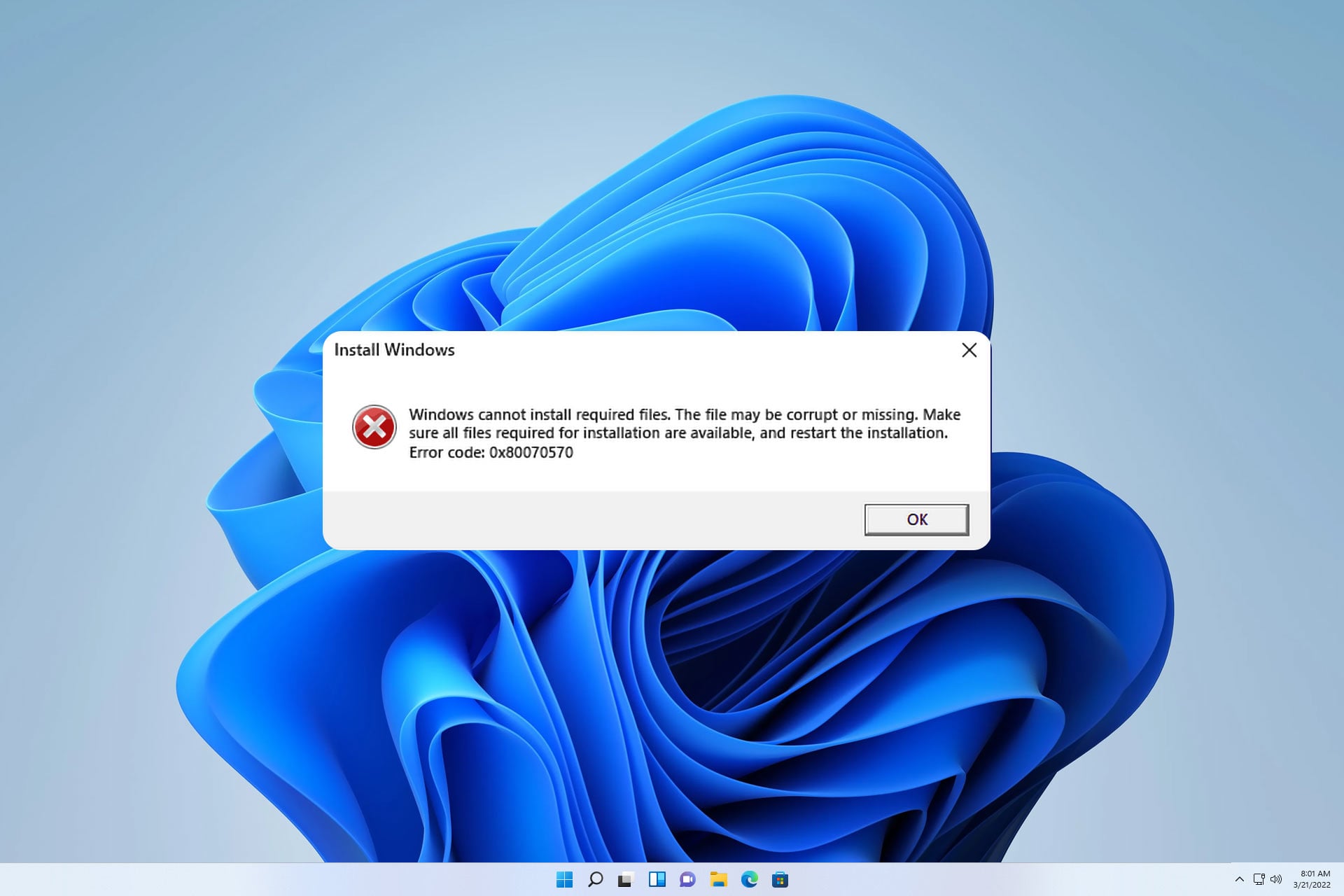
In this article, we’re going to show you how to solve error 0x70080025D, which prevents Windows from installing.

It’s not uncommon for Windows installation to fail, which can happen for various reasons, including your hardware or settings.

Fixing this error is simpler than you think, and all you have to do is change a couple of settings, and this guide will show you how to do that.

How can I fix error 0x70080025D?

Change BIOS settings

  1. Restart your computer and go to BIOS (On most computers, you need to press Del while the computer starts).
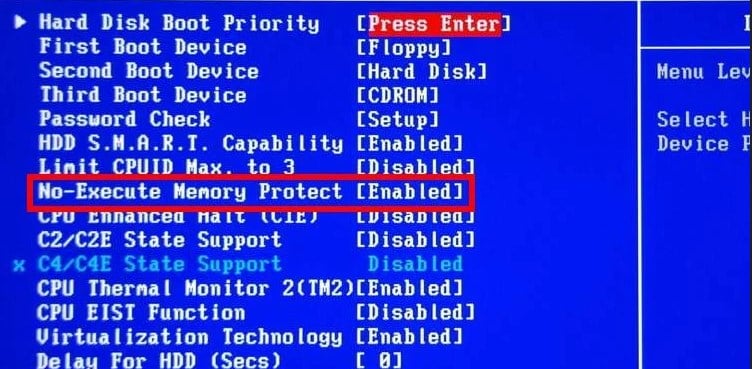
  2. In BIOS, go to Advanced Options, Processor, and then to No Execute Memory Protection.
  3. Change this feature to Enable or On.
  4. Restart your computer and try to install Windows again.

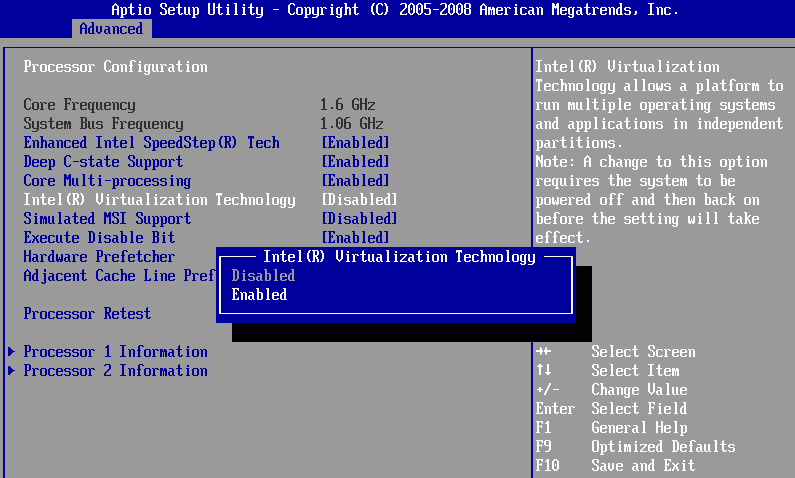
If you’re trying to install Windows on a virtual machine, you need to do this as well:

  1. Go to BIOS (as shown above).
  2. Go to Performance.
  3. Change the Virtualization feature to On.
  4. Save changes and exit BIOS.

We have a great guide on how to access BIOS, so be sure to check it out for step-by-step instructions if you have any difficulty following these steps.

After performing these simple BIOS workarounds, you should be able to install Windows on both a virtual machine and a regular PC.

If you’re somehow still unable to install Windows due to an error 0x70080025D, we suggest visiting our guide and learning what to do if Windows 10 won’t install on your PC.

Did you find a different solution? If so, feel free to share it with us in the comments section below.

Microsoft expands GitHub integration with Visual Studio

Microsoft expands GitHub integration with Visual Studio

Last week, Microsoft announced the upcoming July 20th release date of Visual Studio 2015, which is set to be one of the more ambitious releases of Microsoft’s integrated development environment. This latest edition will introduce support for new platforms, spanning from iOS and Android platforms, to game development through support for Unity, Unreal, and Cocos, and more.

The Visual Studio Engineering Team also announced today that Visual Studio 2015 will support sharing open source extensions hosted on GitHub within Visual Studio Gallery.

GitHub, the popular web-based Git repository hosting service, hosts millions of open source extensions used in software development. With the newly announced support for sharing open source extensions in Visual Studio Gallery, authors will be able to easily share their Github hosted extensions with others and gain more outlets for feedback and collaboration.

Robin Liu, Program Manager of Visual Studio China, says this is just one of the first steps in improving open source extensions in Visual Studio Gallery. Some of the other projects the Visual Studio team is planning are:

  • Pull extension description from ReadMe.md. Want to save your time on writing extension descriptions? With this change we will pull ReadMe content from your GitHub repo directly and populate the description on Visual Studio Gallery.
  • More extension statistical data. We have heard requests from you for easier ways to see statistical data for your extensions. The idea here is to not only show more statistical information on your extension page, but also provide a set of APIs for you to easily consume this data.
  • Show badges on your repo. On your repo a badge will show how many people downloaded your extension. We also think it will be fun if we can provide extension authors a way to generate badges similar to this:
  • Get rewards from your extension. Extending the reward element from badges, we also plan to provide a points and rewards system for extension authors.
  • Extension upload API. Want to have some APIs to upload extensions? Or even integrate with CI services to trigger an auto upload? This is also part of our improvement plan so keep an eye out for upcoming updates to the Gallery.

This latest news adds to the narrative of how Microsoft is following a more open path to meet developers, as well as customers, where they are at, as promised at both Build and Ignite conferences earlier this year. Given this trend in Microsoft news, the technology company will most likely continue to announce previously unanticipated support for cross platform development in hopes to gain momentum among developers as Windows 10 and universal apps launch later this month.