
Why Spotify Keeps Pausing on PC and How to Fix It Fast


 4 min. read
  Published on

If Spotify keeps pausing on PC, the issue usually comes from network drops, background app conflicts, corrupted cache files, or power settings that restrict audio playback. This guide shows the fastest ways to stabilize Spotify and stop random pauses while you listen to music.
Table of contents
Fix Spotify pausing on PC
Check your internet connection
Unstable internet interrupts streaming and forces Spotify to pause during songs.
- Open Settings > Network and Internet.
- Run the Network troubleshooter.

- Restart your router to refresh the connection.
- Connect to a different network to confirm if the issue stops.
If Spotify search also acts slowly or fails during playback, check this guide on how to fix Spotify search problems.
Restart the Spotify app
A full restart closes stuck background processes that cause interruptions.
- Close Spotify completely from the system tray.
- Press Ctrl + Shift + Esc to open Task Manager.
- End all Spotify.exe processes.
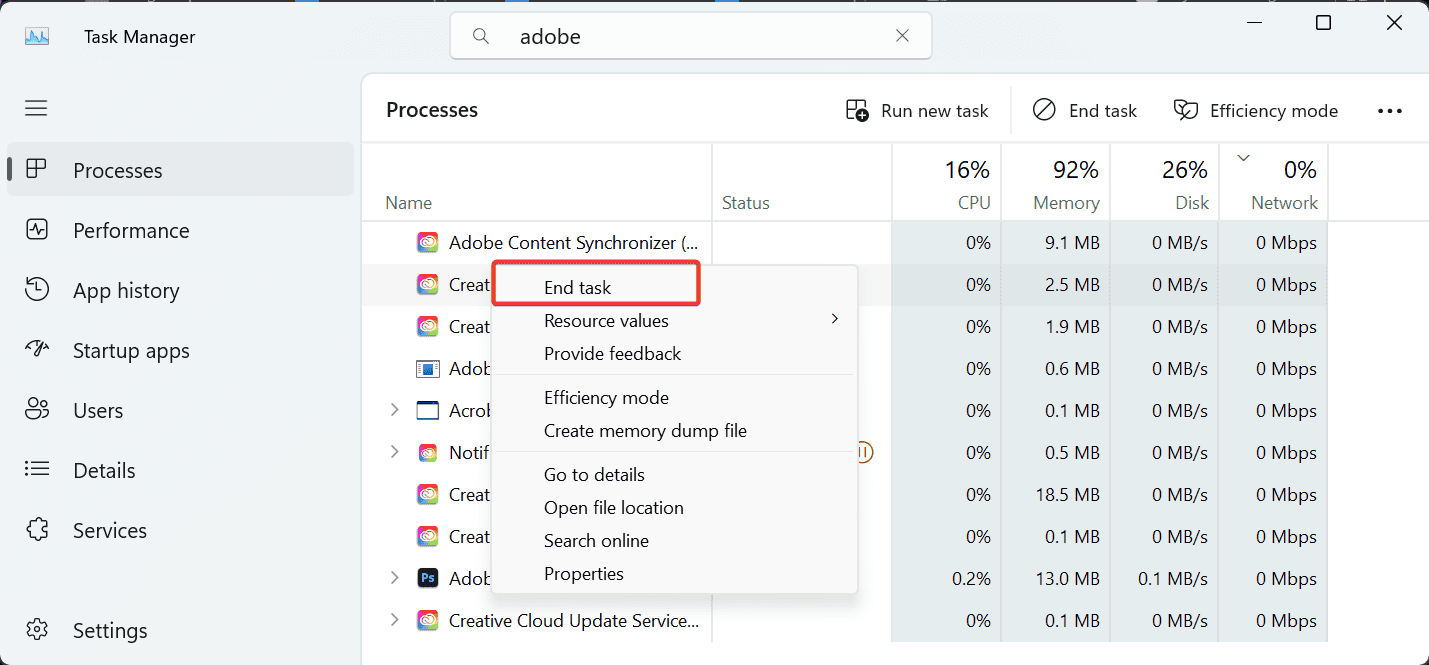
- Reopen the app and play a song.
If the app freezes or stops responding during this process, you can follow this guide on what to do when Spotify does not respond.
Disable battery saver or power limits
Your PC may limit background activity, which interrupts audio streams.
- Open Settings > System > Power and battery.
- Turn off Battery saver.

- Select Best performance under Power mode.
- Restart your PC and test playback again.
Turn off hardware acceleration
Hardware acceleration sometimes conflicts with certain GPUs and creates audio pauses.
- Open Spotify.
- Go to your profile icon and choose Settings.
- Scroll and turn off Hardware Acceleration.
- Restart Spotify.
Clear Spotify cache
A corrupted cache can interrupt streaming and cause random pause events.
- Press Windows + R.
- Type the following and press Enter:
%appdata%\Spotify - Delete the Storage folder.
- Restart Spotify.
Log out everywhere
Your account may stream on another device, which forces playback to stop on the PC.
- Open the Spotify Account page in your browser.
- Select Sign out everywhere.
- Log back in on your PC.
Reinstall Spotify
A full reinstall replaces broken files and resets playback components.
- Open Settings > Apps.
- Uninstall Spotify from the list.
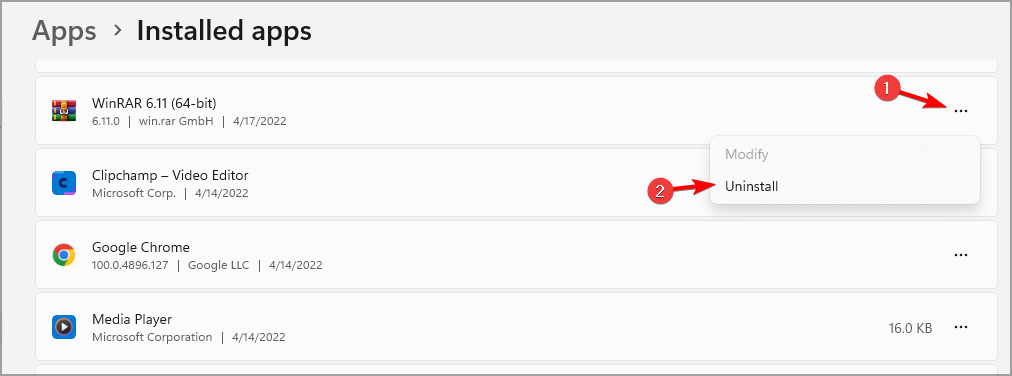
- Download the latest installer from the official site.
- Install it and sign back in.
If you use high quality streaming, you can also follow this guide on how to enable lossless audio on Spotify after reinstalling.
Disable conflicting apps
Audio enhancers and overlays often take control of sound output, which stops Spotify mid play.
- Disable overlays inside Discord, NVIDIA or AMD software, and Game Bar.
- Close third party audio tools like equalizers or mixers.
- Restart your PC and test playback.
FAQ
Network instability, corrupted cache files, conflicting background apps, or account activity on another device often cause Spotify to pause unexpectedly.
Yes. Hardware acceleration can conflict with some GPUs and trigger stuttering or pausing. Turning it off usually stabilizes playback.
Game overlays, audio enhancers, or in-game sound control features often interrupt Spotify’s audio stream, which causes pauses.
Yes. Low system resources or heavy CPU usage from other apps can interrupt Spotify’s playback and cause sudden pauses.
When Spotify keeps pausing on PC, the issue usually comes from a weak network, conflicting background apps, or corrupted local files. You can stabilize playback by restarting Spotify, clearing the cache, adjusting power settings, and disabling overlays. If the issue continues after these fixes, reinstall Spotify and test again to confirm the problem has been resolved.

Read our disclosure page to find out how can you help Windows Report sustain the editorial team. Read more



Improve this guide


User forum
0 messages