
Task Manager Makes It Easier to Track AI Workloads on Windows 11


 3 min. read
  Published on
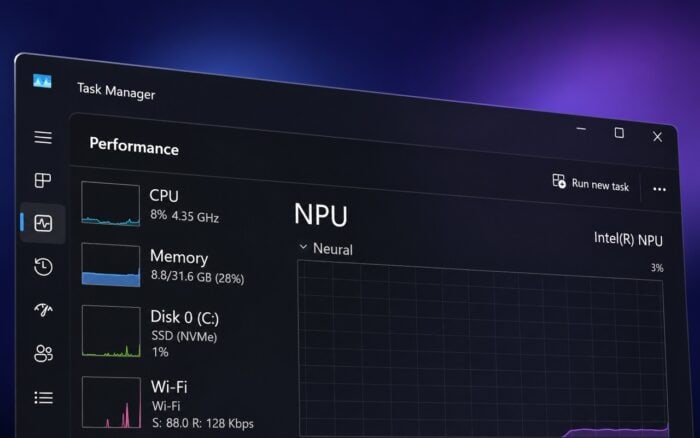
Microsoft is expanding Task Manager with new metrics that make it easier to see how Windows 11 apps use AI hardware.
The changes add process-level monitoring for NPUs, GPU neural engines, and memory dedicated to AI workloads. Microsoft will keep the new columns optional, so users can enable them only when needed.
Task Manager adds NPU monitoring
Microsoft is adding two new columns called NPU and NPU Engine.
They will appear on the Processes, Users, and Details pages and show which applications or background processes actively use the system’s NPU.
This should make it easier to tell whether an AI-enabled app actually takes advantage of dedicated neural processing hardware instead of relying on the CPU.
You can also track NPU memory usage
The Details page will gain two additional metrics: NPU Dedicated Memory and NPU Shared Memory.
These columns show how much memory each process uses through the NPU.
The information could prove especially useful when several local AI applications run at the same time and compete for available resources.
GPU neural engines will appear in Task Manager
Microsoft is also improving the Performance page to show neural engines integrated into GPUs.
Applications using dedicated GPU AI hardware can appear as GPU – Neural under the GPU engine column.
That gives users a wider view of AI acceleration across both NPUs and GPUs instead of limiting monitoring to traditional CPU and graphics workloads.
Task Manager can expose apps falling back to the CPU
The new metrics can also help identify applications that fail to use available AI accelerators.
If an app performs an AI workload on the CPU instead of an NPU or GPU neural engine, processing can take longer and consume more system resources.
Microsoft is effectively giving users a way to check whether AI software uses the hardware as intended.
Microsoft is also adding an Isolation column
Task Manager will also receive an optional Isolation column on the Processes and Details pages.
Users can enable it, along with the new NPU metrics, by right-clicking a Task Manager column header and selecting the metric they want to display.
The changes highlight Microsoft’s growing focus on local AI processing in Windows 11 as NPUs and dedicated neural accelerators become more common in new PCs.
In related news, Lenovo has set a clear 16GB limit for Copilot+ PCs, while Microsoft temporarily disabled Ask Copilot on the Windows 11 taskbar.
Windows 11 could also soon let users control privacy permissions for individual Win32 apps.

Read our disclosure page to find out how can you help Windows Report sustain the editorial team. Read more



Improve this guide


User forum
0 messages