
Truist App Not Working? 10 Easy Fixes for Login & Loading Issues


 6 min. read
  Updated on

Wondering why Truist app is not working right now? Well, it’s because the financial platform is experiencing an outage right now. For those unaware, the Truist mobile banking app lets you manage your accounts, transfer money, pay bills, deposit checks, and monitor transactions from almost anywhere.
However as with every service and apps, sometimes Truist app won’t open, simply keeps crashing on iPhone or Android, or gets stuck on the loading screen. If you are among those facing issues with Truist app today, this guide will give you a better idea as to why the app is not working today. We have also covered fixes to get the Truist app working again. Keep reading!
How to Fix the Truist App Not Working on Android or iPhone
1. Check if Truist is experiencing an outage
If the Truist app is not working today, the first thing you should do is determine whether the problem is affecting everyone. Server outages can prevent users from logging in, viewing account information, or completing transactions through both the mobile app and online banking.
- Check Truist’s official status updates.
- Visit an outage tracking website like Downdetector.
- Search social media for recent user reports.
- Wait until Truist confirms services have been restored if an outage is ongoing.
2. Restart the Truist app
Temporary software glitches can cause the Truist app to stop responding, freeze on startup, or fail to load your account information. Restarting the app refreshes the connection and often fixes minor issues without changing any settings.
- Close the Truist app completely.
- Remove it from your Recent Apps screen.
- Wait a few seconds.
- Open the app again.
- Try signing in once more.
3. Check your internet connection
A slow or unstable network can make it appear as though the Truist app isn’t working, even when the banking service is operating normally. Since the app communicates with Truist’s secure servers, poor connectivity can interrupt logins and transactions.
- Switch between Wi-Fi and mobile data.
- Restart your router if you’re on Wi-Fi.
- Test another app or website.
- Disable your VPN if you’re using one.
- Try signing in again.
4. Update the Truist app
Using an older version of the Truist mobile banking app may cause compatibility problems after Truist rolls out security updates or new features. Installing the latest version can fix crashes, login errors, and performance issues.
On Android:
- Open the Google Play Store.
- Search for Truist.
- Install any available updates.
On iPhone:
- Open the App Store.
- Search for Truist.
- Tap Update if a newer version is available.
5. Clear the Truist app cache (Android)
If the Truist app is not working on Android, corrupted cache files could be preventing it from opening properly or causing it to crash repeatedly. Clearing the cache removes temporary files without deleting your banking information.
- Open Settings.
- Tap Apps.
- Select Truist.
- Open Storage.
- Tap Clear Cache.
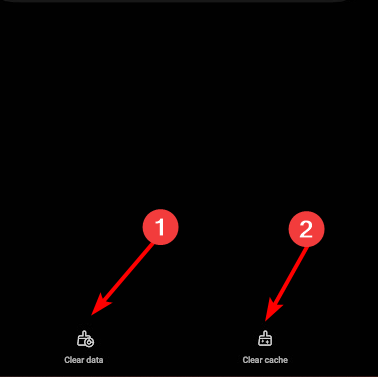
- Launch the app again.
If you’re using an iPhone, reinstalling the app is the best alternative because iOS doesn’t provide a manual cache-clearing option.
6. Restart your iPhone or Android phone
Your smartphone itself may be causing the problem. Restarting your device clears temporary memory, closes background processes, and can resolve issues where the Truist app won’t open or gets stuck on the loading screen.
- Hold the power button.
- Restart your phone.
- Wait until the device finishes booting.
- Open the Truist app again.
7. Check Face ID or fingerprint settings
If you’re unable to log in using Face ID or fingerprint authentication, the issue may not be with Truist itself. Changes to your phone’s security settings can prevent biometric authentication from working correctly.
- Open your phone’s Settings.
- Check Face ID or fingerprint permissions.
- Ensure Truist is allowed to use biometric authentication.
- Sign in using your password if necessary.
- Re-enable biometric login inside the app.
8. Disable your VPN
VPN services can occasionally interfere with secure banking connections, leading to login failures or connection errors. Temporarily disabling your VPN helps determine whether it’s preventing the Truist app from connecting.
- Disconnect your VPN.
- Close the Truist app.
- Reopen the app.
- Try logging in again.
9. Reinstall the Truist app
If the Truist app keeps crashing or refuses to open on Android or iPhone after trying the previous fixes, reinstalling it can replace damaged app files and install the latest version available.
- Delete the Truist app.
- Restart your phone.
- Download the latest version from the App Store or Google Play Store.
- Sign in to your account again.
10. Contact Truist Support
If you’ve tried every fix and the Truist app still isn’t working, the issue may be related to your account rather than the app itself. Truist’s customer support team can check for account restrictions, login problems, or service interruptions affecting your account.
- Contact Truist customer support.
- Explain the issue you’re experiencing.
- Mention any error messages you’ve received.
- Follow any additional troubleshooting steps they recommend.
Is the Truist app down today?
Before changing any settings on your phone, check whether Truist is experiencing a widespread outage. At the time of writing this, we noticed a spike on Downdetector, which suggests that the platform is experiencing an outage. Remember, when the Truist app is down, users commonly report:
- Login not working
- App stuck loading
- Blank or white screen
- Mobile check deposit failing
- Transfers not processing
- Face ID or fingerprint login not working
- Online banking unavailable
- Truist website not loading
That said, if you’re the only person in your family or friend group who’s unable to use the Truist app on your Android phone or iPhone, the issue is likely device specific. Try all the aforementioned methods one after another, we are pretty confident the app will work for you.
There are other general issues that you can encounter, and a few users reported error code 21001 with online banking.
Users also reported issues with TD EasyWeb and the HSBC app, but we covered those in our earlier guides.
FAQs related to Truist app not working issue
1. Why is the Truist app not working today?
The Truist app may be affected by server maintenance, a temporary outage, an outdated app version, or a network issue. Checking whether Truist’s services are down is a good first step before troubleshooting your device.
2. Why is the Truist app not working on iPhone?
The issue may be caused by an outdated iOS version, an older Truist app release, Face ID settings, or temporary software bugs. Updating or reinstalling the app often resolves these problems.
3. Why is the Truist app not working on Android?
If the Truist app won’t open or keeps crashing on Android, clearing the app cache, updating the app, or restarting your device can usually fix the issue.
4. Why won’t the Truist app let me log in?
Login problems can occur because of server outages, incorrect credentials, poor internet connectivity, or temporary account security checks.
5. Is Truist online banking down?
If both the Truist mobile app and website are unavailable, the problem is likely related to Truist’s servers. Check the bank’s official status updates or trusted outage tracking websites to confirm whether there’s an ongoing service interruption.

Read our disclosure page to find out how can you help Windows Report sustain the editorial team. Read more



Improve this guide


User forum
0 messages