
Fix uBlock Origin Not Working on YouTube (5 Quick Solutions)


 3 min. read
  Published on
If uBlock Origin is not working on YouTube, ads may still appear due to outdated filters, anti-adblock scripts, or misconfigured settings. Use the fixes below to restore ad blocking.
Table of contents
What can I do if uBlock Origin is not working on YouTube?
1. Update uBlock Origin Filters
The most common reason is outdated filters. Refresh them with these steps:
- Open uBlock Origin from your browser toolbar.
- Click the gear icon to open Dashboard.

- Go to Filter lists and press Update now.
- Wait until all filters refresh, then reload YouTube.
If filters are not updating properly in Firefox, see our guide on uBlock Origin not working in Firefox.
2. Force YouTube to Reload Without Cache
Cached scripts can break ad blocking. Clear them quickly:
- Press Ctrl + Shift + R on Windows or Cmd + Shift + R on Mac.
- This forces a hard reload that bypasses cached scripts.
- Test YouTube again to confirm ads are blocked.
3. Enable Advanced Settings in uBlock
Custom filters can block YouTube anti-adblock scripts. Apply them like this:
- Open the uBlock Dashboard.
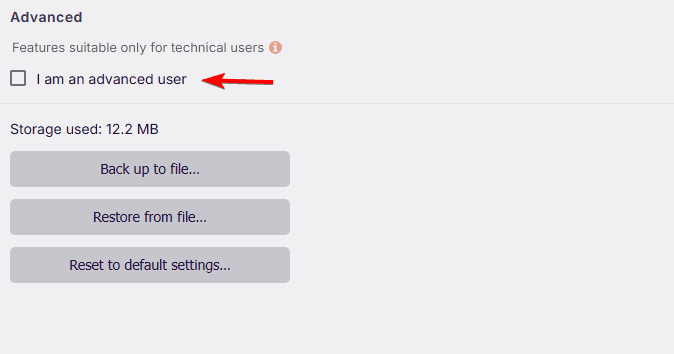
- Go to Settings and enable I am an advanced user.
- Open My filters and add:
youtube.com##+js(nano-sib) youtube.com##+js(nano-setIntervalBooster) - Save and reload the page.
4. Try a Different Browser
Sometimes the issue is browser specific. Switch and test quickly:
- If you use Chrome, try Firefox or Brave.
- Retest YouTube and compare ad blocking results.
For Opera users, it may help to compare Opera Adblock vs. uBlock Origin to see which performs better.
5. Reinstall or Reset uBlock Origin
Corrupted installs can cause problems. A clean setup often helps:
- Remove uBlock Origin from your browser.

- Reinstall it from the official extension store.
- Update filter lists and retest YouTube.
FAQs
YouTube updates anti-adblock measures frequently. Outdated filters or cached scripts can let ads slip through.
Yes. With current filter lists and proper settings, uBlock Origin can still block YouTube ads.
Yes, if they come from trusted sources like the uBlock community or GitHub.
Firefox and Brave are often more reliable for resisting anti-adblock tactics.
Conclusion
When uBlock Origin stops working on YouTube, the fastest wins are updating filters, hard-reloading without cache, and reinstalling the extension. If one method fails, try the next until ads disappear. If you also stream elsewhere, check fixes for uBlock Origin not blocking Twitch ads since solutions often overlap.

Read our disclosure page to find out how can you help Windows Report sustain the editorial team. Read more



Improve this guide




User forum
0 messages