
Wicked Whims Not Working in Sims 4: Quick Fix Guide


 3 min. read
  Updated on

If Wicked Whims is not working in The Sims 4, it usually means the mod wasn’t installed properly, is outdated, or is conflicting with another mod. Below are the most effective ways to fix this problem.
How to fix Wicked Whims not working in Sims 4?
Table of contents
1. Enable mods in Sims 4 settings
- Launch Sims 4 and go to the main menu.
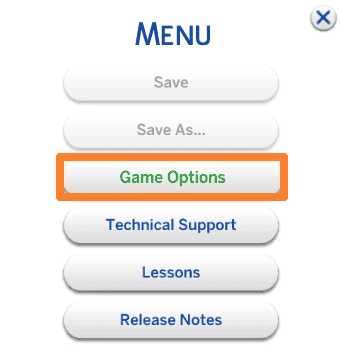
- Click on Options > Game Options.
- Select the Other tab.
- Check Enable Custom Content and Mods.
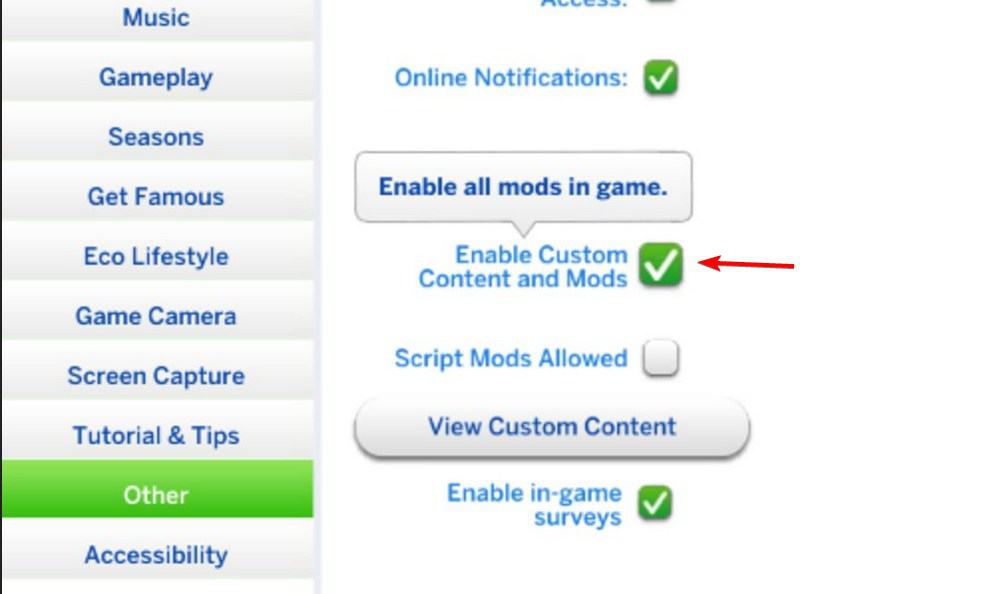
- Also check Script Mods Allowed.
- Restart the game to apply the changes.
You can find more details in this guide on installing Sims 4 mods.
2. Verify Wicked Whims installation
- Download the latest Wicked Whims mod from the official source.
- Extract the archive using a tool like WinRAR or 7-Zip.
- Place the .package and .ts4script files directly into the Sims 4 Mods folder (Documents > Electronic Arts > The Sims 4 > Mods).
- Avoid placing the files in multiple subfolders.
- Restart the game and check if the mod loads.
If your mods still don’t show up, this article on Sims 4 mods not working covers common mistakes and solutions.
3. Update Wicked Whims and Sims 4
- Check for Sims 4 updates on Origin, EA App, or Steam.
- Update the game to the latest version.
- Download the newest Wicked Whims version from the official website.
- Remove the old Wicked Whims files from your Mods folder.
- Place the updated files in the Mods folder and restart the game.
If the game starts failing to launch or crashes right after a patch, see this full guide on Sims 4 not working after update for broader game fixes beyond Wicked Whims.
4. Check for mod conflicts
- Move all mods except Wicked Whims to a temporary folder outside of the game.
- Launch Sims 4 and test if Wicked Whims loads correctly.
- Add your other mods back one by one to identify conflicts.
- Remove or update the conflicting mod.
- Restart Sims 4 with Wicked Whims active.
Conflicts may also trigger specific errors such as the NISA issue in Sims 4, which can interfere with Wicked Whims.
Most problems with Wicked Whims come down to disabled settings, outdated files, or conflicts with other mods. By enabling script mods, reinstalling the files properly, and keeping everything updated, you can usually restore the mod’s functionality without much effort.
FAQs
It’s usually because script mods aren’t enabled or the files are installed incorrectly.
Yes. Game updates often break mods, so always use the latest version.
Yes. Conflicting mods are a common cause, so test by removing other mods temporarily.
Place both the .package and .ts4script files directly into the Mods folder, not inside multiple subfolders.

Read our disclosure page to find out how can you help Windows Report sustain the editorial team. Read more



Improve this guide




User forum
0 messages