
Windows 11 Build 27965 Brings Smarter Start Menu With Scrollable Layout
Multitaskers and power users to benefit with the latest change


 1 min. read
  Published on
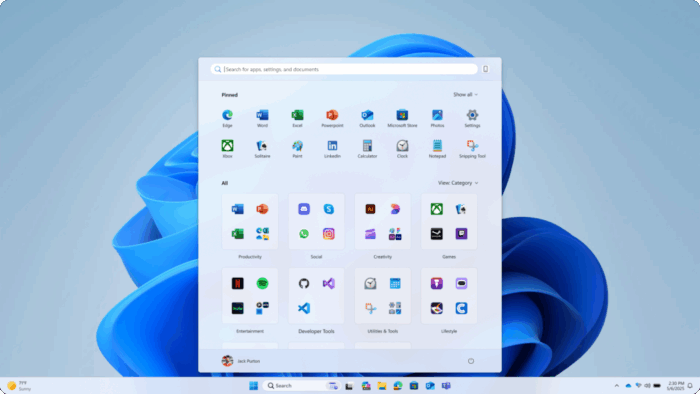
Microsoft has given the Windows 11 Start menu its biggest refresh yet with the latest Build 27965 (Canary Channel). The new design introduces a scrollable layout, improved responsiveness, and two new views that make navigating your apps simpler.
The Category view groups installed apps based on usage, so productivity tools like Outlook or Word appear near the top. Meanwhile, Grid view displays apps alphabetically with better spacing, making it easier to scan through your collection without endless scrolling.

That’s not all; larger screens now show up to eight columns of pinned apps and four columns of categories, while smaller displays scale the layout dynamically. The Start menu also automatically collapses unused sections, keeping things tidy when you have fewer pins or recommendations.

This redesign is more about usability than just a visual change. Frequent multitaskers and power users can now reach key apps faster, while the responsive layout adapts better across laptops, tablets, and desktops.
The scrollable Start menu rolls out gradually to Insiders in the Canary channel, alongside other features like cross-device Phone Link integration, a new Edit command-line tool, and taskbar and playback fixes.

Read our disclosure page to find out how can you help Windows Report sustain the editorial team. Read more



Improve this guide




User forum
0 messages