
Windows Live Mail Sign In Hotmail: Step-by-Step Guide


 2 min. read
  Published on

Windows Live Mail lets you connect your Hotmail account and manage emails in one place. This guide will show you how to sign in and access your messages.
How do I sign in to Hotmail on Windows Live Mail?
Table of contents
Use the sign in option
- Launch the Windows Live Mail program on your computer.
- Type your Hotmail email address ([email protected]).
- Enter your password and click Sign in.
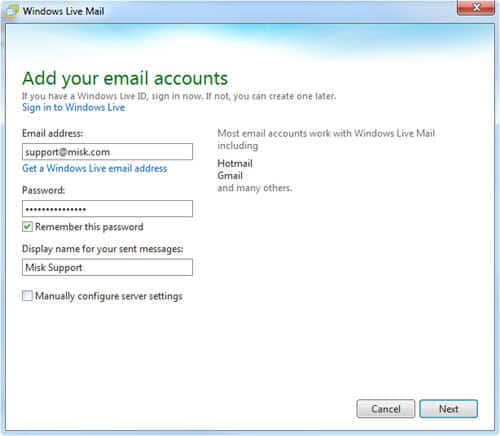
- Configure the server settings if needed: Incoming server: outlook.office365.com (IMAP). Outgoing server: smtp.office365.com (SMTP).

- Make sure SSL is enabled for both incoming and outgoing mail.
For more details on setup, see our guide on Windows Live Mail not accepting passwords.
What to do if Windows Live Mail does not work on Windows 10
There are compatibility limitations when connecting Hotmail through Windows Live Mail on newer systems. Read our full guide on Windows Live Mail in Windows 10 to learn how to configure and use it properly.
Switch from Windows Live Mail to Outlook
Microsoft has phased out Windows Live Mail, and Outlook is now the main option. You can migrate Hotmail messages, contacts, and folders into Outlook. Follow our tutorial on switching from Windows Live Mail to Outlook.
FAQs
This often happens because of outdated authentication methods. Updating server settings usually fixes the issue.
Yes, but support is limited. You may face more frequent connection issues compared to Outlook.
The Outlook desktop app is the official replacement, with stronger security and full integration with Microsoft services.

Read our disclosure page to find out how can you help Windows Report sustain the editorial team. Read more



Improve this guide



User forum
0 messages