
Microsoft Copilot How to Videos: 5 Best Places to Learn Quickly


 4 min. read
  Published on

Microsoft Copilot is built into Word, Excel, Outlook, and Teams, making everyday tasks easier with AI. If you want to get better with it, here are some of the best ways to learn about Copilot through how to videos.
Table of contents
Where to find Microsoft Copilot how to videos?
1. Microsoft Support YouTube channel

The official Microsoft 365 channel is the most reliable source for updated Copilot tutorials. It has dedicated playlists for different apps:
- Word Copilot – drafting essays, rewriting text, summarizing reports
- Excel Copilot – generating formulas, analyzing data, creating pivot tables
- Outlook Copilot – writing emails, summarizing threads, scheduling meetings
- Teams Copilot – meeting recaps, brainstorming ideas, preparing action items
YouTube is free and easy to access, making it the best starting point for beginners.
If you’re unsure how to get started, check this guide on how to access Microsoft Copilot.
2. Microsoft Learn

Microsoft Learn is an educational platform with structured courses and modules. Many include video lessons, quizzes, and practice labs.
- Step-by-step learning paths for Copilot
- Beginner guides to advanced productivity workflows
- Integration lessons showing how Copilot connects across apps
- Video walkthroughs with on-screen demonstrations
This option is ideal if you prefer a more formal, course-like experience.
3. LinkedIn Learning
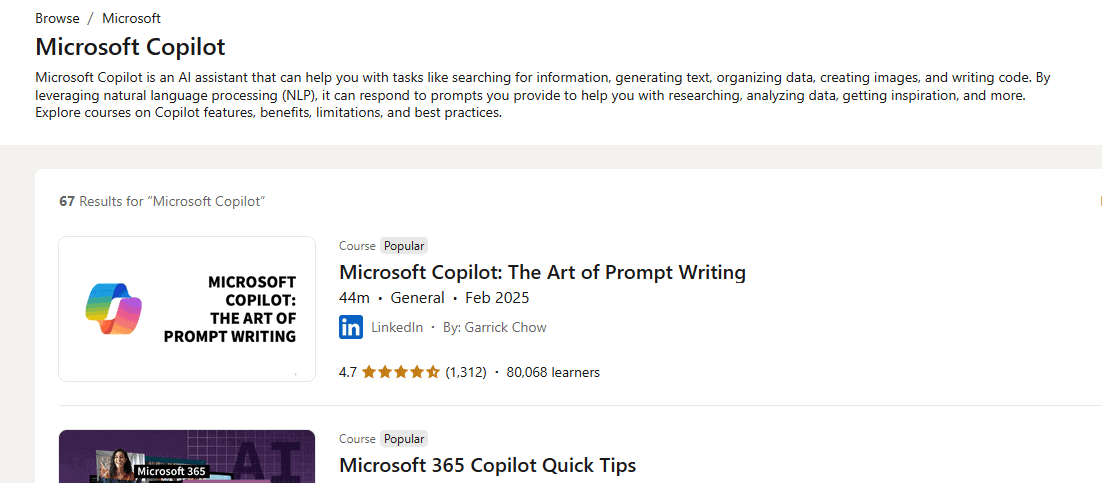
As part of Microsoft’s ecosystem, LinkedIn Learning hosts premium Copilot video courses designed for professionals and teams.
- Business-focused tutorials on Copilot
- Time management and productivity strategies
- Hands-on projects showing Copilot in real work environments
- Certificate of completion for showcasing on LinkedIn profiles
A subscription is required, but the courses often go deeper than free tutorials.
4. Tech blogs and training sites
Popular tech blogs and knowledge bases often embed Copilot how to videos in their articles. Examples include:
- Step-by-step troubleshooting guides with video support
- Comparison articles showing Copilot vs. other AI assistants
- Windows and Office tips with embedded Microsoft videos
- Independent walkthroughs uploaded by trusted trainers
For example, here’s a step-by-step tutorial on how to use Copilot in Word.
5. Community channels
Independent creators publish Copilot tutorials across platforms like YouTube, TikTok, and Reddit. These focus on real-world scenarios, such as:
- Using Copilot to draft business proposals
- Automating Excel budget sheets with Copilot
- Preparing class assignments in Word with AI help
- Summarizing long Teams meetings for managers
Community content is valuable for practical tips and creative use cases.
Why watch Copilot tutorials instead of reading guides?
- Faster learning – follow along with the exact steps shown
- Visual examples – see how prompts generate real results
- Step-by-step clarity – pause, rewind, and replay as needed
- Hands-on practice – try features while you watch
- Better retention – visuals and audio stick longer than text
FAQs
Yes. YouTube and Microsoft Learn videos are free. LinkedIn Learning requires a paid subscription.
No. Anyone can watch. A license is only needed to try the features in your apps.
Yes. These sources stream easily on phones and tablets.
Yes. You’ll find tutorials on advanced data analysis, workflow automation, and business use cases.
Begin with the Microsoft 365 YouTube channel for basics, then move to Microsoft Learn for structured paths.
Conclusion
Microsoft Copilot how to videos are the quickest way to see AI tools in action across Word, Excel, Outlook, and Teams. Start with official YouTube playlists, add structured learning from Microsoft Learn, and explore professional courses on LinkedIn Learning for depth. For more control, review this guide on how to disable Microsoft Copilot when needed.
Once you’ve learned the basics from these tutorials, the next step is setting it up for daily use. Follow this detailed guide on how to buy Microsoft Copilot and unlock its full potential.

Read our disclosure page to find out how can you help Windows Report sustain the editorial team. Read more



Improve this guide

User forum
0 messages