
How to Login on Udemy on Any Device


 4 min. read
  Published on

Udemy login is usually quick, whether you’re opening a course on your laptop or checking lessons from your phone. Problems are more likely to appear when you forget your password or use a different sign-in method than the one you originally chose.
How do I log in to Udemy?
1. Sign in through the Udemy website
Using a browser is usually the quickest option, and you can do it following these steps:
- Open Udemy in your browser.
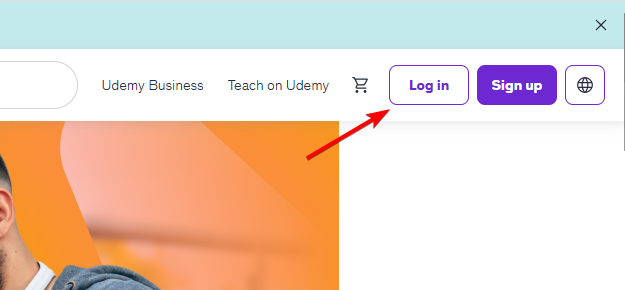
- Select Log In near the top of the page.
- Enter the email address linked to your Udemy account.
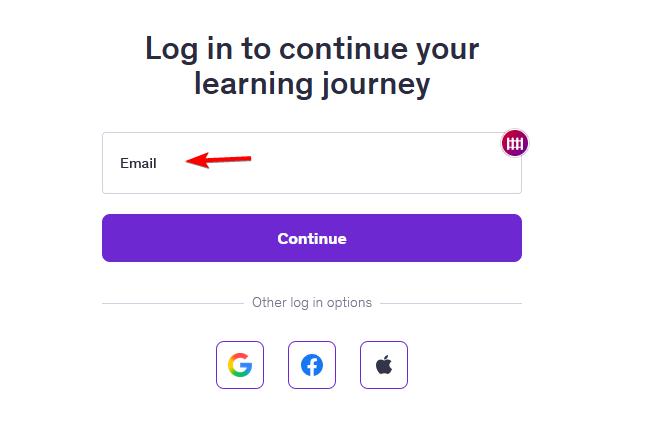
- Enter your password and select Log In.
If your account uses another authentication method, choose the appropriate option shown on the login screen.
If you originally created your account using Google, Apple, Facebook, or another available option, use the same method again.
Quick tip: Always check the website address before entering your password. Avoid signing in through unfamiliar links sent by email, text message, or social media.
2. Use the Udemy app
Mobile users can use their app by following these steps:
- Install the official Udemy app from your device’s app store.
- Open the app and select Log In.
- Enter your Udemy account details.
- Complete any additional verification if prompted.
- Open My Learning to access your enrolled courses.
If login problems continue, make sure the app is up to date. Older versions may not work correctly after service or authentication changes.
3. Use your mobile browser
You don’t need the Udemy app to access your account from your phone.
- Open your preferred mobile browser.
- Visit Udemy.
- Select Log In.
- Enter your account details as usual.
- Use this option if the Udemy app crashes, freezes, or refuses to load.
- If you can log in through your browser, the problem may be limited to the app rather than your account.
Forgot your Udemy password?
- Open the Udemy login page.
- Select Forgot Password? or the password reset option.
- Enter the email address associated with your Udemy account.
- Select Send Reset Link or the equivalent confirmation button.
- Open your email inbox and look for the password reset message from Udemy.
- Open the email and select the password reset link.
- Enter and confirm a new password.
- Return to the Udemy login page and sign in with your email address and new password.
Udemy Login Not Working? Try These Fixes
Login problems don’t necessarily mean something is wrong with your account. Incorrect credentials, browser issues, connectivity problems, and temporary service interruptions can all prevent you from signing in.
- Check your email and password: Make sure Caps Lock isn’t enabled, check for accidental spaces, and enter your credentials manually if you’re unsure because password managers can autofill an old password.
- Reset your password: If Udemy no longer accepts your credentials, use the email address connected to your account and follow the reset instructions sent to your inbox.
- Try another browser: If Udemy works elsewhere, stored cookies or cached data may be causing problems. You can also try a private or incognito window.
- Check your internet connection: An unstable connection can interrupt login. Try another Wi-Fi network or switch to mobile data if the page keeps loading or the sign-in request fails.
- Update the Udemy app: Check for updates on Android or iPhone. If the app is already up to date, restart your device and try logging in again.
Now you know how to log in to Udemy properly, but to ensure that it is working properly, use one of these browsers for Udemy.
Also, a few users reported issues with Udemy Audio, but that can be easily resolved.
Udemy Login FAQs
1. How do I log into Udemy?
Visit the official Udemy website and select Log In. Enter the email address and password associated with your account, or use the authentication method you originally selected.
2. Why can’t I log into Udemy?
Incorrect credentials, browser problems, connection issues, or account-specific problems can prevent you from signing in. Try resetting your password or using another browser.
3. Can I log into Udemy on my phone?
Yes. You can use the Udemy mobile app or access the website through a mobile browser.
4. Why are my Udemy courses missing after login?
You may have signed in with a different email address or authentication method. Log out and try the account you originally used to purchase or enroll in your courses.
5. Can I use Udemy on multiple devices?
Yes. You can access your Udemy account from multiple supported devices. Make sure you’re signing into the same account on each one.

Read our disclosure page to find out how can you help Windows Report sustain the editorial team. Read more



Improve this guide


User forum
0 messages