
NFCU App Not Working? 7 Easy Fixes to Try Now


 5 min. read
  Published on
For some users, the NFCU app is not working, and this can be a major issue when you need quick access to your account. However, this can be easily fixed.
What can I do if NFCU app is not working?
1. Check if Navy Federal is experiencing an outage
If the NFCU app suddenly stopped working after previously working normally, don’t immediately start changing settings on your phone. A service interruption can cause login failures, blank screens, transaction errors, or an app that repeatedly refuses to load.
- Check whether Navy Federal’s website is also unavailable.
- Search Downdetector for recent NFCU reports.
- Check Navy Federal’s official social channels for maintenance announcements.
- Ask another Navy Federal member whether the app is working for them.
- If multiple services are failing at the same time, wait for the outage to be resolved before reinstalling the app.
2. Force close the NFCU app and restart your phone
A temporary app process can become stuck after an update or failed login attempt. Restarting the app gives it a clean session without changing your account information.
- Close the NFCU app completely.
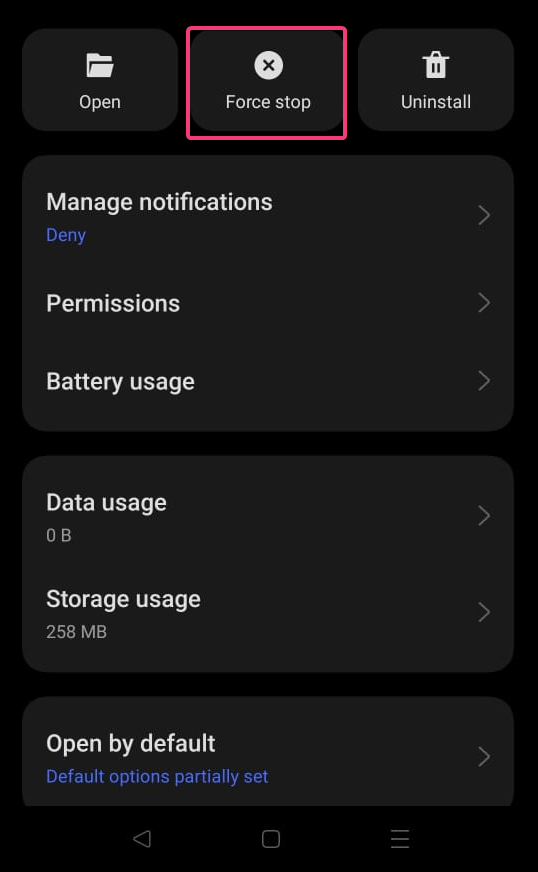
- On Android, open Settings > Apps > Navy Federal > Force stop.
- On iPhone, swipe up and remove the NFCU app from the app switcher.
- Restart your phone.
- Open NFCU again and try signing in.

If the app opens but freezes after entering your credentials, move on to the next fix rather than repeatedly attempting to log in.
3. Update the Navy Federal app
An outdated NFCU version can cause crashes, login problems, or compatibility issues after Navy Federal changes something on its backend.
- Open the Google Play Store or App Store.
- Search for Navy Federal Credit Union.
- Tap Update if one is available.
- Restart the phone after the installation.
- Open NFCU and test the feature that was failing.
If the problem started immediately after an update, the new version itself may be involved. In that situation, check recent user reports before repeatedly reinstalling the app.
4. Switch between Wi-Fi and mobile data
A connection can look normal while still preventing the NFCU app from reaching its servers correctly.
- Turn off Wi-Fi and try NFCU using cellular data.
- If you’re already using cellular data, connect to a trusted Wi-Fi network.
- Disable any VPN temporarily.
- Turn off private DNS or network-filtering apps if you use them.
- Try loading another banking website to confirm that your connection is working.
If NFCU works on cellular data but not Wi-Fi, the problem is more likely related to your network than your Navy Federal account.
5. Clear the NFCU app cache on Android
Corrupted temporary files can cause an app to freeze, crash, or behave strangely after an update. Clearing the cache removes those temporary files without deleting your Navy Federal account.
- Open Settings on your Android phone.
- Go to Apps > Navy Federal Credit Union.
- Select Storage or Storage & cache.
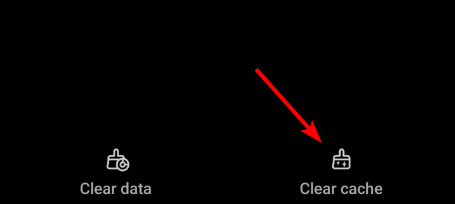
- Tap Clear cache.
- Reopen NFCU and try again.
Don’t tap Clear data unless you’re prepared to sign in and configure the app again.
6. Check NFCU’s updated sign-in requirements
If the app opens normally but you cannot get past authentication, the problem may be related to Navy Federal’s current sign-in process rather than the app itself.
- Make sure you’re using your current Navy Federal username and password.
- Follow the authentication prompts shown in the current app.
- Check whether your device’s screen lock, Face ID, or fingerprint authentication is working correctly.
- If you’ve recently changed phones, complete any required device verification.
- Use Navy Federal’s account-recovery process if you cannot authenticate.
This is particularly important after changing devices, because authentication settings may not transfer exactly as they did on your previous phone.
7. Reinstall the NFCU app
If the app remains broken after updating and clearing temporary data, reinstalling it can remove damaged installation files.
- Uninstall the Navy Federal app.
- Restart your phone.
- Install the latest version from the official app store.
- Open NFCU and sign in again.
- Complete any security or device-verification prompts.
Reinstalling the app does not close your Navy Federal account or delete your bank account, but you may need to sign in and configure app authentication again.
If you need help with other login or banking issues, check our guides on how to login to Army email, how to fix Truist app not working, and PNC Bank not working.
FAQs regarding NFCU app not working
1. What is wrong with the NFCU app?
The NFCU app may stop working because of server outages, app bugs, outdated software, or internet connection problems. Restart the app and check for updates first.
2. Why can’t I log into my Navy Federal app?
You may have entered incorrect login details, triggered a security lock, or encountered an app or server issue. Reset your password if needed and try again later.
3. Why can’t I access my NFCU account online?
Navy Federal online banking may become unavailable during maintenance, outages, or account security checks. Try another browser or network and confirm your login information.
4. Why is my authentication failing on the Navy Federal app?
Authentication can fail because of an expired verification code, incorrect credentials, device settings, or a temporary security issue. Request a new code and try again.
5. Will Navy Federal close my account if I don’t use it?
Navy Federal may classify an account as inactive after a long period without activity. Extended inactivity can lead to restrictions or closure, so review your account terms for details.

Read our disclosure page to find out how can you help Windows Report sustain the editorial team. Read more



Improve this guide


User forum
0 messages