
FT232R USB UART Driver: How to Install And Fix Issues


 3 min. read
  EEST
EEST

The FT232R USB UART driver is essential for devices that rely on USB-to-serial communication. Without it, your PC may fail to recognize the connected hardware, leading to errors or non-functional devices. If you are on Windows 10 or 11 and experiencing problems, here’s how to fix them.
How do I install the FT232R USB UART driver?
Table of contents
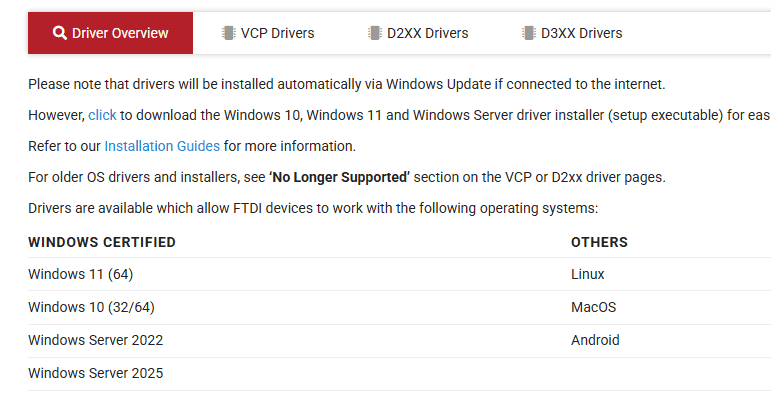
1. Download the driver
- Go to the official FTDI website or a trusted source.

- Make sure to select the version that matches your system (32-bit or 64-bit).

- Run the installer.

Some drivers come packaged in executables such as usbdriver.exe. You can check this article on usbdriver.exe
2. Install via Device Manager
- Press Win + X and select Device Manager.

- Locate the Unknown Device or USB Serial Converter.
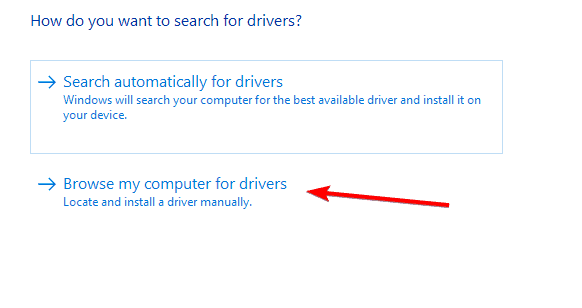
- Right-click and select Update driver.

- Choose Browse my computer for drivers and point to the folder where you saved the FT232R driver.

- Confirm and complete the installation.


3. Reinstall USB drivers on Windows
- Disconnect all USB devices from your PC.
- Press Win + X and open Device Manager.
- Expand Universal Serial Bus controllers.
- Right-click each USB Root Hub, Generic USB Hub, USB Host Controller, and any USB Serial Converter, then choose Uninstall device. If shown, check Attempt to remove the driver.

- Restart the PC to auto‑reinstall drivers, then reconnect your FT232R device. If it is still not detected, install the FT232R driver manually via Update driver → Browse my computer.

For more guidance, see this resource on how to install USB drivers on Windows 10, which also applies to Windows 11 in most cases.
Why do you need the FT232R USB UART driver?
This driver enables your computer to communicate with USB-to-serial converter chips from FTDI. These chips are widely used in development boards, 3D printers, and various electronic devices. Without a proper driver, you may see errors such as USB not recognized or Unknown device in Device Manager.
If your Windows 11 is not recognizing USB devices, it could be related to missing or corrupted drivers. In such cases, reinstalling the correct USB driver often solves the issue. You can follow this detailed guide on Windows 11 not recognizing USB devices for more troubleshooting tips.
Common issues and fixes
- Driver signature error: Disable driver signature enforcement temporarily to install unsigned drivers.
- Device not detected after installation: Try another USB port or cable.
- Corrupted driver files: Re-download the driver and reinstall.
If your PC still cannot detect the USB device after these steps, double-check whether the hardware itself is functioning properly.

Read our disclosure page to find out how can you help Windows Report sustain the editorial team. Read more



Improve this guide


User forum
0 messages