
KB5067106 Adds Microsoft Account Benefits Shortcut & Refreshes Game Pass Branding in Windows 11
The update also improves dark mode within File Explorer


 1 min. read
  Published on
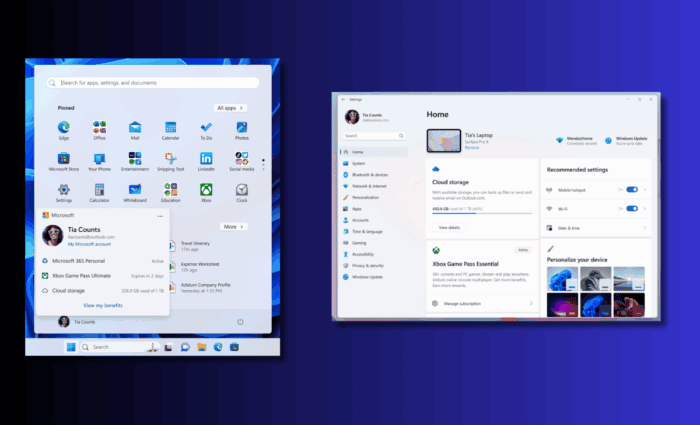
The latest Windows 11 25H2 Insider Preview Build 26220.6972 under KB5067106 now live for Dev testers, with identical changes for 24H2 (Build 26120.6972) for Beta testers.
This update brings Game Pass branding in Settings, making it inline with Microsoft’s refreshed visual identity and subscription tiers. The Settings homepage now reflects new Game Pass benefits, suggesting a deeper integration between Windows and Xbox services.

A new “View my benefits” button also appears in the Start menu’s account section, taking users straight to account.microsoft.com to explore linked perks or subscriptions.

While largely a polish update, these UI refinements push Microsoft’s broader effort to unify its ecosystem under a more cohesive Microsoft 365 + Xbox umbrella.
The same build also continues improving dark mode consistency within File Explorer and introduces the option to toggle the Drag Tray from the Nearby Sharing section. Moreover, Dev and Beta testers on version 25H2 and 24H2, get Mobile Devices page inside the Settings app.

Read our disclosure page to find out how can you help Windows Report sustain the editorial team. Read more



Improve this guide



User forum
0 messages