
Microsoft Launches Intelligent Terminal With Built-In AI Agents for Developers


 3 min. read
  Published on
Microsoft introduced several new developer and AI initiatives during this year’s Build conference, including new code security tools and the launch of Microsoft Discovery. The company also quietly revealed another experimental project aimed directly at developers.
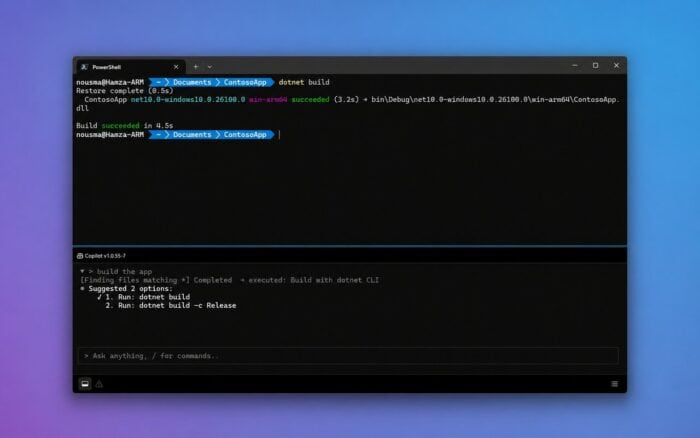
Microsoft has announced Intelligent Terminal, an AI-powered experimental fork of Windows Terminal that adds native AI agent integration directly into the command-line experience.
The app is available now through the Microsoft Store, winget, and GitHub. According to Microsoft, the original Windows Terminal app is not being replaced or modified in any way.
Intelligent Terminal brings AI agents directly into the terminal
Microsoft describes Intelligent Terminal as an open-source experimental fork of Windows Terminal designed for developers who want AI assistance built directly into their workflow.
Instead of modifying the existing Windows Terminal experience, Microsoft created a separate application that focuses on AI-powered terminal interactions.
This move also marks the end of another experiment. Microsoft confirmed that Terminal Chat in Canary is being deprecated, and users interested in AI-assisted terminal features are now being directed toward Intelligent Terminal instead.
AI can explain failed commands and suggest fixes
One of the main features in Intelligent Terminal is AI-assisted troubleshooting.
The app can detect command errors and display explanations or possible fixes inside a dedicated agent panel. Developers can quickly understand why a command failed without needing to search documentation or leave the terminal window.
Microsoft says the goal is to reduce workflow interruptions while making debugging easier, especially for newer developers or users working with unfamiliar commands.
Questions can be asked directly from the Command Palette
Intelligent Terminal also integrates AI into the Command Palette.
Users can ask questions based on the current terminal session, allowing the AI agent to analyze recent commands and context before responding.
Microsoft says the agent runs in the background so it does not interrupt the primary terminal workflow. This allows developers to continue working while the AI processes requests or generates explanations.
GitHub Copilot is the default agent
GitHub Copilot serves as the default AI agent inside Intelligent Terminal.
However, Microsoft says users are not locked into Copilot. The app supports ACP-compatible agents, meaning developers can swap in different AI agents depending on their preferences or workflow requirements.
This flexibility could make Intelligent Terminal more appealing to developers who already use third-party AI coding assistants.
Some developers welcome it while others remain skeptical
AI integration inside developer tools continues to divide opinion across the industry.
Some developers will likely appreciate features such as instant command explanations, inline debugging help, and AI-assisted workflows. These tools could reduce troubleshooting time and simplify complex command-line tasks.
Others remain skeptical as Microsoft and many other tech companies continue adding AI features across nearly every product category.
The announcement also arrives shortly after reports that Microsoft is preparing a new option in Windows 11 that allows users to uninstall local AI models more easily. That feature recently appeared in Insider builds and could help users reclaim storage space on Copilot+ PCs.
Via Windows Central

Read our disclosure page to find out how can you help Windows Report sustain the editorial team. Read more



Improve this guide




User forum
0 messages