
NYT Mini Crossword Not Working? 5 Quick Fixes to Try Now


 3 min. read
  Published on

NYT Mini Crossword not working? Many players report issues with the New York Times mini puzzle not loading or being locked. Here’s how to fix it.
Table of contents
How can I fix NYT Mini Crossword not working?
1. Update the NYT Games App
Keeping the app updated ensures you’re running the latest bug fixes.
- Open the App Store or Google Play.
- Search for NYT Games or NYT Crossword.

- Tap Update if available.
- Relaunch the app and check if the Mini loads.
2. Try a Browser Instead of the App
If the app isn’t working, a browser can be a quick workaround.
- Open your preferred browser (Safari, Edge, Firefox, or Chrome).
- Visit the official NYT Crossword page.
- Log in with your New York Times account.
- Select the Mini puzzle to play it directly online.
3. Clear Cache or Reinstall the App
Refreshing the app can clear out corrupted data that blocks loading.
- On Android: go to Settings > Apps > NYT Games > Storage.
- Tap Clear cache (and Clear data if needed).
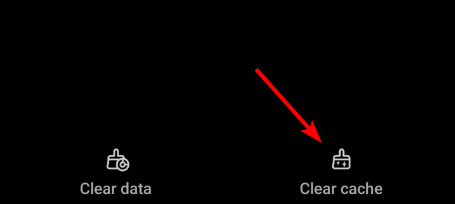
- On iPhone: delete the app from your device.
- Reinstall the app from the App Store or Google Play.
4. Confirm Your Subscription
The Mini now requires a valid NYT Games subscription.
- Sign in to your NYT account.
- Go to the Account > Subscriptions section.
- Make sure you have an active plan that includes Games.
- If expired, renew or upgrade your subscription.
5. Try Free Alternatives
If you don’t want to subscribe, you can switch to free puzzles.
- Visit the New Yorker mini crossword.
- Try the Boston Globe’s daily mini crossword archive.
- Bookmark your favorite free puzzle source.
- Use these as replacements if you don’t want a subscription.
If you’d like more options, check out this list of the best crossword software to enjoy puzzle games beyond the NYT Mini.
FAQs
The New York Times moved the Mini behind a paywall on August 27, 2025. It now requires a Games subscription.
Only older puzzles may remain free. To play new daily Minis, you need a subscription.
Update the app, clear its cache, or reinstall it. If that fails, log in via a web browser.
Yes, but some users report issues with Chrome. Try Safari, Firefox, or Edge if it doesn’t load.
You can try the New Yorker mini crossword or the Boston Globe crossword, which are still free to play.
Conclusion
If the NYT Mini Crossword is not working, try updating the app, using a browser, clearing cache, or confirming your subscription. If you’d rather not pay, free alternatives like the New Yorker or Boston Globe minis can keep your puzzle streak alive.
For broader gaming options, you can explore Microsoft Ultimate Word Games or even casual LinkedIn Games for a different kind of daily challenge.

Read our disclosure page to find out how can you help Windows Report sustain the editorial team. Read more



Improve this guide



User forum
0 messages