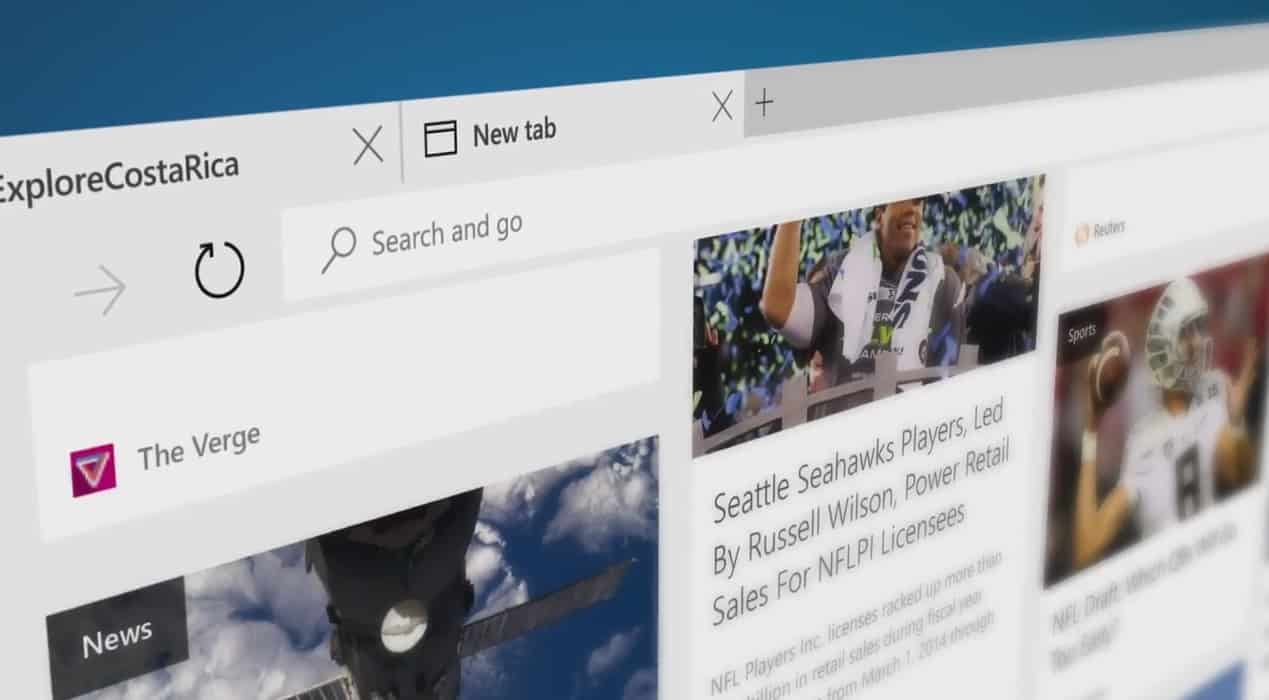
Leveraging some pretty significant announcements revealed during Build 2016, Microsoft is continuing to ring the bell of openness and transparency. During the company’s Edge Summit, details about Microsoft’s new web browser have been shared, including stats on its usage as well as potential features coming being discussed by the engineers currently working on the project.
Among the announcements during the Edge Summit was the mention of Microsoft’s plan to share Edge platform dahttps://developer.microsoft.com/en-us/microsoft-edge/platform/data/ta gathered from its API Catalog and Global CSS usage. Perhaps, insignificant to the common everyday web browser on Windows 10, the new information could be invaluable to developers leveraging new interoperable technologies across browsing experiences.
In particular, developers can look forward to:
API Usage
We use data gathered from various large-scale crawlers to see which front-end APIs are actually used on real sites across the web. This section not only allows you to see which APIs are the most used but also which sites are using them and how they’re being used.
API Catalog
Coding to Web standards is tricky—HTML, CSS, and JavaScript consist of more than 300 W3C specifications from over 400 member organizations. No browser implements every standard, and each browser implements a different subset of specifications in addition to proprietary APIs. This tool compares major browsers’ API sets alongside standards specifications so that you can target the “interoperable intersection” of web technologies.
Microsoft has taken a huge risk by breaking development between its tried and true Internet Explorer for its more modern web standard compliant Edge browser. However, in doing so, the company has set its development on the right path of including interoperable, developer requested and standard compliant features in a much timely manner in the future.
The cryptocurrency Bitcoin at best can be described as a mixed success, so far. It was the first decentralized digital currency and it spawned a shift in how we think about transactions over the internet. With no government, bank or single person able to control the currency – even if they wanted to – Bitcoin has the potential to democratize financial transactions, regardless of borders.
But the currency has had its troubles. It is suspect to wild fluctuations in value, many online banks holding bitcoin wallets have been hacked and pilfered, and in most of the public eye, Bitcoin has become synonymous with dark web activities and black market transactions.
Regardless of how Bitcoin’s story plays outs, there is one fundamental thing about the cryptocurrency that stands to be revolutionary. Bitcoin pioneered a new technology known as blockchain. Blockchain is important because it introduced the concept of a distributed ledger. This concept is what gives Bitcoin its ability to be a currency without banks and national borders.
Instead of an authority, be it government or financial institution, acting as a clearing house for transactions, this virtually unhackable distributed ledger acts as the clearing house itself. What’s more is everyone who uses the blockchain has access to the records of asset ownership, and transactions can securely take place without a middleman gunking up the work or exacting a fee.
If companies used distributed ledgers for their accounting and back-end operations, it could also reduce human errors like double transactions or fraudulent manipulation. Academics speculate blockchain has the potential to revolutionize everything from the financial services industry to countries’ records of land deeds to fine art markets. But that all depends on who can first find a way to make the technology convenient and fast.
Because of blockchain’s promise, two years ago a group of banks formed a strategic partnership, known as the R3 Consortium, to research and develop blockchain technologies for use in the financial system. The Consortium now spans 42 financial companies, including Barclays, Credit Suisse, Goldman Sachs, J.P. Morgan, UBS, Bank of America, Citicorp, and many more big name financial institutions from around the world.
And just today, the R3 Consortium and Microsoft announced a strategic partnership to advance the use of blockchain technologies. Microsoft’s role will be to provide “cloud-based tools, services and infrastructure for R3 lab locations around the world, as well as dedicated technical architects, project managers, lab assistants and support services.” The hope is that with Microsoft’s resources and expertise will enable R3’s labs to accelerate their development of a distributed ledger technology for financial services companies.
Peggy Johnson, Microsoft’s executive vice president of global business development, said in today’s press release that:
With intelligent, cloud-based technology, R3 and member banks will experiment and learn faster, accelerating distributed ledger technology deployment… What’s more, our collaboration brings to light tremendous opportunities to rethink business processes and transform entire industries.
And the CEO of R3 added:
The Azure platform and intelligent cloud services bring advanced capabilities to this budding financial ecosystem, and the commitment by Microsoft will accelerate the adoption of distributed ledger technology around the globe and take our R3 Lab and Research Center offering to a new level of capability.
Today’s announcement expands the number of partners Microsoft is engaged with to deliver new blockchain technologies. It is also another step forward for Microsoft’s Azure program Blockchain as a Service (BaaS), which aims to be the preferred cloud platform for easily providing cloud access to blockchain solutions.
In today’s Azure blog post, Microsoft’s Marley Gray explains that in R3’s selection process of a cloud vendor they tested five different blockchain platforms on each IBM, Amazon, and Microsoft’s cloud. Microsoft’s Azure emerged as R3’s preferred cloud provider because of “its flexible, open, and comprehensive set of enterprise-grade grade services including Internet of Things (IoT), advanced analytics and machine-learning algorithms, security features, and developer tools.”
Blockchains have been around for less than a decade and the potential of this technology has not even begun to be realized. Distributed ledgers offer an open and transparent way for people and organizations to securely engage in transactions from all corners of the globe without the need of middlemen and cumbersome clearing houses. Implemented right, it could facilitate trust, transparency, and incredible efficiencies in economic transactions on a scale not yet achieved with current technologies. But first someone has to get the technology right, and blockchains are still in their infancy. And there will be stumbles along the way like Bitcoin. Hopefully, Microsoft’s expanding partners in its Azure Blockchain as a Service program will lead to some incredible real world solutions.
Microsoft has just kicked off its Microsoft Edge Web Summit 2016, and the company is explaining right now how it wants to change how it will deliver its new browser to the community. Microsoft has just announced a new issue tracker for Edge that will allow Microsoft engineers to better listen to user feedback. The new tool has been designed from the ground up and is directly integrated into Edge engineers workflow.
The new tool allow any user to report or search EdgeHTML issues, such as problems with site rendering or standards compliance. You will see more transparent progress from Microsoft as when you’ll file bugs, you can get notified about replies from the engineering team.
In a press release, Toyota announced the creation of Toyota Connected (TC), a new company that utilizes the power of Microsoft Azure. TC will help develop Toyota’s vehicle technology while using Microsoft Azure to manage its data services for its consumers.
Zack Hicks, CEO of Toyota Connected and Chief Information Officer at Toyota Motor North America explains the new company’s vision:
“Toyota Connected will help free our customers from the tyranny of technology. It will make lives easier and help us to return to our humanity. From telematics services that learn from your habits and preferences, to use-based insurance pricing models that respond to actual driving patterns, to connected vehicle networks that can share road condition and traffic information, our goal is to deliver services that make lives easier. ”
TC is a joint venture with Microsoft, and has two goals; to deliver uninterrupted services and Azure’s data analytics to support product development for its Toyota dealers, customers, and partners. Microsoft’s Kurt DelBene, executive vice president, Corporate Strategy and Planning discussed the new venture with Toyota using Azure:
“Toyota is taking a bold step creating a company dedicated to bringing cloud intelligence into the driving experience. We look forward to working with Toyota Connected to harness the power of data (using Azure) to make driving more personal, intuitive and safe.”
TC will be a completely separate company from Toyota, giving TC ample focus to expand and deliver car technology solutions at their new Toyota Research Institute in Plano, Texas. TC continues the long-standing partnership with Microsoft by further driving research and development efforts to expand on Toyota’s customers’ experiences globally.
Using Microsoft Azure, TC hopes to realize projects like in-car telematic services, home and IoT connectivity, and a broad range of other data services to help Toyota dealers and affiliates.
A few weeks ago, we told you that Microsoft was testing an Outlook.com Premium service that would offer subscribers up to 5 custom emails addresses along with other goodies such as an ad-free inbox. So far, the service appeared to be free for Office 365 customers, but according to new reports Microsoft seems to have updated the information on the dedicated web page to indicate that the premium email service could be offered as a standalone $3.99 monthly subscription.
The new Outlook.com premium service could be a standalone service.
If you click on the “Get started” button, you will be able to fill your personal information to get on the waiting list. We tried the process with several Microsoft accounts, but once you’re done it seems that in some cases the page no longer displays the new information about this new $3.99 subscription. Instead, we got sometimes the old description which previously said: “Get up to five personalized email addresses, an ad-free inbox, and more with Outlook.com Premium, free with your Office 365 subscription”.
However, the details provided in the “disclosure” section didn’t change: the custom domains will still be managed by GoDaddy and will be free with Outlook Premium for the first year. Please note that as this is still a Pilot program, details could change in future and Microsoft still has to communicate about this premium email service more widely. But if Microsoft still plans to offer this Outlook.com premium service with Office 365 subscriptions, we’re not sure if this standalone $3.99 monthly subscription would be good value as you can get much more goodies with an Office 365 Personal subscription ($6.99 per month or $69.99 per year) which includes the Office 2016 apps for your PC and Mac and 1TB of Onedrive storage.
Update: I applied to try Outlook.com premium today, and one of my Outlook.com account just received an invite. The setup is pretty straightforward, you just choose the domain of your choice (you can either choose your own if you already have one. Otherwise you will be given a few suggestions) and then you’re set! I selected a random domain, and I confirm that the service is free, and Microsoft didn’t ask me any billing information during the process. However, I didn’t receive any message telling me when my “free” will end.
Once you’re set, you can go back to your Inbox and enjoy an ad-free mailbox. You can also access an online dashboard where you can invite up to four other people to have a personalized email address in this custom domain. Microsoft adds that “sharing relationships are set up automatically between the people who have email addresses on your domain.” Last, you can also get some information about how to add additional DNS Records.
Please tell us in the comments if you’re interested in a standalone Outlook Premium subscription, and feel free to try to get on the waiting list over here.
Last holiday season, Star Wars: The Force Awakens hit theatres across the across the world to much acclaim and hype. A little over four months later, the hit Hollywood title has finally gone digital and is now available for download in the Windows Store.
The movie, priced at $19.99 and available by clicking here, will play on Xbox, Windows 10, Windows 8, and Windows Phone 8. It can even be viewed offline by downloading your favorites in Windows 10, Windows 8 and Windows Phone 8. Also, once you do purchase the movie, you can either watch it immediately via streaming, or download the video to a compatible device to watch it later. In addition, you can connect your accounts to enjoy this movie anywhere through Disney Movies Anywhere.
This Windows Store version of the movie also includes over one hours worth of bonus features. An in-depth look at the story, deleted scenes, and a look at the digital artistry behind the movie’s visual effects are all just a few of the bonus features.
So, if you happened to have missed Star Wars: The Force Awakens in the theater, now is the perfect opportunity to finally view the hit movie in the comfort of your own home. Even if not, this is still a great deal. So, go ahead and check it out now, and once you do, please comment below to let us know how it is going!
In our article on how to connect PS4 controller to Windows 10 we briefly mentioned that connecting Xbox One controller is rather simple due to Windows 10 native support for Xbox One. Unlike previous versions of Windows, Windows 10 comes with all the necessary drivers to use Xbox One controller, therefore there’s no need to download anything.
In order to connect your Xbox One controller to your Windows 10 device, just plug your controller into your PC using a micro-USB charging cable. Your controller should be automatically recognized and ready to use.
If you want to connect Xbox One controller wirelessly to your Windows 10 PC, you’ll have to use Xbox One Wireless Adapter for Windows. To connect Xbox One controller wirelessly to your PC, do the following:
Connect Xbox Wireless Adapter for Windows to your Windows 10 PC. For best performance, make sure to connect the adapter to the USB 2.0 or 3.0 port on the front side. Sometimes there might be certain connection issues caused by your computer case, or any other metallic object, and this is why it’s recommended to connect the adapter to the front USB port.
The necessary drivers will be installed automatically, so wait for the process to finish.
After installing the necessary drivers, press the button on the wireless adapter.
Press the pairing button on your Xbox One controller. LED on your controller will start flashing while your Xbox One controller connects to the wireless adapter. After the process is completed, LED will go solid.
After you’ve done all of this, your controller will be ready to use on your Windows 10 PC. As you can see, the connection process is rather straightforward, but there might be some minor issues from time to time.
If your Xbox One controller isn’t working on Windows 10, it might be due to a bad driver, so it’s recommended you install the driver manually. To do that, follow these steps:
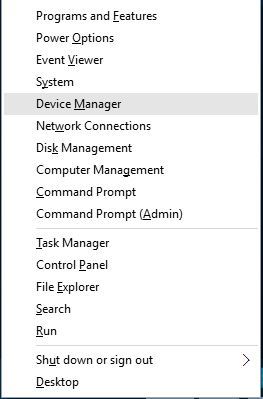
Press Windows Key + X and choose Device Manager from the list.
Once Device Manager opens, locate and right click Xbox One Controller.
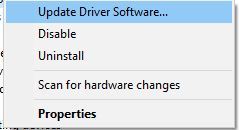
From the menu choose Update Driver Software.
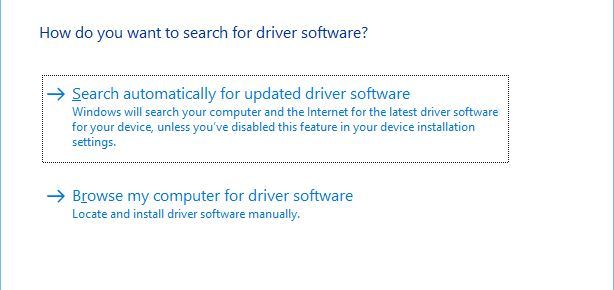
Click on Browse my computer for driver software.
Click Let me pick from a list of device drivers on my computer.
Locate Microsoft Xbox One Controller on the list and click Next to install it. If you can’t locate Microsoft Xbox One Controller driver, you might have to uncheck Show compatible hardware option.
On the other hand, you can manage your drivers and install them automatically using reliable tools offered by expert software, namely Fortect Driver Updater.
Solution 2 – Change USB controller settings
Few users reported that the right trigger shows up as a left trigger while using Xbox One controller on Windows 10, and to fix this issue it’s required that you install the Xbox Controller driver by following the same steps from the previous solution. After you’ve installed Xbox Controller driver, you need to do the following:
Disconnect and reconnect your Xbox One controller.
Press Windows Key + S and type set up USB game controllers. Choose Set up USB game controllers from the list of results.
Select Xbox One controller from the list and click Properties button.
Go to Settings tab and click the Reset to default button.
Navigate to Test section and check if your controller works.
Connecting Xbox One controller to your Windows 10 PC is rather simple, but if you have any issues, feel free to have a look at our solutions.
During a session at Build 2016, Microsoft’s Gabe Aul and Bill Karagounis shared some cool stats about the Windows 10 Insider Program. Both guys, who have a customer service background, went over the beginning of the program offering stats and explaining the purpose behind the Windows Insider program.
Microsoft planned for 250,000 Insiders and presented the first Insider program plans to executives back in May of 2014, several months before the announcement of Windows 10 and the release of the first preview build. Worst case scenario, Microsoft was aiming for 400 thousand testers. One week prior to announcing the Windows Insider program, Windows boss Terry Myerson refused to move forward with the 400 thousand limit, instead urging Aul and Karagounis to make it available to everyone. In September of 2014, a lot of code was thrown away and the feedback stack was rebuilt to support as many people as possible. Then came the big day. September 30th of 2014 was the day Windows 10 and the Insider program was announced. The very first preview build was released on October 1st of 2014 and within weeks, Microsoft hit 1 million Insiders. Microsoft scored 3 million Insiders by March of 2015 and as of today, Microsoft has over 7 million registered Insiders in the program.
Windows Insiders come from all over the globe including Antartica, except for two unnamed countries. When it comes to demographics of the Insider program, 46 percent are in a tech job, while 54 percent joined the program because they “love Windows.” 20 percent of Windows Insiders are students (1/5th of those are in high school still!).
Instead of the traditional “Beta” program, Microsoft opted for something a bit more different with Windows 10 testing. As Aul puts it, “by the time people saw our work, it was too late to give feedback.” Citing the development cycle of Windows 7 and Windows 8, by the time feedback was provided during the public preview phases, it was already too late to make big changes to the operating system. This is why Microsoft opted for the Windows Insider program to change the way they collected and implemented feedback suggestions.
Aul also explains the various different Insider rings, as well as a few other juicy stats. We’ve embedded the session below for your viewing pleasure. Enjoy! Share your comments below.
During Build 2016 this past week, Microsoft’s (presumably) big jaw dropping announcement was the ability to run Bash shell on Windows 10. In a session hosted by Microsoft’s Scott Hanselman, we get an in-depth look at how this all works and what it all means.
The root filesystem of Ubuntu itself was provided to Windows 10 (minus the kernel). In other words, this is not a virtual machine, nor is this cygwin, rather this is “the sweet spot” in the middle as Scott Hanselman explains. “We are running the Ubuntu binaries on top of essentially the NT kernel — also known as the Windows subsystem for Linux,” Microsoft’s Russ Alexander states during the session. Microsoft expects this to roll out to Windows Insiders “within the next two weeks” allowing developers to tinker with the Linux command line on Windows 10.
For those of you interested in the running the Linux command line on Windows 10, we’ve embedded the session below for your viewing pleasure. Share your thoughts in the comments below.
The internet is full of all sorts of security threats with ransomware being the most serious one. In order to tackle this issue, Bitdefender Lab, creator of Bitdefender security software, released its BDAntiRansomware tool.
BDAntiRansomware is a free tool designed to protect you from ransomware
Ransomware is particularly dangerous because it takes over your computer and doesn’t allow you to access your files unless you pay certain amount of money to the person that infected your PC. Some ransomware can even encrypt your hard drive, making your data completely inaccessible.
Ransomware can be a major security threat and with the number of ransomware-based incidents on the rise, it’s no wonder that security companies are gearing up to deal with this issue. If you’re concerned your computer might get infected by this malicious software, you might want to try BDAntiRansomware. This free tool is designed to keep you safe from the most common ransomware threats. According to the developers, BDAntiRansomware can protect you from known and possible future versions of TeslaCrypt, CTB-Locker, and Locky types of ransomware.
BDAntiRansomware is a lightweight tool and will protect you from any potential hazards while running in the background. This tool doesn’t use many system resources, so there won’t be any performance loss or slowdown. As this is a standalone tool, it doesn’t require Bitdefender security to be installed. And unlike certain free security tools, BDAntiRansomware doesn’t pester you with ads. Users have not reported any issues, like false positives for instance, while using BDAntiRansomware, but if it were to happen to you, it’s easy to disable.
Bitdefender Lab did a solid job with BDAntiRansomware, but keep in mind that this tool isn’t an antivirus replacement. Instead, it’s designed to provide you with an additional level of security against ransomware . If you wish to try BDAntiRansomware, download it from here.
If you’re heavily invested in the world of gaming news, you may have heard about the recent rumors involving plans for a Playstation 4.5: a new version of the PS4 with a few new bells and whistles. With rumors of this PS4.5 running rampant, many questions are being raised towards the Xbox One – being Playstation’s biggest rival – and whether or not it’s going to attempt to mirror this effort in the near future.
According to an interview held by GameInformer, Xbox fans won’t have to be coughing up an extra $400 for a new-and-improved Xbox One any time soon. The game-focused publication spoke to Phil Spencer recently about some of the changes coming to Xbox, and when they asked about the possibility of an Xbox One-point-five, they got a pretty straightforward answer.
I’m not a big fan of Xbox One and a half. If we’re going to move forward, I want to move forward in big numbers,” Spencer said. “I don’t know anything about any of the rumors that are out there, but I can understand other teams’ motivations to do that. For us, our box is doing well. It performs, it’s reliable, the servers are doing well. If we’re going to go forward with anything, like I said, I want it to be a really substantial change for people – an upgrade.
Essentially, Phil thinks that the Xbox One is fine as it is, and doesn’t see any reason to go shipping out a new version of it. For Xbox fans, this is pretty good news. While we all love to have the biggest and best in hardware, nobody wants to go dropping another lump sum of cash on a game console they already own. Phil Spencer’s answer here doesn’t leave much room for Microsoft to change their mind in the near future, so anybody that was worried about an Xbox answer to the PS4.5 can cool their jets for now.
Microsoft’s big developer conference took place this past week. Terry Myerson, Microsoft’s Executive Vice President of the Windows and Devices Group, took center stage at Build to talk about Microsoft and Windows 10. During his keynote, the Windows flag was shown on screen in a slide.. but if you look closer, you will see binary code hidden inside the flag.
So what does the binary code actually say? When translated, it says: “Thank you developers, Insiders, partners and everyone else for helping us build the best version of Windows ever! We couldn’t have done it without you.”
Microsoft’s Gabe Aul, the man behind the Windows Insider program, also tweeted out a video message to Windows Insiders, thanking them for being involved in the testing program and for watching Build. You can check out that tweet here.
The Anniversary Update is the official name for “Redstone” and arrives for Windows 10 this summer. You can head over here to read all about what’s coming to Windows 10 in the Anniversary Update.
With all of the excitement from Build winding down, don’t think you’re off the hook following the latest in Microsoft’s world. The company, as always, continues to have irons in every fire, and may be on the verge of another critical partnership. Reuters has reported that Microsoft, along with Amazon, is considering joining forces with HERE: a digital mapping business, owned by German carmakers BMW, Audi, and Daimler.
The nature of the partnership is reported to have its roots in cloud computing, which Microsoft and Amazon would theoretically supply to HERE if their partnership were to work out as planned. It seems like much of HERE’s demand for cloud computing resources is driven by the fact that all of HERE’s owners are currently developing self-driving cars, and would need this cloud computing data in order to pursue self-driving car technology as far as they would like to.
HERE is still reportedly looking to take on new members to split the investment costs, and car companies Renault, Continental, and Ford have all expressed interest in jumping on the bandwagon.
The OneNote app for Windows 10 Mobile just received an impressive update that should excite fans. We first learned of this new update on Reddit, and later it was officially revealed on Twitter by Microsoft. It will only work on Windows 10 Mobile devices, marking one of the few times a newly updated Microsoft app is released first to Windows 10 Mobile before Android and iOS.
OneNote’s new features make it easier for users to create notes without having to type through its option to now record audio or sound clips to OneNote and save them to OneDrive.
#OfficeInsiders on Windows 10 phone, you can now download Build 6769.5763 & record quick audio reminder or sound clips directly in #OneNote.
— Microsoft 365 Insider (@Msft365Insider) April 1, 2016
This is a solid idea since it’s much easier to record a short audio clip instead of having to type one out in a note. We envision many users of Windows 10 Mobile taking full advantage of the new feature by focusing more on recording than typing. While the centerpiece to the update, this isn’t the only new addition to OneNote. The software giant added the OneNote Web Clipper extension for Microsoft Edge, as well, but only for those in the Windows Insider program.
While the ability to record clips is the centerpiece to the update, this isn’t the only new addition to OneNote. The software giant added the OneNote Web Clipper extension for Microsoft Edge, as well, but only for those in the Windows Insider program.
Windows 10 has been steadily improving ever since the operating system was released back in 2015. At the recently held Build 2016 developer conference, Microsoft shared that Windows 10 is currently installed on 270 million computers around the world, with its users having visited the Windows Store five billion times so far.
In addition, according to the latest information coming from NetMarketshare, 90% of desktops on the market use Windows, with Apple’s Mac OS X coming in at a distant second with 7.7% and Linux at 1.78%. When it comes to Windows 10 specifically, it’s only found on 14.5% of desktops — a number surpassed by Windows XP and Windows 8.1. Not surprisingly, Windows 7 is still the top dog with 51% of desktops running it. With Windows 10 steadily growing, though, we expect that number to fall significantly by year’s end.
Looking at the mobile end of the spectrum, Windows is not doing very well: only 2% of mobile devices run it. Apple’s iOS sits comfortably with 31% while Android stands strong with 60.99% of devices. This is evidence that Windows on mobile is stagnant with little hope of success — something even Microsoft knows given how little they talked about it at Build 2016.
In terms of browsers, Internet Explorer still reigns supreme at 43.4% usage when compared to the likes of Google Chrome, 30%, and Edge, 4%. On the mobile front, Apple’s Safari is surprisingly number one while Google Chrome for Android sits in the number 2 position. When it comes to search engine usage on both desktop and mobile, there’s nothing surprising here: Google Search sits high with a 67% market share while Bing Search is a far second with 13 percent.
It should be interesting to see how adoption rates continue to grow when Windows 10 is no longer a free upgrade. The software giant is hoping that DirectX 12 and other exclusive Windows 10 features and services will convince Windows 7 fans to make the jump. Let’s see how that works out.
While Microsoft presented a lot of new innovations and features for Windows 10 at this year’s Build 2016, our sources from direct from the company told us that all that fuss about Windows 10 at Build 2016 was just a mask.
Microsoft is planning to release a new operating system called Windows 11 at the end of this year. The company decided to do this because Windows 10’s extremely poor adoption rate. Our sources close to the company tells us that Microsoft even placed fake reports informing us that more than 200 million people have used Windows 10 so far in order to encourage more people to upgrade — unfortunately without any success.
There’s no word yet on the possible features in Windows 11 as the operating system is still in the early development phase, but it will certainly offer something that Windows 10 and previous operating systems didn’t. However, Microsoft plans to not to just keep Cortana but to make it extremely powerful in the new operating system sporting options that were never seen before. Microsoft will also do away with its Insider program because most Insiders don’t take it seriously since they don’t provide the required feedback and constantly complain about privacy concerns.
In addition to this news, it turns out Windows 7 and Windows 8.1 users who were against the Windows 10 upgrade will have to suck it up in the end: the Windows 10 update is now automatic no matter what settings a user chooses. This will be done to make the automatic transition to Windows 11 smoother. (So, whatever version of Windows you’re currently using, you’re going to end up with Windows 10. Just to be clear.) We’re sure this decision will negatively affect users and draw a mountain of complaints. It’s even possible that some users will completely abandon windows and switch to OS X, something that would be warmly welcomed by Apple.
To conclude this shocking news, we remind you that today is April Fools’ Day so sorry if we got you worried. So, while nothing we just said is true (except the fact that Microsoft is indeed working on Cortana improvements — just not for Windows 11!) you can definitely count on Windows Report to deliver the freshest, most accurate new every day!
During day three of Microsoft’s Build 2016 developer conference, the Redmond giant revealed new improvements that are coming to live tiles and toast notifications on Windows 10 in a special session for app developers.
According to Microsoft, Windows Insiders have been arguing that tiles tease them but don’t always deliver. Windows 10 users want, according to feedback, more flexible toast notifications, the ability to make the Action Center on the desktop “more useful” and a notification platform that is actually powerful. These are the top feedback requests given to Microsoft.
What people want
Microsoft is introducing something new called “chasable live tiles” which offer a deeper connection to the actual live tile information. So in other words, Live tiles will actually showcase useful information for once and take you to a particular area of the app when clicked or tapped — as opposed to showing you information but only taking you to the app’s home page when you click or tap on the tile.
Chasable live tiles
Microsoft also introduced a feature called “adaptive toast” notifications. What exactly does this mean? Think of notifications that allow you to interact with elements — letting you respond quickly to messages, etc. Microsoft has allowed for larger images to be displayed in a toast notification, as well as a new app identity, new button style, and better discoverability.
During the session, we learned that Microsoft Edge will support notifications in the upcoming Windows 10 Anniversary Update. On top of that, the Action Center has received a new placement on the taskbar — it is now located to the right of the clock. Depending on what new notification you receive, the notification icon will change. If you received a new message, you will see a messaging icon. If you received a new Xbox-related notification, you will see an Xbox icon. All these new features with very little code change for developers. These new features offer a more engaging and more visually exciting notification system.
Notification icon
Check out the new Action Center in the picture below. As you can see, notifications look much better than before. You will also be able to manage your app settings from within the toast notification by right-clicking, which previously was only available in the System settings.
New Action Center
According to Microsoft, live tiles with live content have 60 percent more engagement than tiles without live content (who would have thought?!). App developers will be able to sync live tiles with the Action Center, so the end user can dismiss the notification in the Action Center and automatically dismiss the notification counter on the live tile too.
Microsoft also announced a new Notification Listener API, a tool that allows app developers to latch onto notifications and trigger events in their apps based on what notification appears. MUA (Multi-User Aware) Notification APIs were also revealed, which allows for multiple notifications to Xbox, identifying which Xbox user is logged in and who the notification is for. Clicking on the toast notification launches the respective app — like Skype for example.
Remember Project Centennial? The bridge that lets you turn a Win32 application into a Universal Windows Platform app? Microsoft is also allowing these apps to utilize toast notifications using WinRT APIs.
And that’s all folks. In this session, Microsoft showcased chasable live tiles, improved toast notifications, and an improved Action Center — all arriving with the Anniversary Update for Windows 10. Share your thoughts in the comments below.
For those wondering, there are no “interactive live tiles” like we have seen in concepts over the past year — at least not yet. According to Microsoft, “we are working on it, we’re just trying to get it right.”
Microsoft’s Azure cloud service offerings represent one of the company’s harder to define solutions. Azure is a whole set of different products and services that combine to provide the “cloud-first” aspect of Microsoft’s new strategy, and for the uninitiated, Azure can be a challenge to fully comprehend.
The Azure Service Fabric is one element of the overall offering that’s just as confusing. The Azure Service Fabric is used throughout the company to bring global-scale services like Cortana, Skype for Business, and Azure SQL Databases to the millions of Microsoft users, and is thus incredibly important to the company and its customers.
At Build 2016 this week, Microsoft spent many hours talking about Azure and focusing on how cloud services will serve as the foundation of many of the company’s solutions moving forward. One session was devoted to Azure Service Fabric, and the video is embedded below.
If you’re responsible for implementing cloud services at your organization, then this video is a good place to start in better understanding Azure and the Azure Service Fabric. If you’re not, it’s likely safe enough to skip it.
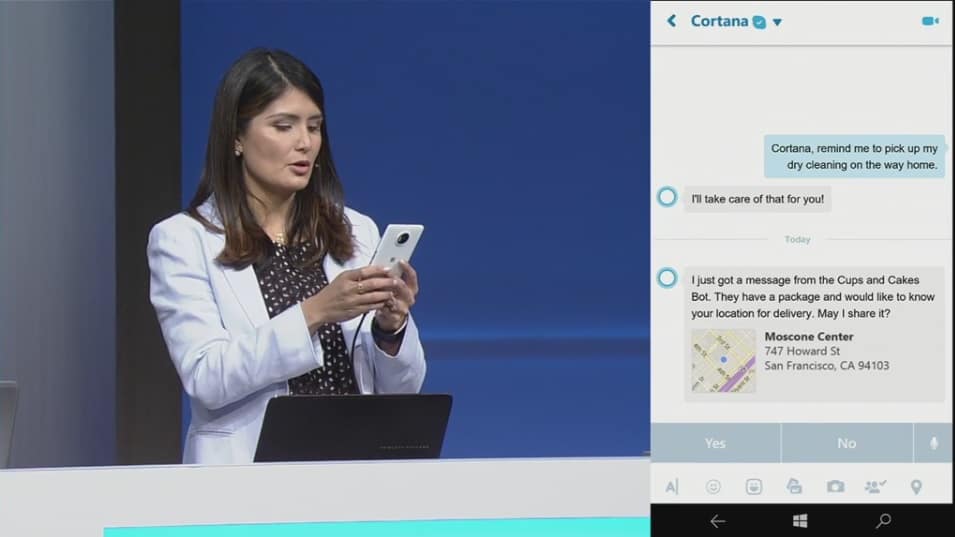
Microsoft spoke at length about Azure Cloud, Office 365, Xamarin, cross-platform development, Skype, chat bots, and the Universal Windows Platform during its two streaming keynotes at Build 2016. What the company didn’t speak about at length were new Windows 10 features. In a sort of cursory glance, Build 2016 attendees were given the high-level bullet points about an upcoming Anniversary Update coming to Windows 10 users, and that was seemingly all.
However, being a developer-centric event, it appears Microsoft would rather save its list of upcoming Windows 10 features for more focused and intimate developer sessions. During a session titled Notification Futures: Action Center in the Cloud and the Windows Notification Platform, developers were given an in-depth fifty-minute walkthrough of all the features coming to Windows 10 notifications and Action Center.
Developers can look forward to working with more robust API’s that will enhance the Windows 10 user experience by including Action Center UI changes, adaptive toast notifications, new Live Tile features and an Action Center that spans platforms and ecosystems by being based in the cloud.
To Windows Insiders, Gabe Aul is probably the most familiar face within Microsoft. Having overseen the program since the beginning, Gabe Aul has been the causes of heart rate fluctuations for Windows enthusiasts with his weekly Windows 10 build tweets, and also received his fair share of nagging from impatient fans. To celebrate Build 2016 – one of Microsoft’s biggest annual conference that focuses on developers – Aul has sent out a heart-warming thank you to Windows Insiders in the form of a short video on Twitter.
Build is the culmination of all the cool development projects happening in Microsoft, during which the company also spoke about the Insiders Program and revealed some big news about Windows, like the upcoming Anniversary Update. The program has been an important part of Microsoft’s changing culture of listening to customers, opening up development, and gaining back interest in the Windows Platform. Aul has been essential to that process, and there’re very few things we can say besides: Thank you Gabe Aul for all your effort.
Microsoft unveiled a new Windows 10 app in the Windows Store today, Project To-do. Project To-do, also known as Project Cheshire, is not currently operational. When you open Project To-do, the app displays a white screen with “coming soon” in the middle and Project Cheshire appearing in the upper-lefthand corner. Project To-do might just be a placeholder name for the Windows Store.
“Say hello to Project Cheshire. Introducing a brand new and simple, yet incredibly focused, to-do app that helps you get stuff done. Please note that we are still in the early stages of development and are working hard in the background to deliver you the best to-do app ever. Stay tuned for updates and more here.”
Whether it be Project To-do or Project Cheshire, you can head over to the Windows Store and download it today in the link below.
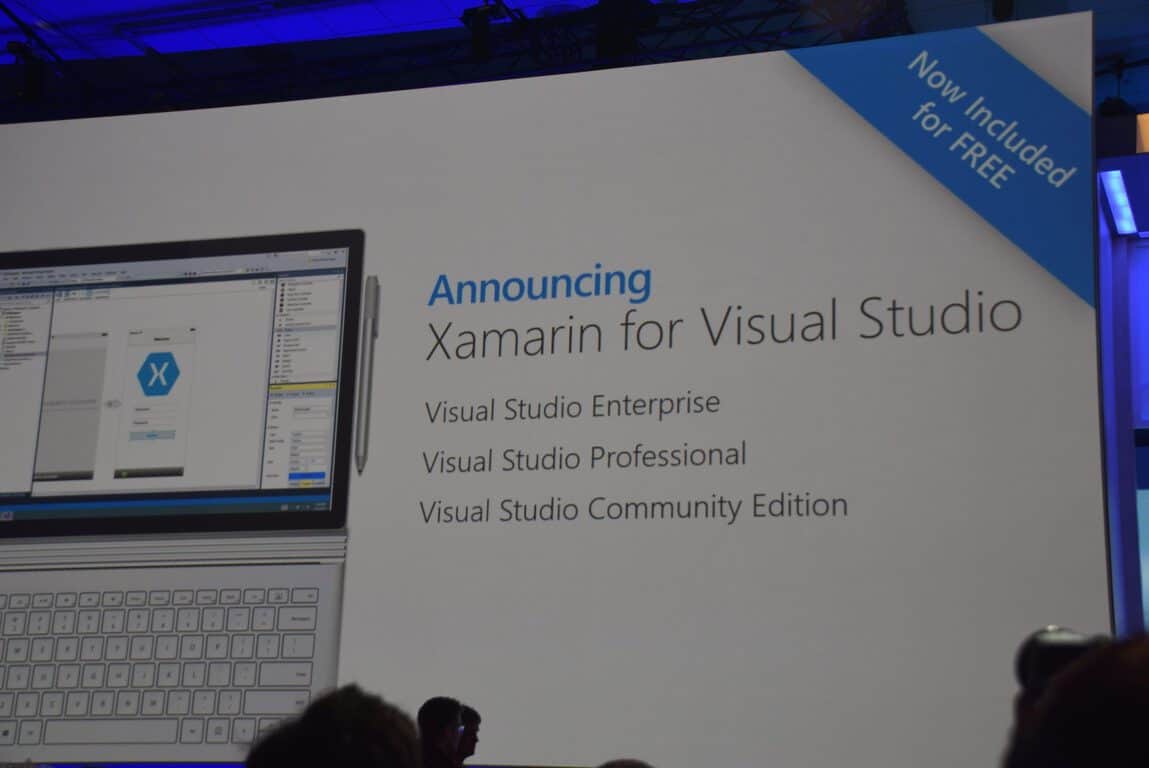
One of the biggest news to come out of Microsoft’s annual developer conference this year, Build 2016, is the fact that Xamarin is coming free to Visual Studio users. Geekwire managed to catch up to Xamarin’s co-founder, Miguel de Icaza–who went on stage during Build’s main keynote–for an interview.
de Icaza’s history with cross-platform development using Microsoft’s framework harkens back to more than a decade ago when he was the leader of the .NET-based open-source development platform Mono. Ten years later, de Icaza is helping developers build Android and iOS mobile apps using Microsoft’s C# programming language with Xamarin, which Microsoft acquired recently.
Like being a frog in the boiling water.
de Icaza credited the change in attitude towards open-source technology from Redmond to the rise of Scott Guthrie within Microsoft’s ranks. Long been an advocate for open systems, Guthrie brought the mentality along as he gained ever more influence, to finally leading all of the software giant’s cloud business, making incremental changes along the way.
I think all these acquisitions that maybe went wrong happened in a different world, in a different dimension with different dynamic. This, I think, is a perfect match.
Contrary to many’s doom and gloom attitude when it comes to acquisitions by Microsoft (who admittedly do not have a spotless history of keeping acquisitions afloat), de Icaza sounds infectiously optimistic about Xamarin’s prospect being part of Microsoft. He attributes this to the long history and wide connections his team and himself have had working with Microsoft to the fact that they are in the same ecosystem, the aligned goals, and also the fact that Satya Nadella is a good CEO.
I don’t know about the history of acquisitions at Microsoft. It is very clear that our team is excited about our mission. Our goals are very much aligned with Microsoft. We’re very much a complement. We had a chunk of the story they didn’t have, but we’re in the same ecosystem, so it was perfect.
As with some other recent acquisition, Xamarin will mostly stay independent with some added deliverables to fulfill from Microsoft. De Izaca in fact already has some ideas of what he may build for Microsoft beyond Xamarin, which will mostly focus on automating applications and make it easier for developers to learn.
The part Xamarin will play in Microsoft’s oncoming vision and strategy is immense, however, and developers’ response to the news shows the enthusiasm they have for the potential it brings. It almost moved De Izaca to tears, and we can only say: Great job, good luck, and welcome.
One of the things Microsoft talked about most extensively during the last two days of Build 2016, has been about the Universal Windows Platform (UWP) and why it is great for developers. The presentation about developing UWP apps have now been released as a video on Channel9.
In the presentation, Microsoft Group Program Manager Andrew Clinick goes over the UWP App Model – the first-ever concrete model for developing apps on Windows – in great detail, from how they are packaged and installed, how they store data and state, background process and multitasking capabilities, to lifecycle, navigation model, and uninstallation. UWP apps can be installed from any source, be it web, side-loaded and so on, so they will not work any different from win32 aps, with the added advantages of manageability in tasks like uninstallation – long been a nightmare to execute properly for any legacy Windows programs.
Apart from the core information about Universal windows Platform apps, Clinick also talks about Windows Store for Business, an overview of Project Centennial – Microsoft’s bridge for building UWP apps from desktop apps – a demonstration of the new “connective device platform”, as well as brief mention of Xamarin among others. Also introduced is the new Project Rome that provides a framework for adding in extensions to a UWP app: in fact, Edge extensions will be built using this framework. With the new UWP, Microsoft has also simplified multitasking for more battery efficient apps.
Microsoft is putting in a lot of effort to ensure that UWP is a proper evolution of legacy programs, and it shows. With all the capabilities being added, UWP apps are getting ever more powerful, with the same potential for expandability and ecosystem building. Developers can take advantage of UWP right away with the also-introduced Desktop App Converter to turn programs into apps, and we can’t wait to see more awesome UWP apps in the future.
Developers will now be able to push updates and data to specific groups of app users through app flighting.
App listings in the Store can now use different languages than those used in the app. This will allow for more flexibility with marketing and communication with consumers. This also means that developers now only have to submit screenshots and store listings in one language if they so choose.
Beginning this week, the Dev Center will begin showing the status of app packages and app metadata updates. This is useful for knowing what content users are seeing.
There is a new Windows Store submission API which is currently in preview and being rolled out to select developers in stages. This new API supports submitting updates, modifying metadata, and adding/removing in-app products when submitting apps for publishing.
The Dev Center dashboard has been redesigned to work faster and provide more data to developers. The new dashboard is currently available to those in the recently announced Dev Center Insider Program.
Microsoft has introduced a new concept for promotion called, Community Ads. These ads basically promote other apps within the marketplace and only display when regular paid ads are not available. Developers will earn credits each time their apps show one of these ads and the credits can be used to get their own apps promoted in other apps that are participating in the program.
Promotional codes have been revamped. The creation of codes now only takes a few seconds and starting next month, the Dev Center will begin managing advanced promotional codes which can be given expiry dates, have their redemption status checked, and even cancelled if needed.
The Dev Center now creates receipts for promote-your-app purchases.
Live Tile updates and notifications can now be targeted so developers can promote and engage with select demographics.
A lot of these new features are pretty substantial. Are you impressed or would you still like to see more Dev Center updates? Let us know in the comments and make sure to check out all of our other Build 2016 news.
At yesterday’s Build conference, Microsoft presented a lot of innovative tools for developers. Besides new HoloLens and Xbox development tools, the company also unveiled new additions to its existing environments with the announcement of its new Update 2 for Visual Studio 2015 along with the new version of Visual Studio, titled Visual Studio 15.
Microsoft points out it’s still in the Preview phase for testing and feedback purpose and recommends not to install it on your main workstation. Still, it will be hard to: Visual Studio 15 is already available to download for all interested developers and comes with a slew of new features.
Visual Studio 15 features
With Visual Studio 15, Microsoft promotes its new lightweight installer, which makes installation of the program much faster. The new installer weighs in at just 300MB but like the program itself, it’s also in Preview which means that those who choose to install Visual Studio 15 using this installer won’t be able to install all of its features.
In addition, there’s also a regular installer which contains all the features and abilities of Visual Studio 15, so developers wanting to exploit the new tool to the fullest will probably choose this option.
The new version of Visual Studio supports over 20 programming languages with a lot of additional features including debugging, source control, .NET desktop development with WPF and WinForms, Python, C++, and Unity.
Microsoft has been seeking out new developer participation ever since it introduced Windows 10 and the Windows 10 Store. The company knows that developers are still far more interested in other platforms despite the fact that the number of apps in the Store is on the rise. So, the company wants to provide developers with the best possible tools in order to persuade them to start developing more apps for its platform.
If you want to find out more about Visual Studio 15’s features, check out its release notes for more information. In case you’re interested in testing the new Visual Studio 15, you can download the fast installer from this link and the ‘regular’ one from this link. You can also share your impressions about the new tool with us in the comments below!.
If you were with us yesterday watching the coverage of the first Build keynote, there’s a good chance that you’d have seen the very end portion of the event. An ending where Microsoft employee Saqib Shaikh explained Seeing AI: the revolutionary program that he helped develop, aimed at making the world a better place for the vision-impaired. If you didn’t see the initial presentation of Seeing AI, you can go ahead and look at it right now – it’s most certainly worth your time, trust us.
If you’re done picking your jaw up off the floor, let’s take a moment to read over Microsoft’s follow-up post that digs into the Seeing AI app in a bit more detail. This post describes the Seeing AI app as a “Swiss Army Knife,” using the latest in technology to allow those without the ability to see a way to independently decipher the world around them. Seeing AI runs using a smartphone and the Pivothead smart glasses, and creates a constant stream of information for the wearer using an AI that decipher photos and gives out audio cues to describe the world around it.
The Seeing AI escalates to the realm of miraculous when you find out just how detailed it can be, and how meticulous the team behind it was when creating something that’s going to be user-friendly for the vision impaired. According to the post about Seeing AI from Microsoft, the app has “tools to recognize and accurately describe images.” This doesn’t just end at being able to identify images, however. As you saw in the video above, the glasses can to take a snapshot of your environment and read out important things, like the people around you and their emotions, and the items on a restaurant menu. The magic behind the Seeing AI comes from the fact that its designers are teaching it to be able to put things in context, and be even more accurate with its readings.
This comes down to Seeing AI being able to break free of the limitations that previous AI-like devices have been held back by. According to the article, “instead of just describing an image as “a man and a woman sitting next to each other,” the team is working to a point where Seeing AI would instead say that “Barack Obama and Hillary Clinton are posing for a picture.” It’s this amount of detail that makes this Seeing AI not just be a small compliment to the lives of the vision impaired, but will actually become an incredible asset. In a world where Seeing AI releases to the public and is adopted by the vision-impaired community, it seems like it could be an entirely new era of empowerment for these vision-impaired individuals.
There are already many tools out there to assist the vision-impaired, and passionate people will always be trying to use their talents to help these individuals live their daily lives. With Seeing AI, it seems like the bar is going to be raised for anyone who attempts to make these products in the future.
Microsoft’s Build 2016 developers event didn’t provide as much information on upcoming Universal Windows Apps as some Windows fans might have liked. In fact, while a number of sessions did deal with developing such apps, there was a relative dearth of specifics on apps that might be upcoming.
Xbox partners such as Nickelodeon, Dailymotion, NASCAR and Hulu LLC announced plans to bring Windows 10 Universal Windows apps to Xbox One later this year.
That’s not a huge list, but it shows that at least some major developers are taking the Xbox One seriously as a Windows 10 device. We’re sure we’ll hear much more about this and everything Windows 10 as the Anniversary Update approaches this summer.
March 31, 2016 marks the end of Microsoft’s 2-day long keynote presentations for its Build 2016 developer conference. While Build 2016 will continue for another day for the actual developers attending the conference and breakout sessions, the main stage for Microsoft presenters and partners is effectively closed.
However, the faces and speakers who donned the stage at Build 2016 did more than show demos and weaved intricate stories for Microsoft’s developer ambitions. Many of them also helped add to the swelling tide of conversation of diversity that is slowly proliferating within the tech industry.
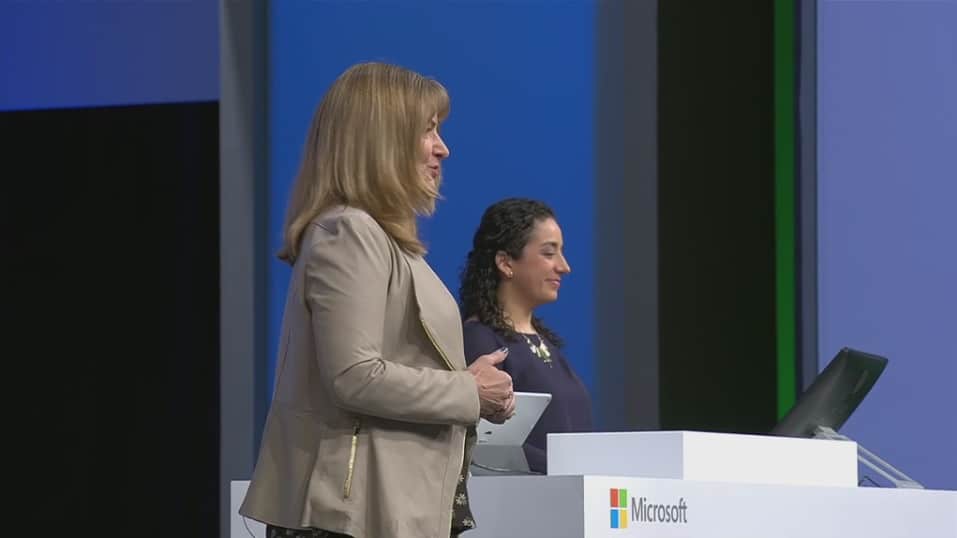
During Microsoft’s Build 2015, here at WinBeta, we noted the number of faces that bucked the trend of a traditionally white male populous that made up attendees as well as presenters at events such as these in the past. Last year, Microsoft made, what seemed like, a concerted effort to diversify their presenters on stage by not only adding women, but people of different ethnic backgrounds to represent the many faces of partners and employees that make up the Microsoft family. From having Office superstar Julia White on stage explaining Office apps on mobile to principle SDE at Microsoft, Lara Rubbelke talking code for over five straight minutes, Microsoft’s Build 2015 conference was an inspiring example for women in tech.
Julia White at Build 2015
Microsoft wasn’t alone in its inclusion effort as companies such as Google, Samsung, and Facebook all pitched efforts to make the tech industry more inclusive of women and minorities during their various events throughout 2015.
In 2016, Microsoft seemed to double down on the notion of inclusion by adding, even more, presenters of differing genders and ethnic backgrounds tell the company’s developer story. While tossing up a few female and minority faces could score some easy diversity points with socially conscious journalists; it’s the attention to detail that caught our eyes here at WinBeta.
Not only were there more women and minorities showcased during Build 2016, but the titles and positions of each on stage added to their presence and perhaps spoke more to the tide of change occurring in the industry.
During Microsoft’s opening keynote on Day One of Build 2016, developers and journalists were introduced to Ashley Speicher, the partner software engineering manager of the Windows and Devices Group at Microsoft, who spoke to the company’s plans for Universal Windows apps on the Xbox. Another impressive Day One presenter was Pamela B. Davis, M.D., Ph.D. and dean of the School of Medicine Case Western Reserve University who spoke at length about the medical capabilities of Microsoft’s HoloLens headset.
Pamela B. Davis, M.D., Ph.D.
Ashley Speicher software engineering manager
Next up was Lilian Rincon, the principal group program manager of the Skype Consumer division at Microsoft who walked attendees through, perhaps, Microsoft biggest bet this year with bot features coming to Skype. Following Rincon with a demo on Microsoft’s bot builder SDK using Domino’s Pizza was Lili Cheng a distinguished engineer at Microsoft who explained chat control and natural language with bots.
Lilan Rincon principal group mananger, Skype
Lili Cheng distinguished Microsoft engineer
Cornelia Carapcea senior PM
Senior PM at Microsoft Cornelia Carapcea also came on stage during the Day One keynote to walk developers through the various APIs that make up Microsoft’s Cognitive Services. While Microsoft made use of its highly talented female engineers, managers, and partners, it was perhaps the companies far reach to its physically challenged employee that had a lasting impact on attendees.
Rounding out the Day One keynote at Build 2016 was the heartfelt story of Saqib Shaikh, the blind developer and 10-year Microsoft employee who created an app that accompanies of smart glasses that enables him to interact with his surrounding world through detailed descriptions of events and people around him. After a beautifully crafted video showcasing Shaikh’s work, he was met on stage by the CEO of Microsoft, making for one the most inspiring moments in tech in the last few years.
Saqib Shaikh developer with Microsoft CEO Satya Nadella
Again, just adding women to an event may seem like a thoughtless knee-jerk reaction to criticism. However, Microsoft’s careful placement of high ranking and knowledgeable females added to the parade of diversity and inclusive nature of its presenters. Other diverse presenter included African American senior program manager at Microsoft, Donovan Brown, Chinese American Qi Lu the executive vice president of applications and services group at Microsoft as well as Spanish American Yina Arenas the senior PPM manager at Microsoft during Day Two of Build 2016.
Build 2016 offered a brief glimpse into the diverse makeup of Microsoft’s employee and partnering family as well as provided an encouraging display for women and minorities interested in the tech industry.
Donovan Brown senior program manager
Yina Arenas senior PPM manager
After the lapse in judgment, the company showed during its Game Developers Conference two weeks ago, offering a stark contrast in how it employs and relates with females in the industry was sorely needed. Not only has Microsoft made an effort to showcase more women during its Build 2016 conference, but developers and journalists were also invited to a Women’s Leadership Panel that covered how women in tech began their careers and the advice they would recommend to others interested.
Hopefully, Microsoft continues to expand its diversity efforts at its events and conferences throughout the rest of the year. It would also be nice to see the crowds at developer conferences, gaming conventions and other tech related events begin to represent the diverse men and women that are finally gracing its stages.
Microsoft’s Build 2016 event was chock full of information for developers across all of the company’s various product lines. Considering everything encompassed by “cloud-first, mobile-first,” that generates a ton of material. While most of the sessions focused on the tools being made available to developers, Windows 10 wasn’t ignored, and we learned quite a bit about what’s going on with the Windows Insider program.
As everyone who’s been following along is likely aware, Gabe Aul is the King of the Big Red Button for the Windows Insider program and is the face of everything that’s new and different with Windows 10. As the Windows Insider program gets merged with the Xbox Review program this summer, Gabe will gain even more notoriety.
Yesterday at Build, the Windows Insider team put together a talk that goes into a number of details behind the Windows Insider program and is well worth the time. For example, the program was initially developed to handle a total of 400,000 Insiders, which was switched at the last minute to be an open-ended program that has grown to millions of users–over 7,000,000, to be more precise.
If you’re a Windows Insider, then you’ll appreciate the work that’s gone into make the program so successful. As we head into summer and the upcoming Windows 10 Anniversary Update, things will likely get even hotter and heavier. Stay tuned to WinBeta for ongoing coverage of everything of interest to the Windows Insider.
Today’s Build 2016 brought a lot of good news for all Windows users. During the event, Microsoft was very generous, offering a lot of information about the new features in the Windows 10 Anniversary Update scheduled to be released this summer. Let’s take a look and see what some of the new features Cortana will surprise us with in a few months’ time are — we bet you’ll fall in love with Microsoft’s assistant if you haven’t already.
There is no doubt that Cortana is a very useful app, helping you better organize your schedule, manage your calendar, or find that important file you lost track of. The new features revealed by Microsoft today will make Cortana even more popular:
A new app collection. In a world where most developers focus on Android-compatible apps, this is an excellent piece of news. More than 1,000 applications will be integrated into Cortana in order to make your life easier.
Cortana will help you to schedule your appointments. If you allow the app to access your emails and calendar, it will help you decide when is the perfect time to set up a meeting with your team. If you have conflicting events on your calendar, the app will reschedule them so that they don’t overlap.
Cortana will add valuable information to your conversations. After having detected what the topic of the conversation is, the app will present related information. Suppose you want to go to the museum tomorrow: once Cortana detects your intention, it will provide you with information about the museum’s opening hours, for example.
Multi-device interaction. Received an SMS on your Windows Phone, but not in front of your PC? No worries? Reply to that SMS from your computer.
Expandable database. With more than 1,000 apps integrated into its system, Cortana will benefit from an expanded database with which can use to perform various tasks. For example, you are looking for a salad recipe and want to know how many calories each ingredient has: transfer the data from a recipe app to a calories intake app and you’ll have your answer.
Location tracking information. The app keeps track of all the places you have been to so that you can go back to that great restaurant where you ate that delicious steak two months ago.
Cortana will be available on your lock screen. No need to unlock your desktop or laptop.
It seems like the battle of artificial intelligence is getting fiercer. One could say that the new Cortana represents Microsoft’s response to Apple’s Siri and Amazon’s Alexa. And judging by the features the team revealed, it seems that Microsoft has done a better job than its competitors. With this, the cooperation between man and machine will be taken to another level. As Microsoft’s CEO Satya Nadella stated:
It is not going to be about man against machine. It’s about man with machine.
Microsoft has made a very interesting choice when they decided to bet on artificial intelligence for their products. It is one of the most difficult and challenging research and development areas, yet it always brings spectacular results. Science fiction is one step closer to reality thanks to Cortana.
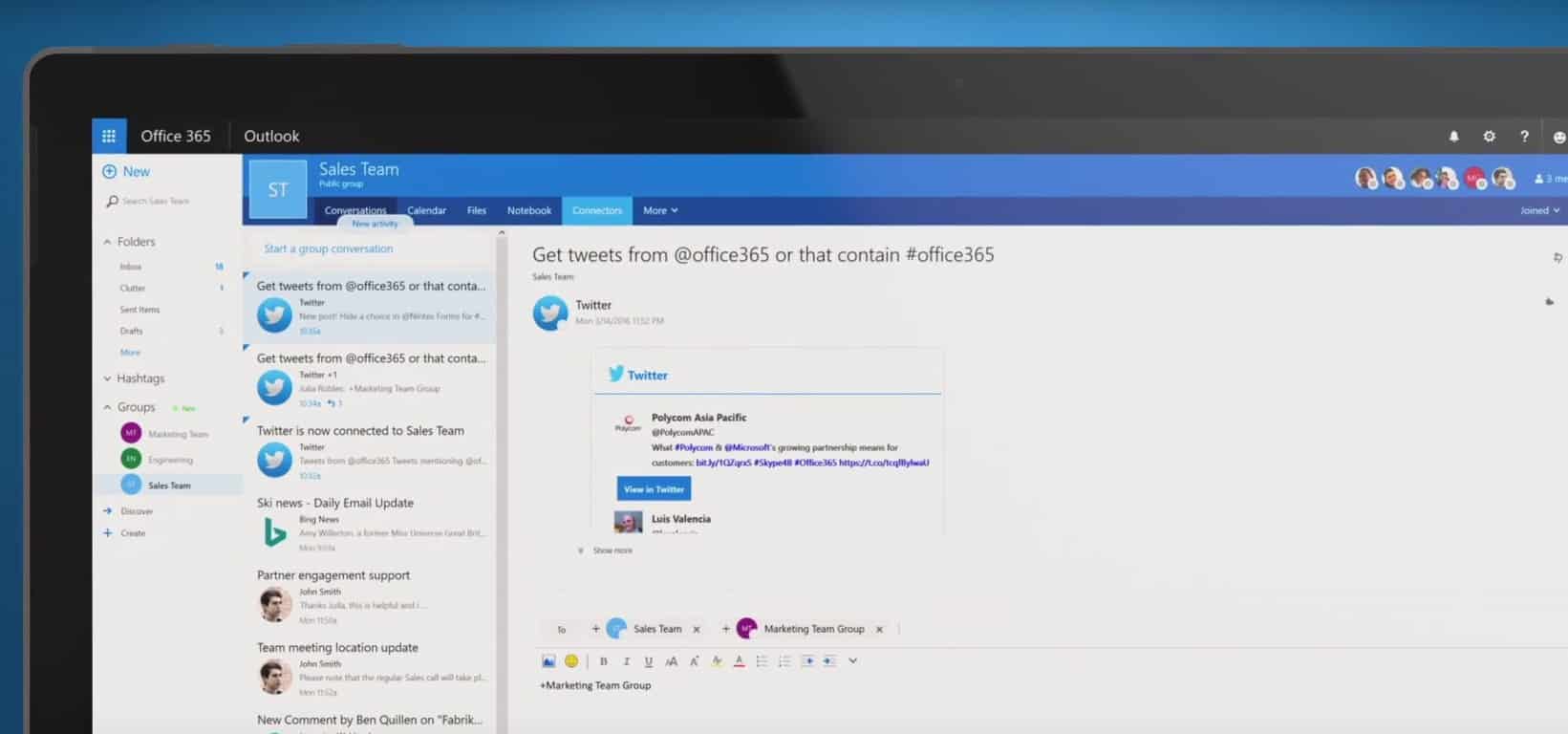
Microsoft has announced today during its Build 2016 developer conference the general availability of Office 365 connectors. If you don’t know what this is about, Office connectors are a set of app APIs that allow Office 365 users to bring in information and updates from Microsoft services and third-party sources such as RSS, Twitter, GitHub, SalesForce, MailChimp or Trello. It’s a really powerful feature that enables Office 365 to turn into a a platform or hub where users can track all their notifications from outside sources without ever having to leave Office 365.
Office 365 Connectors were first introduced in preview back in November 2015 before being released for First Release Office customers in March. Today, all Office 365 customers can try the feature, and Microsoft will work to bring more partners and more “Connectors” to customers in the future.
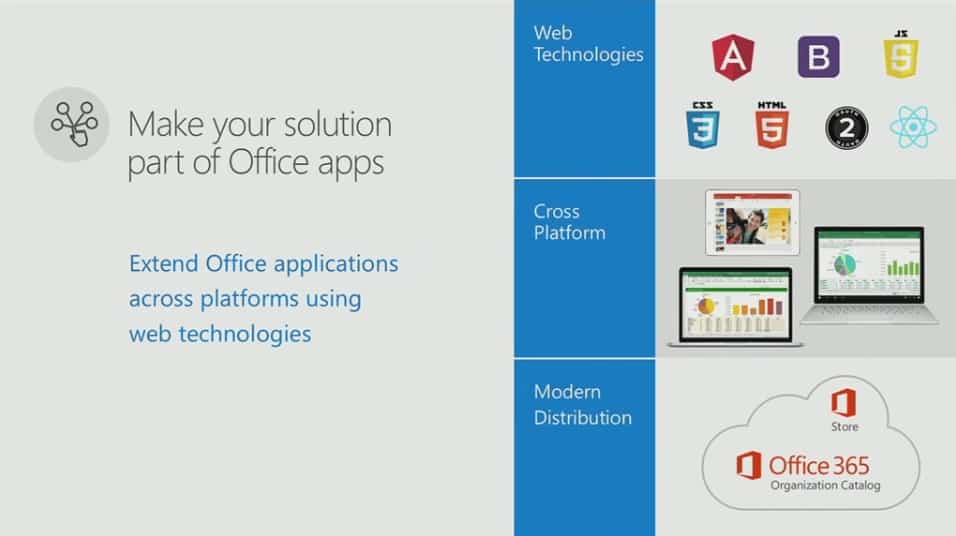
At Build this morning, Microsoft’s Office team announced they are releasing a new set of Office Tools on Visual Studio. These tools were demonstrated with services as different as Docusign and Starbucks building their own custom add-ins that can deeply reach into Office’s capabilities with simpler coding for developers.
These latest tools will make it easier for developers to build Office add-ins that have deeper integrations with Office cloud services, as well as more functionality for the add-ins’ ribbons and buttons in Office 2016 client applications. And the tools are also being extended to Office 2016 for Mac, extending the reach of Office 2016 apps and add-ins. The last half of the second day of Build is underway with a specific focus on Office, so stay tuned as the story develops.
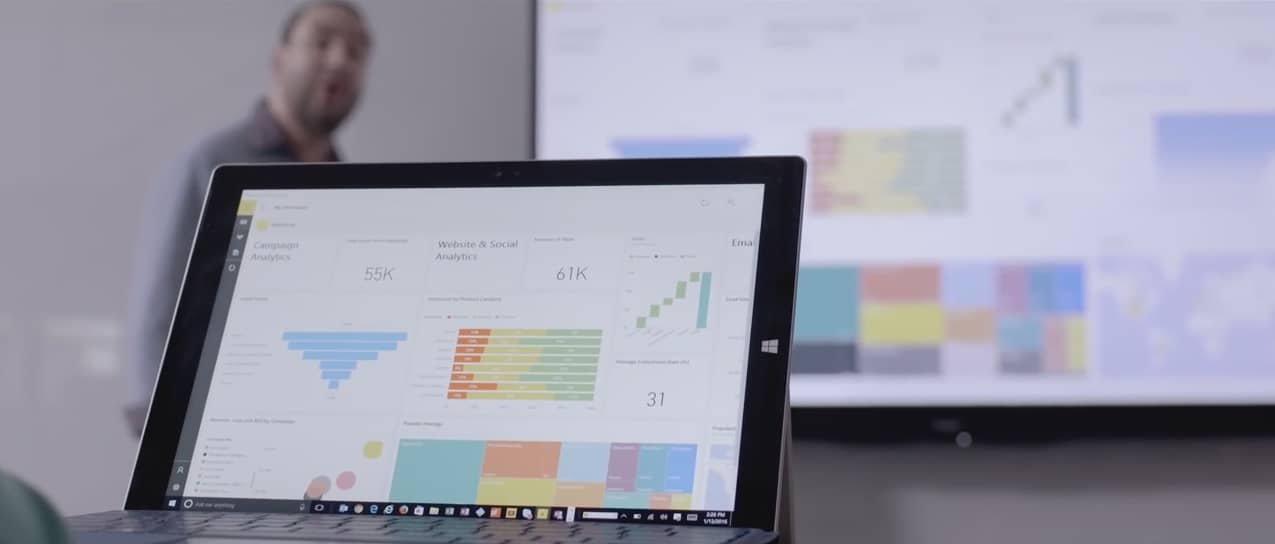
Microsoft’s Power BI is a powerful analytics tool for companies to track their data with rich visualizations and glean meaningful insights into their business. And at Build 2016 today, Microsoft announced a new way for companies to bring this data to life with Power BI Embedded. This new version of Power BI will allow you to embed your Power BI interactive visuals in your app with REST APIs and the Power BI SDK.
Microsoft also announced Power BI Embedded is available for free as a public preview until May 1, 2016. After that point it will revert to its normal pricing, which will be a scaled pricing model based on how much you actually use the service instead of set upfront cost. To learn more about how you can use Power BI Embedded in your company’s application, head over to the Azure website for Power BI here.
Microsoft has spent much of its Day Two keynote presentation at Build 2016 speaking about the power of its Azure Cloud platform. However, without a connection to the swath of Internet of Things (IoT) sensors and devices in the world today, the Azure Cloud is nothing more than a buzz word to most business.
To help with connecting businesses and their IoT sensors and devices to the pools of Azure data, Microsoft has just made its Azure IoT Suite available. While Microsoft’s executive vice president of Cloud and Enterprise was on stage introducing partners who have made use of the company’s Azure IoT Suite, across town at AzureCone, the company flipped the switch making it available to all customers.
Our mission is to empower every person and business on the planet to do more, and one of the most transformative trends affecting every business is the Internet of Things. We call that the Internet of Your things, and today at AzureCon, we made two announcements that will help our customers quickly and easily capture their untapped data, create new intelligence, and ultimately transform their business, including:
Availability of the Microsoft Azure IoT Suite: Now available to purchase, the Azure IoT Suite offers preconfigured solutions built on Microsoft’s cloud platform.
A new Microsoft Azure Certified for IoT Program: In order to get IoT solutions up and running quickly, Azure Certified for IoT program helps customers quickly identify hardware and software offerings verified to work with Azure IoT services.
For more details, visit Microsoft’s Internet of Things blog to find information on how the suite works, visualization tools, preconfigured solutions and certification for IoT devices.
Skype bots are currently in preview and only available in Australia, Canada, England, Ireland, India, New Zealand, Singapore, and US. Right now, you can only chat with the Bing Music, Bing News and Bing Images bots. If you want to chat with them, you have first to add them into your contact list: when you will try to add new contacts on your Skype app, you will now see 2 categories, “People” and “Bots”.
On the Windows desktop client, select the bot directory on the Skype toolbar.
As these bots are currently in preview, you cannot have real conversations with them right now. These bots work more like a limited search engine, and they will respond to your search queries if you use specific keywords. For example, try to say the title of a song to the Bing Music bot, and the bot will bring you up a link to a YouTube video. The Bing News bot will give you recent articles which titles include the keywords you said.
If you think that Skype bots are not very useful right now, just wait for Skype Video bots who are going to give Skype users the opportunity to interact with characters and businesses via a virtual personality through Skype video. But right now, Skype is inviting developers to join its Skype developer program to start building Bots right away, and the team will also hold a May hackathon to invite everyone to create innovative bots on the Skype Bot platform. Please tell us in the comments if you think Skype bots can turn the messaging app into a full-featured platform.
To access the bots, you’ll need to make sure you’re on the latest Skype clients. For Windows PCs, open Skype and go to Help > Check for updates. In iOS and Android, go to the relevant app store and hit update or download from a link below.
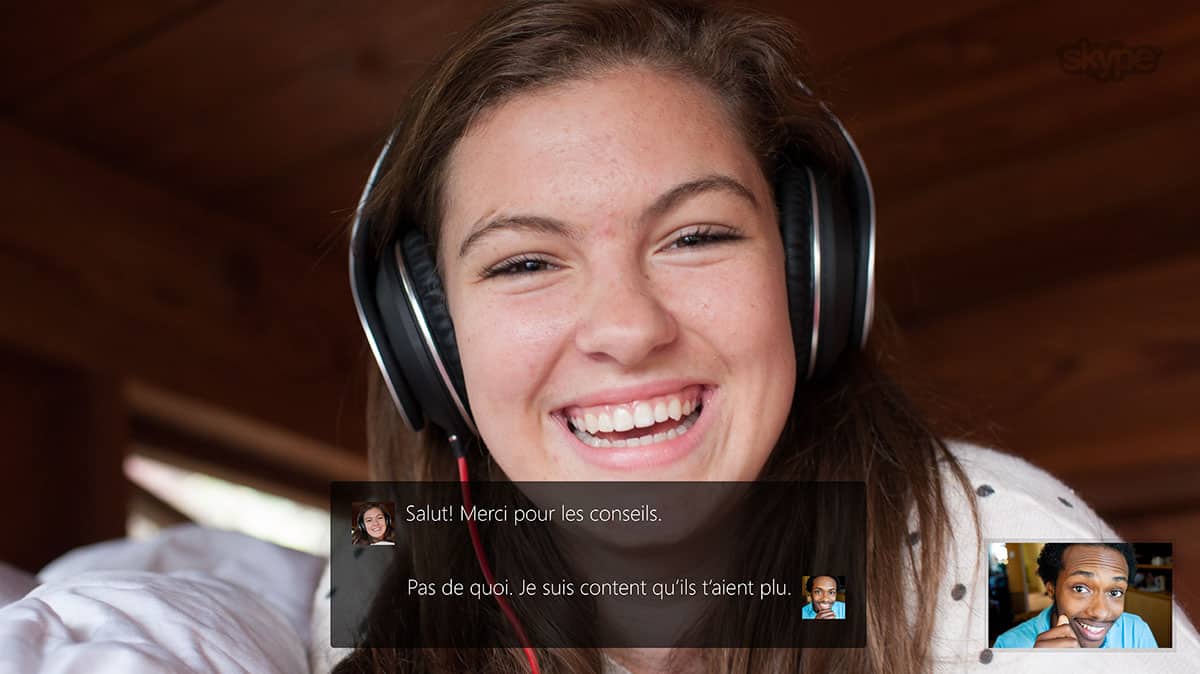
Microsoft’s artificial intelligence technologies have long powered the Microsoft Translator API in both the Skype and the Microsoft Translator app. Now, Microsoft is expanding on this and is releasing a new version of a Microsoft Translator API which will add real-time speech translation capabilities to the existing text translation API.
This means that businesses will be able to add speech translation capabilities to their own services and bring a better experience to their customers. Available in eight languages, and spoken in 18 languages, the new version is also the first end-to-end speech translation solution optimized for real life conversations.
This speech translation service can also be used in a numerous amount of situations, both person to person, or human to machine. Examples include personal translation, subtitling, or remote or in person multilingual communications. It even can be used in groups, such as in online gaming chatrooms or real-time presentations such as keynotes.
Nonetheless, the process of translation is very challenging. Microsoft claims that it uses the latest AI technologies and that there is no other fully integrated speech solution available in the market today that would support real-life speech translation scenarios.
A look at how the Microsoft Translator API works
The full details on how this technology works can be seen below.
Automatic Speech Recognition (ASR) — A deep neural network trained on thousands of hours of audio analyzes incoming speech. This model is trained on human-to-human interactions rather than human-to-machine commands, producing speech recognition that is optimized for normal conversations.
TrueText — A Microsoft Research innovation, TrueText takes the literal text and transforms it to more closely reflect user intent. It achieves this by removing speech disfluencies, such as “um”s and “ah”s, as well as stutters and repetitions. The text is also made more readable and translatable by adding sentence breaks, proper punctuation and capitalization.
Translation — The text is translated into any of the 50+ languages supported by Microsoft Translator. The eight speech languages have been further optimized for conversations by training on millions of words of conversational data using deep neural networks powered language models.
Text to Speech — If the target language is one of the eighteen speech languages supported, the text is converted into speech output using speech synthesis. This stage is omitted in speech-to-text translation scenarios such as video subtitling.
If you’re curious about the technology, a free 2-hour trial of the API is available by clicking here. You can also learn more about the API, and also read the documentation by visiting Microsoft’s Swagger page.


















![devms2]](https://www.onmsft.com/wp-content/uploads/2016/03/devms2.jpg)