Layers of Fear is first-person psychedelic horror game by Bloober Team about a painter that has gone crazy trying to create his ultimate masterpiece. So far, Layers of Fear has garnered 97% positive reviews on Steam. And now, Layers of Fear is in a playable state for the first time as an Xbox One Game Preview.
The final version will be available on Windows 10, Xbox One, Linux, Mac, and PlayStation 4 on February 16, 2016. A new announcement trailer for Layers of Fear just made the rounds and be sure to give it a look below. Layers of Fear is available for Xbox One owners through the Xbox One Game Preview program members and Windows PC owners can grab their copy of Layers of Fear through Steam Early Access.
You can try it for free on Xbox One and Steam, but you can also buy the unstable version on Xbox One or through Steam Early Access for $12.99. Based on the positive reviews, Layers of Fear is sure to be an exciting new horror game on Xbox One as it is for Windows PCs.
An image is making its rounds on the internet, potentially leaking February’s free Games with Gold game. The photo of the Xbox dashboard might have revealed Hand of Fate is the next free game for Games with Gold.
The game has not officially been announced as the upcoming free Games with Gold offering, so it is just a rumor at this point. As reported by GearNuke.com, the photo in question is also a true photo, not a screenshot of the dashboard since you can’t take a dashboard screenshot with the Xbox One.
via Gearnuke.com
Hand of Fate is an action role-playing game which utilizes rogue-like and deck-building elements. It was released in February last year to mostly positive reviews, with a Metacritic aggregate score of 79%. The game was published and developed by Defiant Development and utilizes the Unity engine. It was the Australian studio’s first big push onto PC platforms from their previous mobile games.
For now, we’ll just have to wait until Major Nelson reveals the official lineup.
Last month, Uber rolled out a Universal Windows 10 app, complete with a fancy new user interface as well as Cortana and Live Tile support. The Uber app makes it easier than ever to summon a ride so you can quickly get to your desired destination, regardless if you are on a Windows 10 PC or mobile device.
Uber has rolled out a new app update for Windows 10, this time adding ‘significant’ stability improvements. No specific details were given as to what exactly was fixed or improved, but if Uber says it’s significant, then we’re definitely welcome it! Grab it from the download link below. If you are a regular user of the app, let us know if you notice anything different.
For years, Xbox’s go-to racing game has been the Forza franchise, which has received numerous updates and even its own permanent exhibit. Starting soon, however, Forca looks to gain a running partner in the form of Assetto Corsa from studio 505 Games.
Assetto Corsa has seen success since its initial launch on PCs in 2013, but hasn’t left the platform behind with this latest launch. 505 Games and Kunos Simulazioni released a video on YouTube to showcase the game’s cover car, the Ferrari FXX-K, as well as detail various pre-order bonuses. The video can be found below.
The Xbox One release date is set for April 22. Those people informed enough to pre-order the title will also get the Performance Pack, which will include three more high-octane cars, the Ferrari 488 GTB, the Audi R8 V10 Plus, and the Corvette C7 Stingray.
Assetto Corsa was called the “highest-rated PC racing franchise of 2014”, and in June of last year, 505 Games said that they would be expanding its highly-regarded simulator to consoles in 2016. With that promise in mind, 505 Games and Kunos Simulazioni look to deliver the same calibre of driving realism to console fans this April.
The Xbox One games library has been growing at an incredible rate recently with more and more games being announced and released on Microsoft’s gaming console on an almost daily basis.
Today six new games have been announced as either for sale and immediate download or for pre-order and pre-download. The first game is Gemini: Heroes Reborn, a tie-in to the recently revived Heroes TV show. The game is written by the creators of the Heroes franchise and acts as a prequel to the events seen in Heroes Reborn. Here’s the official description:
The next game made available today (for digital pre-order and pre-download ahead of its March 3rd release date) on Xbox One is Fortified, a modern homage to the Science Fiction films of the 1950s that supports up to four local players in its blend of third-person shooter, real-time strategy, and tower defence gameplay.
Fortified is an explosive strategy shooter where players will defend the Earth against a menacing Martian invasion in the 1950s. Play as one-of-four pulp inspired heroes as they fight swarms of terrifying robots with an arsenal of Cold War era weapons and experimental technology. Protect the city by building a network of defensive structures, commanding an army, and jumping into battle against dangerous sky scraping attackers. Fight for Earth alone or with up to four players for the ultimate co-op defence experience.
A Boy and His Blob is a re-release of a popular platformer that came out back in 2009. It’s unclear if anything has changed for this new Xbox One version but either way it’s still a good opportunity for those who missed it seven years ago to finally give it a go now on current gen consoles.
A Boy and His Blob makes its triumphant return! As the boy, you feed Blob jelly beans and watch him transform into cool and useful objects to solve puzzles and escape danger. With its robust and emotionally driven story, challenging puzzles, and visually impressive art style, A Boy and His Blob marks the re-release of this 2009 cult-classic!
Electronic Super Joy is a bright, eccentric platformer with a bold visual style and an energetic soundtrack. The Xbox One version of the game features special levels exclusive to the console as well as two additional bonus levels and a special expansion called, Micro-Hell.
Electronic Super Joy is a challenging platformer featuring a pulse pounding soundtrack by EDM superstar, EnV! Run, jump, fly and smash your way through 50+ unique levels, featuring low-gravity, world rotation, giant monsters & swarming missile attacks! The Evil Groove-Wizard rules the world with an iron fist. Can you defeat the Groove-Wizard and end his Tyranny? Are you a hero or a goat?
Albedo: Eyes From Outer Space is a first-person shooter adventure game inspired by retro alien movies and TV shows (hey, just in time for the new X-Files series!) and boast a suitably old school soundtrack and design sensibility. Check out this brilliant trailer to see what the game has in store for those who buy it.
By far the biggest game to release this week on Xbox One, Resident Evil 0 is a remake of the original Resident Evil game which has now been updated with full HD graphics, 5.1 surround, widescreen presentation options, and improved controls. Resident Evil 0 is also getting a release on the Xbox 360 as well for those who are still playing games on that console.
Today Microsoft announced a new Release Candidate for their SharePoint Server 2016 and Project Server 2016 platforms. Since the announcement of their SharePoint Server 2016 Beta 2 release in November, over 5,000 clients have downloaded and used this new platform and have provided valuable feedback to Microsoft. This recent release is a culmination of that feedback and these latest updates:
Enhanced IT: Unprecedented flexibility in deploying on-premises, cloud or hybrid scenarios. Enhanced security with simplified configuration and administration policies for IT professionals.
Consistent Development: Unified development experience across server and cloud with modern APIs. Developers have new ways (simpler, more robust APIs) to create contextual solutions for all Office software and services, reaching various organizations utilizing the service.
Better User Productivity: Better mobile access and touch-based experiences across multiple screen sizes and devices. Mobile access to content, people and applications with hybrid integration into Office 365.
SharePoint Server 2016 is Microsoft’s most reliable, secure and scalable server release. This service gives organizations access to Microsoft’s Cloud offerings like OneNote, OneDrive for Business, Yammer and Office 365, while maintaining on-premise applications and security of content.
In the Spring of 2016 customers can look forward to wide availability of SharePoint Server 2016 and Project Server 2016. If you are interested in trying this mostly feature complete release, it is available for download today. What features would you like to see addded in future updates? Let us know in the comments.
Essentially, Microsoft recognizes the value of Node.js to IoT developers and the maker community, and has been actively updating Node.js Windows 10 IoT Core support to enable new applications.
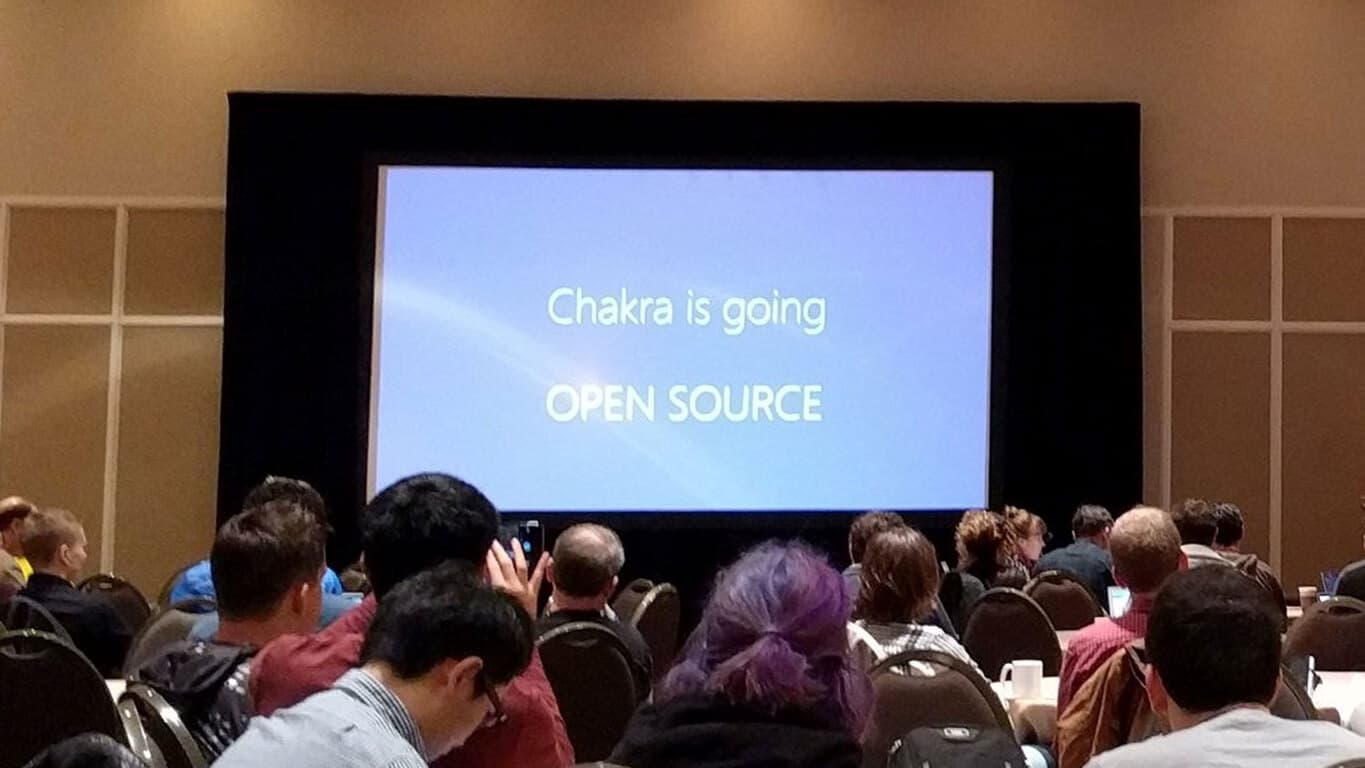
Yesterday, Node.js support for Windows 10 IoT Core reached a new major milestone. The Chakra team submitted a Pull Request(PR) to mainline Node.js using the recently open sourced ChakraCore JavaScript engine. Once accepted, this PR will allow us to move at the speed of Node.js while accomplishing two goals. First, growing organically based on community feedback and, second, bringing innovation faster to the developers on Windows 10 IoT Core. As per our roadmap, detailed in this blog, the Chakra team will continue to work closely with the community and the Node.js Foundation to improve module compatibility and evaluate Node.js performance.
Today, Microsoft released version 1.5 of the Node.js Tools for Windows IoT, bringing a number of important enhancements to the toolset. Basically, the console apps development model has been enhanced to better support ChakraCore, and developers can can now use Node.js within the context of the Universal Windows Platform.
If you’re a developer who understands these things and finds this somewhat esoteric blog post of interest, head on over and check out the details. The rest of us will just look forward to all of the nifty Windows IoT applications that you come up with.
Windows 10 Mobile is already present on some devices, and companies are constantly looking to deliver new hardware powered by Microsoft’s latest operating system for phones. This time, an UK-based company Bush, launched a new budget smartphone that runs on Windows 10 Mobile. Dubbed Eluma, the device is powered by a quad-core processor, and has a 5-inch HD IPS screen.
Bush Eluma is currently available for purchase at the British online retailer Argos, for the price of £79.95 ($113). Bush is offering a solid value for the money, as the device sports a 5-inch 720p display, 16GB of internal memory, 8MP rear camera, and 5MP front, along with above-mentioned quad-core processor. We still don’t know the amount of RAM featured in this device, because it’s still not listed anywhere.
We also don’t know which processor is featured in Eluma, as the Argos listing only says “quad-core processor,” but some people believe that the phone is powered by the 1.1GHz Qualcomm MSM8909 Quad-core processor. This is just a rumor, so take it with a pinch of salt.
Here’s the full list of Brush Eluma features:
Screen: 5-inch TFT display
Resolution: 1280 x 720
Processor: ‘quad core’
Internal memory: 16GB
Rear camera: 8MP
Front camera: 5MP
SIM card: Micro SIM, dual sim
Battery life: 160 hours of standby time, 480 mins of walk time
It’s great to see more and more companies working on the new Windows 10 and Windows 10 Mobile devices. We’re seeing new Windows 10 hardware from less-known companies, but some giants, like Samsung or Xiaomi, are also preparing their Windows 10 devices, which is crucial for the growth of Microsoft’s operating system.
If you’re interested in buying Bush Eluma, you can order it from Argos for $113. There are two models in the offering, a black model, and a white-colored case model, so you can choose your favorite.
Just some of the things you can expect with the Infinity’s Armor multiplayer update are new Atlas and Achilles armor sets, Warzone Urban Assult map, and a number of weapon and armor skins for customizing your appearance. More details on the update can be found on the Halo Waypoint blog:
The Infinity’s Armory update is receiving its final testing as well, and as mentioned above, remains on track for delivery this month. It brings with it new battlegrounds, new weapons (and skins), new armors (and skins), various game updates and tweaks, and more. We’ll reveal some of these now. As a note, if you’ve got a sharp eye and a thing for early morning eSports, you may have caught a few of these weapon skins in today’s Halo World Championship London qualifiers.
It’s looking like the Xbox One is all set to receive some nice new Halo 5 multiplayer goodness. We don’t know exactly when the update is set to release, but we’ll keep our eyes open.
Microsoft is getting active in the X Games arena, in addition to, tossing their hat into the eSports ring with the most recent event being the launch of the Halo World Championship Tour at the upcoming X Games Aspen Invitational 2016. The Skype team doesn’t want to be left out, and so they’ve created a Skype account that will let you interact with some of the most famous X Games athletes at the event.
To get involved, you’ll need to add XGAMES2016 as a Skype contact. Microsoft was nice enough to provide instructions:
1. Add XGAMES2016 as a contact
2. If you don’t already have Skype, download it here
3. Start a new Skype conversation with XGAMES2016 and get closer to the athletes
Follow Skype on Twitter, Instagram, Facebook, and #SkypeXGames to keep up with things. We’ll be sure to let you know if anything exciting happens–at least where Microsoft is concerned.
Windows Defender is a decent antivirus software, and although it’s not the best on the market, it will still do a decent job in protecting your computer. Windows Defender can do a lot of things, and if you’re planning to use Windows Defender to block potentially unwanted programs, today we’re going to show you how to do it.
Windows Defender already has an option to block potentially unwanted programs on Windows 10, but this feature has been available exclusively to Enterprise users. However, if you don’t own an Enterprise version and you want to block potentially unwanted programs, follow the instructions from this article.
How to Block Bundleware Using Windows Defender in Windows 10
Potentially unwanted programs also known as bundleware are those programs that install themselves with other software, and in most cases you won’t even know that these programs are installed. Although they are usually not harmful they will use your space and resources, and that’s not something that you want. So if you wish to protect your computer from potentially unwanted programs, this is what you need to do.
Start Registry Editor. To do this, you can just type Registry Editor or regedit in the search bar.
Right click the Windows Defender and choose New > Key.
Set the name of the key to MpEngine.
Now right click MpEngine and select New > Dword (32-bit) Value.
Name it MpEnablePus and set its value to 1.
If you ever want to disable protection from potentially unwanted programs just navigate to the MpEngine and change the value of MpEnablePus DWORD to 0.
Restart your computer.
As you can see, enabling protection from potentially unwanted programs isn’t hard as you thought, however, we advise you that you modify registry carefully.
Microsoft is planning to showcase its upcoming Xbox spring lineup at a media event to be held in San Francisco on February 25th. The event will feature Xbox head Phil Spencer, and will offer hands-on opportunities with “the best games and platform experiences launching this spring on Xbox and Windows 10”, according to an email sent out to invited media.
We’ve already seen CES come and go, and E3 isn’t until June, so holding a showcase to highlight what’s coming in the first half of 2016 makes some sense, building up momentum even before the annual big games blowout event at E3.
Microsoft has just released its first Xbox One update of the year, including lots of social improvements and new features like an Avatar Store and more, and it looks like we can look forward to not only new games, but more improvements to the Xbox One experience, and more gaming experiences on Windows 10, with many of them coming well before E3.
Windows 10, Microsoft’s latest and (arguably) greatest operating system carries a hefty vision of unification, and plenty of improvements and new features. Coupling with Microsoft’s aggressive strategy to push adoption, the new OS has soared in consumer usage ever since its release back in July last year, passing the 200 million installs mark recently. Enterprise, however, is Microsoft’s true bread and butter, and a new survey suggests that things are also similarly positive for Windows 10 in the company’s key markets, says Adaptiva.
Enterprise has always been slow to adopt new technology: point in case, some corporations were just beginning to transfer to Windows 7 from the ancient Windows XP last year (only because Microsoft completely ended support.) It is, then, rather surprising that the new study from system management specialist Adaptiva reveals that 40 percent of corporate IT departments who piloted Windows 10 have deployed the OS on more than 50 percent of their systems. In another survey, 63 percent of IT professionals participated expect to widely deploy Windows 10 in their organization later this year.
The survey results underscore the surge in Windows 10 interest we are seeing from enterprises as well as the concerns they have about keeping pace with the frequent updates,” “The new Microsoft ConfigMgr and Windows 10 releases are ushering in a need for a more automated, intelligent approach to systems management that reduces the time and complexity necessary to keep software and systems secure and up to date”.
– Jim Souders, chief operating officer at Adaptiva.
There are a number of reasons one can think of for this explosive adoption rate and confidence in Windows 10, not the least of which has to do with the ease of deployment, update and management. Windows 10 is often touted as Microsoft’s “last operating system”, and the company makes clear on that claim by adopting a Software-as-a-Service model for their OS: continual, more rapid improvements on-the-fly instead of the heavy, scattered big updates of yore. Sure enough, adoption of Windows 10 is reportedly fueling demand for Microsoft’s software distribution and update platform, Systems Center Configuration Manager (ConfigMgr). The recent end-of-support for Windows 8 and outdated versions of Internet Explorer was also cited as another possible cause.
Whichever reason it may be, the fact that the enterprise sector’s willingness to adopt Windows 10 should come as a big confidence-instilling win for Microsoft, whose track record of supporting decades-old software is probably too daunting for the company to allow to happen again for its new operating system.
Microsoft’s CEO, Satya Nadella, has just revealed that Microsoft, through its newly created Microsoft Philanthropies department, will dedicate over one billion dollars’ worth of Microsoft Cloud Services over the next three years to assist universities and non-profits as part of a new three-year commitment.
“Microsoft is empowering mission-driven organizations around the planet with a donation of cloud computing services — the most transformative technologies of our generation,” said Nadella in the official announcement. “Now more than 70,000 organizations will have access to technology that will help them solve our greatest societal challenges and ultimately improve the human condition and drive new growth equally.”
This new initiative will make Microsoft products and services such as Microsoft Azure, Power BI, CRM Online, and the Enterprise Mobility Suite, more available to non-profit organizations, building upon similar programs already in place that grants non-profits access to the Office 365 suite of products. The Microsoft Cloud Services for non-profits will rollout beginning this spring and within three years plans to include up to 70,000 organizations.
The Microsoft Azure for Research program is also expected to expand by 50% from its current 600 research projects to assist even more groups with free Azure storage and computing resources and Microsoft Philanthropies and Microsoft Business Development will continue to develop more new low-cost last-mile Internet access technologies and community training in at least 15 countries.
“We’re committed to helping non-profit groups and universities use cloud computing to address fundamental human challenges,” announced Microsoft President, Brad Smith. “One of our ambitions for Microsoft Philanthropies is to partner with these groups and ensure that cloud computing reaches more people and serves the broadest array of societal needs.”
At HP, we believe that every student should be given the opportunity to be an inventive individual rather than a standardized product of a system,” said Gus Schmedlen, vice president, Education, Printing and Personal Systems, HP Inc. “HP is on a mission to enable teachers and students with tools that ‘un-standardize’ learning — making education a more unique experience for students that is more flexible, collaborative and dynamic.”
Part of HP’s plans to help enable teachers and students include providing software and hardware solutions that include:
HP Education Edition notebooks
HP School Pack Software 2.0
HP Sprout Pro by HP
HP and Microsoft’s Reinvent the Classroom Program
Specifically, HP is looking at the practical and aspirational uses of technology in schools. The company is providing rugged notebooks with long lasting battery life coupled with a premium wireless experience for cloud-based LMS and online curriculum with its HP ProBook 11 G2 Education Edition and HP Pro310 x360 Convertible PC Education Edition for more mobile users. Students or teachers sporting The HP ProBook 11 G2 Education Edition should enjoy the up to 18-hours of battery life from the notebook as well as coming equipped with Windows 10 and an Intel Core experience. The convertible on the other hand offers a bit of flexibility (pun intended) with configurations for Intel, Celeron, or Pentium processors as well as massive storage.
Part of HP’s renewed push in assisting students and teachers involves a helping hand from Microsoft and its Windows platform. HP will also be delivering institutions what it calls HP School Pack 2.0.
an out-of-the-box solution of digital tools and content exclusively for Windows devices designed for collaborative, standards-aligned, and personalized learning. School Pack 2.0 includes a host of instructional, management and supplemental tools. It is anchored by HP Classroom Manager Student Edition6 that allows teachers to manage classroom PCs and communicate seamlessly with students. Other software in HP School Pack 2.0 includes HP Adaptive Learning created by Fishtree, HP Prime Graphing Calculator App, Classlink Single Sign On, Codecademy for Learning How to Program, Corinth Classroom, Curriculum Matrix, the Oxford Advanced Learners Dictionary, and PASCO SPARKVue7.”
The new HP School Pack 2.0 also features a one-year inclusion of HP Touchpoint Manager for Education that offers a cloud-based IT management solution to manage and secure data, devices and users.
Another HP-led service for education includes its Sprout Pro by HP. Sprout Pro aims to help accelerate engagement while also inspiring learning at various levels through an immersive computing experience. For institutions, Sprout also helps maximize classroom IT budgets by consolidating classroom equipment such as cameras or interactive whiteboards and school PCs. Perhaps the most impressive feature of Sprout Pro is its ability to reshape classroom engagement by offering a multi-screen, multi-person collaborative surface on any physical workspace powered by Windows 10.
Other Microsoft collaborations involve a joint program called Reinvent the Classroom. RTC is “a worldwide effort to inspire instructional innovation and next-generation learning experiences, powered by Windows 10 and HP solutions.” The initiative will start with over 60 school locations around the globe that will utilize a blend of state-of-the-art learning studios and Microsoft and HP software such as Office 365, Skype, and HP Adaptive Learning.
With Microsoft, we are delivering exciting new devices and solutions that help schools and students rethink the possibilities around learning, creating a vision for the Classroom of the Future,” said Alex Cho, vice president of Commercial PCs, Personal Systems, HP Inc. “This vision is manifested through HP and Microsoft’s Reinvent the Classroom program, showcasing how innovation can create more immersive learning environments.”
For teachers or students interested in any of the HP programs or products geared toward education, pricing and availability can be found at the www.hp.com site or the Learning with Sprouts homepage.
Minecraft is a global phenomenon and popular game among people of all ages. Currently, available on virtually all platforms, from consoles to cell phones, Minecraft is readily available from a variety of devices. This month, Nintendo’s Wii U owners get another exciting game to add to their collection. Previously announced alongside other console editions, Minecraft: Story Mode for Wii U launches on January 21st.
Developed by Telltale Games and based on Mojang’s popular series, Minecraft: Story Mode is spread out among five episodes on an adventure-filled journey. Players will have the ability to take their character across different episodes, experiencing an adventure-type gameplay in the Minecraft world. Priced from $4.99 for the first episode, fans can look forward to the release of the season pass for Minecraft, starting at $19.99. One of the added features for Wii U owners is the implementation of Off-Tv play with the Nintendo GamePad.
Minecraft, being owned by Microsoft has recently helped in developing the game for almost every popular platform. This follows in the recent culture of Microsoft products being available across a plethora of devices. With the recent addition of Nintendo’s Wii U platform, Microsoft is set to have Minecraft accessible from any platform a consumer wishes.
Microsoft’s Windows 10 build guru Gabe Aul might be home sick today, but that’s not stopping him from keeping up with the never-ending questions about the next builds. Today, Gabe let us know that no news is forthcoming.
The lack of info never stopped Microsoft from surprising us, but Gabe’s tweet likely means that we shouldn’t expect a new Windows 10 or Windows 10 Mobile build today. We know Microsoft intends to increase the frequency of updates, but we’ll have to be at least a tiny bit patient in waiting for the next one.
On a weekly and sometimes daily basis, King of the Big Red Button Gabe Aul gives and takes feedback on the status of Windows Insiders and general Windows 10 and Windows 10 Mobile builds. He works hard to bring us the info and to support us as we fight through bugs and build release issues and help build out Microsoft’s newest and most important operating system.
Therefore, we want to make sure we’re supporting Gabe and showing our appreciation for everything he does for the Microsoft and Windows communities. Today, he mentioned that he’s home sick, accounting for the silence of his Twitter feed:
If you haven’t already, go crank up your Twitter account and let him know you’re thinking about him. Nobody likes to get sick, and sometimes a quick “Get well soon!” helps perk up a down day. Seriously, Gabe is one of the hardest working people at Microsoft, and we do appreciate all of his hard work.
Every week at about this time Microsoft announces the week’s Xbox Deals with Gold offerings, and every week we spend a few minutes letting you know about them. Some weeks are more exciting than others, and this week’s deals fall into the latter category. Killer Instinct leads the way in a list of deals that’s not too terribly long.
Without further ado, here are the titles you can snag while saving some serious cash:
There you have it, all of the titles in this week’s Xbox Deals with Gold. Get your credit card out and head on over to the Xbox Games Store and get downloading.
Remember Kingsmen? That scene where Gallahad and Arthur sat down, put on their hip glasses, and the other members magically showed up as holograms perfectly seated at the table? Microsoft Research, it seems, is intent on turning scenes like that into reality with their newest augmented reality project, albeit with a difference: you don’t have to wear anything, reports Technology Review.
Called Room2Room, the new project from Microsoft research uses Kinect combined with digital projectors (rather literally, as seen from the image), to project a life-sized image of a person on a piece of furniture from a 3-D image captured in another room. This means that 2 people can see the image of the others sitting across them, doing normal conversation.
Room2Room uses the combined power of Kinect and digital projector. Courtesy of Technology Review.
The tech works a bit different from Microsoft’s other innovative augmented reality project, HoloLens, in that there is no need for a specialized head gear; the projection is instead visible to everyone, which you can probably guess from the involvement of the digital projector. Unfortunately, this also means that the projected version is less like your floating 3-D objects in Microsoft HoloLens ads, and more like a life-sized, flat PowerPoint presentation of your conversation partner. Maybe it will look better directly from the front.
“Hey man, aren’t you a bit flatter than usual today?”. Courtesy of Technology Review.
The low resolution of the projection is also mentioned as a current problem, making it hard to discern the projected person’s line of vision: testing was done to show that collaborated works with this system takes almost twice as long as face-to-face conversation because of this; it still managed to be faster than working through Skype however. The required equipment is also bulky and can be hard to set up.
It’s clear that Microsoft Research, and Microsoft in general, still has a ways to go before these augment reality projects can be widely adopted. Nevertheless, it once again shows the power and versatility of Microsoft’s Kinect technology, and makes another good case for the upcoming HoloLens. With Microsoft the only current player in the augmented reality market (if we’re not counting the ever-elusive Magic Leap,) the company seems to have finally found its “next big thing”, and we can’t wait to see its advancement in the future.
Accessories were a big part of previous Windows installments, and with Windows 10, the Accessories menu seems missing. We have prepared all the important elements to help you in this guide.
As you know, with Windows 10, we got Start Menu back, and although the Start Menu has returned, it has been changed, and one of the changes is in the absence of the Accessories menu.
However, the good news is that the Accessories menu isn’t removed completely from Windows 10; it has just been moved and changed.
What are Windows 10 accessories?
It refers to a set of built-in and downloadable tools and applications that enhance the functionality of the Windows 10 operating system. Some of the most commonly used Windows 10 accessories include:
Calculator – A basic calculator application that can perform various mathematical functions.
Snipping Tool – A screenshot tool that allows users to capture a part or the entire screen and save it as an image.
Sticky Notes – A digital note-taking application that allows users to jot down quick notes and reminders.
Paint 3D – A 3D modeling and painting tool that allows you to create and edit 3D images.
Microsoft Edge – A web browser that comes pre-installed with Windows 10.
Photos – A photo viewer and editor that allows users to view and edit images.
Notepad – A basic text editor that allows users to create and edit plain text files.
Microsoft Store – An app store that will enable users to download and install various apps and games.
Many other Windows 10 accessories are available, and users can download additional apps and tools from the Microsoft Store.
Where is the accessories folder in Windows 10?
In Windows 10, the Accessories folder does not exist as a separate folder. However, you can access the built-in accessories from the Start menu or search for them in the search bar.
Alternatively, you can search for any accessory by typing the name in the search bar next to the Start button. When you start typing the name of an addition, Windows will automatically suggest it in the search results.
You can learn more about how to locate and use the Accessories folder in Windows by checking this detailed guide on finding the Accessories folder.
How do I access Windows accessories in Windows 10?
1. Using the Start menu
Click the Start button in the bottom left corner of the screen.
Scroll down to the Windows Accessories folder.
Click on the folder to expand it and see the list of built-in accessories, such as a Calculator, Paint 3D, and Snipping Tool.
2. Using the Search bar
Click on the Search, just beside the Start menu.
Type the name of the accessory.
Click on the needed accessory (in most cases, you only need to start typing).
As you can see, Accessories are still there, but you need to know where to look for them.
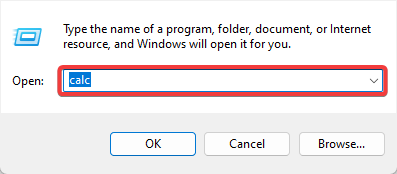
3. Using the Run dialog
Press Windows + R.
Type the name of the accessory you need.
Hit Enter.
3. Using the File Explorer
Press Windows + E.
Navigate to the path below: C:\ProgramData\Microsoft\Windows\Start Menu\Programs\Accessories
Yes, it is possible to download Windows accessories from the Microsoft Store or other third-party websites.
The Microsoft Store offers many apps and tools, including Windows accessories for your Windows 10 device.
Not all Windows accessories are available for download from the Microsoft Store; some may only be available from third-party websites. However, when downloading from third-party websites, only download from reputable sources and be cautious of potential security risks.
There you go; as you can see, accessing Windows Accessories is also accessible in Windows 10.
Let us know in the comments below what your favorite accessories are.
In a journey through distant and unknown galaxies, you play as the members of the ZHEROS squad: Mike and Captain Dorian. Brave, strong as awkward and dim-witted the first one; agile, smart and ready for anything the second one. They are both intergalactic agents called to defend the universe from crime. In single player or in co-op mode, you can rely on your punches, using a rich selection of combos, and on powerful hi-tech weapons, but if that was not enough, a strong and destructive mech will come to the rescue in the most dangerous situations.
From bizarre characters and encounters to strange locations, find out what mystery awaits you at the end of your journey.
The second new game released this week on Xbox One is Oxenfree. Oxenfree is an adventure game that has been receiving a lot of praise for its emotionally deep storytelling. The game features an atmospheric design aesthetic and the voice talents of several established videogame voice actors such as Erin Yvette and Gavin Hammon.
Here’s the description:
Oxenfree is a supernatural thriller about a group of friends who unwittingly open a ghostly rift. Play as Alex, a bright, rebellious teenager who brings her new stepbrother Jonas to an overnight party on an old military island. The night takes a terrifying turn when you unwittingly open a ghostly gate spawned from the island’s cryptic past. How you deal with these events, your peers, and the ominous creatures you’ve unleashed is up to you.
Puzzle Bundle collects both Unmechanical: Extended and Q.U.B.E: Director’s Cut in one neat package and a rather easy way for the game developers to get their titles more exposure in the Xbox One game store. Q.U.B.E: Director’s Cut is a third-person puzzler while Unmechanical: Extended is a more traditional puzzle/platformer.
OneNote is a fantastic note-taking tool and is available on both Windows 10 and Windows 10 Mobile. A recent update has added several new improvements that will help you stay organized while improving your experience with the app.
With this update, you now have better control over your notes. You can move or copy pages and sections to keep everything organized. You can also automatically transform your drawings into shapes, as well as use Office Lens from inside OneNote to capture a document or whiteboard. Previously, you were able to use Office Lens to scan a document and send to OneNote. With this update, you can scan from within the OneNote app.
The latest update to OneNote now lets you see where others are working with you in a shared notebook, which can come in quite useful. You can snag the app from the download link below. For those wondering, here’s the full changelog:
Automatically transform your drawings into shapes
Move/copy pages and sections to keep everything organized, just the way you like
Share a copy of a page from your phone to other apps like Outlook Mail
Quickly insert a photo from your phone’s camera
Copying and pasting content on your phone just got easier
Additional bug fixes and improvements
Update: Nope, this update was made available back in late-November. Seems like the only thing new in this update is the splash screen that showcases the old change log making you think these updates are brand new. Thanks, Microsoft. Very informative stuff.
Unfortunately, for some, Microsoft saw fit to axe its highly rumored Surface Mini tablet, but the updated Dell Venue 8 Pro may be the sub 10-inch Windows 10 device users want. The updated Venue 8 Pro 5000 series tablet is packing more ‘pro’ features to users who are looking for a compact Windows 10 experience without compromising performance.
Up front, the Venue 8 Pro 5000 comes in with the hefty price tag of $641.00 (US). Fortunately, the device is on sale for $449 (US), and the price can bottom out as low as $399 (US) depending on which version of Windows 10 is selected. While the price is much steeper than sub $200 (US) the previous iterations of Venue 8 devices enjoyed, the Venue 8 Pro 5000 does pack a feature set worthy of the increase.
On top of adding NFC, a Micros SIM slot, 64GB of internal storage and bumping up the screen resolution from 1280×800 to 1920×1200, the Dell Venue 8 Pro 5000 also packs twice as much memory as its predecessors at 4GB. Other additions to the Venue 8 Pro 5000 include a transition from micro USB to a Thunderbolt Type-C connector that is more in line with Dell’s new crop of PCs and tablets.
The full spec list and configurations of the Dell Venue 8 Pro 5000 include:
8.0-inch Display with FHD (WUXGA 1920 x 1200) with touch
4GB DDR3L-RS
Intel HD Graphics
64GB eMMC Hard Drive
Wi-Fi 2×2 802.11 AC with Miracast, BT 4.0
2MP front/5MP rear cameras
19.5WHr Lithium Ion battery
1 Micro SD card slot (up to 128GB)
1 Micro SIM card slot
1 USB Type C
1 headset/microphone combo jack
TheDell Venue 8 Pro 5000 can be ordered from Dell.com and we assume it will eventually make its way to the Microsoft Store in the coming months. Interested customers should also note, the Venue 8 Pro 5000 can be used as a notepad or drawing canvas with the Dell Active Pen, but Dell sells the pen for $40 separately.
Even though Microsoft canceled the Surface Mini, the Dell Venue 8 Pro 5000 appears to be its spiritual successor in almost every way.
Let us know if you plan to pick up an updated Dell Venue 8 Pro 5000, and what how you plan to use it.
No self-respecting Xbox One fan likes to think that those PS4 fanboys have access to exclusive content. Of course, they do, just as Xbox One owners can take pride in their own exclusive titles. However, one PS4 title that was thought to be an exclusive, The Witness, might very well be making it to the Xbox One.
As Venturbeat.com reports, recent Entertainment Software Rating board info lists an “E (for Everyone)” rating that would indicate an Xbox One release at some point. It’s also entirely possible that The Witness is simply a timed beta, and will naturally migrate to the Xbox One when its time arrives.
The Witness is a 3D puzzle game and you can check out the game trailer below:
So, there you have it. Xbox One fans won’t need to feel envious for too long of their PS4 buddies, at least as far as The Witness goes. And they still have Rise of the Tomb Raider to feel good about.
If you’re an Xbox One owner, you’re likely itching for a new update to fix any random bugs you’re experiencing. With the New Xbox One Experience update in November being the last major update to Microsoft’s console, you’re about due. According to Xbox’s Mike Ybarra (via GameSpot), you shouldn’t have too long to wait.
Answering that very question in Twitter, here’s Ybarra’s response:
Not a great deal of detail there, and “next week” depends on how precise you want to be. Next week from last Saturday is this week, of course, and so that’s what we’re expecting. Next month’s update might be bringing the much-requested party feature, so there’s always that to look forward to as well.
The numbers for Microsoft’s Office 365 continue to impress, as the adoption rate seeks new heights. However, more impressive than the adoption numbers for the cloud-based Office suite are the real-world stories of how effective and productive the services are helping customers to become.
During the Kraft Foods Group and H.J. Heinz company merger resulting in the newly established Kraft Heinz Company, both organizations relied on the services of Microsoft Office 365. At the time, the two companies used the communicative and collaborative capabilities of Office 365 to make sure their employees were up to date with information and remain productive during the transition.
One of the first steps was to unite the underlying technology that supported both enterprises. Both companies are already used Office 365, so we could give every employee a common Kraft Heinz email address on Day One of the merger, establishing one culture and one identity right away. Speed of decision-making is key for IT, and we were lucky that Office 365 was already in use on both sides. It was helpful to leverage that strong usage and flexibility to make the whole workforce immediately feel comfortable.
The company quickly began using Skype for Business Online to streamline communication and decision-making. During the merger process, we didn’t have the luxury of emailing documents and waiting for everyone’s edits. The ability to check calendar availability, send instant messages, open a video call, share documents, and collaborate on the fly was priceless. Without Office 365, it would have taken months to create a single operating environment, instead of just a few weeks.”
Specifically, Office 365 has enabled the Kraft Heinz company employees to simplify processes, while also observing emerging trends that have allowed the business to engage with its customers and consumers more efficiently. Tools such as Microsoft Power BI help underlie the importance of big data, collecting vast amounts of info and quickly turning it insights and predictive measures for Kraft Heinz.
Perhaps, most importantly, the use of Office 365 during the company transition plays into an ambitious cost-reduction target of $1.5 billion US by 2017. Using Office 365 is enabling Kraft Heinz to run a much leaner business while continue to increase the company’s collaborative efforts on site or in remote locations.
Beyond the activation, subscription and install base numbers, it’s stories such the Kraft Heinz company merger relying on Office 365, that are helping investors see the merit of Microsoft’s transition to the cloud. As big data analysis and employee mobility continue to be a merging intersection in business, Microsoft’s Office 365 appears to be the best single-packaged solution for heavy-hitters in the industry.
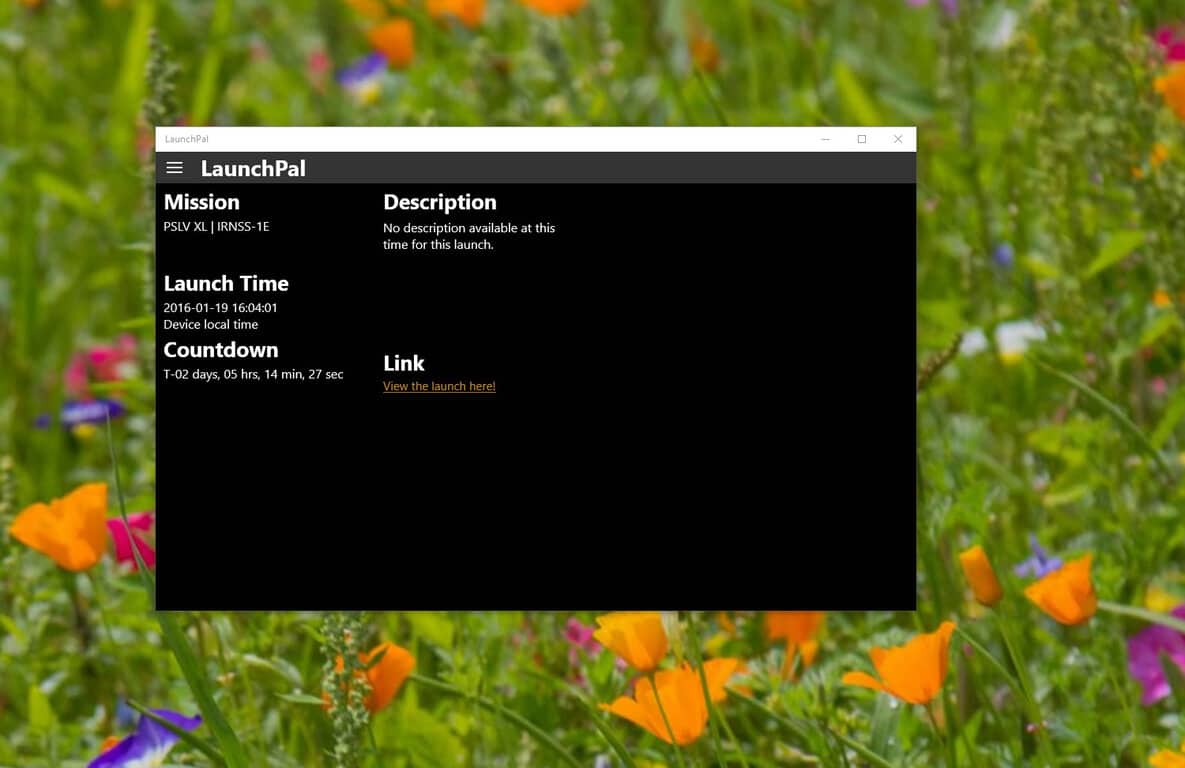
For those of you who enjoy watching space launches or special events, you really need to snag this Universal Windows 10 app. The app is called LaunchPal, and it has one simple mission: keep you notified whenever there is an upcoming space launch or event. Here’s the official app description:
“LaunchPal is a perfect companion for keeping you up to date with upcoming space launches and events. It keep tracks of the next planed launch and displays the launch time and a countdown timer for easy planing.”
The app has a super simple layout and is compatible on both Windows 10 desktop and Windows 10 Mobile. Opening the app displays the relevant information, such as the next mission planned, when the next launch time is scheduled, how long you have to wait, a short description, and a link to view the launch (if a live stream is provided).
It’s a super simple app and definitely worth grabbing if you are into SpaceX or any other space organization. In a future update, i’d like to see a live stream of a space launch within the app as opposed to a link that just opens up the browser. The app is free and you can download it below.
Microsoft has filed a new trademark for something called “Roboraid.” The trademark is filed under Class 09, which means it’s specifically designated as some sort of game software. Due to the nature of trademark leaks – being that they give us a name and a type of trademark and not much else – we know absolutely squat about what Roboraid is meant to be, apart from a game of some sort. That said, any more first party titles to beef up Microsoft’s 2016 in gaming could come as a welcomed fortification to an already strong lineup.
Xbox has been doing a mind-boggling job so far this year. On top of bringing AAA titles like Gears of War 4 and Quantum Break to us later this year, the company has also managed to snag DC Universe Online for the Xbox One, a game that was previously owned by Sony Online Entertainment before they sold their IPs (like H1Z1 and Planetside 2) to Daybreak games. If this new Roboraid game can do anything interesting, then it’s going to be welcomed by audiences on Xbox One and/or Windows 10.
The current lineup is somewhat lacking in truly unique ideas, and Microsoft’s first party titles currently are somewhat lacking in the sort of color and bright tone that many people are growing more accustomed to lately. Roboraid, something that has a relatively campy name, might end up being the sort of lighthearted and unique IP that Microsoft needs to put some variety into its portfolio in 2016. While all we can do right now is speculate, it’s exciting to think that there may be some new life being breathed into Microsoft’s first party lineup.
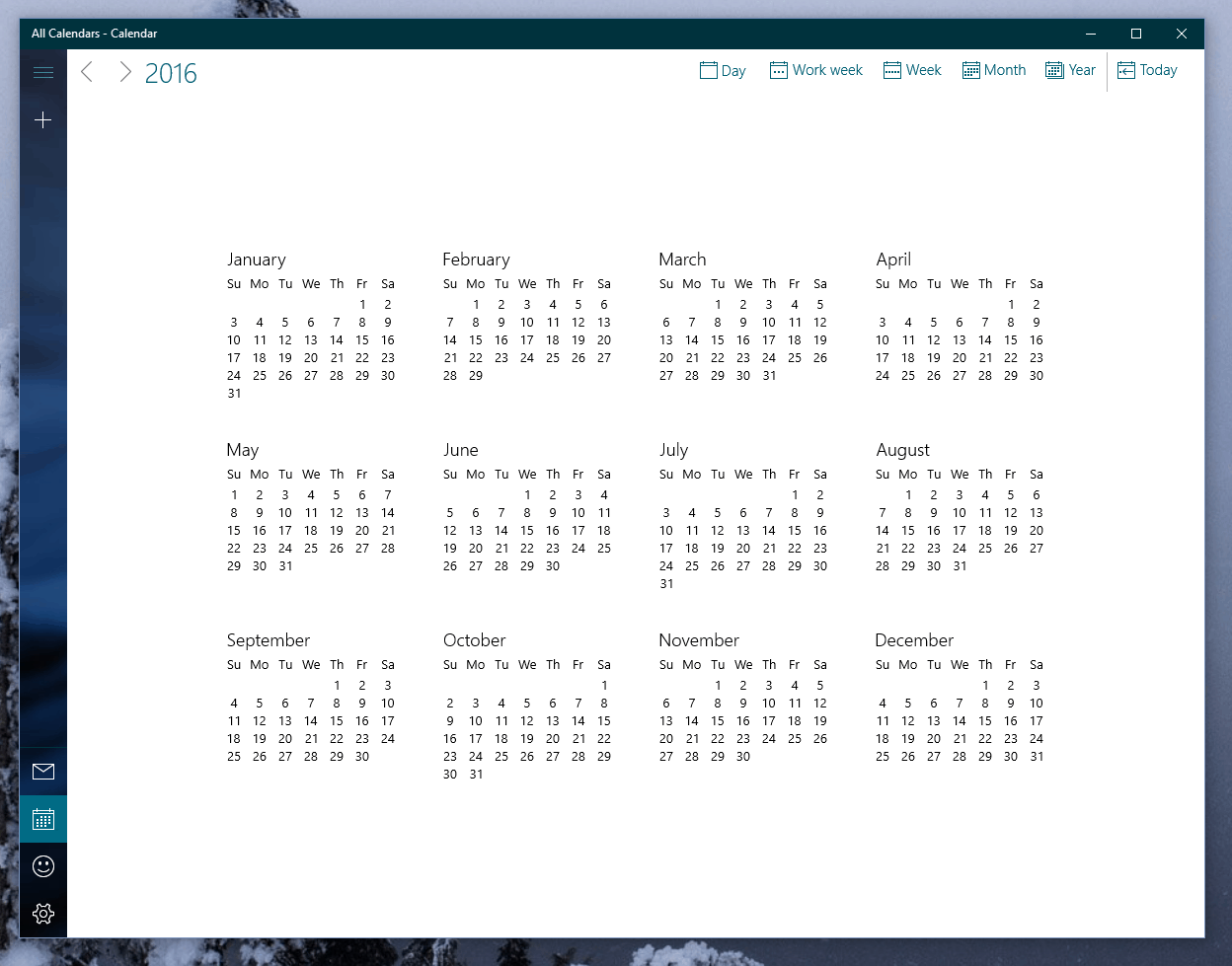
For those who wanted the Calendar app to have a bit more of a “New Year” feel this January, the newest addition to the Calendar app in Windows Insider build 11099 is offering a new “year view.” The new year view lets users of the Calendar app see the entirety of their year in just one screen – a perspective that’s relatively new, and certainly welcomed among those who tend to rely on the Calendar app to plan out their day-to-day lives.
The update is currently only available on the new Insider build (for those who have it, your version number for the Calendar app is going to be 17.6568.116421.0. Otherwise, your version number will be 17.6525.42271.0). Since this isn’t necessarily a massive change to the app, it’s likely that the update should be coming to non-Insiders relatively quickly. It isn’t much, but the new addition to calendar certainly has its place in the app.
Any app developer knows that it’s an intense struggle to try and be noticed in today’s climate of mobile applications. With thousands of new apps being brought into the app store on any given day – even on the Microsoft Windows Store, which has a selection currently paling in comparison to its competitors – it’s becoming increasingly difficult to try and be heard among the sea of apps that vie for the attention of users. In a blog post, Microsoft gives us a rundown of 6 ways an app developer can give their apps more visibility when trying to stand out.
#1: Create an original app. Make sure you own the name, brand, icon and content
This is one of the big pitfalls several budding developers fall into. Whether they’re using assets on the internet to try and cut corners in development, or if they’re purposefully using the name of a more popular app to try and get cheap attention, things never turn out well for developers who rely on others’ work.
#2: Make sure your app stands out and has compelling capabilities
This is pretty much common sense for developers, but still, it needs to be said. There are such an overwhelming amount of apps out there that just plain aren’t ambitious – as a result, they’ll never succeed. If you have an idea for an app, bring it to the drawing board and start expanding it before you begin production. Think about what other apps are doing with that idea and try to combine all of those ideas into one package. Once you have one dedicated app that can tackle multiple issues, you’ve got a good app on your hands.
#3: Build one great app instead of several related apps
It’s a simple, all-encompassing concept: quality over quantity. When users look through your history, they don’t care how many apps you’ve made. They care about how polished your products are. If a developer makes their name pumping out shovelware, they’ll never get anywhere.
#4: Make a good first impression with metadata that’s compelling and accurate
When users are deciding whether or not an app is worth their time, all they really have to go on is the metadata. Your app’s name, description, and especially its screenshots have to be chosen very carefully. It may have taken you months of hard work to put together your app, but if your metadata isn’t interesting, it only takes a user a second to close the page. Microsoft put up this post not too long ago to help polish this data.
#5: Know and follow the Windows Store certification process and policies
It’s beyond important that you check the Windows Store policies and the common certification failures before you try and submit your app to the Microsoft store. Microsoft checks every app that’s given to them for malware and compliance to their rules, so if you aren’t absolutely sure that you’re playing by the rules, you risk having your app rejected. For your own sake, double check and make sure your app checks out before you submit it.
#6: Keep a clean record
If you put something up on the app store, you’d better believe in its quality. Your reputation as a developer matters when you put apps out there, and that reputation is easily tarnished if you have a history of sub-par products. Just make sure that you’re proud of everything that you work on, and your time as an app developer is guaranteed to be more fulfilling.
Last year, a class action suit against Microsoft over issues with the Xbox 360 was allowed to proceed by the 9th U.S. Circuit Court of Appeals in Seattle. The suit alleges that Microsoft must address a design flaw that causes game disks to be damaged while Microsoft counters that only a small percentage of users (0.4%, to be precise) are affected and thus the issue must be due to user error.
It seems that Microsoft disagrees with the lower court, however, that a class action lawsuit is appropriate, and is appealing to the highest court in the land. That would be the U.S. Supreme Court, of course, which has agreed to consider the case and put the question on the docket, according to Reuters.
Previously, the case was dismissed by U.S. District Judge Ricardo Martinez due to a dearth of complaints (hence the significance of the 0.4%). Previous case law suggested that class action suits like the one against Microsoft need to reach a certain threshold of complaints to reach class action status.
The U.S. Supreme Court will be addressing the case titled Microsoft Corp v. Baker, No. 15-457. Xbox 360 users with ruined disks will no doubt be paying close attention to the case (or just checking back with WinBeta to learn about the Court’s decision).
Garden Warfare 2 takes the battle for suburbia to new heights with six new characters and two new game modes. On the plant side, there’s Kernel Corn, Rose, and Citron. On the zombie side, there’s Imp, Super Brainz, and Captain Deadbeard. The two new game modes sound interesting too; Herbal Assault and Gardens and Graveyards.
The battle for suburbia grows to crazy new heights in Plants vs. Zombies Garden Warfare 2 Multiplayer Beta. Whether you play as a plant or a zombie, it will be interesting to see how crazy the Xbox One gameplay will get with 24 simultaneous players. So far, Garden Warfare 2 is shaping up to be a good sequel so far. Try it yourself and you’ll see. Remember: you have until January 18 to play Garden Warfare 2 Multiplayer Beta. After that, you’ll have to wait for the full release of Plants vs. Zombies Garden Warfare 2 on February 23. Give it a try (it’s free).
With the Halo World Championship almost on our doorstep, offering its teams millions of dollars in prizes, some of you might be thinking to yourself: “What’s with this whole eSports thing, anyways?” It’s a common question being asked by no small portion of people as eSports become a bigger and bigger deal with each passing day. Tournaments like The International, for DotA 2, and Worlds, for League of Legends, garner the undivided attention of millions of people, and make mind-boggling amounts of money – in no small part due to the fact that just about anybody can be a spectator to nearly every eSports event without spending a penny.
Twitch.tv
Being an eSports fan is just like being a fan of traditional sports, except there’s more to watch, and you don’t have to spend obscene amounts of money on cable. As a budding eSports fan, the first thing you need to be familiar with is Twitch.tv. Twitch, for the uninitiated, is a website built around two things – the first of which being charismatic people who run entertaining shows playing video games (you can equate these people to radio hosts, though the professionals among them tend to do daily streams that can run as long as 8 to 10 hours, instead of just 1 or 2.) The second, and most profitable, is the hosting of eSports tournaments. These tourneys can be as large as multi-million dollar affairs like Worlds, or as small as a non-profit affair run by some college students – there’s almost always something that you can look forward to watching.
As a Windows 10 user, you’ll be able to go down several different avenues to observe some of these events on Twitch.tv. Apart from just going to the website, you can choose one of the few Windows 10 third party apps that plug into Twitch.tv. Apps like 8Stream, Unstream, and MyTwitch are all perfectly functional applications – just pick your personal favorite, and start looking for tournaments for your favorite games.
League of Legends
On that note, once you’ve picked your favorite streaming service, you should pick the game you want to start following. Some eSports fanatics tend to follow the goings-on in every major eSport, but the majority of fans tend to just pick one game and stick with it. If you’re familiar with – or looking to get familiar with -MOBA’s (That’s Multiplayer Online Battle Arenas) you may want to check out League of Legends, as it’s by far the most popular and well-supported eSport that’s out there. DotA 2 and Heroes of the Storm are both excellent, and incredibly fun to watch. If you’re worried you won’t know what’s going on, don’t be. eSports often have a color commentator and play-by-play commentator, just like in traditional sports.
Judging by the fact that you’re reading this, it’s a fair assumption to make that you’re a Microsoft fan. As such, you may be curious as to how everyone’s favorite tech company is making its way into this new industry of entertainment. You’ll be pleased to know that Microsoft has been, slowly but surely, making its mark on eSports throughout last year, and is about to start kicking that into high gear with the upcoming release of Rocket League and Gigantic for Xbox One. If you don’t want to wait for these two games to bring eSports competition to Microsoft, then look in the direction of the Halo World Championship. The qualifiers for ESL (Europe’s eSports league) and MLG (North America’s eSports league) are going to be having tons of placement matches tomorrow, January 16th.
Halo 5: Xbox and ESPN unite for X Games Aspen 2016: Thanks to a partnership between ESPN X Games and Xbo… https://t.co/Sz3TUPeuft#halo
If you don’t feel like spectating, or for some reason you can’t quite devote the time to doing so, you can check out websites like theScore eSports. The name may sound familiar to some traditional sports fans, as theScore has been one of the leading online sports news outlets for a while, and has gotten on the eSports bandwagon fairly quickly. They cover a large variety of different eSports, reporting on tournament standings, upcoming events, roster changes, and anything else that you’d want to know as an eSports fan.
Whether you’ve never heard of eSports, or if you’ve heard of it and didn’t approve of the concept, keeping an open mind about it could help you find a new interest. Following the eSports scene is fun and satisfying, offering all of the healthy competition and perks of traditional sports (things like following roster changes, tournament standings, and even creating Fantasy leagues) while cutting out plenty of the issues (cost barrier to spectating, only one season to watch all year.)
Microsoft isn’t as much of an advertising company as, say, Google and Yahoo, both of which rely on advertising dollars for the majority of their revenues and profits. That doesn’t mean, however, that Microsoft doesn’t care about ad revenues. A new rumor has it that Microsoft might purchase mobile ad platform InMobil, if true, makes the company’s interest all the more obvious.
As investment site Seeking Alpha reports, Microsoft is allegedly beating out both Google and Yahoo in the acquisition, with a target price of close to $2 billion. Certainly, Microsoft has the cash for such acquisitions, and with Microsoft smartphone platform suffering in terms of gaining market share, Microsoft needs to increase its presence in advertising via the other, vastly more successful mobile platforms. Think of it as Microsoft’s cross-platform strategy for ads.
Seeking Alpha points out that Microsoft is InMobi’s largest customer, which means the acquisition would make for a good fit and likely bring built-in financial benefits to Microsoft. Rather than paying InMobi a cut, all advertising dollars would show up on Microsoft’s balance sheet. That’s a win-win for everyone.
Microsoft continues to make some bold moves in this space, in both directions. The company made some noise when it handed over its display advertising business to AOL, while in other deals Bing has become the search engine for the likes of Apple’s Siri and the AOL search traffic that powers the display ads that Microsoft no longer manages itself. Advertising and search are complicated businesses, clearly, with all sorts of permutations and combinations–the process of sorting through tactics to accomplish strategic goals must give Microsoft executives massive headaches.
Nevertheless, with the InMobil purchase, Microsoft gains another foothold into iOS and Android, and one might argue that Windows 10 Mobile thus becomes a little less important. There’s no doubt about it–2016 is going to be a very, very interesting year in determining the future of Microsoft’s smartphone strategy.
According to a survey conducted by the research firm IDC, about a third of US Windows users are running the latest Windows 10 operating system (via Computerworld). The survey was conducted in September and polled 1,000 users who owned a computer about their view regarding Microsoft’s latest operating system.
According to the results, almost 30 percent of the people polled were running Windows 10 on their computers with 27 percent respondents running Windows 8. Still, 28 percent of the users reported they are running Windows 7 as the operating system on their devices.
The survey respondents also rates the satisfaction rate for the new operating system high. Almost 60 percent of the people running Windows 10 rated it as “favorable” or “very favorable” when asked. There were a few people who were not completely satisfied, but that’s bound to happen, not every user is happy with new operating systems, whether it’s Microsoft or any other firm. According to the survey, one out of 10 people picked “unfavorable” when asked.
Some other research firms who conducted a similar survey for September pegged the market share for Windows 10 to be quite lower. StatCounter results showed a 9 percent market share out of all operating systems, while Digital Analytics program put the market share on 9.2 percent for September. The differences can arise, as IDC’s Tom Mainelli said that 30 percent of the correspondents of the survey they took were Windows 10. “As with any consumer survey, it’s not possible to verify what they’re claiming,” Mainelli said.
Furthermore, the survey also said that 45 percent of the people who are running the new operating system upgraded after clicking Microsoft’s notification app which came up. On the other hand, 37 percent of the people said they were a part of the Windows Insiders program started last year and upgraded as soon as Microsoft released the new operating system in July 2015. Five percent of the people surveyed said they bought a retail copy while a similar percentage of people said they received the new operating system with their new computers. Not many are interested in picking up a new system just for the sake of Windows 10, which brings us to another important point, that is, it’s not a major factor that can boost PC sales at the moment.
“The poll shows that people using Windows 10 like it, which is a positive,” Mainelli said. “And this survey shows that while many consumers have embraced Windows 10, they’re not necessarily buying new systems to get it.”
PC shipments are declining year-on-year, and the recent report from Gartner estimated the decline at over 8 percent for the fourth quarter with the shipments expected to become slightly better in late 2016. As for IDC, they estimated a global industry decline at 10 percent, but it’s a little better in the United States for 2015 — the decline was slightly less compared to the global market.
It remains to be seen Windows 10 can really help kick off PC sales for this year as there are a number of other devices making rounds in the market, especially tablets.