

Microsoft announces Transparency Center in ongoing efforts to stop spying

Microsoft announces Transparency Center in ongoing efforts to stop spying

Many people are divided on their beliefs about major companies like Microsoft and Google making claims of not being complicit with spying efforts carried out by the National Security Agency. However, it can’t be argued that such news is bad for business, and therefore makes the arguments against any kind of partnership with the NSA more believable.

For his part, Brad Smith, Microsoft’s general council and executive vice president of legal and corporate affairs, famously called the US Government an “advanced and persistent threat”. He then proceeded to outline the company’s plans to deal with this menace, in much the same way the corporation would treat “malware” (another term he used).

One of the ideas outlined was the creation of “transparency centers” across the Americas, Europe and Asia. Now Microsoft has unveiled one of those locations. At today’s Munich Security Conference, Matt Tomlinson, vice president of security, announced a transparency center will be placed in Brussels, Belguim.

“The Brussels center will build upon on our long-standing program that provides government customers with the ability to review our source code, reassure themselves of its integrity and confirm there are no back doors. It is my hope to open the Brussels Transparency Center by the end of this year”, Tomlinson states.

He goes on to talk about the encryption efforts being made by the company to help better protect customer information. That includes both data stored by the company, as well as what is transmitted between it and other services.

We still await the announcements of other locations, and the question remains regarding how much customers will trust the company, given the current news cycle.

Download Marvel Run Jump Smash game for Windows 10

There aren’t too many of Windows 8 games released by Marvel in the Windows Store, so that’s why they’ve decided to launch another one for fans of their games – Marvel Run Jump Smash. Check out more details below.
marvel run windows 8
Marvel Run Jump Smash! is a new Windows 8 action game that has been recently released in the Windows Store by Marvel Entertainment who only has two other games – Avengers Alliance and Avengers Initiative. It has less than 40 megabytes and is available for $1.49, but unfortunately a free trial isn’t available so the single way to play it is to buy it. But judging by the rating it has received so far and number of downloads, this isn’t a hindrance for the true players.

Read Also: Windows 8 Super Bowl NFL Official Program App now Available

Have some fun with this endless runner game from Marvel

Run, jump, and smash as Marvel Heroes in a brand new endless runner! Compete with friends and fight Super Villains and their henchmen! How far can you make it? Fly as Iron Man! Smash as The Incredible Hulk! Run and Jump as Cap! Run and Gun as Super Spy Black Widow! Unlock additional Super Heroes…Swing as Spider-man! Shoot arrows as Hawkeye! Unleash the Thunder as Thor! Binary Blast as Captain Marvel!

windows 8 game marvel runThe game brings your favorite characters that you can play with – The Incredible Hulk, Iron Man, Super Spy Black Widow, Hawkeye, Thor, Captain Marvel and others. This is a fun endless runner game that looks really awesome on your Windows 8 tablet, thanks to its high-quality graphics. There’s a leaderboard available, as well, so you can invite your friends to see who manages to obtain the best score. Having been recently released in the Windows Store, the app has already received minor bug fixes and the performance has been optimized for those who have downloaded it.

If you want to get an even bigger score, you can upgrade your character. Throughout the game you will discover new Super Heroes and location updates, that will probably be delivered as the game will get new versions in the Windows Store. So, if you think you have what it takes to fight against uper villains like Loki and others, follow the link from below and get Marvel Run Jump Smash on your Windows 8 devices.

Download Marvel Run Jump Smash! game for Windows 8

Windows 8, 10 Super Bowl NFL Official Program App now Available

If you are a fan of the American Football game, then you are probably in need of a reliable NFL (National Football League) app for your Windows 8 device. Besides the NFL Connect Windows 8 app that we already talked about, you can try out Super Bowl XLVIII – NFL Official Program for Windows 8 that has recently got launched in the Windows Store.
windows 8 super bowl
Super Bowl was first played on January 15, 1967 and this year, it will take place on February the 2nd, so the launch of the official Windows 8 Super Bowl app comes in at the right moment. Super Bowl XLVIII NFL Official Program for Windows 8 is available for a price of $1.99 but the downside is that there’s no free trial available, so only the true NFL aficionados will buy the application, I suppose.

Read Also: Mint App for Windows 8 Gets Fix for Login Issues

Official Super Bowl app launched for Windows 8 users

The National Football League presents the Official Super Bowl XLVIII Interactive Game Program. The app has everything you need to know about the AFC Champion Denver Broncos and NFC Champion Seattle Seahawks plus video highlight recaps for every week of the 2013 season!

super bowl windows 8If you missed the printed 288-page commemorative program, then don’t worry as this $1.99 app brings it straight to your Windows 8 device, be it a touch or desktop one. Besides complete information and details related to this year’s edition of the Super Bowl, it also has a gallery of images and information about every previous Super Bowl, and you will also be able to find high-resolution images of every Super Bowl ring.

Some of the most important features of the app include animated starting lineups and stadium renderings; live Twitter and Instagram feeds; actual temperature at MetLife Stadium, as well as sortable rosters for both teams and some bonus material. As you know, this year we will see Denver Broncos and Seattle Seahawks fight to claim the Vince Lombardi Trophy. I guess this will be the same app for the year 2015, but I can’t be sure 100%, as NFL might choose to release a special one, just like it has done it this year.

Download Super Bowl XLVIII – NFL Official Program app for Windows 8

Microsoft’s OneNote.com website begins rolling out new design

OneNote.com website update begins rolling out with new design

It’s been a busy week for Microsoft, as we’ve seen the announcement of a name change for SkyDrive, a rumored name change for Office Web Apps and even indications that the software giant is close to naming its next CEO.

It seems that some of the changes are now in motion, as the folks over at LiveSide have spotted a design change to the OneNote.com site.  The new design brings a cleaner look to the service, now presenting a simple list of you notebooks stored on SkyDrive…ah, OneDrive.

Speculation is that this is what users will begin seeing when they click on OneNote in the SkyDrive drop-down menu, though that part of the implementation has not yet occurred.

The roll out of the new OneNote.com design is apparently one of those gradual ones that Microsoft and Google seem so fond of. As of this writing, I am still getting the old version of the site. However, all of these changes are expected to happen in the coming weeks, so keep your eyes peeled and let us know if spot something new.

Office 365 is one year old today — happy birthday!

Office 365 is one year old today -- happy birthday!

They said it couldn’t be done. Launching a subscription-based software service was ridiculed, put down as something that the average user was simply not interested in. Why would people want to pay a monthly or yearly free for an app when they could just pay for it outright and use it forever? Seems crazy, right? But Office 365 proved a lot of people wrong — and a year after launch it is still going strong.

It’s fair to say that Office 365 has changed the way people think about not only Office, but also subscription software and online apps. In the space of just twelve months it has managed to dispel the myth that subscription software is more expensive than traditional apps. For many people, Office 365 is significantly cheaper than its predecessors.

It’s easy to forget, but your subscription fee doesn’t just pay for a single license. In fact $99 a year enables you to install Office 365 on up to five computer at a time — and it’s easy to deactivate individual machines if you need to move between devices. You also have the option of using the mobile apps on up to five more devices, and then there’s Office on demand if you need even more options!

Office 365 is a continually evolving service and it is incredible to think about how far it has come in just one year. I know I rely on Office for my day to day work — I simply could not live without it — and the flexibility afforded to me by the way the licensing now works is a welcome change.  I was one of those people who was initially resistant to the idea of a subscription model, but now I’m sold… what a difference a year makes!

How do you feel about subscription software? Is it something you are comfortable with, or do you prefer to old way of doing things — just pay for it once and own it forever? Perhaps you think the subscription model is something that should be left to the business market rather than home users. Share your thoughts below.

Oh yeah… happy birthday, Office 365!

Marvel Run, Jump, Smash! slams into the Windows Store

Marvel Run, Jump, Smash! slams into the Windows Store

Marvel has long been popular with comics fans, but more recently it has scooped up a whole new base of fans, thanks to all of the popular movies that have graced the silver screen. The comics have morphed into a major franchise, thanks to those flicks, as well as games and any manner of merchandise.

Today the Marvel Run, Jump, Smash! game has appeared in the Windows Store. The app is, quite obviously, based on the characters from the popular movie franchise.

“You play as superhero characters like Iron Man, the Incredible Hulk, Captain America, or super spy Black Widow and you run, jump, and smash your way through different environments, dodging obstacles and battling super villains like Loki by deploying your superhero’s unique “Special Attack”. As you run, you collect coins that help boost your run and let you buy special power-ups to boost your distance and score”, states Microsoft’s Brandon LeBlanc.

The app will set you back $1.49, and you can download it now from the Windows Store by following the link posted below. The game does require internet access to play.

Mint App for Windows 8, 10 Gets Fix for Login Issues

The official Mint app for Windows 8 users is one of the best Finance apps to use and it has been released into the Windows Store at the end of 2013. Mint has millions of users and plenty of downloads for the iOS and Android versions, so it was no wonder that Windows 8 users would have so quickly adopted it.
windows 8 app mint
If you’re looking to manage your personal finances straight from your Windows 8 tablet, then Mint is definitely among the best solutions you have at your disposal. With a beautiful, clean and useful design, Mint for Windows 8 is one of the best money management tools, no matter if you are using a touch or a desktop Windows 8 device.

Read Also: AccuWeather App for Windows 8 Gets Push Notifications

Manage your money with Mint for Windows 8

THE BEST FREE WAY TO MANAGE YOUR MONEY. Mint pulls in all your personal finance accounts into one place, so you can manage your money from anywhere. Track your spending, create a budget, and save more.

When I first installed the official Mint app on my Windows 8 device, I noticed that many users were already complaining that they were having issues with the app, more precisely – they were having login problems. Now, Mint for Windows 8 has been update to take care of those problem, as we have been informed through the changelog. So, now you can start using the app to manage your checking, savings, and credit cards accounts, and perform other financial actions needed for your money management.

You can even pin it to your start screen and get live updates about your accounts, there are plenty of tools to track your cash spending and you can also set bill alerts. And if you are worried that someone might access all this sensible data, you shouldn’t be, as you can password-protect everything. So, follow the link from below to get it on your Windows 8 systems.

Download Mint.com Personal Finance app for Windows 8

Posted in Fix

Evernote for Windows desktop gets an update, adds improved scan management

Evernote for Windows desktop gets an update, adds improved scan management

If you aren’t familiar, Evernote is one of the top note-taking apps on the market. The company covers everything from browser extensions, to desktop operating systems to mobile platforms. But it also does much more than just take notes, you can scan documents and even grab screenshots of web pages and add graphics to them.

Now the company is pushing a major update to its Windows desktop offering. The biggest addition is new functionality for the ScanSnap scanner. Users will now get integration with LinkedIn so scanned business cards can be connected to the person associated with each. Customers will be able to simply scan in business cards and ScanSnap will fill in all of the information and even add a photo of the person.

It also adds auto-filing of scanned documents, which eliminates manual steps that were previously necessary. “The new Evernote for Windows works directly with the ScanSnap Evernote Edition to send your receipts, business cards, and documents directly to the notebooks you choose, automatically”.

You can grab the app by following the link below. Evernote is free, but there are paid plans for those who need additional features, or wish to use the service in a business environment.

Microsoft welcomes Bill Clinton as the keynote speaker at SharePoint Conference 2014

Microsoft welcomes Bill Clinton as the keynote speaker at SharePoint Conference 2014

Microsoft has several upcoming conferences, which isn’t unusual, as the company loves to hold these shows to communicate with users and developers. The next one up on the schedule is the SharePoint Conference, which kicks off on Monday March 3rd in Las Vegas, and runs through the 6th.

Today the company announces a very special keynote speaker will be getting things started at 8:30am that Monday. President Bill Clinton will take the stage to kick things off. “All attendees with a General Registration pass can attend the keynote and are advised to arrive early”, the Office team announces.

The conference focuses on SharePoint, Yammer and Office 365, and has more than 200 sessions scheduled to take place. Registration for the event is still open, with varying levels of access available for purchase, ranging in price from $150 to $1,995.

Windows 8, 10 App Check: Endomondo, the Social Fitness Network

The official Endomondo app has been available for Windows 8 users in the Windows Store for quite a while, but only now have we decided to have a look at it. You can also check out our review of Fitbit for Windows 8, another important Health and Fitness app.
windows 8 endomondo app
The good news is that there is an official Endomondo app avaiable in the Windows Store for touch and desktop users, but the bad news is that this is merely a companion app for those of you who have the app already installed on iOS and Android. However, as more smaller Windows 8 devices will start appearing on the market, I think it will make sense for Endomondo to release a standalone Windows 8 app. We will be keeping an eye on this and will report you when and if this happens.

Read Also: Windows 8 Chemistry App TouchMol Lets you Draw Molecules

Check out Endomondo for Windows 8 fitness enthusiasts

Endomondo is a social fitness network with 12 million users worldwide. Use this application to get an overview of your training. The app offers: A calendar with an overview of workouts. A summary of your total workout statistics. A workout map and stats for each workout. Personal bests on different distances. An overview of what your friends on Endomondo have been up to.

endomondo windows 8 app

To be able to use the official Windows 8 Endomondo app, you will need to have an account; if you don’t, you can sign up straight from within the Windows 8 application. The app basically serves as an overview tool of your training as it comes with a calendar that contains all your workouts that you have written down, your workout statistics, the map with the locations where you have been exercising, for how much and how long and also your own records. Since Endomondo is a social fitness network, you can see what your friends have been doing and share your own results with them.

Download Endomondo app for Windows 8

Windows 8, 10 Chemistry App TouchMol Lets you Draw Molecules

In the past we have featured some other Windows 8 chemistry apps on Wind8Apps, such as the Periodic Table or the Doodle God game. Now, we’re having a look at TouchMol, a cool Windows 8 chemistry app that needs to make it in your list of the best Windows 8 school apps.
windows 8 chemistry app touch molTouchMol app for Windows 8 is available for the price of $4.99, but there’s also a free trial available, so you can take it and see how the app works.  The app is obviously designed for chemists, biologists and all those passionate by chemistry or having to deal with it as their daily work. By using TouchMal, once can draw, share and search chemical and biological structures right from their Windows 8 tablet or other Windows 8 device.

Read Also: Awesome Quotes App for Windows 8: Your Daily Dose of Inspiration

Drawing molecules becomes fun on your Windows 8 tablet

TouchMol help chemists to draw, share and search chemical and biological structures. Draw structures with fingers on touch screens. Integrated Name/CAS-to-Structure. Peroform fast structure search in. Supporting chemical reactions. Supporting biologics

chemistry app windows 8 touch molThis interesting Windows 8 chemistry app has a size smaller than 1 megabyte but it comes with plenty of useful features, such as the ability to draw chemical or biological structures directly using your fingers, which makes it seem really, really cool. Obviously, it comes with background support for chemical and biological reactions, so it also represents an interactive method to learn about these things.

While inside the app, you can choose from the following structures – biologics, small molecule, reaction. When editing a molecule or any other structure, you will have plenty of tools at your disposal, such as lasso, eraser, undo, different templates to choose from, links, carbons, charges and plenty more that you need to be able to complete your drawing and to find the thing that you’re looking for.

Download TouchMol app for Windows 8

Follow 2014 Brazil Fifa World Cup on Windows 8 with This App

The 20th FIFA World Cup will take place in Brazil this year from 12 June until 13 July and football (or soccer, as some call) lovers from all over the world will watch the event live. If you want to stay update with what happens during the event on your Windows 8 tablet, then you need to download and install the app that we’re going to talk about below.
world cup 2014 windows 8 app
The biggest downside of the app is that there’s no free trial currently available, so Windows 8 users won’t be able to tell if their $1.49 investment is worth it or not. I can only hope that the developer will make it available in a future update. For now, the app is fairly limited in functions, but this will change, I guess, once the World Cup gets started, as you should be able to follow live score and other timely news.

Read Also: Fate of the Pharaoh is a Cool Windows 8 Strategy Game

Get read for the 2014 World Cup with this Windows 8 app

This App contains complete details about Teams who qualified to 2014 FIFA world cup And detailed profile Information about Teams, Also include Their FIFA World Ranking as Subtitle

fifa world cup brazil windows 8 appSo, as you can see from the above description, the app comes with details regarding those teams who made it to the final competition in Brazil. There’s also the FIFA world ranking position available underneath the national flag. The app has grouped teams according to the official structure. Overall, the app is nicely designed but it lacks important features that I hope will be added in the future.

Download FIFA World Cup Brazil 2014 app for Windows 8

Fate of the Pharaoh is a Cool Windows 8, 10 Strategy Game

Here at Wind8Apps we love Windows 8 strategy games and we have talked about Catan and Ancient Rome 2 before. Fate of the Pharaoh is another new interesting Windows 8 game that lovers of the genre will definitely appreciate.
windows 8 strategy game
Filed as a strategy game, the full version of Fate of the Pharaoh is available for $2.99, with a free trial, as well. There’s also a lite version of the game that you will be able to download from the Windows Store free of charge. This Windows 8 strategy game is developed by Cateia Games and will take around 150 megabytes of your storage space. The supported processor architectures are are x86, x64 and ARM, so it will work just as well on your Windows 8 tablet or Windows 8 touch device and on your Windows 8 desktop laptop or other device.

Read Also: Tennis in the Face is a Hilarious Windows 8 Game

Interesting strategy game launched for Windows 8 users

Return to the golden realm of ancient Egypt in this challenging strategy game: Fate of the Pharaoh! The glorious Egyptian empire is left exhausted after a longstanding war. The greedy invaders fled, leaving chaos and ruins of a once magnificent kingdom. Become the loyal Pharaoh’s adviser and help him to restore peace and prosperity in the golden cities of Egypt. Construct houses and beautiful castles, collect taxes and materials, set up production and trade, and fight crocodiles and wicked cobras. Can you return Egypt to its days of glory?

fate of the pharaoh windows 8The game is really well designed and you will have lots of fun playing it. It comes with 44 challenging levels at your disposal and 9 different achievements that you can earn throughout the game. When first opening the game, you will be ask to choose what mode you want to play – the Adventure mode where you have to complete each level within the time of Ra or in the Relaxed mode, where there’s no time of Ra.

At the beginning, you will be able to do basic things in the first missions, such as building tents and collecting taxes. As you will complete the missions, the new levels will get more difficult, with more buildings available to build, materials to gather, ships to build and even pyramids to erect. Follow the link from below to get the game on your Windows 8 device and start building your ancient Egyptian civilization.

Download Fate of the Pharaoh game for Windows 8

Tennis in the Face is a Hilarious Windows 8, 10 Game

I’ve been playing Tennis in the Face on my Android smartphone for a while now and was glad to hear that it got launched for Windows 8 users, as well. After playing it for a few good minutes, I recommend it to anybody look for a funny Windows 8 game.
windows 8 tennis in the face
Tennis in the Face for Windows 8 is one of the best looking games that have been recently launched in the Windows Store and it’s just as good as the other versions of it for iOS or Android users. It’s currently available for only $1.49, but it will soon get more expensive, as it’s still part of this week’s Windows 8 Red Stripe Deals. And if you think you don’t want to pay for this game, believe, get the free trial, and you will fall in love with it!

Read Also: Windows 8 App Check: Stickman 2D Evolution

Have some real fun with Tennis in the Face on Windows 8

This is no Wimbledon, this is Tennis in the Face! Get ready for some hilarious ragdoll-smashing ball-bouncing action! Help Pete Pagassi to save the city from an evil energy drink corporation Explodz. Knock out creepy clowns, evil riot police and other Explodz-addicted maniacs with a tennis ball in the face. Bounce the ball off walls to reach targets lurking in cover and watch them tumble hilariously. Trigger masterful chain reactions and watch the chaos unfold. Finally enjoy the level finale in slow motion!

windows 8 tennis gameYou play as Pete Pagassi, which is a fictional character made from mixing Pete Sampras and Andre Agassi. The game can be enjoyed on Windows 8 desktop devices, as well, as it is not limited to tablets only. Pete Pagassi is on a brave missing to destroy creepy clowns by hitting them with a tennis ball in the .. face. Of course, you can hit them wherever you like, they will vanish. And what’s cool is that your ball will keep on bouncing and if you guess the right angle, there are good chances that you will hit some more clowns.

What I particularly liked about the game, besides the huge fun that I had, is the high-quality of the design and the finely tuned physics engine. Tennis in the Face for Windows 8 also comes with hilarious ragdoll characters and slow motion level finales. There are more than 100 levels plus bonus game modes and a dozen challenging achievements Follow the link from below to download and install and let me know if you enjoyed it as much as I did.

Download Tennis in the Face game for Windows 8

Windows 8, 10 App Check: Stickman 2D Evolution

More than one year ago, we were sharing with you a Windows 8 app that you could use to create a story with Stickman in Windows 8. Now, we have found the new Stickman 2D Evolution that we’re going to talk about below.
windows 8 stickman game
We have found out about the Stickman 2D: Evolution Windows 8 game when Microsoft has rolled out the latest Red Strip Deals. The game is currently available for only $1.49 but its price will go up after the temporary promotion will end. The game is filed in the Arcade category and comes with a size of slightly more than 60 MB, so it will be gentle with your storage.

Read Also: Fantastic Farm is Nice Windows 8 Farming Game

Best Windows 8 Stickman game gets released

The magic of stickman drawing brought to life on your screen! In Stickman 2D: Evolution, you will draw each stickman you send into battle. How well you draw determines how healthy your stickman is. You then send them to capture diverse objectives such as guard towers and village bonuses, with the ultimate goal of winning each battle and moving on to the next Age of stickman evolution.

windows 8 stickman evolutionStickman 2D: Evolution takes the classical Stickman drawing game a little further for Windows 8 devices. The game is pretty interactive and the quality of your drawing determins the outcome of the battle. Your final mission is to move into the next Age of your stickman’s evolution. If you’re not read to pay the entire price, you can choose the free trial version to see if the game is really that great.
The game comes with plenty of features, such as different Stickman types, from prehistoric caveman to modern rocket wieding infantry; ability to use the game with touch and desktop controls; four Ages: Stone Age, Iron Age, Renaissance, and Modern Age; Endless Stickmen mode, aditional “Challenge” levels, and “Insane” difficulty mode.

Download Stickman 2D: Evolution game for Windows 8

Fantastic Farm is Nice Windows 8, 10 Farming Game

Farming games are a lot of fun, especially if you are a true aficionado. In the past, we have talked about the popular Farming Simulator game for Windows 8 device. Now, I’ve discovered the Fantastic Farm game which many of you will find interesting. More details about it are below.
windows 8 fantastic farm
Fantastic Farm is a fairly new Windows 8 game that has been recently released in the Windows Store for farming game enthusiasts. The story of the game is the same as with the majority of farming games – you start low, and you grow your farm gradually until it becomes a successful business. The specific of the game is that there’s magic involved, as you can use magical machines to help grow your farm.

Read Also: Mini Golf Mundo is a Fine Windows 8 Golf Game

A fun Windows 8 farming game to play

Ever wondered what it’s like to run a magical farm? Maggie, fresh out of the School of Magic, has just taken over her parents’ farm, and is now being threatened by a sinister business man. To help her succeed, build your small farm into a prosperous enterprise. Grow plants, care for the animals, and operate magical machines to produce sweaters, pies, ice creams and much more!

windows 8 farming gameInside the app, there are more than 150 levels with five different game modes. If you manage to take your farm to real success heights, then you will also earn trophies for your achievements. The game contains 6 different plants, 4 animals and 3 machines that you can use. I hope that in a future update more plants and animals will be added, as the game is fairly simple for the experienced gamers.

You will play as Maggie, who is a fresh graduate of the School of Magic, so she will be able to use the magic cauldron to improve the yields. The game is filed in the Simulation category and has quite a small size, with slightly over 50 megabytes. Follow the link from below to get it on your Windows 8 devices and start building your small farming empire.

Download Fantastic Farm game for Windows 8

Mini Golf Mundo is a Fine Windows 8, 10 Golf Game

A while ago, I was sharing with you the Windows 8 game Super Golf Land that I hope you have achieve. Now, I’ve discovered the new Mini Golf Mundo game that brings the beloved golf game to Windows 8 users, tablet and desktop device owners. More details below.
windows 8 golf game
Alas, there aren’t too many awesome Windows 8 golf games in the Windows Store, but I think more will appear in the near future. One such example is the recently launched Windows 8 game Mini Golf Mundo which is available for $1.99. What’s really bad is that there’s no free trial, so users have at their disposal only printscreens from the game to judge of its quality. I am reaching out to developers and hope that they will change this as they need to understand that the Windows 8 user first needs to see if the app is good enough and then pay to get it.

Read Also: Connect-Mania is a Beautiful Windows 8 Dot Connecting Game

Bring the golf game on your Windows 8 tablet

Put your ball around these challenging 18 hole mini golf courses in “Mini Golf Mundo”. Play along or with up to 3 friends across 4 different courses. In addition to great looking graphics, this game features many challenging yet fun holes. Mini Golf Mundo was built using an advanced physics engine which provides realistic game play and refined by the masters to be as smooth as possible. It doesn’t matter if it is sunshine or rain outside, in here it is nothing but green!

The game comes with good looking graphics, which is something that I’ve always needed in a Windows 8 golf game and couldn’t find. Sure, there’s plenty of room for the game to be innovated, and I will be following the updates that it will received.  The game contains four different courses: Woodland Falls, Highland Hills, Springwater Valley and Meadowland Plains where you can see just how good you are at golfing.

If you prefer to play in multiplayer mode, you can invite up to 4 friends and play the classical golf game across all 18 holes. It has an approximate size of slightly over 36 megabytes, so it won’t eat too much of your storage space. Follow the link from below to get in on your Windows 8 devices.

Download Mini Golf Mundo game for Windows 8

Connect-Mania is a Beautiful Windows 8, 10 Dot Connecting Game

Quite a while ago we featured one Windows 8 app that you could use to transform your Windows 8 tablet into a piano – Piano 8 was its name. Now, the developer of that app has reached out to use to review another fun Windows 8 game – Connect-Mania.
windows 8 bubble game
Connect-Mania is a very simple, yet very nice Windows 8 game for you to play on your Windows 8, Windows 8.1 or Windows RT tablet, as well as desktop device. The game features beautifully crafted hand drawings that I always appreciated in mobile games. Filed as a puzzle game in the Windows Store, this game will only take a little over 5 MB from your storage space, but it can take a lot of time, if you get sucked into it.

Read Also: Genstalgia is a Cool Windows 8 Sega Genesis Emulator

Connect-Mania is an addictive bubble connecting game for Windows 8

Your goal : Connect as many same-colored dots as you can in one minute. Too easy? Not too simple… Challenge your friends’ scores with the worldwide leaderboard. Highly addictive game. A game that is harder than it seems

windows 8 connect mania

So, as the description says, this is a game that is hard than it seems. After playing for a good minutes on my Windows 8 tablet, I can indeed confirm this. What’s cool about is that, the longer your line gets, the “sharper” the sounds gets, indicating that you’re about to receive a bonus which will increase your score. Many might think that these games are a waste of time, but they actually improve your attention for details. And in Connect-Mania, you only have 60 seconds at your disposal, so you really need to have an eagle’s eye to spot which is the best way to connect those colorful dots.

The game can be played with your mouse and keyboard or with touchscreen control support, on your Windows 8 or Windows RT tablet. If you get really good at it, there’s also a worldwide leaderboard where you can challenge your friends or players from all over the world to see who’s the better player.

Download Connect-Mania game for Windows 8

PressReader App for Windows 8, 10 Makes Print Newspapers Digital

If you read magazines or newspapers on your Windows 8 tablet, then you probably wouldn’t say no to an app that keeps them all in a single place. PressReader is one such app and we’re talking about it below.
press reader windows 8 app
When it comes to managing your magazine or newspaper subscriptions, we have featured here on Wind8Apps multiple solutions in the past, such as the official Zinio app, or the Nook app. But many have heard about the official PressReader app which has made its way into the Windows Store more than a year ago. But only today are giving it a quick overview to see how it can be of benefit to you.

Read Also: Fitbit’s Windows 8 App Updated, Solves Login Problems

PressReader brings thousands of newspapers to Windows 8

With over 2,300 full-content newspapers and magazines from 97 countries in 55 languages in just one app, PressReader provides readers with the most immersive and rewarding way to experience the world’s best press! If you’re looking for the ultimate reading experience for your favorite newspapers and magazines, then you have to try PressReader, which is without a doubt the most satisfying, engaging, feature-rich and entertaining newspaper and magazine reading application you’ll ever use.

press reader windows 8For those who are acquainted with the PressReader functionality on other platforms, you probably know that it gives access to thousands of newspapers from many countries. At the moment, the Windows 8 PressReader app covers 97 countries and 55 languages, which is quite impressive. What’s cool is that you can get the first 7 issues of any newspaper you choose completely free. After that, you will have to buy each issue.

The magazines and the newspapers look just exactly like the printed version, as this is the specific of PressReader. You will be able to browse and zoom the pages in your favorite magazines and newspapers. as well as adjust font size and type, choose to have your favorite publications automatically delivered and many other features. Follow the link from below to get it on your Windows 8 devices.

Download PressReader app for Windows 8

Microsoft’s Gigapixel ArtZoom showcases a 360-degree, panoramic view of Seattle

Tired of seeing all the Panoramas, Google Street Views and virtual tours to space? Well, don’t quit just yet. Check out what Microsoft’s 20-Gigapixel ArtZoom Project has to offer.

A team of computer scientists from the Microsoft Research Interactive Visual Media Group has sewn together 2,400 digital photographs of Seattle into an interactive, 360-degree, 20-billion-pixel panoramic image. Hundreds of artists, performers, photographers, videographers, coders and editors collaborated to contribute to this project.

Using its own Image Composite Editor and Photosynth technology, engineers at Microsoft research developed Gigapixel ArtZoom, that lets you explore the beautiful city and discover local artists while stumbling across the several Easter eggs which they have left behind.

“The mission of Microsoft Research is to extend the state of the art, and technologists really benefit from seeing the world through artists’ eyes,

“It challenges us to build better tools and technology. Artists are the pioneers at the edge of what’s possible, pulling us into the future.” says Michael Cohen, head of the Gigapixel ArtZoom.

Gigapixel ArtZoom is an attempt by Microsoft to find a common ground between technology and art. And unlike earlier panoramic projects, this time you will find real people in the images too.

“The fun in a panorama comes from panning around, zooming in, and discovering things, and when you do see someone you wonder what they’re doing.

“So for Gigapixel ArtZoom, we decided to take this beautiful cityscape of Seattle and fill it with people to find: the artists, acrobats and performers who give this city such a vibrant life.”

To give you an idea of how large and crisp the images are, consider the numbers of pixels your HDTV can fit together, and multiply that by 10,000. All photographs were taken using a Canon DSLR camera with a professional-grade 400 mm lens.

You don’t require any special software to access Gigapixel ArtZoom. Open any web-browser, and click here.

Windows Store developers receive new app availability settings and simplified certification requirements

Windows Store developers get new app availability settings and simplified certification requirements in new update

Microsoft has rolled out an update to the Windows Store onboarding and publishing process, making a developers life a tad bit easier. With this new update, developers can now set their app’s release date and time, along with the ability to remove an app from the Store for a period of time. Microsoft has also made the certification process a bit easier.

“We’re always thinking about how we can improve the Windows Store onboarding and publishing process to make things easier for you as an app developer. This week we rolled out a few changes to help you manage the availability of your app in the Store, and we also simplified the app certification requirements,” Microsoft stated in an official blog post.

Windows Store app developers can now choose the data, hour, and time zone for their app, granted it has not reached the Signing and Publishing phase just yet. This allows developers to change the release date while the app is still in certification. On top of that, developers can remove an app’s listing from the Store temporarily, which can be quite useful while working to fix a bug or addressing a concern.

“We’ve now given you the ability to remove your app’s listing from the Windows Store at any time just by clicking Remove this app’s listing in the Manage availability section of the App details page in your Dashboard. You can later click Restore this app’s listing if you decide to make the app available again. It’s important to remember that removing an app’s listing means that your app is no longer available for new customers to download. Your app’s existing customers can continue to use it, although they’ll no longer be able to make any in-app purchases,” Microsoft explained.

Developers can also end support for Windows 8 and focus entirely on Windows 8.1 by removing the listing from the Windows Store during the app submission process.

Microsoft has also “evolved” the app certification process, making the process easier while still maintaining appropriate levels of app quality. “For example, you now have more flexibility in where your app can display ads. We’ve also combined some requirements that cover different aspects of the same area (such as technical requirements). For specifics on what’s changed, see the summary of changes in the certification requirements Revision history,” Microsoft explained.

As a Windows Store app developer, how do you feel about these new changes?

Windows 8, 10 Horror Game Decay: The Mare gets Released

I am not a passionate of Windows 8 horror games or movies, but I know that there are plenty of aficionados in this world that would love to play a horror game on their Windows 8 tablet. Of course, the game comes with suspense action which makes it interesting to play.
windows 8 horror game
Decay: The Mare has been previously released for desktop devices and other mobile handsets, and now it has made its way into the Windows Store for Windows 8 users, as well. The full version of the game is available for $3.49, but you can use the free trial to see if this is truly a Windows 8 horror game that deserves to be bought or not.

Read Also: Best Windows 8 Paper Toss Game: 3D PaperBall

Scary horror game gets launched for Windows 8 users

A new psychological horror adventure game from the creators of the successful Decay series. Sam has ended up in an institution named “Reaching Dreams” to get rid of his drug addiction and his miserable life. But during the first night, something happens and he gets stuck in a nightmare that never seems to end.

The game has a little over 150 megabytes and is filed in the adventure games category. It features an “amazing atmosphere, art and music”, along with a scary and deep story. You will encounter challenging riddles and puzzles along your progress in the game, as you play as Sam who has ended up in an institution named “Reaching Dreams”. He tries to get rid of his drug addiction and his miserable life but he gets stuck in a nightmare that never seems to end. So, if this sounds intriguing enough, follow the link from below to get it on your Windows 8 tablets.

Download Decay: The Mare game for Windows 8

Microsoft updates Outlook Web App with new People View

Microsoft updates Outlook Web App with new People View

Office web apps sometimes feel left out as Microsoft concentrates on 365 and the desktop versions of the suite. It’s not true of course, as the company actually pushes frequent updates to its free version of Office, which resides within the SkyDrive ecosystem.

Today the software giant releases its latest update to the service, this time unveiling a new People View. The name may explain the functionality, but if not, let me try. It appears in the folder pane, in an effort to get you to the messages that matter most. It even provides a nice graphic image of the sender.

“The number of unread messages from each person in your list appears next to their photo. When you click a person’s photo, the email messages from that person in your Inbox are shown in the order received”, the company states.

There’s no configuration necessary, so once you get access you’ll be good to go. Getting it is another story. The company is planning one of its gradual roll outs. And this one is slower than normal, with worldwide users expected to get it “in the coming months”. It will only be available in the web app, at least for now.

Windows 8, 10 App Check: Super Golf Land

If you will go right now in the Windows Store and start looking for some Windows 8 golf games, there will be plenty of apps and games, but unfortunately, so many of them are either spam or cloned apps. Super Golf Land is one of the best choices that you have.
windows 8 golf game
Super Golf Land is a Windows 8 golf game that needs to be improved a lot, but from what we have at our disposal at the moment, it is one of the best golf games to download on your Windows 8 tablet. The game has plenty of downloads and positive ratings from those who have downloaded it, which shows that players are pleased with its performance. What I personally would love to see is an increase in the quality of the display, why not, maybe make it even HD.

Read Also: Windows 8 ‘Spades’ Game gets AI Improvements

The BEST free golf game for Windows 8! Play Super Golf Land today and golf across 8 beautifully designed courses. Develop your skills and unlock all 8 unique power-ups. Play the minigames and earn some spare cash. Hours of fun for the whole family!

Play golf on your Windows 8 tablet with this game

windows 8 golf appHowever, despite all the downsides that it comes with, the game is 100% free and this is perhaps its most important feature. So, considering that you don’t pay anything to get it, it’s pretty cool. There are 72 holes at the moment, but more will be added in future updates. There are 3 exciting minigames for every hole with 8 unlockable powerups. Recently, Super Golf Land for Windows 8 has also been updated with a bug squash related to the accuracy powerup. So, if you’re a golf aficionado, follow the link from below to get it on your Windows 8 tablets and desktop devices.

Download Super Golf Land game for Windows 8

Rethink Internet Explorer: Microsoft showcases what the browser has done and what it can do

rethinkie

Internet Explorer, the browser you all once loved to hate, has grown stronger over the last few years. After ignoring its web-browser for a long time, the software giant not only added many enticing features into it, but also made the browser much more secure and stable. Today, Microsoft has launched a website RethinkIE which documents all its recent developments and accomplishments.

The latest version of IE, Internet Explorer 11, sports some unique and intuitive features that make it stand tall against its competitors. The browser supports 3D graphics rending as well as a touch-first experience. In past few months, Microsoft partnered with an array number of firms, including GlacierWorks, Atari, Red Bull to exhibit the astonishing results its browser could produce. At the same time, it also encouraged web developers to write optimized codes to make their website faster.

Microsoft wants you to rethink the web as we know it. Not only is the company working on making a modern browser which will enhance your browsing experience, it is also working on making the web much more beautiful. 

“People expect their browser to be fast and so do we”

“Rethink is about where the Web has come from and where it can go with a modern browser like Internet Explorer. We’ve taken a different approach than others by helping create experiences that work well not only with Internet Explorer but across any modern browser and device,” Microsoft stated in an official blog post. 

If you are a web-developer, you can hop over to Get Tools page to find yourself a wide range of software that will help you benchmark your site. Although Windows XP users have got a big hand behind this, but according to NetMarketShare, Internet Explorer is being used by over 57% people across the globe. 

Windows 8, 10 App Check: Valentine Photos

Valentine’s day is just around the corner and if you are looking for an app to celebrate this magical day on your Windows 8 tablet, then you need to have a look at Valentine Photos. Find below more details about it.
windows 8 valentine appJust like with Christmas, many people have no clue what is the real origin of the holiday; and such is the case with the Saint Valentine’s Day. Throughout history, it has been celebrated in many countries as the holiday when love is promoted and you need to do something special for your loved one. In the majority of situations, it’s a boy’s duty to show his love, but we won’t get into that now…

Browse through Valentine photos on your Windows 8 tablet

Saint Valentine’s Day, also known as Valentine’s Day or the Feast of Saint Valentine, is observed on February 14 each year. It is celebrated in many countries around the world, although it remains a working day in most of them. This application provides list photos about Valentine in around the world.

The Valentine Photos app for Windows 8 is pretty straightforward and easy to use. It simply collects from social networks as much photos as it can that are somehow related to the upcoming holiday. What I don’t like about the app is that there are many low-resolution images, but I hope that a future update will take care of this and only high-quality images will be displayed.

Download Valentine Photos app for Windows 8

Windows 8, 10 App Check: Answers.com

Answers.com is one of the most visited online portals when it comes to various questions that people might have. In the past we have reviewed the official ChaCha app for Windows 8 users and now we’re having a look at Answers.com.
answers.com windows 8 app
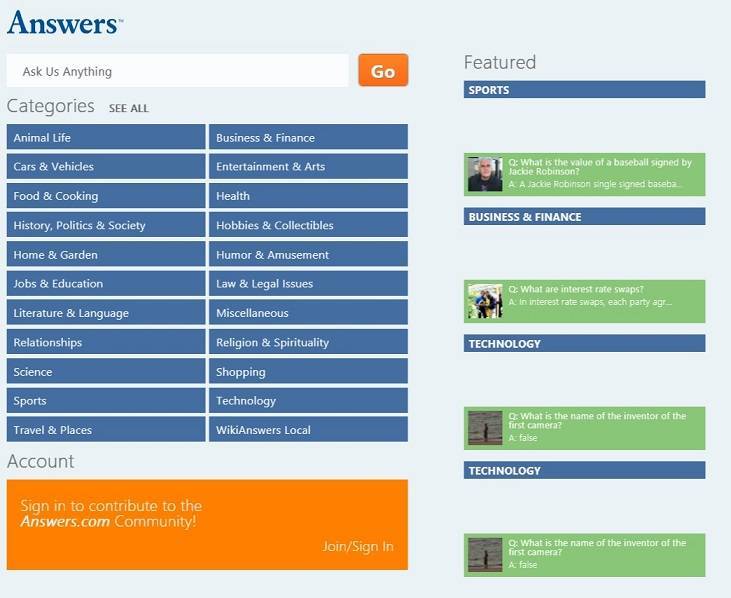
Answers.com has been available in the Windows Store for quite a while now, being among the most important first apps that have been launched for Windows 8 users, but only now do we have a look at it. By using this app, you won’t have to open your browser anymore, as you will be able to ask questions straight from your Windows 8 tablet or desktop device.

Read Also: Windows 8 NFL Connect App Launched in the Store

Get answers to your questions on your Windows 8 tablet

As you read this sentence there are more than 75,000 people actively asking, answering, learning and sharing on an Answers property. In a typical month, we touch more than 130 million people on the web, 45 million on social network applications, and 42 million on mobile. Over 60 million user generated questions across 8,000 categories. Our Q&A platform allows users to create new content around trending topics, world events and everything in between. All available on your Windows 8 computer!

Inside the Windows 8 official Answers.com app, you will be able to ask and answer questions, as well as improve the answers that you have given. There are many categories and topics that you can explore to find the right answer for what is bothering you. Your navigation history inside the app will be enabled and there will be featured content at your disposal, as well.  The app is really well designed and seems pretty fast, so if you’re a Answers.com user, head over to the Windows Store and get it on your Windows 8 devices.

Download Answers.com app for Windows 8

Windows 8, 10 App Check: Museums of the World

I love museums, so whenever I travel to a new city, I don’t miss the opportunity to explore the local museums. There are plenty of museum apps for iOS and Android devices, but if you are running Windows 8, then you definitely need to check out Museums of the World.
windows 8 museum app
Museums of the World is a new Windows 8 app that has been recently launched in the Windows 8 Store but it is not the single one. There are plenty others, but in my opinion, it comes with the most complete set of features and options that you’d expect from an app like this one. The app looks absolutely gorgeous on a Windows 8 tablet, so I recommend it to anybody that is interested in exploring museums straight from their Windows 8 tablets.

Read Also: Windows 8 Zara App Launched in the Windows Store

Explore museums from your Windows 8 tablet

Museums gives you free access to thousands of museums around the world. It’s designed to give you up-to-date information about museums, exhibitions and other cultural events in your city and across the world. This easy to use and professionally designed application is a must-have for art and culture lovers, travel aficionados and all those who want the right information instantly in the palm of their hand!

By using this app on your Windows 8 tablet or desktop device, you will be able to explore thousands of museums and galleries from all over the world. When you will open the app, you will have the option of inputting your location and the app will then showcase museums and galleries available near your location. Also, you will be able to get detailed museum and gallery information and see current and upcoming exhibitions and events that will happen there.

If you have some favorite museums and exhibitions, there’s the option of marking them as such to make it easier to get back to them easily. There’s also a trending section where users of the app share interesting things that they  found in various museum locations. If you will follow certain museums, you will also have the option of tracking the activity that happens there. So, if you want to enrich your cultural knowledge, then go ahead and download the app right away.

Download Museums of the World app for Windows 8

Windows 8, 10 Zara App Launched in the Windows Store

The official Zara app has been recently launched in the Windows Store and it thus becomes one of the best Windows 8 fashion apps to download on your tablet or desktop device. Read below for our detailed insight.
windows 8 zara app
Zara is one of my favorite clothing lines and it has great apparel for both women and man, not to mention the great looking clothes for kids. And if you are interested in Windows 8 fashion apps, then you will find the official Zara app for Windows 8 quite enjoyable. The app has no advertisements at all, and it comes with a really great content that is of high-quality and the images presented are simply gorgeous.

Read Also: Use This Windows 8 App to Improve your Speed Reading

Windows 8 fashion app Zara launched

Enjoy the latest fashions for women, men and children. Find all the latest from ZARA online: Lookbook, People, Campaign and more weekly contents. Online shopping

windows 8 zaraThe famous Spanish clothing retailer offers a great shopping experience through its app, by offering campaigns and clothes for purchase straight from within the app. Besides looking at the clothes catalog for women, men and children, you can also locate nearby Zara stores, buy gift cards for the loved ones, save money with the articles that have been discounted. Head over to the Windows Store and download the app right away.

Download Zara app for Windows 8

Use This Windows 8, 10 App to Improve your Speed Reading

I read so many news articles every day that I can’t keep count, so I am very grateful that I have mastered the speed reading technique. Recently, I’ve discovered that there’s one such app for Windows 8 users. Read my thoughts on it below.
windows 8 speed reading
Windows 8 tablets can become awesome tools in the right hands and with the right apps that can be downloaded from the Windows Store. Recently I’ve discovered an interesting new app that is really well-designed and will help you improve your reading. Entitled simply “Speed Reading”, the app contains both tips that you can use to improve your speed reading, and also some interesting information.

Read Also: Windows 8 App Naturespace Improves your Sleep and Meditation

Improve your reading speed with this useful Windows 8 app

windows 8 reading speed app

You probably read many things every day: newspaper, emails, books, letters, reports etc. So maybe reading is a skill that you should improve? Average person read at a rate of 200-250 words per minute. You can increase your reading speed. Just learn the methods presented here and practice them for a few weeks.

The Windows 8 Speed Reading app will keep track of your reading speed progress and will come with exercises that you can use to train your eyes. There’s a simple calculator inside the app that you can use to test your current reading speeds and there’s also an option to keep track of your results. The “theory” section of the app contains important tips on how you can increase your reading speed. What’s interesting is that albeit the app is free to download, I haven’t seen any ads at all. So, if you want to be a better reader while maintaining comprehension levels, go ahead and download it from the Windows Store.

Download Speed Reading app for Windows 8

Windows 8, 10 App Naturespace Improves your Sleep and Meditation

This might sound crazy or at least unusual for some, but there are actually apps that you can use to help you in your meditation or even to have a better sleep. Usually, these are timer apps or apps with special music. For Windows 8 users, we have selected the Naturespace app.
windows 8 sleep meditation app
There are plenty of meditation and sleep apps available in the Windows Store, but from the plethora of titles, NatureSpace is in my opinion, the most professional one to choose. This is a masterfully crafted app that will help you with your meditation or when you are trying to sleep, as the app isn’t focused only on relaxing sounds, but also on beautiful holographic imagery. Here’s how the description of the app goes:

Read Also: Play Bowling on Windows 8 With These Apps

Probably the best sleep and meditation Windows 8 app

Naturespace is unique. It’s not just about nature’s sound, it’s about nature’s space. All 3 dimensions (including height) are accurately reproduced, providing the listener with a true “being there” experience under headphones. The impact that spatially accurate outdoor sound has on the brain is astounding; it is immensely relaxing and entertaining. Whether you take a 5 minute vacation to a gentle evening by a lake, or an extended stay underneath a powerful thunderstorm, Naturespace provides the brain with the sense of openness and vastness that is so important to a balanced state of well-being. Naturespace is a spectacular catalyst for creative visualization and imaginative exploration.

windows 8 sleep meditation appAs you can see from the description, this is a really professional sleep and meditation app for Windows 8 users and the guys behind have really put soul in it. However, be aware that it has quite a big size – more than 670 MB, which shows just how much work has been put into its creation. Thus, the 3 dimensions that the team behind Naturespace is talking about will create a soothing 3-D experience which will induce a “physiological sense of safety, peace, and tranquility”.

The app comes with 6 pristine holographic spaces, sound tracks that are quite long and intentionally looped for endless hours of listening. While the app is totally free to download and use, for more features, you can purchase other items and complete the 41 available additional spaces. So, if you want to have a good sleep or meditate better, then waste no time and download it on your Windows 8 tablets.

Download Naturespace: Relax Meditate Escape Sleep app for Windows 8

ChartIQ is the Best Windows 8, 10 Forex App Available

There are plenty of Forex traders that use their Windows 8 tablets as main tools, and if you too are among them, then you need to have at your disposal a handy Windows 8 Forex app. From all the apps currently available, ChartIQ seems to be the best proposal.
windows 8 forex appChartIQ has released their touch-enabled Windows 8 stock and Forex charting app almost a year ago, back in February, 2013, but only now do we have a look at it. Since the main tool for a Forex trader is represented by charts, that’s what this app is all about. At $22.99, it’s definitely not the cheapest Forex app available, but at least you know it’s something professional. There’s also the free trial option, so you can see if it’s worth the money or not.

Read Also: Windows 8 Fitbit App Receives Improvements

Master Forex on your Windows 8 tablet with this app

ChartIQ Plus provides a full range of charting and technical analysis tools, including premium indicators, drawing tools, and high-quality data. ChartIQ works with touch gestures, or with a keyboard and mouse – allowing you to use it no matter what Windows 8 device you’re on. The power of desktop charting with the ease and elegance of a touch app! ChartIQ Plus includes free high-quality end-of-day data with inexpensive subscription options for real-time, streaming intraday data.

windows 8 forex chart appSince Windows 8 is all about mixing the desktop and mobile together, the app will work on desktop devices, with the traditional keyboard and mouse and on mobile interfaces, with touch support. You will have at your disposal a full range of charting and technical analysis tools, like premium indicators, drawing tools, and high-quality data. The app comes with plenty of interesting and useful feature, from which here are some of the best important ones:

  • StockTwits! – over 150,000 investors discuss stocks, join them and learn more about the markets
  • Free end of daycharts for equities and major indices
  • Automatic detection of open or closed gaps
  • Easily create watch lists
  • The Projection Tool predicts future price scenarios
  • Calculate and plot moving averages against indicators such as RSI and volume

Download ChartIQ Forex app for Windows 8

Windows 8, 10 Vine app PrimeVine Released in Windows Store

The official Vine app for Windows 8 users is yet to launch in the Windows Store, and until then we have to resort to third-party apps. Besides the recently launched Bine app, we now have a look at PrimeVine and see what its features are.
windows 8 vine app
Recently released in the Windows 8 Store, PrimeVine wants to be yet another third-party Vine app that will benefit from the fact that Vine is yet to launch their official Windows 8 app. Actually, the developers of the app have went as far as to say that their app is the “first and only fully featured Vine Client for Windows 8 devices“, which is debatable, really. Nonetheless, the app is quite well designed and looks premium enough for you to give it a try (download link at the end of the article).

Read Also: ‘The Weather App’ for Windows 8 Gets Launched

PrimeVine brings full Vine functionality to Windows 8

The best way see and share life in motion. PrimeVine is the first and only fully featured Vine Client for Windows 8 devices. Watch short, beautiful, looping videos in a simple and fun way. PrimeVine is 100% Free.

After signing in by using your email or Twitter accounts, you will be able to explore popular Vine posts and channels, as well as search for Vine users and hashtags. There’s also the ability to quickly re-post videos on Vine and share them to social networks, such as Twitter, Facebook or Google Plus. If you are a Vine user and owner of a Windows 8 tablet, then you’ll find the app really useful. You will also be able to pin and search Vine tags to the home screen of your Windows 8 tablet or Windows 8 desktop device.

Download PrimeVine app for Windows 8

‘The Weather App’ for Windows 8, 10 Gets Launched

There isn’t a lack of weather apps in the Windows 8 Store, and we have featured and described in the past the famous AccuWeather app, its updates, and also the Bing Weather app by Microsoft. But if that’s not enough for you, then have a look at the recently launched “The Weather App”
the weather app windows 8
First of all, let me start by saying that The Weather App for Windows 8 is just at its beginning, so bugs and glitches are expected to be present, so be patient with it as I’m sure the developer will take care of them on the go. What I particularly love about it is the absence of ads, which could be something temporary to attract more users to download it. The background images are beautiful, but they really need to improve the relevancy and location of the apps, perhaps borrowing the same design idea from the Yahoo! Weather app.

Read Also: Discounted Windows 8 Apps & Games This Week #7

The Weather App launches for Windows 8 users

Check the weather in most cities and towns in the world with this app. The app’s beautiful and minimalistic layout shows the current weather condition in the given location as well as a 3 day forecast. Provided by World Weather Online, the data provided is accurate and is available for almost every city in this planet (so sorry for any alien being living somewhere outside Earth).

It can be used on a desktop Windows 8 device, and on a Windows 8 or Windows RT tablet. It says that most of the world’s cities are included, but I tried inputting some European locations, and it didn’t show up anything. Most certainly, this is a temporary bug that will be fixed.  The app offers a 3 day forecast and by using a live tile pinned on the start screen, you will always get the latest weather updates. There’s also the option of sharing the weather conditions on social networks. Follow the link from below to download it.

Download The Weather App for Windows 8

Update: Microsoft did not remotely uninstall Tor software from computers to halt botnet

Microsoft remotely uninstalled Tor software from computers to halt botnet

When a virus strikes, the first line of defense is antivirus software. But when a botnet is running wild, things aren’t quite as simple. In the middle of last year, millions of computers around the world were infected with Sefnit malware. Communicating over the anonymizing Tor software automatically downloaded and installed by the malware, Microsoft had a battle against a huge botnet on its hands.

The company took an interesting, and ultimately very effective, line of attack against the botnet. In addition to remotely removing the malware itself from as many computers as possible, Microsoft also wiped out copies of Tor in a bid to stop the malware from communicating and spreading.

It was possible to identify which machines had Tor installed by the malware — rather than those whose owners had purposely installed it — by detecting which folder it had been installed to. Tor can be installed anywhere, of course, but most people stick to the default folder, or use one of a few common variants. When installed by malware, Tor was installed in a strange location.

In this instance it was very helpful that Microsoft could detect the presence of a particular piece of software and remove it from computers without the owners being aware of anything that was taking place.

How do you feel about this capable of Microsoft? It is worrying or reassuring that the company is able to remove software from your computer? Looked at in terms of malware, few people would have a problem with having their system protected for them, but Tor also has plenty of legitimate uses — it is fair to have software uninstalled without consent?

Update

Since posting this article, we have spoken with Microsoft who want to make clear that Tor was not in fact removed from any computers — the original source was incorrect. A Microsoft spokesperson said: “Microsoft Malware Protection Center has protections to remove the services started by the Sefnit malware, but it does not uninstall Tor, remove any Tor binaries, or prevent users from using Tor.”

Windows 8, 10 App Check: Where’s Waldo?

Where’s Waldo is one of the games that I remember clearly playing while I was just a little kid. I was mesmerized by Waldo and tried finding him in those deceiving colored books. Now, there’s an app that you can enjoy on your Windows 8 tablet to find Waldo.
windows 8 where's waldo
There aren’t too many things to be said about the Where’s Waldo game for Windows – there are a few images and you have to find the elusive Waldo with his hat in white and red stripes. The biggest complaint that I have with regards to this game is the fact that there are only ten challenges that a true aficionado will complete quite quickly.

Read Also: Windows 8 App Check: Music Maker Jam

Where’s Waldo game lands for Windows 8 users

Find Waldo! Your aim is to search for Waldo. Waldo is the little guy wearing a red-and-white-striped shirt, bobble hat, and glasses. Find him and just tap him to complete the level. Where’s Waldo? is an app made by Brainstorm (c) 2013. Original game Where’s Waldo was created by British illustrator Martin Handford.

The app has only 15.8 MB and is obviously aimed at kids. Since its launch in the Windows Store, the Where’s Waldo app for Windows 8 hasn’t received any updates, which leaves a shade of hope that the developer will decide to add more features in the near future. First of all, as I said before, there definitely need to be more levels to complete, and maybe add more options that will make the game even more challenging. Until then, follow the link from below to get it on your Windows 8 tablets.

Download Where’s Waldo for Windows 8