
Venmo Instant Transfer Not Working? 7 Easy Fixes to Try Now


 3 min. read
  Updated on

Venmo instant transfer issues are common when your bank, card, or app settings block the transaction. Below are step-by-step solutions to help you get your money moving again.
Table of contents
What Can I Do if Venmo Instant Transfer Not Working?
1. Check Your Bank or Card Eligibility
Not all banks and debit cards support instant transfers.
- Use a U.S. bank account or Visa/Mastercard debit card linked to Venmo.
- Confirm your card supports “Fast Funds” by contacting the bank.
- If it does not, switch to a different eligible card.
2. Update the Venmo App
Outdated apps often fail to process payments correctly.
- Open your phone’s app store.
- Search for Venmo and tap Update.

- Restart the app after installation and retry the transfer.
3. Verify Your Account Information
Incorrect or outdated details can block instant transfers.
- Open Venmo > Settings > Payment Methods.
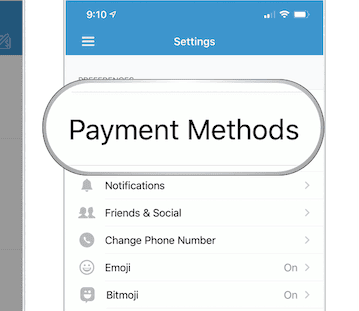
- Check that your bank account or debit card information is correct.
- Update expired cards or incorrect routing numbers.
4. Ensure Sufficient Balance
Instant transfers fail if your Venmo balance is too low.
- Check your balance on the Venmo home screen.
- Add money from your bank if needed before retrying.
5. Review Transaction Limits
Venmo has daily and weekly transfer limits.
- The standard limit is $5,000 per transfer.
- Verify limits under Venmo > Settings > Limits.
- If you exceed them, wait until the reset period.
6. Disable VPN or Proxy
Venmo may block transfers if you use a VPN or proxy.
- Turn off your VPN or proxy in device settings.
- Reconnect directly to a stable internet connection.
7. Contact Venmo Support
If all else fails, Venmo may have flagged your transfer for security reasons.
- In the app, go to Settings > Get Help.
- Choose Contact Us and follow the support steps.
For more specific issues, see our guide on how to fix error authenticating with Venmo.
FAQs
It usually fails due to ineligible cards, outdated details, or exceeding transfer limits.
Standard transfers typically take 1–3 business days.
Yes. Venmo may temporarily hold transactions if it detects unusual activity.
Conclusion
If your Venmo instant transfer is not working, use these steps to solve common issues quickly. From checking bank eligibility to fixing authentication problems, most errors can be resolved without much hassle. For related mobile payment fixes, you can also read our guides on Poshmark app not working and HSBC app not working for more troubleshooting tips.

Read our disclosure page to find out how can you help Windows Report sustain the editorial team. Read more



Improve this guide



User forum
0 messages