
Black Ops 6 Not Launching on Steam? Try These Easy Fixes


 3 min. read
  Published on

If Black Ops 6 is not launching on Steam, it can be caused by corrupted files, outdated drivers, or background conflicts. However, you can easily fix that with the solutions below.
Table of contents
How to Fix Black Ops 6 not launching on Steam?
1. Verify the Integrity of Game Files
Corrupted files can stop the game from running.
- Open Steam and go to your Library.
- Right-click on Black Ops 6 and select Properties.
- Go to the Installed Files tab.
- Click Verify integrity of game files.

- Wait for Steam to finish scanning and repairing corrupted files.
For more details on similar problems, see our full guide on Black Ops 6 not working. If Black Ops 6 launches but you cannot join matches, follow this guide on Black Ops 6 not letting me play multiplayer to fix multiplayer connection problems.
Sometimes Black Ops 6 launches but you get the Hueneme Negev error when trying to connect, use this step-by-step guide to resolve it: Black Ops 6 Hueneme Negev error.
Players who encounter the Puget Altus error during startup can follow our step-by-step guide on Black Ops 6 Puget Altus error to resolve it quickly.
2. Update Graphics Drivers
Outdated GPU drivers often cause launch failures.
- Identify your GPU manufacturer (NVIDIA or AMD).
- Visit the official NVIDIA or AMD website.
- Download the latest drivers for your card.

- Run the installer and select a clean installation if available.
- Restart your PC and launch the game again.
3. Run Steam and the Game as Administrator
Lack of permissions may block the game from starting.
- Locate the Steam shortcut on your desktop.
- Right-click it and select Properties.
- Go to the Compatibility tab.
- Check Run this program as an administrator.

- Apply changes and do the same for the Black Ops 6 executable file.
This solution can also help if you encounter BO6 error code 0x3, so don’t hesitate to try it.
4. Disable Background Apps
Third-party apps and overlays can interfere with Steam games.
- Press Ctrl + Shift + Esc to open Task Manager.
- Look for overlays or monitoring apps such as Discord or MSI Afterburner.
- Right-click each one and choose End task.

- Temporarily turn off antivirus software.
- Restart Steam and try launching Black Ops 6.
5. Check for Windows Updates
System updates improve game compatibility and performance.
- Press Windows + I to open Settings.
- Go to Update & Security.
- Select Windows Update.
- Click Check for updates.
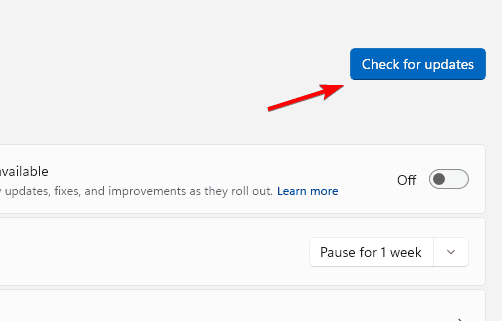
- Install pending updates and restart your PC.
6. Reinstall Black Ops 6
A clean reinstall can fix persistent errors.
- Open Steam and go to your Library.
- Right-click on Black Ops 6 and select Uninstall.
- Delete leftover files from the installation directory.
- Restart your PC.
- Reinstall the game through Steam.
If crashes still appear, visit our BO6 dev error 10493 guide for more step-by-step solutions.
Conclusion
Most launch issues in Black Ops 6 can be resolved by verifying files, updating drivers, and running Steam with administrator rights. If the game still refuses to start, use the linked guides above for targeted troubleshooting.
FAQs
It usually happens due to corrupted files, outdated drivers, or background app conflicts.
Yes, keeping your GPU drivers up to date often resolves startup problems.
If the game still fails to launch, try a clean reinstall or follow the guide for dev error 10493.

Read our disclosure page to find out how can you help Windows Report sustain the editorial team. Read more



Improve this guide
User forum
0 messages