
Black Ops 6 Not Letting Me Play Multiplayer? Try This


 3 min. read
  Published on
If Call of Duty: Black Ops 6 is not letting you play multiplayer, you are not alone. Many players have reported issues connecting to matches or getting stuck before joining a lobby, but you can fix this problem by following these steps.
Table of contents
How to Fix Black Ops 6 not letting you play multiplayer?
1. Clear reserved data
A quick reset of your saved data can solve multiplayer errors caused by corrupted files.
- Open Steam and go to your Library.
- Right-click Black Ops 6 and select Manage game and addons.
- Scroll to Saved data > Reserved space.
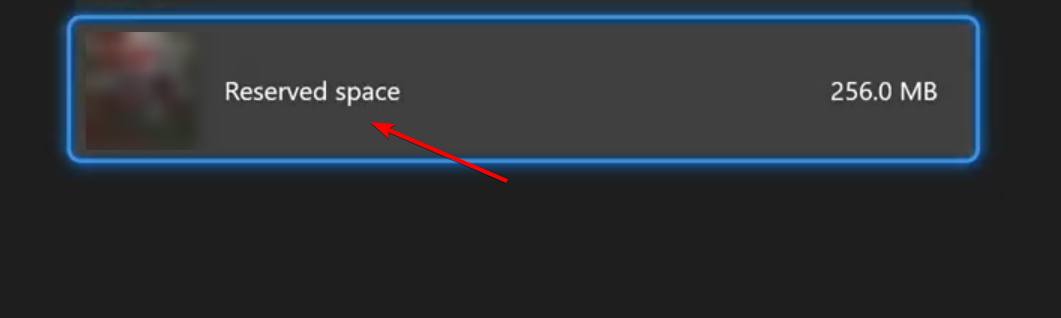
- Click Clear reserved space and confirm.
- Restart the game.
Refreshing your reserved space forces the game to recreate clean files, which often restores multiplayer stability. You can also review broader steps if Black Ops 6 is not working after this reset.
2. Run Black Ops 6 as administrator
Running the game with elevated permissions can bypass conflicts with system settings.
- Locate the Black Ops 6 installation folder.
- Right-click the executable file and select Properties.
- Go to the Compatibility tab.
- Check Run this program as administrator.

- Click Apply and restart the game.
3. Verify game files in Steam
Corrupted or missing files can block multiplayer from loading correctly, so it is worth checking your installation.
- Open Steam and go to your Library.
- Right-click Black Ops 6 and select Properties.
- Under Installed Files, click Verify integrity of game files.

- Wait for the process to finish and try again.
This process repairs damaged data and ensures your install is complete, which also helps if Black Ops 6 is not launching on Steam.
4. Fix inventory and connection issues
Multiplayer may fail due to account sync or network problems. Here are quick fixes to try.
- Log out of your Activision account, then log back in.
- Disable any active VPN or proxy.
- Restart your router to refresh the network.
If you still get sync or inventory errors, follow the dedicated Black Ops 6 failed to fetch inventory error fix.
Black Ops 6 may also trigger the Hueneme Negev error when connection problems block multiplayer. To resolve it, follow this detailed guide on the Black Ops 6 Hueneme Negev error and apply the recommended steps.
Players who encounter the Puget Altus error while trying to connect to multiplayer can use our complete guide on Black Ops 6 Puget Altus error for reliable fixes.
FAQs
This usually happens because of corrupted saved data, missing game files, or temporary connection issues. Clearing reserved space and verifying files often helps.
No, your progress is stored on Activision servers. Clearing reserved data only resets locally cached files.
Yes, some system restrictions can prevent the game from launching properly, and elevated permissions bypass these conflicts.
If file verification does not fix the problem, reinstalling the game is the next step. It ensures you have a completely clean installation.
The game needs to sync your account data before joining matches. If this fails, multiplayer will not load until you refresh your login or connection.
Conclusion
Start with clearing reserved data and verifying files, then run the game as administrator and refresh your account and network. These quick steps resolve most cases where Black Ops 6 blocks multiplayer access, so you can rejoin matches without interruptions.

Read our disclosure page to find out how can you help Windows Report sustain the editorial team. Read more



Improve this guide

User forum
0 messages