
Install Google USB Driver On Windows 11 Quickly


 3 min. read
  Published on

You often need the Google USB Driver when your Android device does not connect properly to Windows during ADB or debugging tasks. This guide helps you install it quickly.
Table of contents
How Do I Install Google USB Driver on Windows?
Check your system requirements
Make sure your PC runs Windows and has Android Studio available to access the SDK Manager.
Download the Google USB Driver
Follow these steps to get the driver from the SDK Manager.
- Open Android Studio.
- Click More actions on the welcome screen.

- Select SDK Manager.
- Open the SDK Tools tab.

- Check Google USB Driver.
- Click OK to download it.
If the driver does not appear in SDK Manager, you can review this guide on resolving missing ADB drivers in Windows by using the instructions found on this ADB driver setup page.
Enable USB debugging on your device
Turn on debugging so your device communicates with the driver.
- Open Settings.
- Go to About phone.
- Tap Build number seven times.
- Open Developer options.
- Enable USB debugging.

This section does not fit any of the provided links.
Install the driver manually in Windows
Use Device Manager to load the USB driver folder.
- Connect your Android device with a USB cable.
- Press Windows key, type Device Manager, and open it.
- Expand Portable devices or Other devices.
- Right click your Android device.
- Select Update driver.
- Choose Browse my computer for drivers.
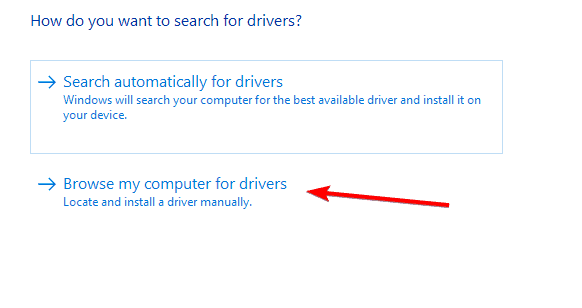
- Click Browse and select:
C:\Users\<YourUser>\AppData\Local\Android\Sdk\extras\google\usb_driver
- Click Next.
If Windows shows installation errors, use the troubleshooting steps from this fix for ADB interface installation problems.
Confirm the connection
Check that Android Studio detects your device correctly.
- Reconnect your device.
- Open Android Studio.
- Start a new project.
- Click Run.
- Select your device from the list.
If you also use fastboot tools, you can improve device recognition with the instructions on this fastboot driver installation guide.
Why this fix works
The Google USB Driver gives Windows the correct files to recognize Android devices and maintain stable ADB communication. It also prevents common driver conflicts when you switch between debugging and fastboot tools.
FAQs
You may need updated ADB or USB drivers. Installing the Google USB Driver usually resolves this.
Yes. You can download the ZIP version from the Android developer site and install it manually through Device Manager.
It supports Pixel, Nexus, and many generic Android devices. Some brands require their own drivers.
You do not normally need to reinstall unless you reinstall the SDK or move to a new PC.
Once you install the Google USB Driver, your Android device communicates reliably with Windows for ADB, fastboot, and development tasks. Use these steps any time Windows stops detecting your device or when you set up a new workstation.

Read our disclosure page to find out how can you help Windows Report sustain the editorial team. Read more



Improve this guide

User forum
0 messages