
McDonald’s App Not Working? 6 Quick Fixes


 4 min. read
  Published on

The McDonald’s app is a convenient way to order food, get deals, and earn rewards, but sometimes it may stop working on your phone. If it keeps crashing, will not load, or shows errors, try these simple fixes.
Table of contents
What can I do if McDonald’s App Not Working?
1. Check your internet connection
The app needs a stable connection to function properly.
- Open your phone’s settings.
- Confirm Wi Fi or mobile data is turned on.
- Switch between Wi Fi and mobile data to test both options.
- Restart your router if you notice weak or unstable Wi Fi.
If you often have trouble with other apps, this guide on how to fix the Instacart app when it is not working shares connection tips that also apply here.
2. Restart the app and your phone
A quick restart often resolves temporary glitches that cause the app to freeze or stop responding.
- Close the McDonald’s app completely.
- On iPhone, swipe up and remove the app from recent apps.
- On Android, open recent apps and swipe the McDonald’s app away.
- Restart your phone and launch the app again.
3. Update the McDonald’s app
Running an outdated version can cause crashes or loading issues.
- Open the App Store on iPhone or Google Play Store on Android.
- Search for the McDonald’s app.
- Tap Update if a new version is available.

- Restart the app after updating.
Updating is often the fastest fix, as seen in this guide on how to solve problems when the Flipp app is not working, which outlines steps similar to what works for McDonald’s.
4. Clear app cache and data
Corrupted app files can prevent the app from working correctly, but clearing cached data often helps.
- On Android, go to Settings > Apps > McDonald’s > Storage.
- Tap Clear Cache and then Clear Data.

- On iPhone, delete the app and reinstall it from the App Store.
- Log back into your McDonald’s account.
5. Check if McDonald’s servers are down
Sometimes the problem is not with your phone but with McDonald’s servers.
- Visit the official McDonald’s website.
- Check McDonald’s social media for outage updates.
- Search online for “McDonald’s app down” to see if others report the same issue.
- Wait until the servers are restored before trying again.
This type of downtime is common across many services; see what to do in cases where the Shoppix app is not working to understand why outages happen and what you can do while waiting.
6. Reinstall the app
Reinstalling can fix deeper issues and remove corrupted files that block the app from opening.
- Uninstall the McDonald’s app from your device.
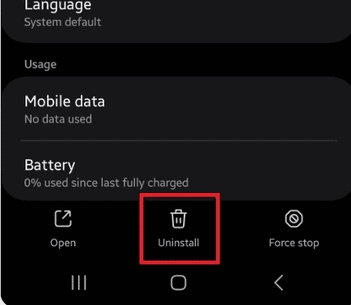
- Open the App Store or Google Play Store.
- Download the McDonald’s app again.
- Sign back into your account and test it.
Final thoughts
Most McDonald’s app issues are solved by checking your connection, restarting your phone, updating the app, or reinstalling it. If problems continue, contact McDonald’s support so you can continue enjoying your favorite meals without interruptions.
FAQs
The app may crash because of outdated software, bugs, or corrupted files. Updating or reinstalling usually fixes it.
Open the App Store or Google Play Store, search for McDonald’s, and tap Update if a new version is available.
Force close the app, restart your phone, and try again. If it still does not open, reinstall it from the app store.
Yes, you can still order in person, use the drive thru, or check if the McDonald’s website is available in your area.

Read our disclosure page to find out how can you help Windows Report sustain the editorial team. Read more



Improve this guide


User forum
0 messages