Microsoft reminds users that Windows XP and Office 2003 support is ending, offers advice

Microsoft reminds users that Windows XP and Office 2003 support is ending, offers advice

Unless you have been in hibernation under a rock whilst wearing earplugs and a blindfold, you’re undoubtedly aware that support for both Windows XP and Office 2003 is coming to an end. This in itself is not news, but today Microsoft is taking the opportunity to remind us all of the 8 April deadline — as well as pointing out that the operating system and office suite have been supported since the days of Baywatch.

Jay Paulus, director, Windows marketing, Microsoft says that it is time to move on: “It’s been a great run for these popular products, but a decade later, times and technology have evolved. Windows XP and Office 2003 weren’t designed for the world we live in today.”

There has been a lot of debate and discussion about what will happen once the support deadline passes, and this is something that Microsoft is keen to clear up. In case there was any confusion, neither Windows XP nor Office 2003 are going to stop functioning — they will remain usable on 9 April and beyond. But security is a serious issue: “Users will no longer receive new security updates, nonsecurity hotfixes, free or paid support options, or online technical content updates from Microsoft.”

Microsoft is understandably pushing people towards Windows 8.1 and Office 365, pointing out that many newer applications will simply not work under Windows XP. It is unusual to hear a company knocking its own product, but here Microsoft explains that Windows XP is “five times as susceptible to viruses and attack” than Windows 8.1.

It’s not just about security, though. Microsoft explains that modern software is designed with modern problems in mind, allowing for a more efficient way of working — and could even save money.

Have you heeded the advice and upgraded all of your software, or are you hanging on until the bitter end and beyond?

Researchers manage to bypass Microsoft’s EMET zero-day protection

Researchers manage to bypass Microsoft's EMET zero-day protection

A team of researchers from security firm Bromium Labs has managed to produce code that bypasses Microsoft’s Enhanced Mitigation Experience Toolkit (EMET) software. This security tool is supposed to offer protection against zero-day attacks, and there are fears that the same technique could be used by malicious hackers to get around security and install malware.

A study by Bromium Labs set out to “gauge how difficult it is to bypass the protections offered by EMET” and included a real-world attack scenario. The lab came to the conclusion that “technologies that operate on the same plane of execution as potentially malicious code, offer little lasting protection”.

While the study focused on EMET, similar techniques could be used to bypass other comparable security system — which Bromium Labs refers to a “userland protections” — and highlights the importance of selecting the right type of security

The bypass affected EMET 4.1, and it is not clear whether or not Microsoft will be able to patch hole for the next release. EMET 5.0 Technical Preview has just been released — however, Bromium Labs have suggested that many of the weakness are too deeply ingrained to be easily address:

“The bypasses leverage generic limitations, and are not easily repaired.”

But companies who rely on EMET will undoubtedly be concerned by Bromium Labs’ claim that “yes, we found ways to bypass all of the protections in EMET.” The group points out that the research was made available to Microsoft before publication.

Hands-on With the Windows 8.1 Tablet HP Pavilion x360 [MWC 2014]

I am not used to doing hands-on videos and neither to film stuff, so you’ll excuse me please if you think the below video is amateurish. Nonetheless, it offers a pretty good insight on what the Windows 8.1 convertible HP Pavilion x360 tablet brings to consumers.
Hp pavilion x360 hands on
There haven’t been too many Windows 8.1 tablets announced at the 2014 edition of the Mobile World Congress in Barcelona but one of the interesting new appearances is the HP Pavilion x360, a really affordable convertible Windows 8.1 tablet with the low-entry configuration that starts at just $399. You can find some pictures that we took of the device and the video in which somebody from HP goes through its technical specifications and features.

Read Also: Nokia’s Windows 8 HERE Maps App Worldwide Available on Windows Store

An interesting Windows 8.1 affordable tablet

We have been pleasantly surprised by the HP Pavilion x360, as this device felt really good in our hands and this is the kind of Windows 8 devicethat I was hoping to see more of at the congress. Here’s a quick rundown of the main technical specifications that it comes with:

  • Intel 2.17GHz Bay Trail-M SoC
  • 11.6-inch diagonal HD LED-backlit Display (1366×768) Touchscreen
  • Notebook, tent, tablet modes
  • 3 pounds, 21.9mm thick
  • Beats Audio technology
  • Up to 8GB of RAM, 500GB hybrid hard drive
  • Three USB ports
  • 802.11n Wi-Fi, Bluetooth

The Windows 8 Pavilion x360 tablet will be available for commercial purchase from today and it will be initially in red, later in smoked silver, and they will come with a soft touch finish and brushed metal wrist rest.

People think every version of Windows sucks — but is this inevitable?

People think every version of Windows sucks -- but is this inevitable?

Google’s comparative searches often make for interesting reading, and a Reddit user noticed that it could be used to monitor user opinion of different versions of Windows. The method is a little crude, and far from scientific, but it is interesting nonetheless. Click this link and you’ll be taken to a page that shows you searches that have been performed relating to Windows XP, Windows Vista, Windows 7 and Windows 8.

Or, more specifically, it shows searches that have been performed where searchers have appended the word “sucks” to different versions of Windows. Taking things further, Google Trends then plots the results on a handy graph making it easy to see how popular particular search terms have been.

It should perhaps come as no surprise that there are people using the search phrases “Windows XP sucks”, “Windows 8 sucks”, and so forth, and at first glance it would appear that each version of Windows has suffered at the hands of mean-spirited searches. It appears that each version suffers a peak of hatred which gradually trails off over a period of months and years.

Each version suffers a peak of hatred which gradually trails off

Windows XP, for instance, was accused of sucking all the way back in 2004, but there was then a steady decline in “Windows XP sucks” searches to the point that there are hardly any being conducted now. The reason for the trail-off could be indicative of people becoming used to Windows XP — after all, there seem to be endless streams of people keen to continue using it — but it could equally be down to the fact that the operating system is of less interest now and fewer XP-related searches are being conducted.

Vista searches followed a fairly similar trend — although there are a few extra spikes — ultimately trailing off just like XP. In the case of Windows 7, the story is still much the same, but things are a little different when it comes to Windows 8. This particular version of Windows found itself on the receiving end of the most hate, being the subject of a greater number of “Windows xx sucks” searches than any other.

More searches relating to Windows 8 sucking are being performed

But the trail-off of “suck” searches is much slower; more searches relating to Windows 8 sucking are being performed. Obviously, it is still fairly early days for Windows 8 and 8.1, but the dislike levels do seem to be staying higher for longer — time will tell how things pan out.

Is the shallower dropping off of sucking a sign that Windows 8 is the least liked version of Windows Microsoft has produced? This is hard to say with any confidence, as Google Trends does not provide concrete figures that could be relied up in court, but it’s clear that every single version of Windows is met with animosity that gradually fades. Windows 8 may be on people’s hate list at the moment, but the same was true for all of its predecessors — it just goes to show how resistant to change people are.

It looks as though Windows 8 is proving far more antagonizing than previous versions of the OS, but the difference isn’t so marked as to be worrying. If anything, the graphs show just how fickle computer users can be — what’s hated today could be loved tomorrow.

How does your experience with Windows 8 compare to older versions?

Microsoft’s Julie Larson-Green becomes chief experience officer for Bing, Office, Skype, and more

Microsoft's Julie Larson-Green becomes chief experience officer for Bing, Office, Skype, and more

Microsoft’s Julie Larson-Green, the woman who was formerly a Windows executive and most recently the top executive in the company’s Devices and Studios Group thanks to former CEO Steve Ballmer’s company restructuring, has transitioned into a new role at the devices and services giant. Her replacement? Nokia’s Stephen Elop.

Larson-Green will now become the chief experience officer for products such as Bing, Office, Skype, and more. Her immediate boss will be Qi Lu, the executive VP who is in charge of the Applications and Services Group. Elop will take her place as the top executive in the company’s Devices and Studios Group as soon as the Nokia acquisition closes sometime this quarter. This particular group handles the Xbox, Surface, and other hardware products.

Larson-Green also sent out an email to Microsoft employees declaring this change. The folks over at Geekwire were able to get their hands on the email and we have copied it below for your reading pleasure.

From: Julie Larson-Green
Sent: Monday, February 24, 2014
Subject: FW: ASG Organizational Announcement

Team,

As you will read in the notes below from Qi and Satya, I’ve accepted a new challenge, leading the My Life & Work team in ASG and serving as the Chief Experience Officer (CXO). As hard as it is for me to leave Devices & Studios, I’m thrilled about this opportunity. In working with company leaders this year to establish our One Microsoft vision and plan, I thought about ways I could have impact on helping Microsoft prepare for the future and innovate. My discussions with Satya and Qi made clear this is a critical space to drive new thinking and an essential way to help the shape the company’s direction.  I’m looking forward to developing the Digital Life & Digital Work Experience Substrate that powers modern digital experiences regardless of device, as well as working across ASG to strengthen customer experiences.

I want to thank each and every one of you for welcoming me and supporting me as the leader of Devices & Studios over the past 7 months. I’m very proud of what we have accomplished during such a short timeframe.  We launched Xbox One, Surface 2 & Pro 2, blockbuster games like Forza and Ryse, a brand new Xbox Music and Video service, PPI, and some amazing unannounced innovations just to name a few – incredibly impressive!

Our opportunity to grow as a world-class devices and experiences company is greater than ever, and I have every belief that as One Microsoft we’re on the right path. The addition of Nokia Devices & Services into the DnS family will add tremendous scale, talent and opportunity for our future.

I’ll remain in role leading the DnS organization in the interim until the Nokia deal closes and Stephen Elop makes his transition to Microsoft. We’ve been meeting regularly throughout and are making a lot of progress, ensuring our teams are ready for the Day 1 close and beyond.

You are all in great hands with Stephen and already we’ve shared a lot with him and his LT from Nokia regarding all of the fantastic people, teams and products in DnS. I also know many of you are looking forward to welcoming the Nokia team and working more closely with them.

As I look to the future, I’m reminded of a favorite Chinese proverb: “To get through the hardest journey we need take only one step at a time, but we must keep on stepping.”

I encourage you all to stay focused on the journey and opportunities ahead, and know that I’ll be there in step with you as we launch the next chapter of Microsoft.

Thank you,

Julie

Word Online App for Windows 8.1, 10 Available; Download from Windows Store

Do you want to have a web-based version of Microsoft Word on your own Windows 8 tablet? Well, if you do, then now you can safely download the Word Online app from Windows Store. Even though the app is not official (it is developed by third party devs, so we are dealing with a third party app) Microsoft Word Online is running without lags or other issues on any Windows 8.1 or Windows RT 8.1 powered device.
Word Online
As mentioned, the app is not provided by Microsoft, so we don’t have an official release of Microsoft Word online for Windows 8 devices just yet. Currently, Microsoft isn’t offering a dedicated and touch-optimized Office app for Windows 8.1 tablets and portable devices, so Word Online should be a perfect alternative for most of the users who need to create, view and share documents without using their laptops or desktop computers. Let’s just hope it doesn’t get pulled off by Microsoft itself.

Read Also: 500 Billion Microsoft Office Documents Were Made in 2013 [MWC 2014]

Word Online app for Windows 8 lands by third-party devs


word online app windows 8Office Online combines commonly used Office features and real-time co-authoring capabilities so you can collaborate for free with friends and family on shared documents, presentations, spreadsheets, and notebooks.

Word Online is quite similar with the Office app that we all have installed on our computers. Thus Word Online can be safely used for writing texts, for editing documents, for creating presentations (by using Word Templates) and also for sharing docs with your friends, family or with your work colleagues or business partners.

With Word Online for Windows 8 you will also be able to insert images or charts in text, you will be able to format your page depending on what you have to achieve and also you can work with tables. From what I have noticed while testing this app, everything is working great and there are no stability issues. For now the supported language is only English, but further updates will probably add more languages and more options and dedicated features.

The best is that Word Online is feature a modern UI that can be easily used by any type of user, whether we are talking about the business field or even if the app is used just for fun. Word Online has been developed by third part apps and can be downloaded for free from Windows Store. Hopefully, Microsoft will soon release a touch-optimized Office app for Windows 8.1 and Windows RT 8.1 powered devices, though until then we can anytime use third party apps that work just fine.

Download Word Online app for Windows 8

HP announces the Pavilion x360 laptop, the latest in Windows convertible laptops

HP announces the Pavilion x360 laptop, the latest in Windows convertible laptops

The face of the computer world is changing, despite some of us grasping at the past. The traditional desktops and laptops are becoming a rare breed, though many of us still find a compelling need for these devices. Replacing them are tablets and a new style of notebooks known as convertibles.

Today, HP announced the latter, unveiling its Pavilion x360, a device that sports Windows 8.1, but doubles as both a laptop and tablet. “When you open it up, the x360 looks like an (un)conventional laptop. Oh, sure, it’s got a keyboard and it opens up clamshell-style, but that double-hinged mechanism connecting the touchscreen to the base is what makes all the difference”, the company states in an official announcement of the product.

So, what do you get in the new Pavilion x360? Three USB ports, HDMI out, Ethernet, SD card slot, SIM card capability, a generous 500 GB drive and Bluetooth.

The product is set to ship on February 26th, so it is only days away. Price is set at a rather low $399, which makes it affordable to the masses. Is it enough to sway customers over to the new Windows? That remains to be seen.

Windows Store Now at 4 Million App Downloads per Day [MWC 2014]

We are at the Mobile World Congress 2014 in Barcelona, collecting all the most important Windows and Windows 8 news for you folks out there at home. After we have previously told you that Microsoft has officially confirmed the Windows 8.1 Spring update and now we’re talking about another interesting information.
windows store daily downloads
Joe Belfiore, who is the head of platform at Microsoft, for smartphones, tablets and desktop devices, recently confirmed that there will be a spring update to Windows 8.1. Speaking to the audience, Belfiore also spoke about other interesting details, such as the fact that there are now 4 million daily downloads in the Windows Store.

This means that there are more than 120 million downloads of Windows Store applications and almost 1.5 billion downloads per year. However, Belfiore didn’t let us know how many apps are there in the Windows Store. And we know how big the problem is with cloned apps, so quantity is nothing to brag about unless there is real quality with these apps.

The Microsoft executive also said that Windows 8 and Windows 8.1 have a larger market share than all versions of Apple’s OS X. Also, more than 40% of Windows 8 devices that have been sold in the USA are touch enabled.

Windows 8.1 Spring Update to Focus on Non-touch Devices [MWC 2014]

We’re at the Mobile World Congress in Barcelona and here we already have the first important story – Microsoft has just announced the ‘spring’ update for Windows 8.1 through Joe Belfiore, head of platform at Microsoft. Read below for more details.
windows 8.1 spring update
Microsoft has released the official Windows 8.1 version not too long ago and many were already interested in uninstalling it. Its worldwide share still has to grow, but many are already looking forward to the first update to the Windows 8.1 update. I know, it sounds absolutely horrendous, and that’s why Microsoft has decide to call it the “Windows 8.1 Spring update”, albeit it hasn’t mentioned yet an exact date.

Joe Belfiore, who is the head of platform at Microsoft, for smartphones, tablets and desktop devices, said that the Windows 8.1 update will come this spring and with it, it will come with improvements for non-touch devices. Speaking to a narrow circle of press attendees, Belfiore described that the Windows 8.1 spring update will come with many hardware and software improvements for non-touch device, but said that

None of the work we are doing has a negative effect on the touch experience at all. We love touch.

The much-hyped about “start” button will allegedly make a comeback, to make it look just the same like it was prior to the Windows 8 launch. Plenty of other mouse and key-board friendly features will be deployed, as well. There are now more than 200 million Windows 8 licenses sold, but we don’t know yet how many of these run Windows 8.1.

Some of those touch affordances weren’t really tuned as well as we could do for those mouse and keyboard users. We found people weren’t aware of where they should look in the UI. Those are the things we’ve really started to improve for this update coming this spring.

The next update for Windows 8.1 will also bring improved compatibility for education and enterprise, as Microsoft probable feels that they are losing the game to Apple’s devices, such as iPads and even Google’s Chromebooks. The Windows 8.1 spring update will change the requirements needed to run Windows 8.1, as these will begin with 1GB of RAM and 16GB of storage inside. This will increase the number of Windows 8 devices, without a doubt.

The Windows Phone platform will also extend to a new range of devices and it will also support Qualcomm Snapdragon 200, 400 and 400 LTE devices. Besides this, important software features will be added, such as fexibility in how keys are implemented, optional the camera button, introduction of other softkeys, support for dual SIM in new devices and many others.

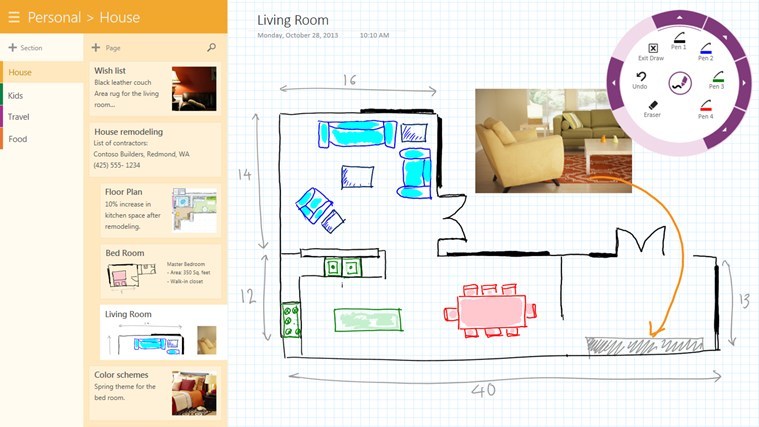
Windows 8.1, 10 OneNote App Gets OneDrive Support

Recently, Microsoft was obliged to change the branding of its storage service SkyDrive to OneDrive, and subsequently many apps that have been linked to SkyDrive have been update. One such app is the note taking and reminder app One Note; read more details about it below.
windows 8 one note one drive
Albeit the OneNote Windows 8 app is released by Microsoft, it doesn’t come built-in on all Windows 8 or Windows 8.1 devices, so be sure to follow the link at the end of the article to download it on your device. Thus, the official OneNote app for Windows 8.1 has been updated with support for the new OneDrive storage service. The rebranding of SkyDrive into OneDrive made me wonder of the fact that Microsoft might have taken inspiration from the OneNote name, since they are very similar now.

Read Also: Acer Launches Windows 8 Apps Photo, Music, Docs and Remote Files

OneNote for Windows 8 now supports the new OneDrive storage service

SkyDrive recently announced a name change to OneDrive. We’re excited that OneNote and OneDrive now share a similar name since we also share a similar promise. OneDrive is the one place for all your most important stuff, including photos, videos, and documents, and OneNote is the one place for all your notes. Together, OneNote and OneDrive enable you to access your notes on all your devices.

Besides support for the OneDrive service, there have been added 62 new languages, some of the most important being Arabic, Belarusian, Bulgarian, Chinese, Ukrainian and many others. Besides this, the rule line heights have now been increased in order to accommodate larger handwriting. The Recen Notes feature now lets you easily go to a note’s location. Also, it’s easier to navigate OneNote with a keyboard and to what’s really cool is that you can have the Narrator read your notes while you are around the room.

Of course, several bugs have been squashed, especially those making OneNote sluggish. Also, the app has been updated to use less hard drive space. So, if you want to benefit from all these new features and the old ones, follow the link from below to download OneNote for Windows 8.1 which comes with a size of around 28 megabytes.

Download OneNote app for Windows 8, Windows 8.1, Windows RT, Windows RT 8.1

Ford drops Windows from next-gen Sync systems in favor of BlackBerry’s QNX

Ford drops Windows from next-gen Sync systems in favor of BlackBerry’s QNX

If you drive a newer model Ford, you likely have the Sync in-vehicle communications and entertainment system, which runs Microsoft’s Windows Embedded Automotive. Enjoy it while you can – Ford is reportedly dumping Windows in the next generation Sync systems in favor of BlackBerry’s QNX.

Sync, powered by Windows, has been providing seven million vehicles with the ability to have hands-free phone calls, music control, and perform other in-car functions with the use of voice commands. Unfortunately, this has resulted in glitches.  Ford has reported malfunctioning tech systems and touch screens, and improvements have felt short over the years.

Ford is now looking towards BlackBerry’s QNX, which happens to be much cheaper than Windows. In fact, QNX and Microsoft are the two primarily suppliers of automotive operating system software. Currently, Volkswagen AG’s Audi and BMW utilize BlackBerry’s QNX operating system to power their in-vehicle communication systems. 

Having the Sync system glitch-free is a key selling point for Ford vehicles, as demand for in-vehicle communications and entertainment systems is quite high. In fact, in-vehicle technology is the top selling point for 39% of auto buyers, according to a recent study by Accenture. Ford hopes to turn things around by making the move to BlackBerry’s QNX.

We’ve embedded two videos that showcase the two operating systems in action, in case you are not familiar with either one. Take a look below.

Microsoft issues fix-it patch for critical vulnerability in Internet Explorer 9 and 10

Microsoft issues a "Fix it" patch for Internet Explorer 9 and 10 critical vulnerability

Recently we learned about a critical vulnerability found in IE 9 and IE 8. Microsoft had confirmed that it was aware of the bug, and on Wednesday, the company issued a fix-it patch that addressed the vulnerability for both the affected browsers.

While those on Windows 7 and higher could simply install Internet Explorer 11, the current version of Internet Explorer, and get away with the problem, Windows Vista users, which account for 3.6% of desktop share, had no such option. This attack code had left one third of Internet Explorer users vulnerable. This attack code was reportedly circumventing one of Windows’ most critical anti-exploitation technologies ASLR (address space layout randomization) using Flash ActionScript which is used by many websites that run content using Flash player.

Microsoft has made available a “fix It” patch on its website which you can manually install on your computer. You can install this patch until the company rolls out a permanent fix, likely during the upcoming Patch Tuesday. “This issue allows remote code execution if users browse to a malicious website with an affected browser. This would typically occur by an attacker convincing someone to click a link in an email or instant message.” states, Microsoft’s newest security advisory (2934088).  A permanent fix for this issue will be coming very soon, perhaps in the March’s “Patch Tuesday.”

Nokia says its tax dispute in India will not stand in the way of sale to Microsoft

Nokia says its tax dispute in India will not stand in the way of sale to Microsoft

The planned acquisition of Nokia’s Devices and Services business by Microsoft will not be affected by tax issues in India, the company has said in a statement. Microsoft’s takeover includes ownership of a handset factory in Chennai in southern India, but Nokia has an ongoing tax dispute with the Indian government.

The factory has not been operating since December after the government claimed that Nokia owed around $3.4 billion in taxes. Since local authorities stepped in, Nokia says that the jobs of 30,000 people are at risk but insists that the Microsoft purchase will go ahead as planned in the near future.

The Finnish company issued a very short statement making it clear that the deal with Microsoft should not be affected in anyway by the dispute over unpaid taxes:

“Nokia would like to stress that recent developments in India related to ongoing tax proceedings are not expected to affect the timing of the closing nor the material deal terms of the anticipated transaction between Nokia and Microsoft, announced on September 3, 2013. The transaction is still expected to close in the first quarter of 2014, subject to regulatory approvals and other customary closing conditions, irrespective of the proceedings in the Indian tax case.”

There’s now something of a standoff. The Indian government will not want to risk 30,000 jobs by keeping the factory closed, but it will be equally keen to recoup outstanding taxes it believes are owed. Opening the factory, allowing the deal to go ahead and no preventing handsets from being produced would be a massive boost to the local economy, so it’s hard to imagine that Nokia’s statement is wrong — it is really in the government’s interest to allow things to get up and running as soon as possible.

Windows 8, 10 Game GTA: San Andreas Appears in Windows Store

Back at the end of December I was only speculating about the moment when Grand Theft Auto will finally get launched for Windows 8 users in the Windows Store. It seems that the moment has finally come as the game has shortly appeared in the Windows Store.
grand theft auto game windows 8
I didn’t manage to catch the moment when Grand Theft Auto: San Andreas had finally launched for Windows 8 users in the Windows Store, but many of our readers have tipped us about the release. The game has already been pulled down by Rockstar and GTA iFruit remains currently the single app in the Windows Store. But our readers managed to inform us that it comes with a 1.84GB size and that the game will cost $6.99, like the Windows Phone version.

Read Also: Windows 8 Skype App Update: Manage Contacts Easier & Mute IM Sounds

GTA San Andreas game finally launched in the Windows Store

The famous Rockstar game comes with remastered graphics, enhanced lighting and improved character models. Personally, I think that this is a very important moment in the evolution of the Windows Store, as it will show that big companies like Rockstar have trust in its potential. Being able to download a game that can be enjoyed both on 32 and 64-bit processors along with ARM means that desktop and touch devices are targeted, which isn’t possible on Android and iOS.

Since this isn’t your ordinary mobile game, you will need at least 1GB of RAM to run it, but if you already own one of the best Windows 8 tablets for 2014, then you won’t have any problems in playing it. We will include the link to the official GTA San Andreas game in the Windows Store as I am almost sure it will soon get officially released. We will be informing you when that happens.

Besides touch and keyboard control, there is also the option of using a controller with it. Once it gets officially released, it will definitely be among the best, if not the best Windows 8 action games in the Store. It’s also interesting to observe that Microsoft has also featured the link to the official Surface Twitter account.

Download Grand Theft Auto: San Andreas game for Windows 8 

From the rumor mill: Windows 9 to hit Beta in May of this year, Release Candidate close to September

From the rumor mill: Windows 9 to hit Beta in May of this year, Release Candidate close to September

Microsoft is currently set to roll out Update 1 for Windows 8.1 soon and now rumors are circulating yet again about the next version of Windows – currently known as Windows 9. This information comes from Wzor, the man responsible for the recent Windows 8.1 Update 1 leaks. We’re going to label it as a rumor for now, for obvious reasons.

According to Wzor, Windows 9 will reach Beta in May of this year. This will be the only Beta version of the operating system. A Release Candidate build of Windows 9 will then arrive sometime between late August and September of this year. Sign-off for the final build of Windows 9 will take place sometime between the end of October to the middle of November. Wzor is sticking to his claim that Windows 9 will hit RTM between October 21st and October 25th.

However, the well-connected Mary Jo Foley over at ZDnet recently said she heard from her sources that Windows 9 Threshold RTM will not hit RTM in October 2014, as rumored by Wzor. According to Mary Jo Foley, “By the way, for what it’s worth, I’m hearing from my sources that WZor’s claims this week that Threshold will be released to manufacturing in October 2014 are inaccurate. Maybe he’s hearing about something like another Windows 8.1 Update.”

Microsoft is expected to introduce a plethora of new features including floating modern apps as well as some sort of “mini” Start Menu, but it seems they’ll not be a part of the Windows 8.1 Update 1, according to Foley. It could, however, make an appearance next year with Windows 9.

2014 Round-up: Best Windows 8 Tablets

I know that we are still “accommodating” with the beginning of a new year, but since we are tech addicts we can’t forget that big surprises are being prepared for 2014. As we all know, until now the smartphones industry has proved to be a real success for almost all the producers out there (on this category Android is still leading as the devices are more “budget friendly” than the ones that are featuring what we like to call the best mobile OS out there: Windows 8), but with the beginning of 2014 we will notice some changes. Of course I’m talking about the tablet field, where we will be able to see some awesome devices, featuring Windows 8, being released.

In that matter, we have decided to offer a background view over what it will be the best Windows 8 tablets of 2014. The round up includes both mid-range and high end devices, so we are talking about impressive specs and Windows 8 dedicated apps, games and tools that you will be getting access at. Therefore, if you are planning in buying a Windows 8 tablet in 2014, take a look below and choose the gadget you like the most. Then check the release date that is scheduled for your new tablet and start saving some money.

The round up presented here on Wind8Apps is only bringing what we think that is worth mentioning, so after checking which is our Windows 8 tablet selection for 2014, complete the list with your own preferences – feel free and use the comments field for sharing your thoughts with us and of course with other Windows 8 users. Most of the devices described below have been unveiled at CES 2014, so you should already be familiar with the best Windows 8 tablets of this year.

Lenovo ThinkPad 8

Lenovo ThinkPad 8

The Lenovo ThinkPad 8 was presented at CES 2014, being one of the best Windows 8 tablet with a small display. The tablet is featuring an 8.3 inch display with 1920 x 1200-pixel resolution along with dedicated Windows 8 apps for business area or for your entertainment.

Specs wise, Lenovo ThinkPad 8 is coming with an 8 MP rear facing camera (the camera gets activated one the dedicated QuickShot cover is being moved) and with Intel’s Bay Trail CPU. On this tablet you will be able to run 4K videos and to shot high res photos. The tablet is already available, on Lenovo’s official US website the ThinkPad 8 being priced at $379.00.

Panasonic Toughpad 4K

Panasonic Toughpad 4K

Now here is something that you will never see on Google: an impressive 20 inch with 3840 x 2560-pixel resolution tablet that runs on a powerful 2.1-GHz Intel Core i7-3687 CPU. The Panasonic Toughpad 4K is a real awesome Windows 8 tablet that is the best choice for those who are looking high end performances on the go.

Toughpad 4K specs are also including 16 GB of RAM and a 256GB SSD. This gadget is designed especially for designers and artists but nobody is stopping you from buying the Panasonic Toughpad 4K, well if you can afford it as the tablet is priced at no more than $5,999.

Transformer Book Duet

Transformer Book Duet

If you can’t decide whether to choose Android or Windows 8, we have something that is perfect for you: the Asus Transformer Book Duet. This tablet can be switched between Android and Windows 8, while it can also be attached to a dedicated keyboard, so that you can obtain a high end laptop.

So, we can say that we have a 4-in-1 device that might be one of the best tablets of 2014. The device is coming with a 13.3 inch display, Intel’s Haswell CPU and 64 GB of internal storage. The Transformer Book Duet will be released in Mid-March and it will be priced at $599.

Nokia Lumia 2520

Nokia Lumia 2520

Even though the Lumia 2520 is Nokia’s first Windows RT based tablet, the company had managed to develop an impressive handset. This tablet features a 10.1 inch display and support for 4G connectivity.

Specs wise, the Lumnia 2520 is bringing a Qualcomm Snapdragon 800 chipset a 6.7MP camera with Carl Zeiss lens, 32 GB of in built storage, micro SD card slot and a 8,120mAh battery. The tablet is priced £400 and might be the best Windows RT tablet of 2014 in case you are a Nokia fan boy, though you can anytime choose something better if you ask me.

Asus VivoTab Note 8

Asus VivoTab Note 8Asus, with VivoTab Note 8 has designed a Windows 8 tablet that can be perfect for both students and also professionals. This tablet is coming woth an IPS display and with Intel Bay Trail-class CPU. This is a mid range device that has 2 GB of RAM memory and no micro SD card slot as the tablet is being delivered in two models depending on the internal storage you prefer.

Also, with VivoTab you will get a 5 MP rear facing camera and no HDMI port. The tablet will be offered in two versions: the 32GB model which will cost you $299 and the 64GB model which will be priced $349.

Panasonic Toughpad FZ-M1

Panasonic Toughpad FZ-M1

If you liked Toughpad 4K but the price was too high for you, then you can still buy a Windows 8 based Panasonic tablet. The Toughpad FZ-M1 is a small sized device the features a 7 inch display and brings 8 GB of RAM memory and either 128GB or 256GB of solid state storage.

Other specs are including an Intel fourth-generation Core processor – i5-4302Y in our case, while the tablet unveils a ruggedized case – the Toughpad FZ-M1 is dust and water proved and you can also drop it without having any problems. Panasonic FZ-M1 will be released during this Spring and you will be able to buy it for $2,099, this being only the starting price. Of course this Windows 8 tablet aims for the business segment mainly for those who work outdoors in not so great environments.

Lenovo ThinkPad Carbon X1

Lenovo ThinkPad Carbon X1

Another Windows 8 tablet designed for the business segment is Lenovo’s ThinkPad Carbon X1. Unlike ThinkPad 8, this tablet is not for regular users as its price is tagged at $1,299. In a few words, here is what you will receive if you will buy this Windows 8 device: a 14 inch tablet built from carbon fiber and powered by Intel’s latest Haswell processors.

The device features 4G LTE connectivity, unlike MacBook Air for example. The Lenovo ThinkPad Carbon X1 has been already released, so you can buy the same anytime you want.

Lenovo Miix 2

Lenovo MIIX 2

Lenovo’s new MIIX 2 models are two Windows 8 powered tablets offered on affordable price tags along with great performances that can satisfy even an advanced user with great expectations. The MIIX 2 devices will be made available in two variants (a 10- and 11- inch one) and it will be released somewhere during March 2014.

The 10 inch tablet is more affordable as it will be available for only $499 (specs wise this model is coming with a quad-core Intel Atom processor and a 1080p screen) while the 11 inch device will cost you no more than $699 (it will be powered by a Intel Core i5 processor though).

Toshiba Encore

Toshiba Encore

If you are thinking in buying a budget friendly Windows 8 tablet in 2014, then I have the perfect device for you: Toshibe Encore. This 8 inch Windows 8 tablet can be yours for only £250; of course don’t expect to receive high end specs and features at that price, though Toshiba Encore can be placed ahead of almost all the Android based devices released with the same price.

With this tablet you will be able to enjoy an 8 MP camera on the back, 64 GB of internal storage, a quad-core chip clocked at 1.7GHz and 2GB of RAM. The device has been already released and it is currently available in stores and on Toshiba’s official web store.

Of course this list of what we think that are the best Windows 8 tablets of 2014 can be anytime completed with new devices. If you think that we missed something, don’t hesitate and point it out. We will then update this post in order to enlarge our round up.

2014 should be a good year for Microsoft as the Windows 8 platform is getting better and the App market will soon be similar with Android’s Google Play. And when that will be fulfilled Android will no longer rule the smartphone and tablet market. The Windows 8 tablets are better, in any way you want, than the devices that are coming with Android, even though the price aspect is a huge balance when it comes to these two giants (Google and Microsoft).


Microsoft open sources NewsPad Editor program, now everyone can really contribute

Microsoft open sources NewsPad Editor program, now everyone can really contribute

We don’t often associate the words “Microsoft” and “open source”, but the company does more than the general media gives credit for. Today the Redmond-based company takes another step, as its Fuse Labs (a research arm) announces a new app being offered out to the community.

NewsPad Editor is a brand new concept that allows groups of people to communicate in building a story. “The software, which supports real-time collaborative editing and content curation, incorporates the best ideas from Wikipedia, Storify, and online text editors”, the company announces.

The idea is to combat the usual content systems which are designed for one writer. It was created after consultation with bloggers in the Seattle area, and the interviews revealed that many writers felt overwhelmed with more stories than they could possibly cover.

“NewsPad also incorporates lessons from the network structure of local communities. During the summer, as we built NewsPad, we were also learning from research by Shelly Farnham and Emma Spiro to map out local Twitter networks, in combination to deep qualitative research on the health and information resources of Seattle’s communities. By comparing Seattle neighborhoods’ Twitter networks to blogging networks, we were able to identify patterns of interaction and information access across dozens of Seattle neighborhoods”, the announcement states.

You can find out more information, and get your hands on the app by following the link below.

Flap Flap is a Flappy Bird-like Addictive Windows 8, 10 Game

If you have been following the world of mobile games, then by now you have probably heard about the Flappy Bird game, which has been already pulled from the Android and iOS store. However, third-party developers have brought it to Windows 8, as well.
windows 8 flappy bird
Flappy Bird has become an incredibly successful game for Android and iOS users, allegedly pulling in more than $50, 000 per day. It was just as surprising when we have heard that the creator of the game has decided to pull the game from both mobile store, saying that it was causing “addiction”, which he was strongly against. However, if you own a Windows 8 device, especially a touch one, then you should know there’s one game that follows the same logic of the Flappy Bird idea.

Read Also: Best Windows 8 App This Week: Georama, the Travel Guide

Play the Flappy Bird game on your Windows 8 tablet

flappy bird windows 8The game has only 5.4 megabytes and is better enjoyed on a Windows 8 tablet, as you will have to rely on your mouse when playing the game on a non-touch Windows 8 device. If you were wondering, this game never ends and the mission is to beat your own high-score or to compete against your friends, at best.

When you are using the game on a Windows 8 tablet, you will be relying on your fingers to move your bird-ish character and you will use your left click on a desktop device to keep it going. There are other similar games in the Windows Store, but in my opinion, Flap Flap is the best Flappy Bird-like Windows 8 game at the moment.

Download Flap Flap game for Windows 8

Best Windows 8, 10 App This Week: Georama, the Travel Guide

Another week has started and Windows 8 readers all over the world have at their disposal the Windows Store for various tasks or needs. For this week’s best Windows 8 app selection we have Georama, a really useful Windows 8 travel app.
windows 8 travel app georama
A while ago we have written about 10 of the best Windows 8 travel apps that you can found in the Windows Store. Now, for the title of the best Windows 8 app this week we have hand-picked Georama, another really awesome Windows 8 travel app. If you have been using the service before on other platforms, then you are acquainted with this service. So, if you own a Windows 8 device, go ahead and download Georama (download link at the end of the article) and start exploring the world!

Read Also: Windows 8 App Check: Skitch Touch

One of the best Windows 8 travel apps

Georama helps you discover vacation ideas based on who is going, when you want to go, your interests, and more! Get personalized suggestions on where to travel and explore holiday destinations, places to stay, and things to do – all in one place.

georama windows 8 travel appThe Windows 8 travel app Georama lets you discover vacation ideas inside a beautifully crafted design. When you will open the app, there will be some featured cities that you will be able to select. Then, you will be able to get a summary of the city, a weather forecast, hotels and hostels, attractions, restaurants, nightlife and shopping tips, as well.

In the “discover vacation ideas” section, you will be able to find your perfect travel location judging by what are you looking for to do – arts, adventure, culture, sport, romantic, nightlife; when you plan on making the trip and with whom are you going to go. If you are not sure, you can even get destination recommendations, as well.

Download Georama app for Windows 8

Windows 8, 10 App Check: Skitch Touch

Quite a while ago we have given a full review to the official Windows 8 Evernote app, and we have also covered an important update that it has received. But there’s another app released by the Evernote app in the Windows Store – Skitch Touch.
windows 8 skitch app
If you have been using the touch version of Skitch Touch on another platform, such as Android and iOS and you now have acquired a Windows 8 tablet or other non-touch device, then you are probably looking to get the official Skitch Touch app from the Windows 8 Store (download link at the end). We go through its main features and what it comes with, so that you can know whether it’s just as useful as the service on other platforms.

Read Also: Shooting Showdown Windows 8 Game is Lots of Fun

Skitch Touch for Windows 8 is a useful collaboration tool

Skitch Touch is a free tool for communicating visually with friends, co-workers, and the world. Annotate images with arrows, shapes, text, and more. Use Skitch to sketch something new, mark up maps, screen captures, or even a photo. Then save or share your Skitch annotation to help others see and understand your ideas. Getting everyone on the same page has never been easier.

skitch windows 8 appBy using the official Skitch Touch app for Windows 8, you will be able to communicate easier with your friends or colleagues as you will be able to give a bigger meaning to a simple image, addign arrows, shapes, text to make up your point and transmit your message. You can even annotate maps, webpages, and screenshots, as well. And provided that the app is totally free, it’s a must have for everybody looking for the features that it brings.

You can use the Windows 8 Skitch app in a lot of situations and environments, such as travelling and adding text to the views that you make, modify a map to show exact directions to a certain place. Of course, to enjoy its full features, it’s easier to use it with a Windows 8 tablet that has a really good camera, as you it will produce a higher-quality image. Follow the link from below to get the app on your Windows 8 devices.

Download and install Skitch Touch app for Windows 8

Paul Thurrott thinks Microsoft should stop trying to please everyone. He’s wrong.

Paul Thurrott thinks Microsoft should stop trying to please everyone. He's wrong.

Sometimes it seems as though you can do right for doing wrong; that’s certainly the way it seems for Microsoft a lot of the time. I will admit to sticking the boot into Microsoft from time to time — I am as guilty of this as anyone — but sometimes it is important to look at the bigger picture, gain a little perspective and cut the company a little slack. In a tirade on his website, Paul Thurrott lays into Microsoft asking “what the heck is happening to Windows?”

There is a great deal happening to Windows, and it has been happening for the last couple of years. There have been ups and downs. Paul points out that Windows 8 was widely regarded as being a failure, and it is true that it was a disappointment for many people — and Microsoft will hardly have been celebrating the sales figures.

He goes on to say that detractors complained that the release of Windows 8.1 was seen as a step backwards. While it is true that Windows 8.1 is still not a perfect operating system, it was a step in the right direction. Now it seems that Thurrott has had a change of heart and the release of Update 1 is causing him to question his initial defense of Windows. The accusation? That Microsoft is trying to please everyone.

Is it not right that Microsoft should listen to its customers?

Looking at the combination of the traditional desktop and modern UI some complaints are easy to understand. On the face of it, Windows 8 lacked direction. It was unwilling to nail its colors to the mast and presented users with a hybrid experience that was just too much for some to bear. Things improved with the release of 8.1 as Microsoft listened to the complaints users had made. Yet this appears to be a problem for Thurrott.

Is it not right that Microsoft — or any company for that matter — should listen to its customers? This is what Update 1 is about, addressing further issues that have been raised. But this is not good enough for Thurrott. He would prefer that Microsoft stuck to a “singular vision that is typically associated with the Mac and Apple’s other products”. As a customer I would much rather a company took notice of what I had to say rather than just telling me how things are going to be.

The ability, and willingness, to respond to demands is the sign of a forward-thinking, progressive company. Microsoft took a bold step with Windows 8 and it turned out that people weren’t quite ready for such a radical departure from what they had become used to. Did Microsoft stick doggedly to its “singular vision”? No, this would have alienated users. Instead Microsoft did the sensible thing and did what too many companies fail to do. It listened.

Thurrott complains that Windows 8 is evolving in a spaghetti-like fashion and there are now — as there have always been — multiple ways to achieve the same thing. This is not a bad thing. It is choice. For me, the modern interface doesn’t work. I don’t like it, so I don’t use it. But there’s another side of Windows that works very well for me, so I use that instead. Even within desktop mode there are multiple ways to do the same task. Want to create a new folder? This can be done using keyboard shortcuts, context menus or toolbar buttons. They are options that you can use as the mood takes you.

There is absolutely nothing wrong with presenting users with choice, and there is even less wrong with listening to them and adopting Windows to meet requirements. The claim that Microsoft is “trying to please everyone” is one that sticks. Of course Microsoft wants as many people as possible to like and use Windows — this just makes sense — and it follows that their product would be adapted as deemed necessary.

Would you prefer that Microsoft had tunnel vision with Windows, or are you happy to see changes being made according to customer feedback?

Shooting Showdown Windows 8, 10 Game is Lots of Fun

Shooting Showdown has been a very successful action game for Android and iOS users and it has recently launched in the Windows Store for the Windows 8 environment, as well. And it’s one of the best Windows 8 touch-enabled shooting games.
windows 8 shooting game
If you were on the lookout for a cool Windows 8 shooting game, then you should stop here as we have found one that you won’t regret downloading. Shooting Showdown is a new Windows 8 action that is free to download and has slightly more than 42 megabytes, so it won’t be a space hog.

Read Also: NBC Olympics Windows 8 App Streams the 2014 Winter Games

Cool Windows 8 FPS touch game

Experience the trick shooting game that changed the FPS genre forever. Match up against your friends, your enemies, or anyone in the world in the world’s first virtual reality shooting range! Hyper-realistic muzzle flash, bullet tracers, and impact sounds make for a spectacular next-gen experience.

shooting game windows 8Shooting Showdown is not a shooting game per se, as it’s rather a trick shooting game that also comes with a virtual reality shooting range, so you can compete against your friends and worldwide players. The game can also be played with your mouse and keyboard, and with your Windows 8 tablet, as well, but it depends on what you prefer the most. I somehow like playing it with the mouse, as it’s easier to aim and shoot, but it’s not that difficult with your finger, as well.

It comes with a really realistic muzzle flash, bullet tracers, and awesome impact sounds that makes it sound just as if you were in a real shooting range. Just make sure you have your speakers sounding good enough! There are some really cool guns that you can unlock and achievements that you can achieve. Follow the link from below to download it and start shooting!

Download Shooting Showdown game for Windows 8

NBC Olympics Windows 8 App Streams the 2014 Winter Games

The Sochi Olympic 2014 Winter games are in full swing but if you own a Windows tablet, you should know that NBC has recently launched the NBC Sports Live Extra app in the Windows Store to bring the 2014 Winter games and much more.
nbc live extra windows 8 app
NBC has recently released the NBC Olympics app in the Windows Store for Windows 8 users who want to follow the 2014 Winter Games from Sochi. There are many Windows 8 Olympics apps, but this is the best out there, as it’s really well designed and comes with the most important events. The single downside of the app is the fact that it is available for residents of the United States, only.

Read Also: Discounted Windows 8 Apps & Games This Week #10

Follow the 2014 Olympics on your Windows 8 tablet

NBC Olympics: Watch more than 1,000 hours LIVE for FREE with the NBC Sports Live Extra app. Coming in February, watch live coverage of the 2014 Winter Games: All 15 sports. All 98 medal events. All streamed LIVE! Download now on your Windows 8 device. The vast majority of live streaming content on NBC Sports Live Extra will only be available to authenticated cable, satellite and telco customers via TV Everywhere.

To be able to enjoy the entire streaming of the 2014 Winter Olympics on your Windows 8 tablet with this app, you will need to be a subscriber with the NBC Universal Media. However, there is also a free way to watch the Olympics, but the offer is limited, meaning there are only some hours that you can enjoy for free.

Besides live events and video on Demand features, the app also comes with full event replays and online coverage schedule. It has all the options that you need to make sure you don’t miss an important moment from the event. Follow the link from below and get it on your Windows 8 devices.

Download NBC Sports Live Extra app for Windows 8

Discounted Windows 8 Apps & Games This Week #10

Yes, the Windows 8 Red Stripe Deals are here and this we have six new Windows 8 apps that have received an important discount in the Windows Store. I hope you managed to make use of last week’s titles, as well.
windows 8 red stripe deals
Last week, we have featured the following discounted Windows 8 apps and games –  TY the Tasmanian Tiger, BackTrainer, Instant Photo Booth, Heroes of Kalevala, Drawboard PDF and Dark Arkana The Carnival. I hope you haven’t missed them as they were really useful Windows 8 apps. For this week, we have four games and two productivity apps, so let’s have a look.

Read Also: Windows 8 Zuma Apps: 4 of the Best

Windows 8 Red Stripe Deals for this week

  • Pac-Man Championship Edition DX+: [$4.99] – this is one of the best Windows 8 Pacman games available in the Windows Store and we have recently also talked about an important update that it had received. It’s now available for half the price
  • The Treasures of Montezuma 3 Premium: [$1.49] – this is one of the best matching games available in the Windows Store, and with great graphics and play, it also comes with plenty of fun levels which look really good on your Windows 8 tablet
  • Modern File Explorer: [$1.49] – it seems that many are having a hard time accommodating to the touch interface of Windows 8, so that’s why there are plenty of file manager and explorer apps. Modern File Explorer is now available for a discounted price so you can benefit from the occassion.
  • Algebra Touch: [$1.49] – this Windows 8 app deserves to be among the best Windows 8 math apps available in the Windows Store. The app has 20 really useful algebra lessons for anybody out there so give it a try if you want to refresh your mathematical thinking.
  • Engimatis: The Ghosts of Maple Creek (Full): [$2.99] – this is already a famous Windows 8 adventure game released by the Artifex Mundi developer. With a very good rating, it will definitely won’t let you down!
  • Special Enquiry Detail: The that Feeds: [Free] – another interesting adventure-detective styled game, this one is the single one in the list that is available for free, so there are no impediments at all in downloading it on your Windows 8 device.

Read Also: Windows 8 Pregnancy Apps for Responsible Parents

Microsoft tells businesses to prepare for the end of Windows XP support

Microsoft tells businesses what to do before Windows XP support ends

There are just 60 days to go until Windows XP reaches the end of its support cycle. Despite the age of the operating system, there are still millions of people — including numerous businesses — who use XP on a daily basis. While there are some who are determined to stick doggedly with the old version of Windows, there are some who have simply postponed upgrading to Windows 8.1. To help with the transition, Microsoft has produced a guide to the tings businesses need to consider.

Two months may not seem like long for a business to upgrade its computer systems, but Microsoft’s guide helps to keep things as simple as possible. It is possible that older hardware will be up to the task of running Windows 8.1, and a check can be performed by using the upgrade assistant.

As it is likely that anew computers will be required, Microsoft invites businesses to investigate the newer form factors that are available. There are obviously Surface device to consider, but Microsoft also highlights the Lenovo ThinkPad X1 Carbon and the Dell Venue 11 Pro. The blog post points out that as well as being underpowered, it is likely that older desktop computers are large, bulky affairs which ate very different to the small, sleek models that are available today.

Buying a new system always means having to migrate files and data, and this is something that is likely to be as off-putting to some business as the actual cost that will be involved in the upgrade. Microsoft has advice about how to bets go about this, but there are also helpful tips about planning ahead.

Anyone using an older system is also likely to be reliant on older software and there is no guarantee that this will work under Windows 8.1. Tools are available to help check compatibility, and there are also numerous resources to help make the move as quick and painless as possible.

There will be some who remain determined to stick with XP beyond April, but Microsoft is ready to retire the elder statesman of the OS world:

“We are proud of the value that Windows XP has offered to businesses for more than a decade and we are excited to help companies reach the next level of productivity with Windows 8.1 Pro.”

Is your business ready?

Microsoft’s voice assistant Cortana reportedly features Foursquare integration

Windows Phone

Recently, Foursquare received $15 million in funding by the Redmond giant to help them become a sustainable business and in return, they’ll help Microsoft with their products and services. A recent report from Bloomberg suggests Microsoft’s recent investment in FourSquare will be used in location data and services in the upcoming Windows Phone 8.1, including the voice-assistant Cortana to help push out tips, discounts, and suggestions based on user’s location on the go. 

Microsoft didn’t reveal anything about the upcoming Windows Phone 8.1 or the Cortana voice-assistant, and how they’ll work, along with their official launch date, but Microsoft Zig Serafin told Bloomberg, “We’re building some contextually aware experiences to power some upcoming products in Windows Phone. This will be for anywhere you get a Bing-powered experience.”

Bloomberg also reports Cortana will be a part of the Windows Phone 8.1 — like we didn’t already know this — and will launch within “several months,” citing sources familiar with the project and Foursquare agreement. Several months could mean anything, but in another sense, it could be correct as it will take a few months for the Windows Phone 8.1 to reach all devices — as Microsoft already confirmed that Windows Phone 8 devices can be upgraded to WP8.1.

In terms of launch, Microsoft is rumored to unveil the Windows Phone 8.1 OS in the coming months, possibly at the annual BUILD 2014 conference which will take place in April. Several rumors suggest WP8.1 will hit RTM in March, with the developers getting access to it in April followed by its official public launch in the following months. When it comes to Cortana, a rumor suggested it will see the light of the day in April and will be available in US only, at least in the beginning, but you never know, Microsoft may have planned some surprises for its users.

NBC teams up with Microsoft for live and on-demand Olympics streaming

NBC teams up with Microsoft for live and on-demand Olympics streaming

The 2014 Sochi Winter Olympics are officially underway and, despite the misgivings of many people regarding the state of affairs at the venue, as well as in the host nation, it’s still an event many of us will tune in to watch.

In the US, that coverage comes from NBC, which yesterday released an app for Windows Phone. But the broadcasting company is doing more with Microsoft than just providing an app. It’s utilizing the software giant’s technology to run streaming and on-demand coverage.

“Through the power of cloud computing, NBC will use Windows Azure Media Services, a highly scalable video service platform hosted in Microsoft’s datacenters, to publish and stream coverage of the 2014 Sochi Winter Games”, Microsoft announces.

NBC points out that its previous coverage, which was the 2012 Summer Olympics in London, generated an average of six hours watched per day for each viewer. According the NBC Sports’ Scott Guthrie, the company expects even higher demand this time around.

“To meet that demand, Windows Azure is leading the way by providing end-to-end live streaming of the Winter Olympics entirely in the cloud, including encoding, transcoding and streaming, for the first time in history”, Guthrie comments.

Will you be watching the streaming version of Olympics, or sticking to the tried and true TV? Either way, coverage should be very good this time around.

Read the Drudge Report on Windows 8, 10 with This App

The Drudge Report is an American news aggregator, one of the oldest and used by plenty of readers all over the world. If you happen to be among them and you also own a Windows 8 device, then what you need now is the right app that brings the Drudge Report in the palm of your hands.
drudge reader windows 8
The Drudge Reader app for Windows 8 isn’t officially released by the Drudge Report team, but the quality and style of this app look as if it was released by team itself. What’s really cool is that there are no advertisements at all, and the application moves really, really fast. The app comes with the same “trademark” design consisting in the monochromatic color scheme and the monospaced font text. Actually, the original Drudge Report has seen only a few design changes from its initial release, which is something that you don’t see too often.

Read Also: Windows 8 App Check: Deluge Connect

Read the Drudge Report on your Windows 8 tablet

Use Drudge Reader for a quick and easy way to view pictures and articles from the official Drudge Report website. Keeping with the style of the Drudge Report, we kept this app simple and familiar for Drudge fans. The Drudge Report web site is published by Matt Drudge and covers a myriad of the latest breaking news and world events. Matt Drudge is a pioneer in news and his website is the ultimate site for the news that matters most.

windows 8 drudge readerYou will get plenty of breaking news and world events, and there’s also the ability to change from the normal to the optimized reading mode. When you stumble across an article that you like, there’s the option of sharing it with your friends by using the Share bar. You can also pin the Drudge Reader app to your start screen and the live tile will be updated with the latest articles that interest you. Follow the link from below to get it on your Windows 8 system.

Download Drudge Reader app for Windows 8

Windows 8, 10 App Check: Deluge Connect

Here at Wind8Apps we have covered some of the best torrent apps to use with your Windows 8 device, including, the desktop version of uTorrent and its touch alternative, as well. Now, we’re have a look at Deluge Connect for those Windows 8 users having an interest in this BitTorrent client.
windows 8 deluge app
For those who don’t know, Deluge is a free software, open source and cross-platform BitTorrent client and this app makes it available for Windows 8 touch device owners. We won’t go over which torrent client is best – uTorrent or Deluge as each one has its ups and downs; but there are definitely enough Deluge users, despite the fact that uTorrent is the leader.

Read Also: Awesome Windows 8 Astronomy App SkyORB gets Even Better

This app brings Deluge to Windows 8 touch devices

Manage your Deluge queue from your couch! Check out your downloads or snag the next episode from any Windows 8 device. Deluge Connect is a management client for Deluge, a popular BitTorrent client. After enabling the Web UI feature in the Deluge preferences, Deluge Connect enables you to connect to and manage your Deluge queue from any Windows 8 device. Deluge Connect opens .torrent files and catches .torrent and magnet URIs from Internet Explorer, so no more tedious copying and pasting.

Deluge Connect for Windows 8 is really simple to use and no matter the expertise and experience in working with Deluge, every users will find the app very simple and easy to set up. Inside the app you can enjoy plenty of useful features, such as the following:

  • View grouped torrents by label
  • Add .magnet or .torrent links from Internet Explorer
  • Add .torrent files directly from Windows Explorer
  • Sort by name, status, ETA, queue position, added or completed date
  • Play, pause or remove groups of selected torrents
  • Add and manage multiple Deluge servers.
  • Search torrents by their Name or Tag.

Those who have been using Deluge know that it was among the first torrent clients to introduce support for magnet links, as well. Deluge is also known to be a really lightweight application, and the app has a ridiculously small amount of 0.6 megabytes. Follow the link from below to get it on your Windows 8 tablets and desktop systems.

Download Deluge Connect app for Windows 8

What does Sony’s sale of VAIO mean for Microsoft, Windows, and the PC?

What does Sony's sale of VAIO mean for Microsoft, Windows and the PC?

A big company announcing details of its finances for the quarter often makes for interesting reading, but Sony played something of a trump card this week. The company spoke of the “drastic changes in the global PC industry” meaning that it no longer felt it was viable to stay in the business. Rather than staying in the game and fighting its corner, Sony made the surprise move of selling its VAIO brand so it can concentrate on smartphones, tablets and TVs.

VAIO – a name that Sony would have liked customers to associate with quality and luxury, almost as a Maserati of PCs. But as poor sales demonstrated, it is a name that was more readily associated with expense, and apparently the quality was not sufficiently high enough to justify the price for large numbers of people. But what does this all mean for the PC industry in general, and Microsoft in particular?

It is true that the VAIO name is not going to completely disappear, but for the time being it is going to be limited to Japan. Of course there is scope for it to expand globally again in future, but whether or not this will actually happen is anyone’s guess. On the face of it, things aren’t looking great for the future of the PC.

On the face of it, things aren’t looking great for the future of the PC

The newly appointed Satya Nadella may be wondering if he’s to blame. One day in the top spot at Microsoft and one of the most well-known names in the industry withdraws! But of course, this is not something that has come completely out of the blue. The death of the PC is something that has been predicted for many years now. We’re not quite there, but it is fair to say that we are moving towards a post-PC world. This is a world that reflects the business move just announced by Sony — mobile devices are very much where the innovation and excitement is to be found.

PC and laptop sales have been in steady decline for some time now. Some industry analysts have suggested that the blame for this could be placed at least partially at the door of Windows 8. It is certainly true that the world was not enthralled by the release of this version of the operating system, but the issues experience by naysayers are being addressed. There is interest in Windows 8.1 Update 1 — massive interest. Whether this will be enough to rejuvenate a flagging PC market is not clear, but most of Microsoft’s income stems from the business division anyway — dwindle PC sales don’t really have that much impact. Sure, it’s not great news to see such a big name disappearing, but it is not the end of the world.

Companies such as Lenovo and Nokia have demonstrated that there is huge interest in mobile computing. Sony’s shift to focusing on this area of the industry could create the lead that others can follow. Microsoft is already well-positioned to make great strides in this field, but the company is also able to hedge its bets and keep a foot in the desktop market in case the transition is slow.

Microsoft has already shown that it is capable of producing some impressive hardware of its own

Microsoft’s move to the cloud with Windows Azure, Outlook.com, Office 365 and the like could be seen as partly indicative of its own belief in the future of mobile. Joining forces with Nokia means that tablets and smartphones are also well-catered for, but Sony’s switch to concentrating on smartphones and tablets almost certainly means focusing on its Xperia range rather than looking to Windows Phone or Windows RT.

In a sense, Microsoft is losing Sony to Google as the devices that Sony will be producing are Android-based. HP has already shown its interest in mobile devices with it investment in Chromebooks — again, Google. Does this matter? Windows Phone may be losing out to Android, but there is little sign of Windows losing its dominance of desktops and laptops. Chromebook has caused some interest, but it is far from being a major threat.

Of course, Microsoft still has a very healthy home and business user base. There are millions of people ready to lap up the software pumped out by the company — it’s just a shame that the number of manufacturers working on the hardware side of things is diminishing.

Microsoft has already shown that it is capable of producing some impressive hardware of its own — Xbox One and Surface are testament to this. The investment in Surface and Surface Pro, coupled with the move to the cloud, shows that Microsoft is pinning more on mobile devices than desktop computers. The PC may not be dead, but it is certainly changing.

With other manufacturers jumping ship, Microsoft could ultimately be left on its own producing both hardware and software for Windows devices. Now that would be an interesting state of affairs.

But what do you think? Does the sale of VAIO impact the PC industry? What’s does the future of the PC hold?

BackTrainer is a Windows 8, 10 Fitness App to Help Against Back Pain

BackTrainer is a cool new Windows 8 fitness app that has been recently released in the Windows Store for Windows 8 users. We have featured in our weekly Windows 8 Red Stripe Deals and now it’s time to have a closer look at it.
windows 8 fitness appBackTrainer is a new Windows 8 fitness app that comes with the right exercises needed to protect against the back pains that are affecting hundreds of millions, if not billions of people worldwide. Many work in front of the computer, like myself, so these kind of exercises are essential to being healthy and be able to have a normal life and free of frustrating back pains that only those who are suffering from them know how painful they are.

Read Also: Bing Maps Windows 8 App Updated With Many New Features

Windows 8 App BackTrainer looks after your back

BackTrainer offers a practical guide for people seeking to prevent lower-back and neck pain with the help of physical conditioning. The App features easy-to-do exercises that can be performed in gradual increments. BackTrainer’s videos and photos make all exercises easy to understand and perform without any exercise equipment.

back trainer windows 8The Windows 8 BackTrainer app is currently available for $2.49, but its price could go up after price promotion will have ended. However, there’s a 1 day free trial available, which is enough to get to know all its useful features. Besides the developer, medical practitioners and physiotherapists have contributed with their knowledge to create this app. It contains seven training programs that will help you reduce your back pain and also prevent it from appearing.

The exercises are really easy to follow, especially thanks to high-quality photos and videos. The workout program will strengthen the trunk muscles, the cervical spine (neck) and the lumbar column (lower back). Sever back pain or prolonged stay in front of the computer, as well as lack of exercising can cause serious damage to the spine and intervertebral discs, so you really don’t want this to happen.

That’s why such an app like BackTrainer comes in really handy, especially if you have a Windows 8 tablet, as it’s much easier to follow the exercises using a tablet than the computer. What’s really cool is that you get to learn about the anatomy of the spine, the significance of your trunk muscles, symptoms and other details that will help you understand better what is causing your back pain problems and how to solve them. The app has a size of slightly more than 350 megabytes and can be downloaded by following the link from below.

Download BackTrainer app for Windows 8

My BMI Windows 8, 10 App Calculates your Body Mass Index

There are plenty of Windows 8 health and fitness apps in the Windows Store that are available for use, such as Fitbit, Endomondo, HealthVault, Gym Guide and many others. Now we’ve been asked to review a simple app yet useful app, called My Body Mass Indicator.
windows 8 body mass index app
This new Windows 8 app that we’ve been approached to give a quick review is really simple to use and there aren’t too many things to say about it – it’s a body mass index calculator designed both for those using Windows 8 touch devices, be it Windows 8 tablets, Windows 8 hybrid devices or Windows 8 desktop systems, such as desktops or laptops.

Read Also: Best Windows 8 Apps & Games for This Month [February 2014]

Calculate your body mass index on Windows 8 with this app

Calculate your body mass index easily and save your results! Besides your body type, the application will show you the appropriate limits of your weight in order to be normal.

You can easily calculate your body mass index online, but if you want to have a Windows 8 app always at your disposal, then My BMI is something really simple and useful to download. It measures height from 1.4 to 2.5 meters and weight from 40 to as much as 200 kg. You just need to enter your weight and height and the app will tell whether you are obese, normal or underweight. However, the app has a big downside and that is the fact that it doesn’t let you introduce your age, as that is an important factor in finding out your BMI.

Download My BMI app for Windows 8

Microsoft takes another shot at the Chromebook in new Windows advertisement

Microsoft takes another shot at the Chromebook in new Windows advertisement

Microsoft has rolled out another Windows advertisement titled The New Windows: Karate which features a mother who, while sitting in her child’s karate class, talks to a camera about how her kids are always on her laptop. She then brags about how her “Asus with Windows” laptop is not only under $300, but has everything the kids need.

The woman then takes a jab at the Google Chromebook. She argues that the Asus X200CA Windows laptop has everything her kids need, unlike the Chromebook which can’t install Microsoft’s Office productivity suite and requires an internet connection to get things done. You can check out the Asus X200CA laptop here.

This isn’t the first time we’ve seen Microsoft take a shot at Google’s Chromebook. Back in November, Microsoft rolled out a video that basically stated: “the Chromebook was pretty much a brick.” Microsoft’s Ben the PC Guy even hit the streets of Venice, California, showing everyone how the Chromebook doesn’t stack up against a Windows device.

“Whether it’s playing games or getting homework done with Microsoft Office, Windows laptops give you the best of work and play,” the video description reads. We’ve embedded the view below for your viewing pleasure. Enjoy!

Windows XP global usage goes up again, what’s wrong with the world?

Windows XP global usage goes up again, what's wrong with the world?

Finding a new CEO isn’t the only thing which is worrying Microsoft right now. December’s global usage of Windows XP, the second most popular desktop operating system on the planet manifested a 3% decline, but the 1.3% surge in January’s data has left all of us shocked.

The 13-year old operating system will be retiring on April 8th this year, but instead of switching to a newer version of Windows, people have surprisingly started showing interest in it again. According to Net Marketshare, the global share of Windows XP has risen from December’s 27.84% to 29.23% by the end of January 2014.

So whose share did Windows XP eat? Well, while Windows 8.1 managed to go up from 3.50% to 3.93%, its predecessor Windows 8 registered a 0.02% decline. Meanwhile, Windows Vista is running on around 3.3% computers worldwide, whereas Windows 7 is still going strong with a whopping 47.49%.

What’s with the sudden jump in market share for Windows XP? Sound off in the comments below with your theories!

Best Windows 8, 10 App This Week: Windows Store App Review

We have been featuring for quite a while now the best Windows 8 apps for every week that has come to an end, but now we are changing the structure, as per the requests of our readers – we will be featuring one app that we consider to be the best and at the beginning of every new month a collection of more.
best windows 8 appFor the first week of February, I have handpicked the Windows 8 app “Windows Store App Review”, because, erh, because this app has taken the content from Wind8Apps.com and transformed it into a Windows 8 application that can be downloaded from the Windows Store on your touch and desktop Windows 8 devices. I didn’t even know that somebody was creating this app as I fund it myself while browsing the Windows Store.

Read Also: Discounted Windows 8 Apps & Games This Week #9

Explore Wind8Apps’ content using this app

After learning that this app is “cloning” content from our website, I’ve contacted the developer and we have agreed to collaborate on further updates that it will receive. At the moment, the app is a faithful copy of the entire content that is available on windowsreport.com, as well, only that it is optimized for your tablets, and can be found in the Windows Store.

best windows 8 appsAt the moment, we can’t say that this is the official app for Wind8Apps, but it might just as well grow into becoming it, but we don’t know for sure. If you are a frequent reader of our website, you can just continue to use the website, as the app works as a “veil”, if I can say so, and the single things that are specific to Windows 8 are the different navigation and the fact that there’s an extra advertising block on top.

But, you can definitely have a look at it by following the download link from below. Also, if you could share with me what features you’d like to see, that would be great! So, that’s it for this week’s best Windows 8 app. Subscribe as we will be keeping you updated with new worthy Windows 8 apps on a timely basis.

Download Windows Store App Review app for Windows 8

It’s almost kick-off time and Microsoft is unveiling its full Super Bowl ad

It’s almost kick-off time and Microsoft is unveiling its full Super Bowl ad

We are only hours away from kick-off of the big game. The Seattle Seahawks and Denver Broncos have completed all preparation, and now it’s a matter of sitting back and watching who comes out on top. However, the game is only half of the story where the Super Bowl is involved.

Ads play a huge part in the game, in fact they are one of the primary reasons that some people actually bother tuning in. If you paid attention during the season, you likely realized that the Redmond company has partnered with the NFL, including making the Surface the official tablet of the league.

Microsoft also has an ad planned for the big game, and despite that it hasn’t actually started, you can now see the entire one minute video in advance.

This isn’t the ordinary game ad, which have a tendency to lend a sense of humor to things. Instead Microsoft has gone the route of showing what technology can do help those less fortunate, including people with no voice, or even missing limbs. It is a heartbreaking, yet also hopeful, look at the technology being employed in today’s world.