
How to Log In to Sentara MyChart on Web and Mobile


 3 min. read
  Published on

The Sentara MyChart lets you access appointments, test results, prescriptions, medical records, and messages from your care team online, and in this guide we’ll show you how to log in to Sentara MyChart.
How do I log in to Sentara MyChart?
1. Use the login page
You can access your Sentara MyChart account directly from the official login page.
- Go to the official Sentara MyChart login page.
- Enter the username associated with your account.
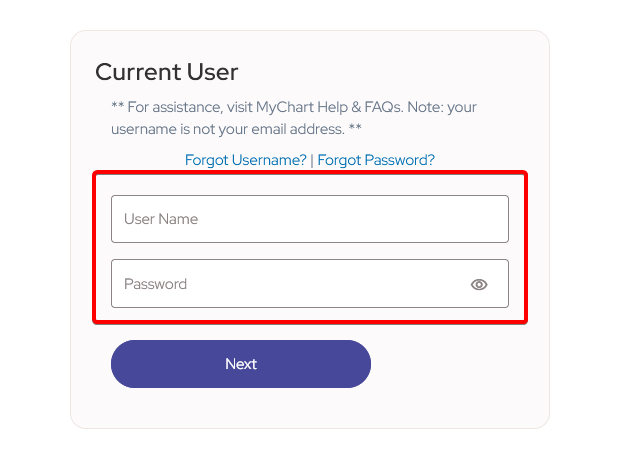
- Enter your password.
- Click Sign In.
- Complete any identity verification requested on the screen.
Once logged in, you can view upcoming appointments, check lab and test results, request medication refills, review your medical history, and communicate with your care team.
2. Log in through the Sentara website
You can also access MyChart through the Sentara website if you prefer starting from the main Sentara homepage.
- Open the Sentara website.
- Select Sign in to MyChart.
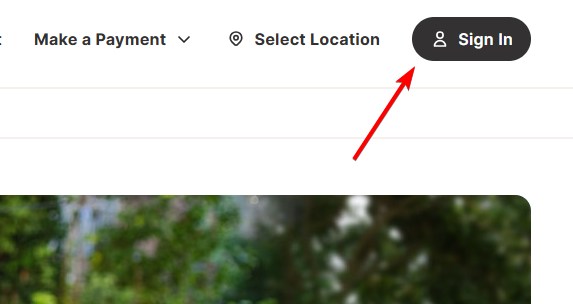
- Wait for Sentara to redirect you to the MyChart login page.
- Enter your username and password.
- Click Sign In to access your account.
3. Use the Sentara MyChart app
The Sentara MyChart app lets you access your account from a phone or tablet.
- Open the Sentara MyChart information page.
- Choose the option to download the MyChart app.
- Install and open the app on your device.
- Select Sentara if the app asks you to choose your healthcare provider.
- Enter your Sentara MyChart username and password.
- Sign in to access appointments, test results, medications, and other health information.
What if the Sentara MyChart login isn’t working?
If you can’t access your account, try these troubleshooting steps before contacting support.
- Make sure you entered the correct username and password.
- Use the username or password recovery option on the login page.
- Close the page and reopen the official Sentara MyChart portal.
- Try signing in with another browser.
- Clear your browser cache and cookies if the page still doesn’t work.
- Contact Sentara MyChart Support at 1-833-351-4357 if you still can’t access your account.
We hope this guide helped you complete the Sentara MyChart login. We also have short guides for LinkedIn login, Canvas students login, and DocuSign login.
FAQ
What is Sentara MyChart?
Sentara MyChart is an online patient portal for managing appointments, test results, prescriptions, medical records, and messages.
How do I reset my Sentara MyChart password?
Select the password recovery option on the login page and follow the instructions to reset your password.
Can I use Sentara MyChart on my phone?
Yes, you can access Sentara MyChart through the mobile app on a compatible smartphone or tablet.
How do I create a Sentara MyChart account?
Choose the sign-up option on the MyChart login page and complete the requested identity verification steps.
Who can I contact for login help?
Contact Sentara MyChart Support at 1-833-351-4357 if you need help accessing your account.

Read our disclosure page to find out how can you help Windows Report sustain the editorial team. Read more



Improve this guide




User forum
0 messages