
Spectrum Business Sign In: Quick Login Guide


 4 min. read
  Published on

Spectrum Business lets you manage your business services, check bills, make payments, and review account information online.
The correct login page depends on whether you have a Spectrum Small Business account or a Midsized and Enterprise account. Spectrum provides separate portals for these account types.
How to log in to Spectrum Business
1. Use the browser
If you have a standard Spectrum Small Business account, follow these steps:
- Go to the official Spectrum Business login page.
- Enter your Spectrum Business username.
- Enter your account password.
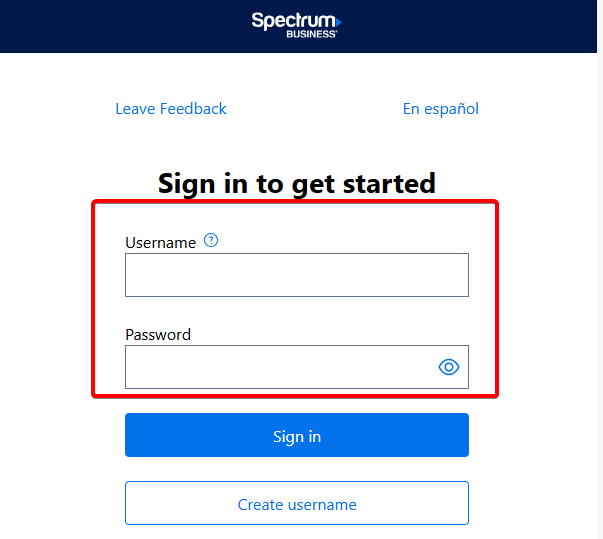
- Select Sign In.
- Wait for your account dashboard to load.
Once signed in, you can access account management features such as billing, payments, and service information. Spectrum currently directs Small Business customers to SpectrumBusiness.net for account management.
If the page does not load correctly, enable JavaScript and cookies in your browser. SpectrumBusiness.net requires both features for its account portal to work properly.
2. Spectrum Enterprise login
Midsized and Enterprise customers use a different login portal.
To sign in:
- Open the Spectrum Enterprise login page.
- Enter the email address or username associated with your account.
- Enter your password.
- Select the option to sign in.
- Complete any additional verification request if one appears.
The Spectrum Enterprise portal lets customers view account information, manage bills, monitor support tickets, review locations, and access service information.
Spectrum also uses the Enterprise portal to provide access to services such as Managed Network Edge, Cloud Security, Secure Access, and Unified Communications.
How do I know which Spectrum Business login to use?
Check your Spectrum Business bill if you are unsure which account type you have.
Spectrum says Small Business account numbers contain 16 digits in most cases. Midsized and Enterprise Business account numbers typically contain eight or nine digits.
Use:
- SpectrumBusiness.net for Spectrum Small Business accounts.
- SpectrumEnterprise.net for Spectrum Midsized and Enterprise accounts.
Using the wrong portal can prevent you from accessing the account even when your login details are correct.
What to do if Spectrum Business login is not working
First, make sure you are using the correct Small Business or Enterprise portal.
Then try these steps:
- Check your username and password for typing errors.
- Make sure Caps Lock is turned off before entering your password.
- Enable cookies and JavaScript in your browser.
- Open the login page in a private or incognito window.
- Clear your browser cache and cookies if the page keeps reloading.
- Try another supported browser or device.
- Reset your password if Spectrum rejects your credentials.
If you still cannot sign in, contact Spectrum Business support.
Signing in to Spectrum Business should only take a few moments once you use the correct portal for your account type. If you also use Spectrum email, see how to log in to Spectrum email or fix Spectrum email issues.
For connection problems that affect calls, browsing, or online services, our guide to Spectrum packet loss can help you troubleshoot the network.
FAQs
How do I log in to my Spectrum Business account?
Go to SpectrumBusiness.net if you have a Small Business account. Enter your username and password, then select Sign In. Midsized and Enterprise customers should use SpectrumEnterprise.net instead.
What is the official Spectrum Business login website?
Spectrum uses two primary business account portals. Small Business customers use SpectrumBusiness.net, while Midsized and Enterprise customers use SpectrumEnterprise.net.
What should I do if I forgot my Spectrum Business password?
Use the password recovery option on your account’s login page. Follow the identity verification steps and create a new password. Make sure you use the portal that corresponds to your Spectrum Business account.
Why can’t I log in to Spectrum Business?
Incorrect credentials, using the wrong Spectrum portal, disabled cookies or JavaScript, expired account credentials, or browser problems can prevent a successful login. Try resetting your password and signing in through the correct portal.
Can I pay my Spectrum Business bill after logging in?
Yes. Spectrum Business customers can use their online accounts to manage billing and make payments. Enterprise customers can also use the client portal to view bills, manage payments, and review other account information.

Read our disclosure page to find out how can you help Windows Report sustain the editorial team. Read more



Improve this guide




User forum
0 messages