
How to Log In to SSM MyChart on Web and Mobile


 3 min. read
  Published on

SSM MyChart gives SSM Health patients secure online access to appointments, test results, prescriptions, messages, bills, and other health information.
You can log in to SSM MyChart from a browser or use the MyChart mobile app. If you cannot access your account, SSM Health also provides username, password, and account recovery options.
How do I log in to SSM MyChart online?
1. Use the web browser
The easiest way to access your account on a computer is through the official SSM Health MyChart website.
- Go to the SSM Health MyChart page.
- Select Log In to SSM Health MyChart.
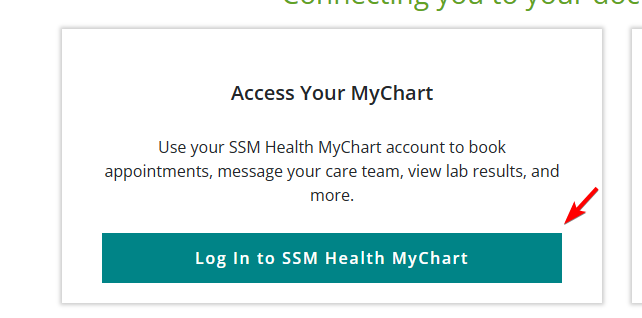
- Enter your MyChart username.
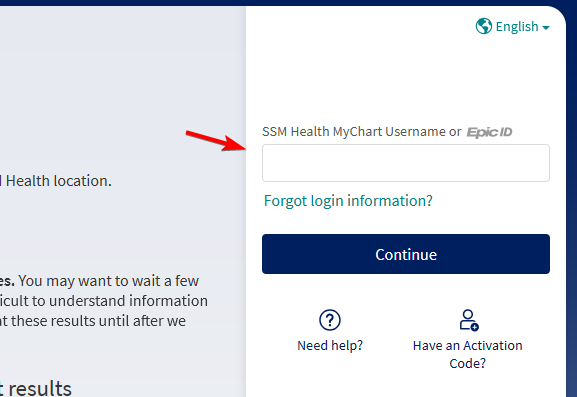
- Enter your password.
- Select Sign In to open your account.
You can also go directly to the official MyChart portal at mychart.ssmhc.com. SSM Health recommends entering this address directly into your browser if you receive a MyChart email and want to make sure you are visiting the legitimate website.
2. Use the SSM MyChart app
You can also access SSM MyChart from a phone or tablet using the official MyChart app.
- Download MyChart from the Apple App Store or Google Play.
- Open the app.
- Search for SSM Health as your healthcare organization.
- Select SSM Health.
- Enter your MyChart username and password.
- Tap Sign In.
Once logged in, you can access many of the same features available through the web version. SSM Health supports the MyChart mobile app for managing your healthcare while away from a computer.
SSM MyChart login is not working
Several simple checks can fix common login problems.
- Confirm that you are using the official SSM Health MyChart website.
- Re-enter your username and password carefully.
- Check whether Caps Lock is enabled.
- Use the password or username recovery option if you are unsure of your credentials.
- Try another browser or restart the MyChart app.
- Clear your browser cache if the login page does not load correctly.
- Make sure your internet connection works.
- Update the MyChart app if you use a mobile device.
The SSM MyChart login process works much like other healthcare portals, so you should be able to access your account quickly once you have the correct credentials.
If you use another healthcare provider, check our guide on logging in to Sentara MyChart for steps on accessing your Sentara account on the web or mobile.
You can also read our Medicare login guide if you need help accessing your Medicare.gov account, checking claims, or managing Medicare information online.
FAQ
How do I log in to SSM MyChart?
Visit the official SSM Health MyChart website or open the MyChart app, then enter your username and password.
What should I do if my SSM MyChart login is not working?
Check your username and password, confirm Caps Lock is off, and try another browser or restart the app.
Can I use SSM MyChart on my phone?
Yes. Download the MyChart app from the Apple App Store or Google Play, select SSM Health, and sign in.
What can I do after logging in to SSM MyChart?
You can manage appointments, view test results, request prescription refills, send messages, and review eligible bills.
Is mychart.ssmhc.com the official login website?
Yes. You can access the official SSM MyChart portal at mychart.ssmhc.com or through the SSM Health website.
What if I forget my SSM MyChart username or password?
Use the username or password recovery options on the MyChart login page to regain access to your account.

Read our disclosure page to find out how can you help Windows Report sustain the editorial team. Read more



Improve this guide




User forum
0 messages