
Windows PE Explained: What It Is And How It Can Help You


 3 min. read
  Published on

Windows PE gives you a lightweight version of Windows that loads fast and helps diagnose serious system issues, and in this guide we’ll show you all you need to know about it.
Table of contents
Windows PE: What It Is And Why It Matters
What Windows PE Is

Windows PE is a minimal operating system that runs entirely from memory. It provides core drivers, networking support, storage tools, and image servicing utilities without loading a full Windows desktop. This makes it ideal for situations where stability, isolation, and reliability matter.
You can see how technicians build USB media by following a guide on how to create a Windows PE bootable disk.
What Windows PE Includes
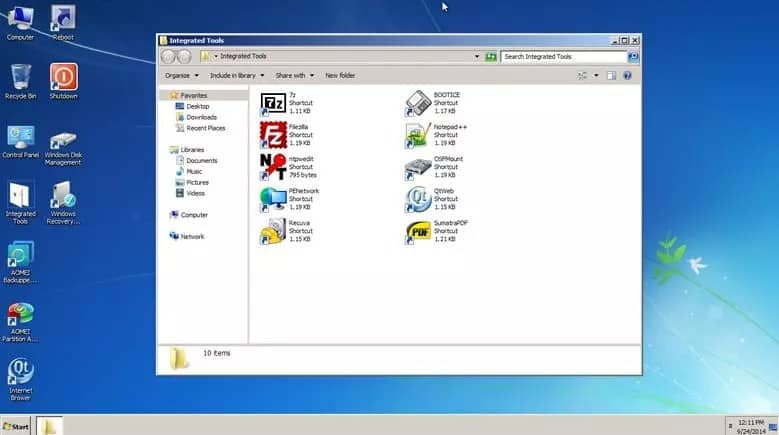
Windows PE includes a trimmed kernel, PowerShell support, DISM tools, and drivers for modern hardware. It gives you access to file operations, imaging commands, and partition tools. Since it operates in RAM, you can repair system files or rebuild disks without file lock conflicts.
When you work with servicing commands, this explanation of why DISM does not support servicing inside Windows PE helps clarify the limitations.
Key Uses Of Windows PE
System Repair And Recovery
Windows PE helps you repair a system that cannot boot. You can load it from a USB drive, run commands to rebuild boot data, restore corrupted files, or access the system drive without interference. This gives you a safe way to bring damaged installations back to life.
For broader recovery workflow details, refer to this guide on the Windows Recovery Environment.
Disk And Partition Management
Windows PE gives you full control over local disks before installing or reinstalling Windows. You can clean drives, create partitions, format volumes, or rebuild drive layouts. This lets you prepare devices in a consistent and predictable way.
Image Capture And Deployment
Windows PE supports WIM image capture and deployment across multiple devices. You can capture a reference installation, store it on a network share, and apply the same image to new hardware. This improves speed and consistency in large scale deployment environments.
What Makes Windows PE Different
Windows PE resets on every restart because it runs from RAM. Nothing persists, which protects devices from accidental changes. It also avoids background processes, so imaging and disk operations run cleanly. This isolation makes it safer than working inside a full Windows session.
Benefits Of Using Windows PE
Windows PE supports both BIOS and UEFI systems, which makes it flexible in mixed environments. It loads fast, keeps tools isolated, and supports network operations. It also works well with automated scripts and PowerShell, which helps technicians streamline repetitive tasks.
FAQs
It provides a minimal environment for system repair, imaging, and deployment when full Windows cannot load.
No. WinRE ships with Windows as a built in recovery tool, while Windows PE loads from external media as a flexible troubleshooting environment.
No. It resets after every boot because it runs in RAM.
No. It only supports lightweight tools and cannot run full Windows applications.
Windows PE delivers a clean and reliable environment for recovery, disk preparation, and imaging tasks. It helps technicians troubleshoot damaged systems, prepare hardware for installations, and deploy images at scale. The links included above offer extra guidance on building WinPE media, understanding DISM limitations, and navigating recovery workflows.

Read our disclosure page to find out how can you help Windows Report sustain the editorial team. Read more



Improve this guide

User forum
0 messages